
Setup: Bloody WS87 Dual-Core Wireless Mechanical Keyboard User Manual
Content
bloody WS87 Dual-Core Wireless Mechanical Keyboard: Complete Product Manual & Review Guide
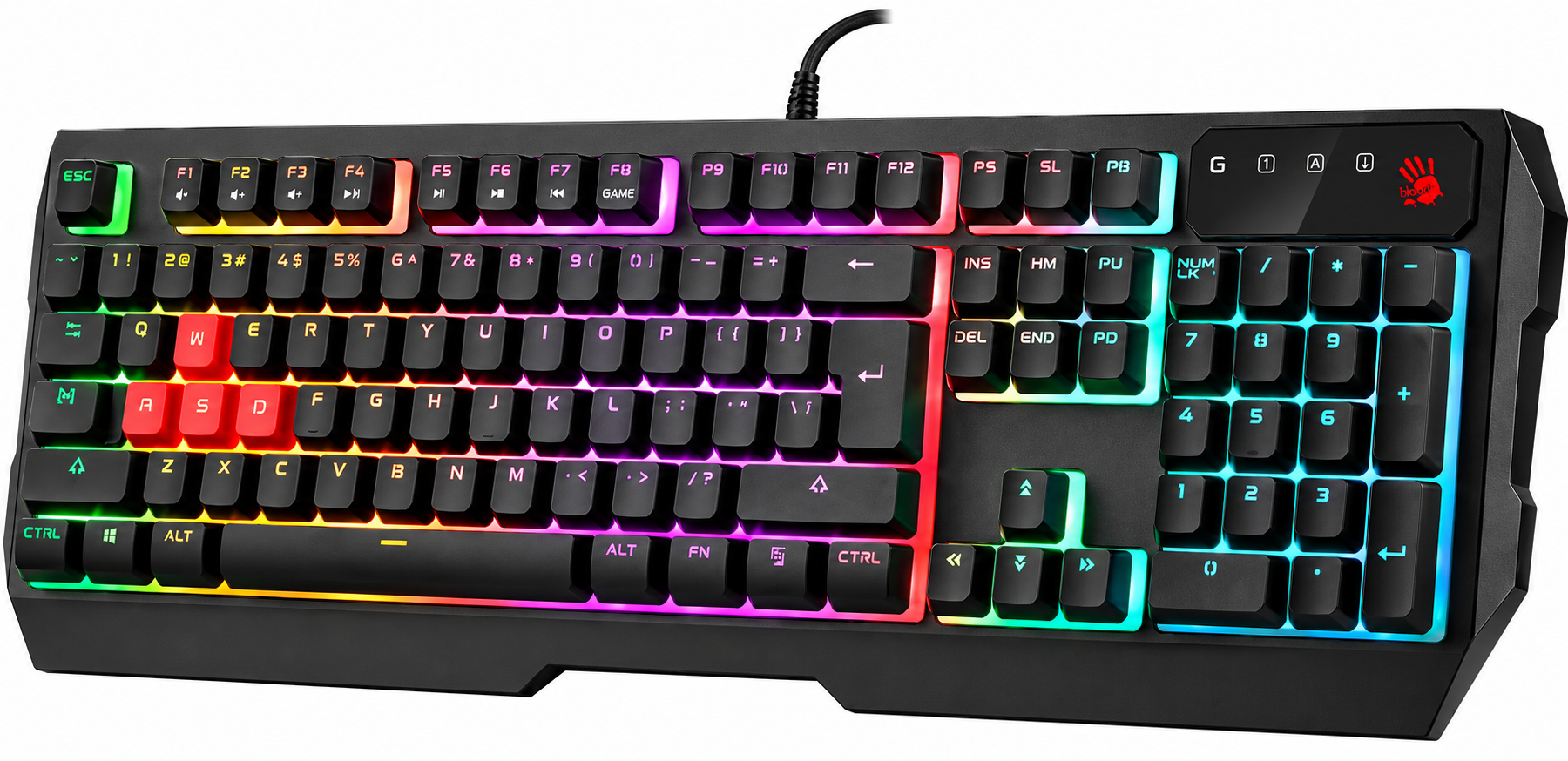
Introduction to the bloody WS87 Dual-Core Wireless Mechanical Keyboard
The bloody WS87 Dual-Core Wireless Mechanical Keyboard represents a premium gaming peripheral engineered for serious enthusiasts and competitive players who demand responsive, reliable performance across multiple devices. This 87-key mechanical keyboard combines cutting-edge dual-core processor technology with versatile tri-mode connectivity, delivering an exceptional typing experience whether you're gaming, working, or streaming content.
At its core, the WS87 features a sophisticated dual-core Cortex-M4 chip architecture where one processor dedicated manages keyboard lighting and functions while the second core handles all wireless transmission duties via USB, 2.4G, and Bluetooth v5.1 protocols. This intelligent design ensures that your gaming performance never suffers from lighting effects or multi-device switching.
The keyboard is equipped with BLMS Red Plus switches, delivering linear, light, and smooth keystrokes with a lifespan of 50 million keystrokes, making it an investment that will last through years of intense gaming sessions. With RGB backlighting customization and support for Windows and Mac operating systems, the bloody WS87 appeals to gamers, content creators, and professionals seeking premium build quality and advanced features.
The bloody WS87 Dual-Core Wireless Mechanical Keyboard typically retails between $120-$180 USD depending on your region and retailer, positioning it as a mid-to-premium gaming keyboard. It's widely available through major electronics retailers, gaming-focused e-commerce platforms, and the official Bloody website, making it accessible to global customers.
Technical Specifications
| Specification | Details |
| Connectivity | Bluetooth v5.1 / 2.4GHz / USB Wired |
| Operating Range | 5-10 meters (2.4GHz), 30-100cm (Direct Receiver) |
| Multi-Device Support | 4 Devices (2x Bluetooth, 1x 2.4G, 1x USB) |
| Switch Type | BLMS Red Plus (Linear, Light, Smooth) |
| Switch Lifetime | 50 Million Keystrokes |
| Battery Capacity | 3.7V / 4000mAh |
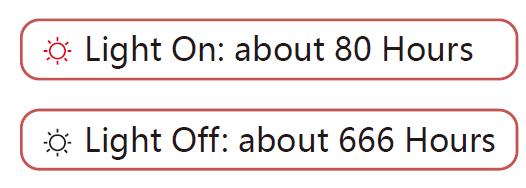
| Battery Life | 666 hours (lights off) / 80 hours (lights on) |
| Backlight | RGB Customizable |
| Layout | 87-Key TKL (Windows/Mac Compatible) |
| Dimensions | 36 x 13.3 x 4 cm |
| Weight | 843g (with cable) / 773g (without cable) |
| Cable Length | Type-C, 180cm |
| System Requirements | Windows 7/8/8.1/10/11 |
| Anti-Ghosting | N-Key Rollover with 100% Anti-Ghosting |
| Wireless Latency | 1ms |
Key Features
- Connectivity Options: The WS87 excels with its tri-mode connectivity supporting Bluetooth v5.1, 2.4GHz wireless, and USB wired connections, allowing you to connect up to 4 devices simultaneously across Bluetooth (2 devices), 2.4G (1 device), and USB (1 device). This multi-device capability means you can seamlessly switch between your gaming PC, laptop, tablet, and smartphone without physically reconnecting.
- Performance Specifications: With a 1ms wireless transmission latency and an operating range of 5-10 meters for 2.4G connectivity and 30-100cm for direct receiver connection, the bloody WS87 ensures responsive gameplay with minimal input lag. The keyboard features N-Key Rollover with 100% anti-ghosting technology, critical for competitive gaming where multiple simultaneous keypresses must register accurately.
- Battery & Power: The integrated 4000mAh battery provides exceptional battery life, delivering 666 hours with lighting disabled or 80 hours with RGB lighting enabled, translating to weeks of use on a single charge. The Type-C charging cable measures 180cm, providing convenient charging flexibility.
- Physical Design: Measuring 36 x 13.3 x 4 cm and weighing 843g with cable or 773g without, the WS87 is a compact 87-key TKL (tenkeyless) layout that balances functionality with portability, ideal for esports players and LAN event participants.
WHAT'S IN THE BOX
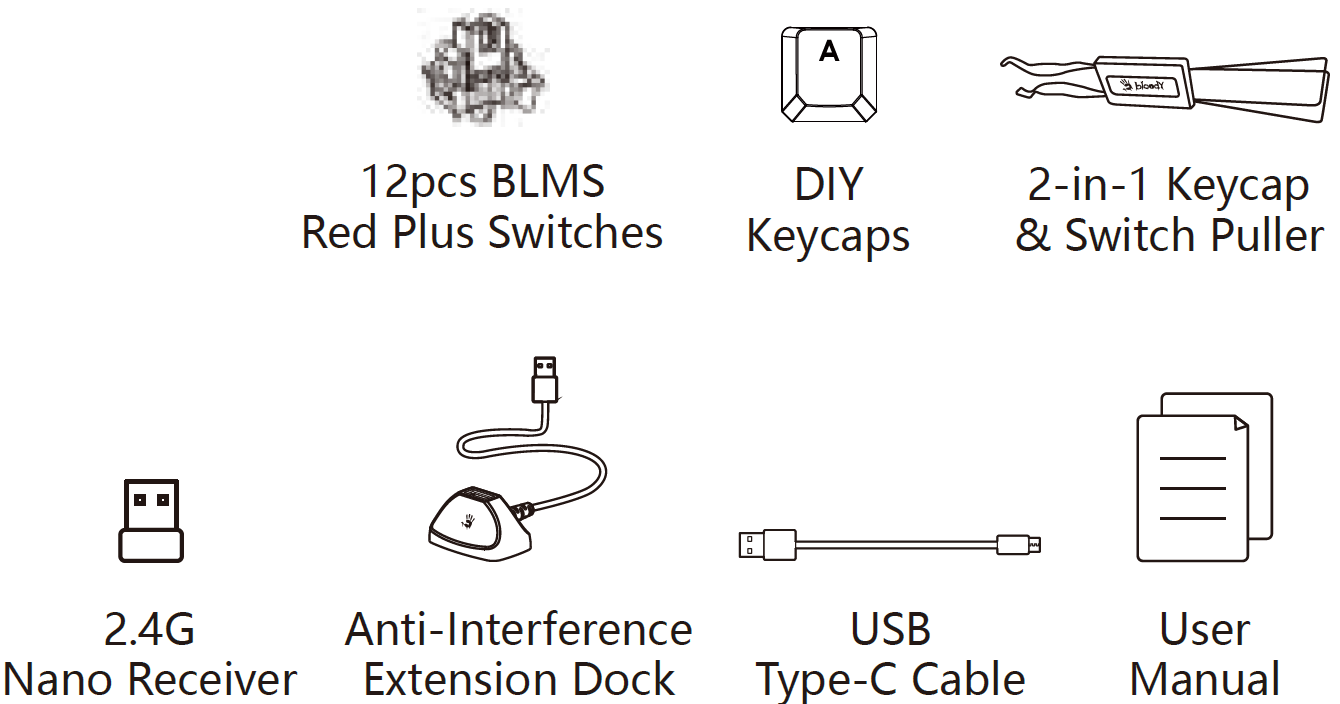
Setup & Installation Guide
- Initial Setup for Wired Connection: To establish a wired USB connection, simply plug the Type-C cable directly into your computer's USB port. No drivers or software installation is required for basic functionality on Windows 7 through Windows 11 systems.
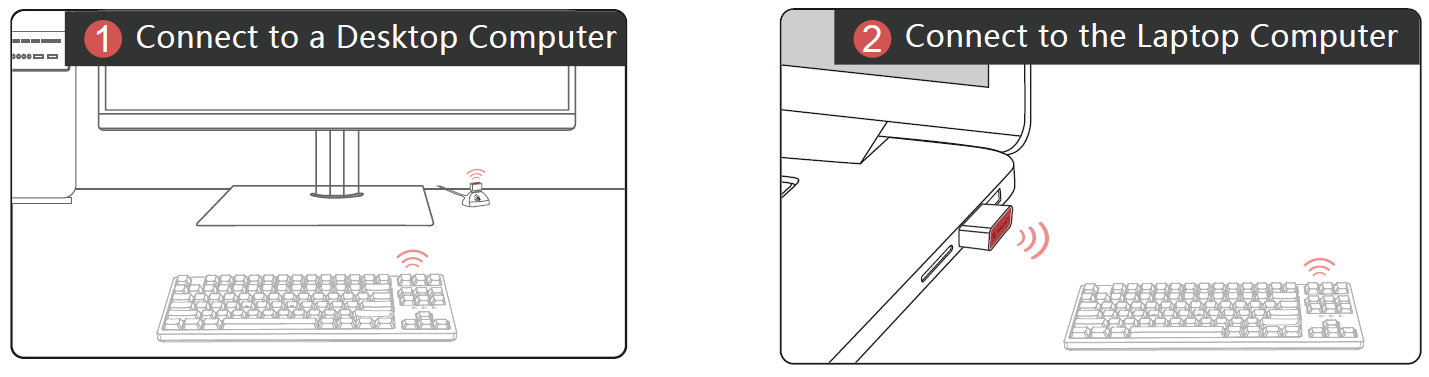
- 2.4GHz Wireless Setup: For 2.4GHz connectivity, connect the nano receiver to your host computer either directly or through the included 120cm anti-interference extension dock. The optimal operating range between the receiver and keyboard is 30 to 100 centimeters with no obstructions. The extension dock significantly reduces electromagnetic interference, improving signal stability during competitive gaming.
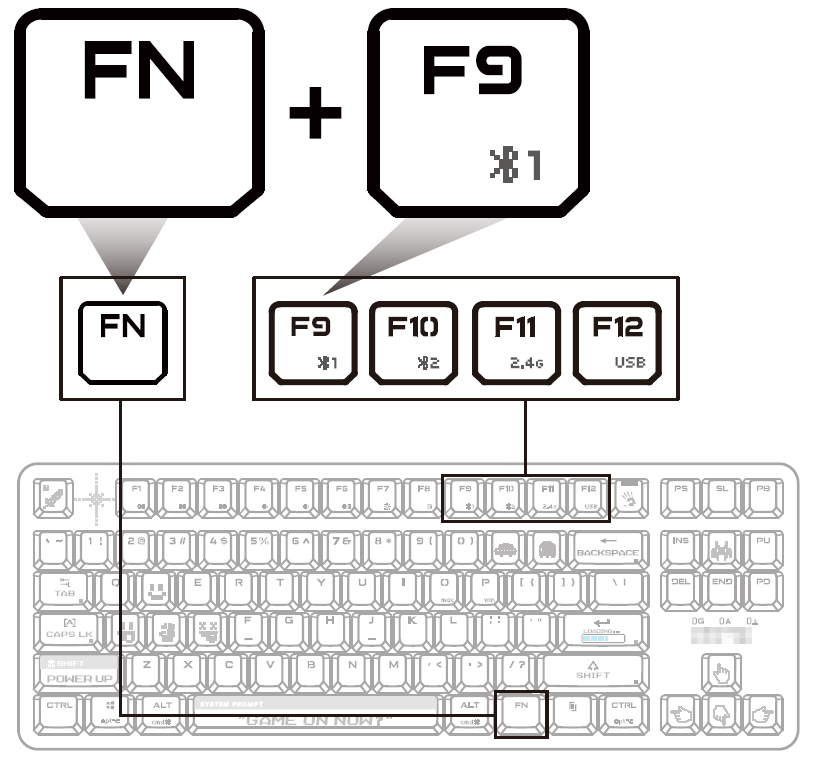
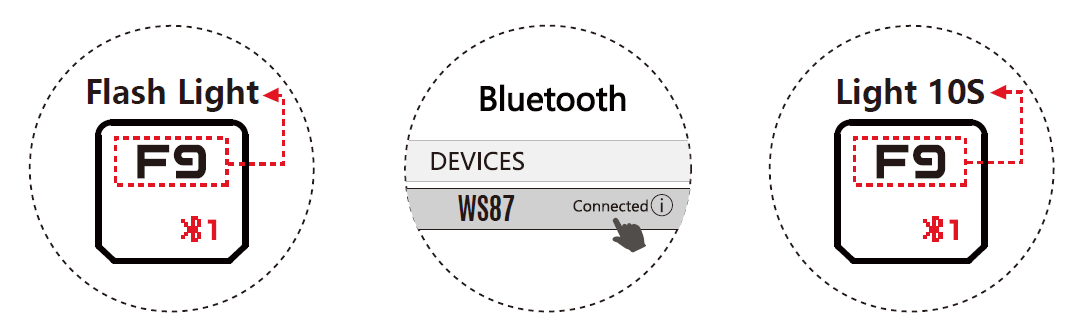
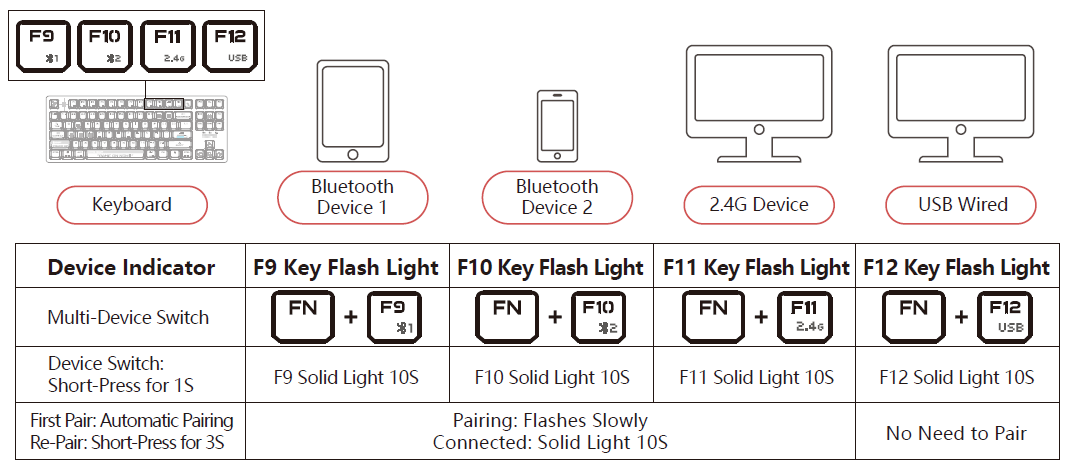
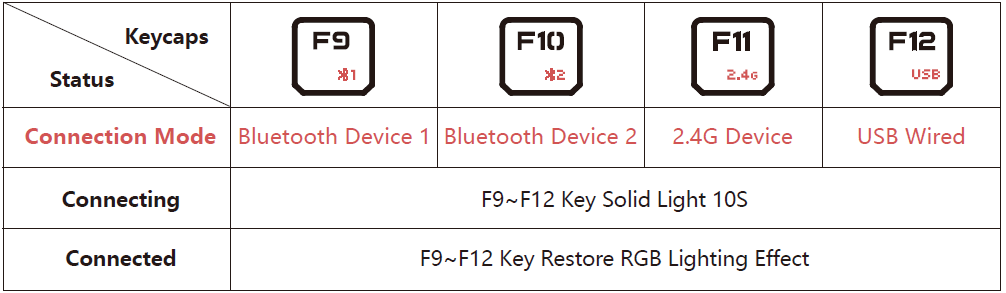
- Bluetooth Device Pairing: To pair your first Bluetooth device, press Fn+F9 for a short press to initiate pairing mode. The F9 key will flash as an indicator light. Select "WS87" from your device's Bluetooth menu, and the connection will establish once the F9 key lights up and then turns off. For re-pairing with previously connected devices, perform a long press on Fn+F9 for 3 seconds.[1] This process works seamlessly with mobile phones, tablets, and laptops supporting Bluetooth v5.1.
- Multi-Device Switching: The keyboard features dedicated multi-device switch keys on the front panel, allowing instant switching between your connected devices. This feature, combined with the operating system swap functionality, makes the WS87 exceptionally versatile for users managing multiple computing platforms.
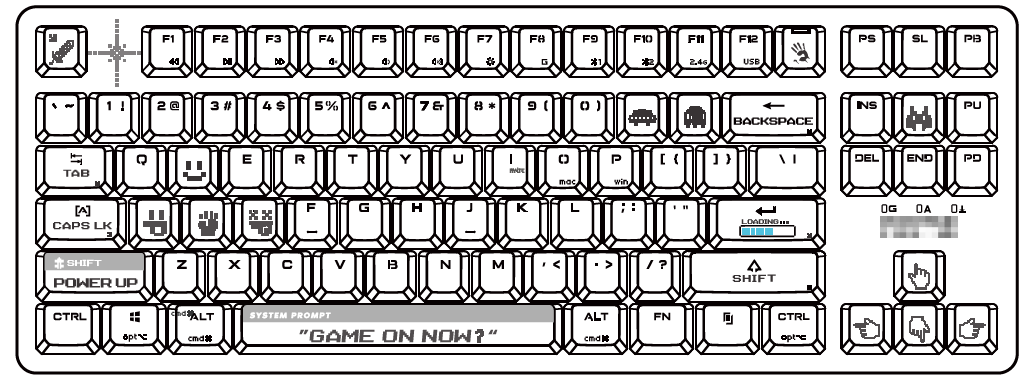
KNOW YOUR KEYBOARD
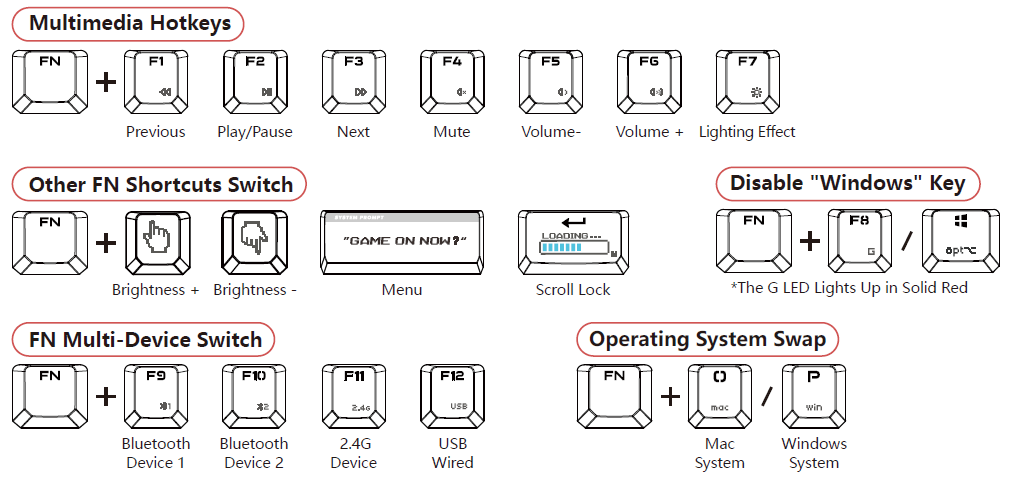
- FN Multimedia Hotkeys
- Multi-Device Switch
- Lighting Effects Switching
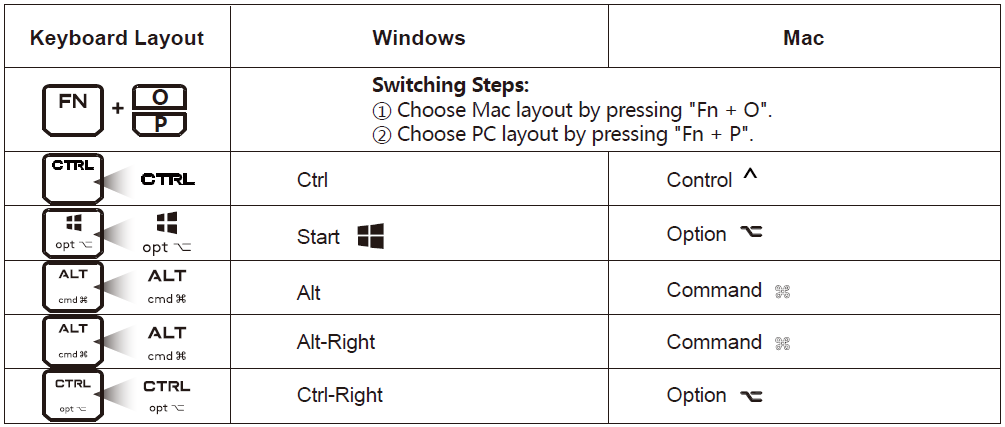
- Operating System Swap
- PC/MAC Dual-Function Keys
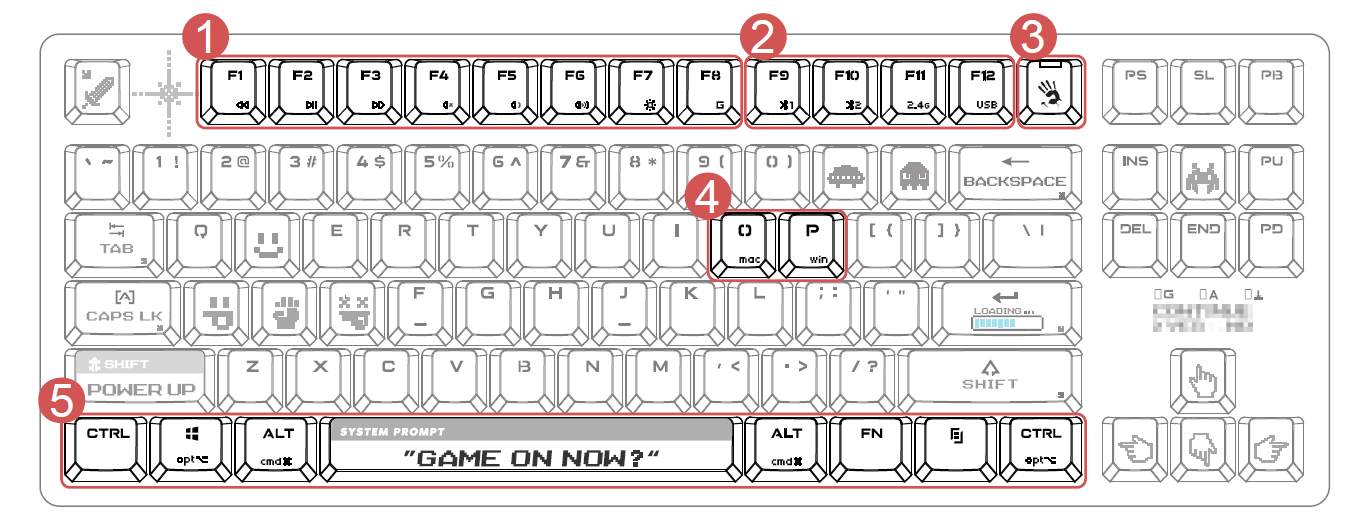
THE BOTTOM
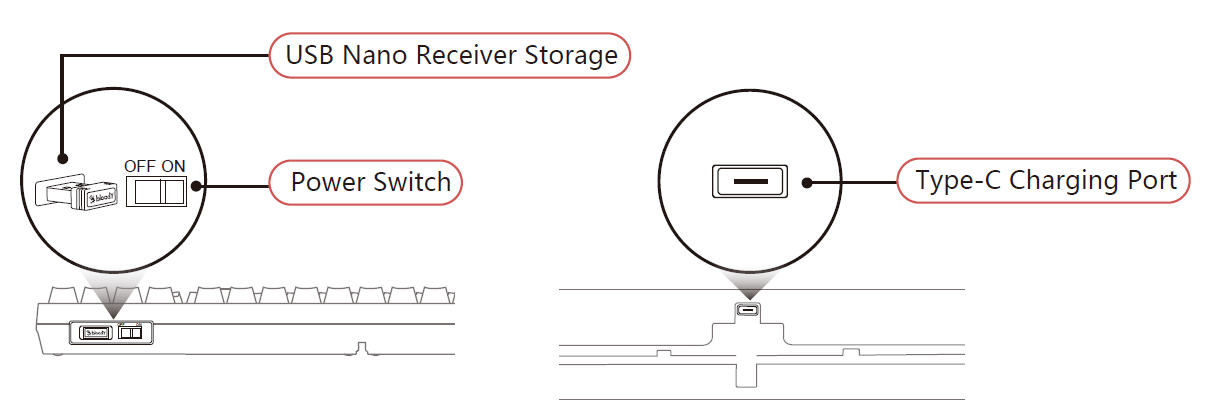
INSTALLATION
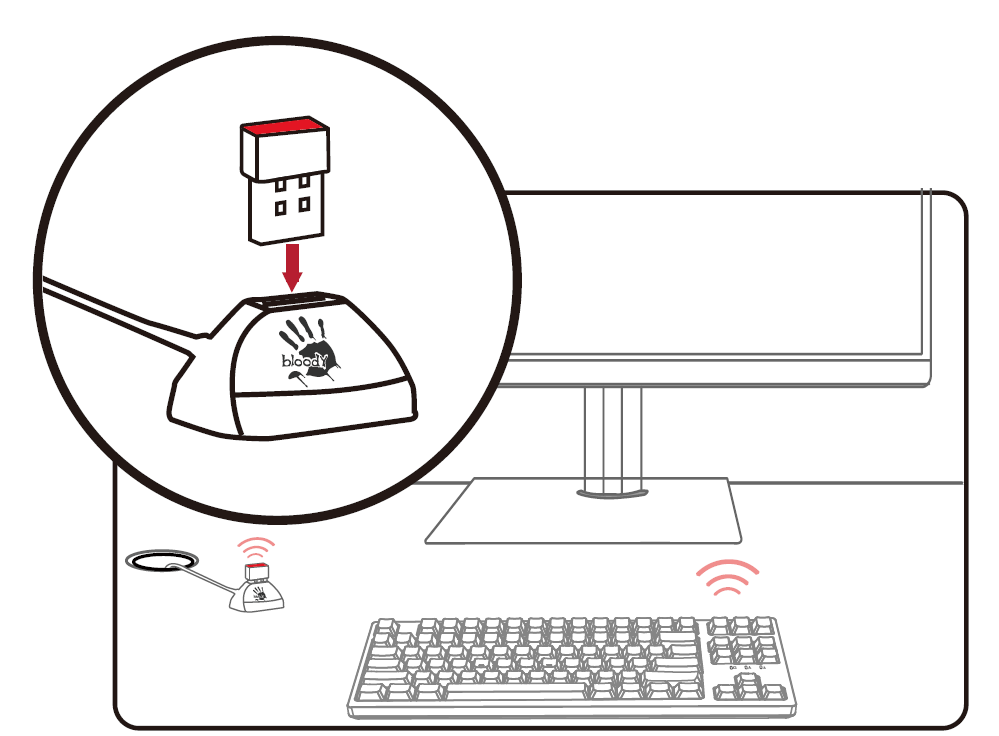
The optimal operating range between the receiver and the keyboard is 30 to 100 cm, ensuring there are no obstructions between them.
- Connect the extension dock to the host computer, and plug the nano receiver into the extension dock.
- Plug the nano receiver directly into the laptop.
CONNECTING BLUETOOTH DEVICE 1
- First Pairing: Short Press [Fn+F9]
- Re-Pairing: Long Press [Fn+F9] for 3s
- F9 Key Flashlight
- Choose [WS87] from your Bluetooth device.
- The F9 key will light up for a while, then light off after the keyboard is connected.
CONNECTING BLUETOOTH DEVICE 2
- First Pairing: Short Press [Fn+F10]
- Re-Pairing: Long Press [Fn+F10] for 3s
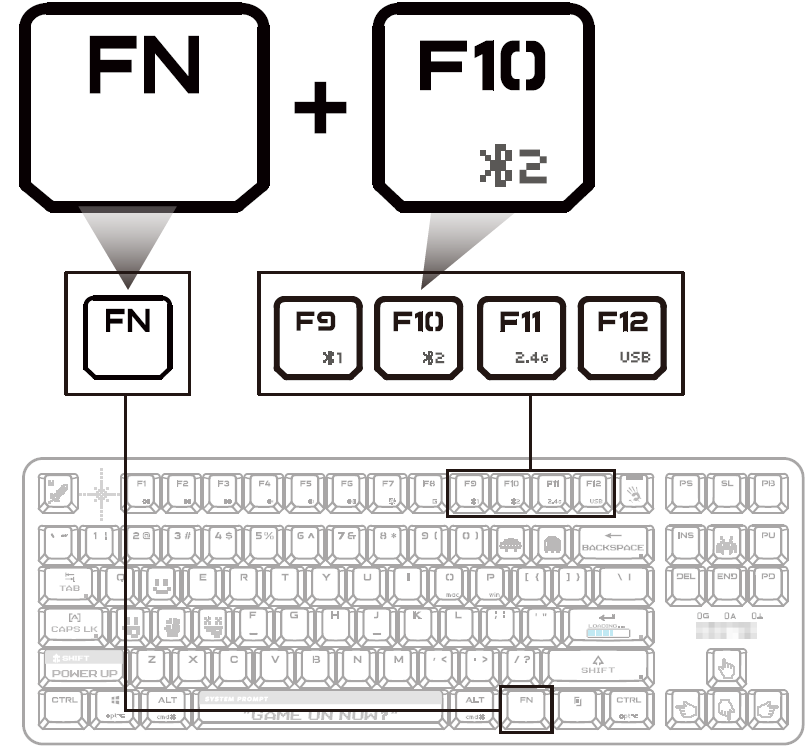
- F10 Key Flash Light.
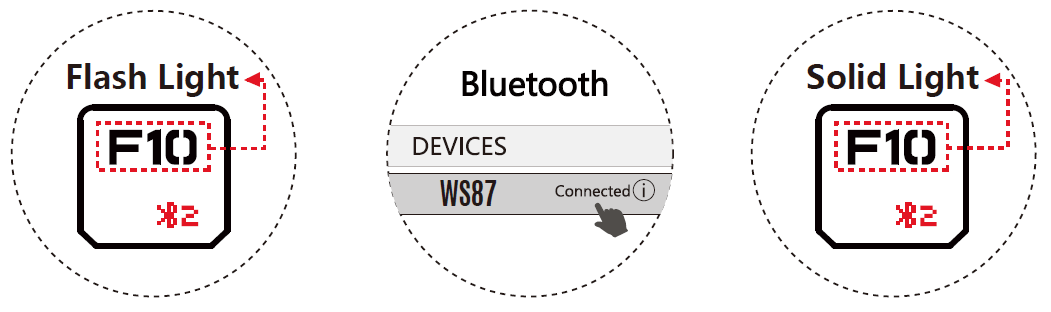
- Choose [WS87] from your Bluetooth device.
- The F10 key will light up for a while then light off after the keyboard is connected.
CONNECTING 2.4G DEVICE
- Insert the nano receiver into your computer's USB port.
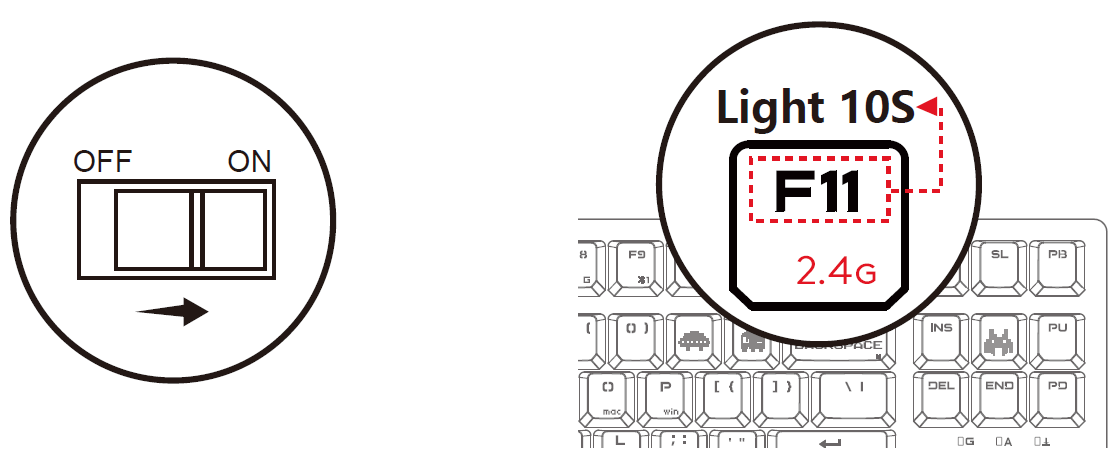
- Turn on the keyboard power switch.
- The F11 key will light up for 10 seconds, indicating that the 2.4G device is connected
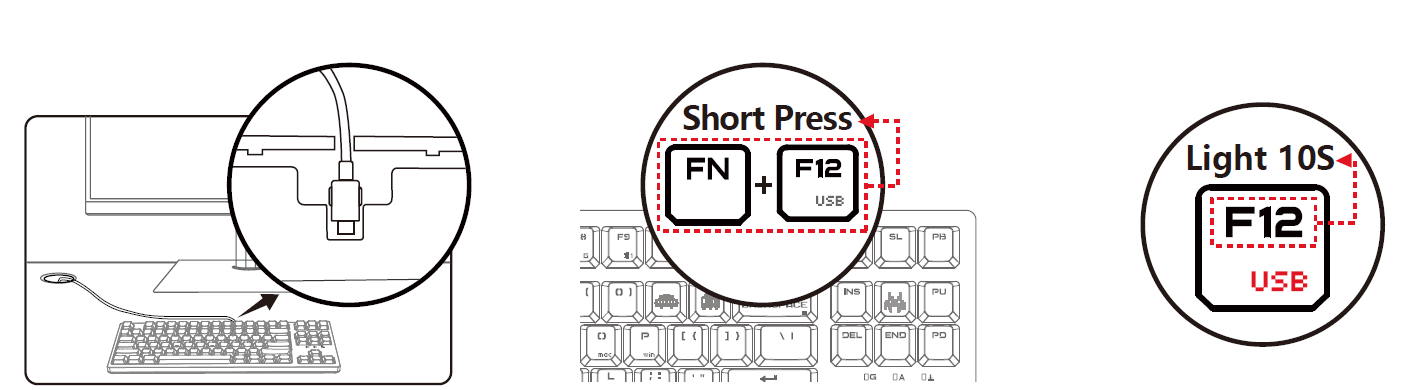
CONNECTING USB DEVICE
- Attach the Type-C end to the keyboard and the USB end to your computer.
- Press "Fn + F12" to change to wired connection mode.
- The F12 key will light up for 10 seconds, indicating that the device is connected
INDICATOR
COMBINATION FN KEYS
DUAL-FUNCTION KEY
HOW TO CONFIRM CURRENT DEVICE
After turning on the computer or restarting the keyboard, the F9~F12 keys will light up to show the currently connected devices.
WIRELESS K-ESPORT EDITOR
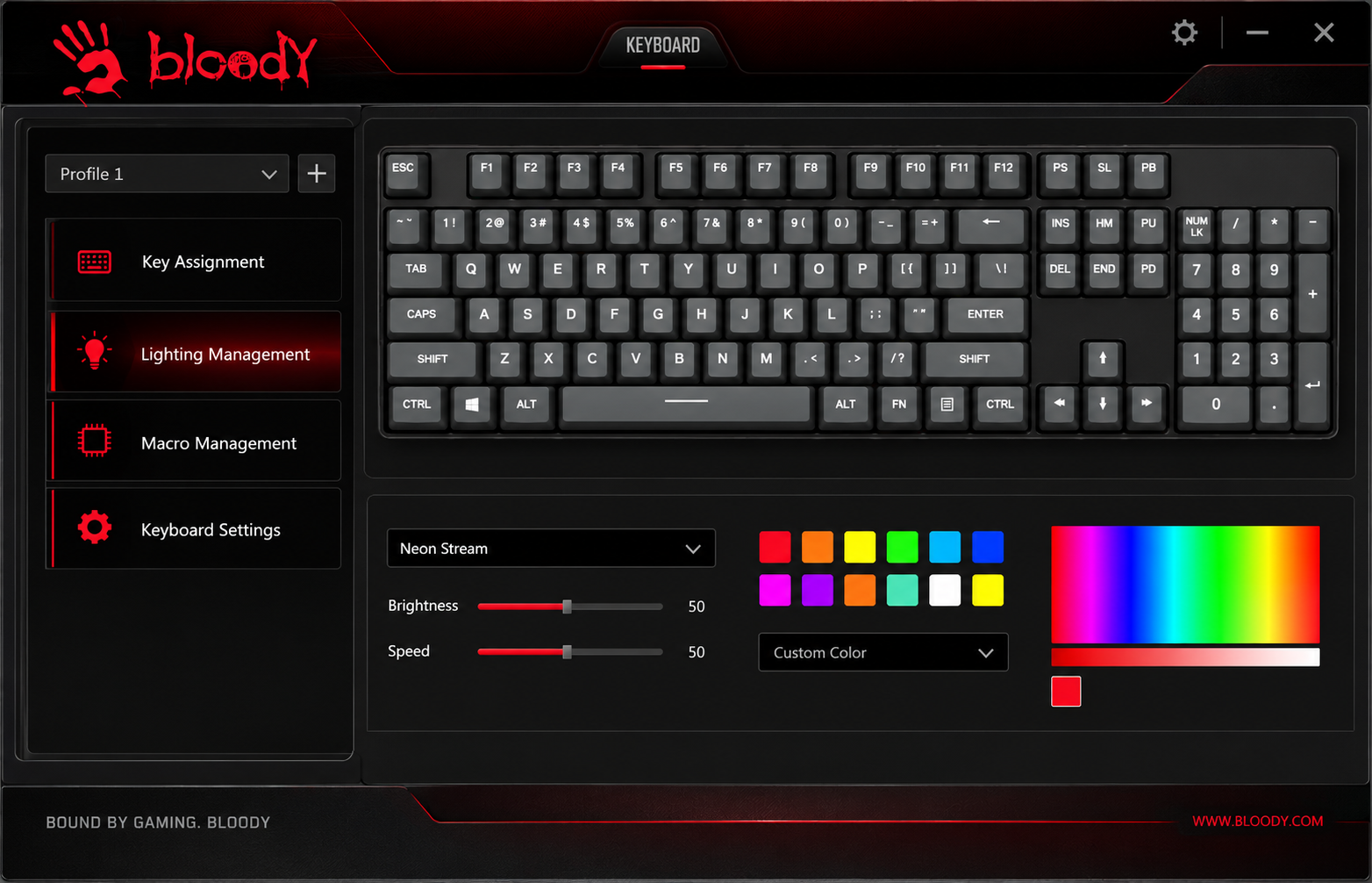
Provides the keyboard with simple combination settings and programming functions. Players can optimize the most suitable game configuration by key lighting and combination macros, then save it to the keyboard on-board memory
CHARGING/LOW BATTERY INDICATOR
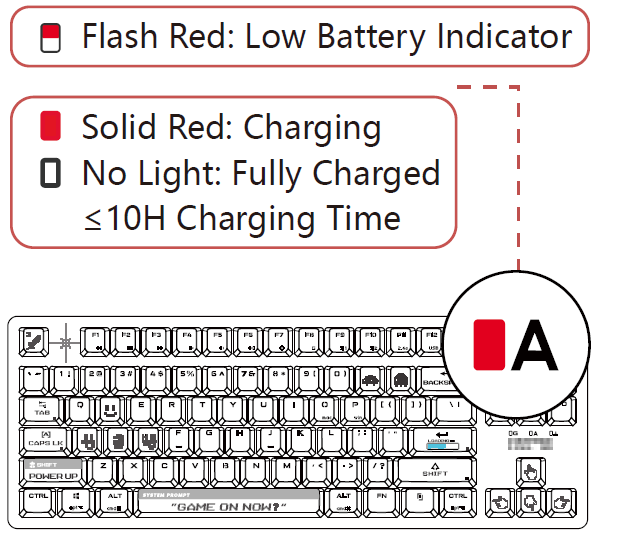
- Low Battery Indicator/Charging
- Wireless Playback Time
- A flashing red light indicates when the battery is below 15%.
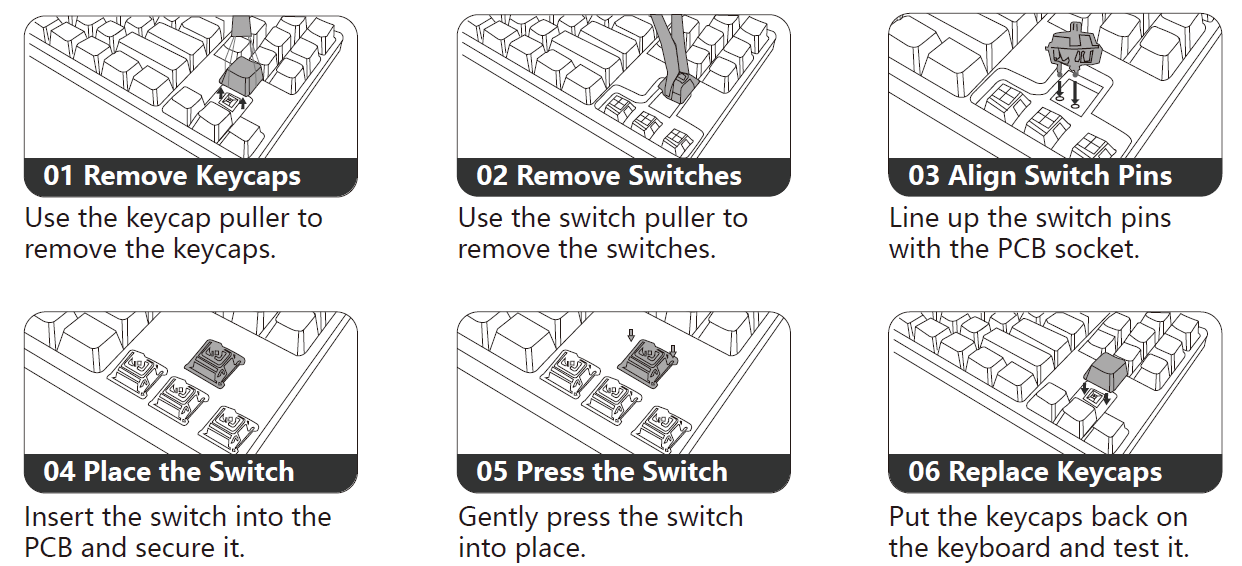
SWAP SWITCH STEP
Compatible with 3-Pin & 5-Pin Style Mechanical Switches
Pros & Cons Analysis
Advantages of the Bloody WS87
- Exceptional Battery Life: The 666-hour battery endurance with lighting off represents industry-leading longevity, meaning you'll charge your keyboard less frequently than competing models, enhancing portability and reducing cable management headaches.
- Tri-Mode Connectivity: Supporting Bluetooth, 2.4GHz, and USB connections simultaneously with multi-device support creates unprecedented flexibility for users juggling gaming, work, and content creation across multiple platforms without requiring keyboard swaps.
- Responsive Gaming Performance: The 1ms wireless transmission latency combined with N-Key Rollover anti-ghosting technology delivers competitive-grade responsiveness, making the WS87 suitable for esports titles requiring split-second reaction times.
- Durable BLMS Red Plus Switches: With a 50-million keystroke lifespan, these linear switches offer smooth, quiet operation while maintaining reliability through extended gaming marathons and professional work environments.
- Compact TKL Design: The 87-key layout eliminates the number pad without sacrificing essential keys, creating a portable form factor ideal for LAN tournaments, travel, and minimalist desk setups while maintaining full functionality.
- Hot-Swap Compatibility: The keyboard supports both 3-pin and 5-pin hot-swappable switches, allowing users to customize their switch selection and maintain the keyboard long-term through switch replacement rather than complete keyboard replacement.
Disadvantages & Limitations
- Limited Customization Software: While the keyboard includes the Wireless K-Esport Editor software, some users report limited macro programming capabilities and RGB customization options compared to premium competitors from Corsair or SteelSeries.
- No Wrist Rest Included: The keyboard does not ship with an integrated wrist rest or detachable wrist support, requiring separate purchases for ergonomic comfort during extended typing sessions.
- Price Point: At $120-$180, the WS87 sits in the premium keyboard category, making it a significant investment compared to budget gaming keyboards, though the feature set justifies the cost for serious gamers.
- Limited User Reviews Available: As a specialized gaming peripheral, the WS87 has fewer user reviews and community feedback compared to mainstream keyboard brands, making pre-purchase research more challenging.
- Extension Dock Dependency: Optimal 2.4GHz performance requires the separate extension dock purchase or proper receiver placement, adding complexity compared to plug-and-play wireless keyboards.
Customer Reviews & User Feedback
The bloody WS87 Dual-Core Wireless Mechanical Keyboard has generated positive reception among gaming and professional communities, though verified customer reviews remain limited on major retail platforms. Users consistently praise the keyboard's build quality, responsive mechanical switches, and exceptional battery life as standout features that justify the premium pricing.
Common User Praise: Gamers particularly appreciate the 1ms wireless latency and anti-ghosting technology, reporting smooth competitive gaming performance without noticeable input delay. The multi-device connectivity feature receives consistent acclaim from users managing both gaming and work setups, eliminating the need to switch keyboards between activities. Professional typists commend the quiet BLMS Red Plus switches for reducing keyboard noise in office environments while maintaining the tactile feedback gaming enthusiasts demand.
Frequently Mentioned Concerns: Some users note that the software customization interface could offer more advanced macro programming options. A few customers request the inclusion of a wrist rest for improved ergonomics during extended gaming sessions. The compact TKL layout, while praised for portability, occasionally concerns users accustomed to full-size keyboards with dedicated number pads.
Purchase Recommendations: The bloody WS87 is highly recommended for competitive gamers seeking reliable wireless performance, esports players who attend LAN events and value portability, and professionals requiring multi-device connectivity. It represents excellent value for users willing to invest in a durable, feature-rich mechanical keyboard that balances gaming performance with productivity versatility. For budget-conscious buyers or those preferring full-size layouts with integrated wrist support, exploring alternative options may prove more suitable.
Conclusion & Final Recommendations
The bloody WS87 Dual-Core Wireless Mechanical Keyboard stands as a compelling choice for users seeking a premium gaming peripheral that doesn't compromise on versatility or reliability. Its intelligent dual-core architecture, tri-mode connectivity, and responsive BLMS Red Plus switches create a keyboard equally comfortable in competitive gaming environments or professional workspaces. The exceptional battery life and multi-device support eliminate common frustrations associated with wireless peripherals, while the hot-swappable design ensures long-term usability and customization.
For competitive gamers, esports enthusiasts, and professionals managing multiple computing devices, the bloody WS87 Dual-Core Wireless Mechanical Keyboard represents an investment in quality that will deliver years of reliable performance. While the price point positions it as a premium product, the comprehensive feature set, build quality, and performance capabilities justify the investment for serious users. Those prioritizing budget considerations or requiring full-size layouts with integrated wrist support may explore alternative options, but for users valuing portability, wireless reliability, and gaming-grade responsiveness, the WS87 delivers exceptional value and performance.
```
Faqs
How do I set up the bloody WS87 Dual-Core Wireless Mechanical Keyboard for the first time?
What should I do if the bloody WS87 Dual-Core Wireless Mechanical Keyboard won't connect wirelessly?
How do I customize RGB lighting on the bloody WS87 Dual-Core Wireless Mechanical Keyboard?
Is the bloody WS87 Dual-Core Wireless Mechanical Keyboard compatible with Mac and Windows?
How can I optimize battery life on bloody WS87 Dual-Core Wireless Mechanical Keyboard?
How do I perform maintenance on bloody WS87 Dual-Core Wireless Mechanical Keyboard?
What makes the dual-core processor in bloody WS87 Dual-Core Wireless Mechanical Keyboard special?
How do I troubleshoot lag or delay on bloody WS87 Dual-Core Wireless Mechanical Keyboard?
More bloody manuals
- Setup: Bloody WS98 Dual-Core Wireless Mechanical Gaming Keyboard User Manual
- Setup: Bloody AT98 Alpha Optical Switch Mechanical Gaming Keyboard User Manual
- Setup: Bloody ES9 Plus RGB Esports Gaming Mouse User Manual
- Setup: Bloody AT87 Alpha Optical Switch Performance TKL Keyboard User Manual
- Setup: Bloody ES9 Pro RGB Esports Gaming Mouse User Manual
- Setup: Bloody RGB ESPORTS Gaming Mouse ES5 User Manual
Leave a Comment