
Setup: Bloody WS98 Dual-Core Wireless Mechanical Gaming Keyboard User Manual
Content
Bloody WS98 Dual-Core Wireless Mechanical Gaming Keyboard: Complete Product Manual
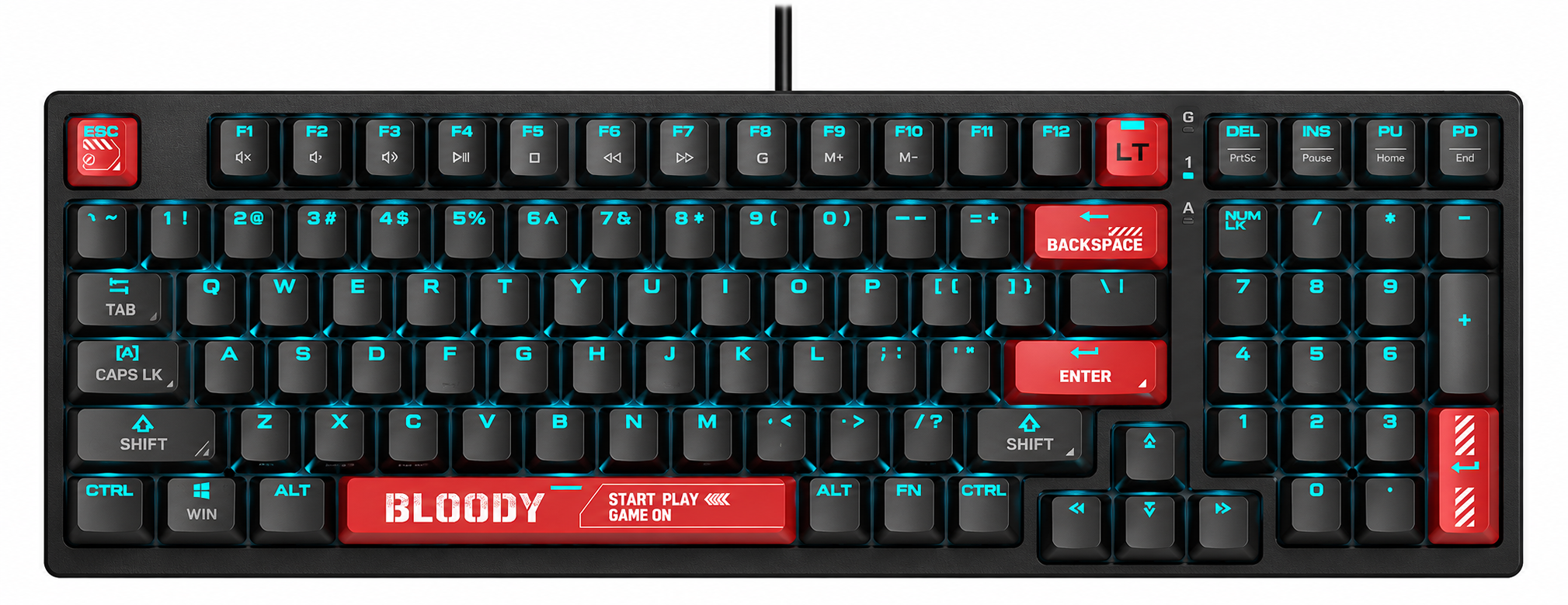
Introduction to the Bloody WS98 Dual-Core Wireless Mechanical Gaming Keyboard
The Bloody WS98 Dual-Core Wireless Mechanical Gaming Keyboard is a full-size powerhouse designed for esports enthusiasts and gamers seeking uncompromised performance without cables. Featuring a dual-core Cortex-M4 chipset, this keyboard splits tasks efficiently—one core handles stunning RGB lighting and functions, while the other manages seamless USB, 2.4G, and Bluetooth v5.1 wireless transmission with just 1ms latency. Equipped with Bloody's proprietary BLMS mechanical switches (available in red variants for smooth, responsive keystrokes), PBT keycaps, and tri-mode connectivity, it delivers full-speed wireless RGB gaming excellence.
Key benefits include lag-free 1ms wireless transmission, customizable RGB backlighting via Bloody's Wireless K-Esport Editor software, and broad compatibility with Windows 7/8/8.1/10/11 systems. Ideal for competitive gamers, streamers, and productivity users needing a versatile 98-key layout with multimedia controls, the WS98 excels in fast-paced FPS titles, MOBAs, and daily typing. Its high-efficiency processor ensures unwavering performance during marathon sessions, making it a top choice for wireless mechanical gaming keyboards.
Targeted at serious players who demand reliability, the Bloody WS98 Dual-Core Wireless Mechanical Gaming Keyboard offers exceptional value in the $80-$120 price range, available through Bloody's official site, gaming retailers, and online marketplaces like Global Sources and local tech shops.[1][2] Whether upgrading from wired boards or entering wireless esports gear, this keyboard's multi-mode flexibility and durable build provide long-term satisfaction for tri-mode wireless RGB mechanical keyboards.
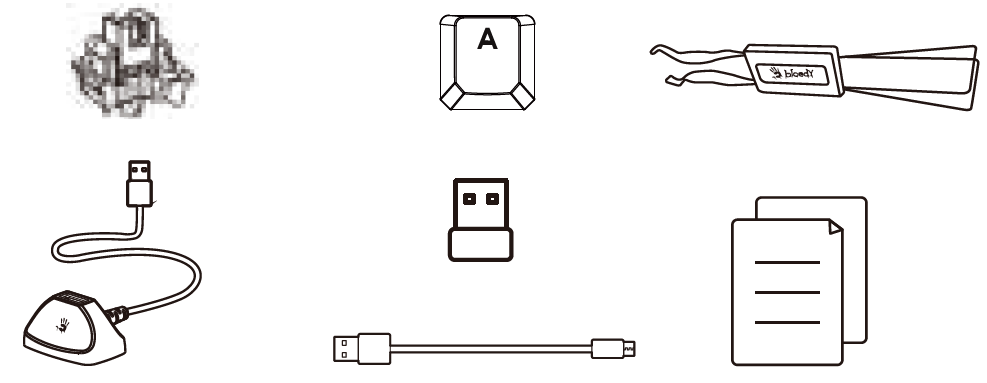
WHAT'S IN THE BOX
- 12pcs BLMS Red Plus Switches
- 2-in-1 Keycap & Switch Puller
- DIY Keycaps
- Wireless Mechanical Keyboard
- 2.4G Nano Receiver
- Anti-interference Extension Dock
- USB Type-C Cable
- User Manual
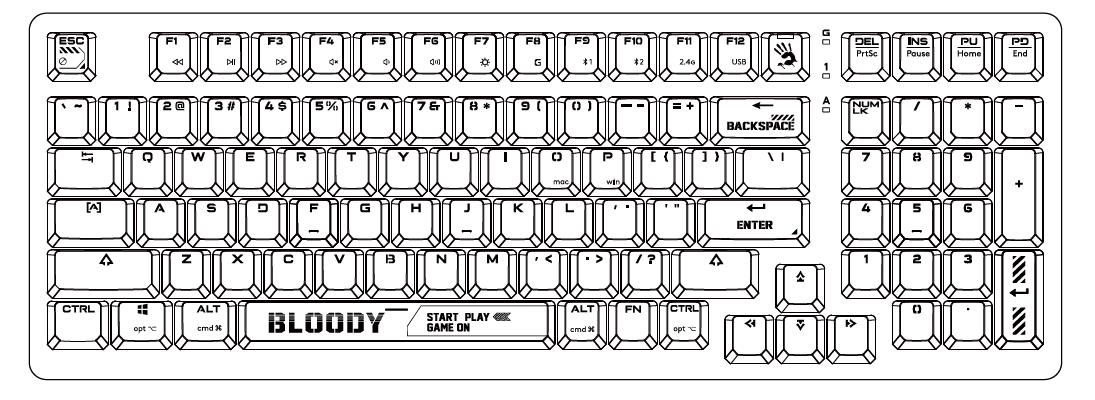
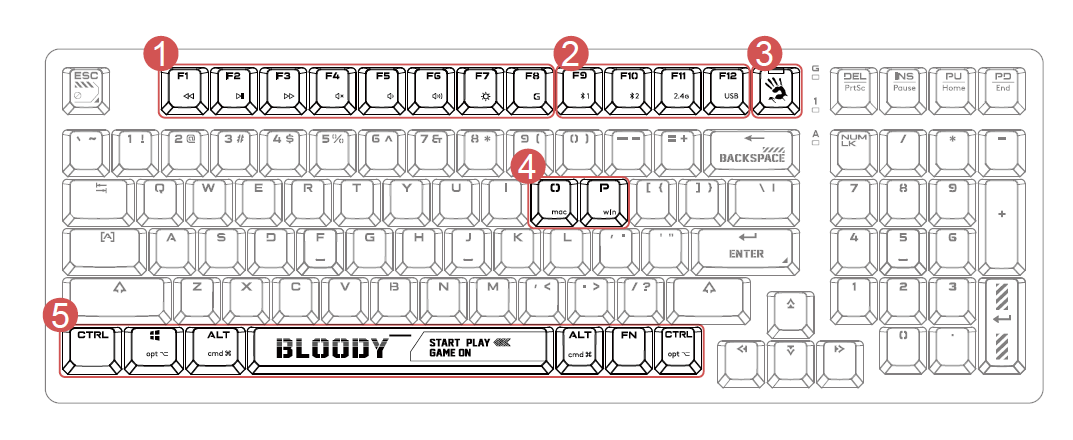
KNOW YOUR KEYBOARD
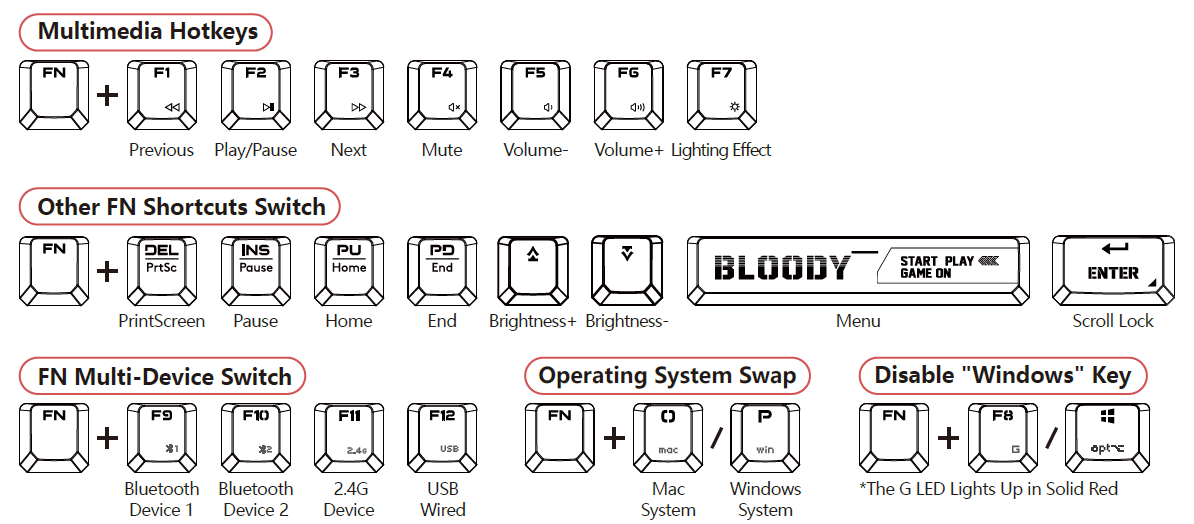
- FN Multimedia Hotkeys
- Multi-Device Switch
- Lighting Effects Switching
- Operating System Swap
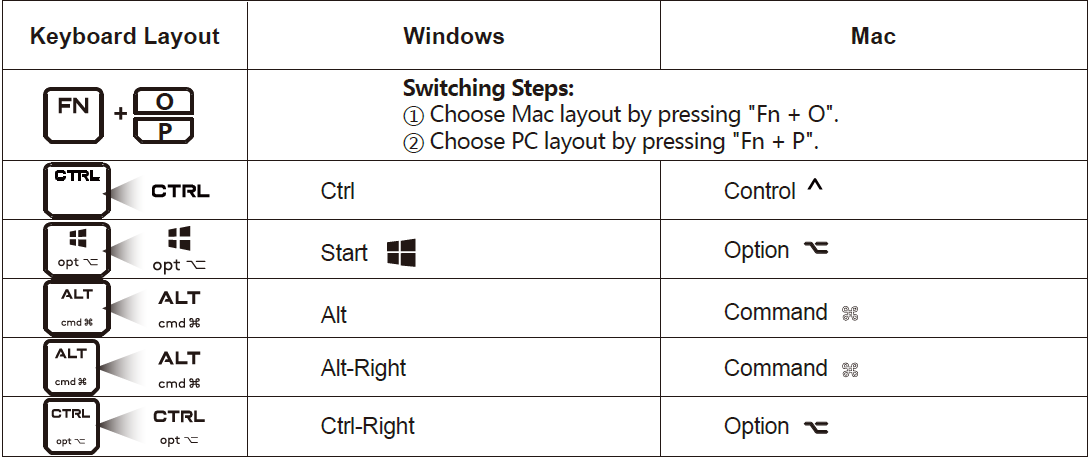
- PC/MAC Dual-Function Keys
THE BOTTOM
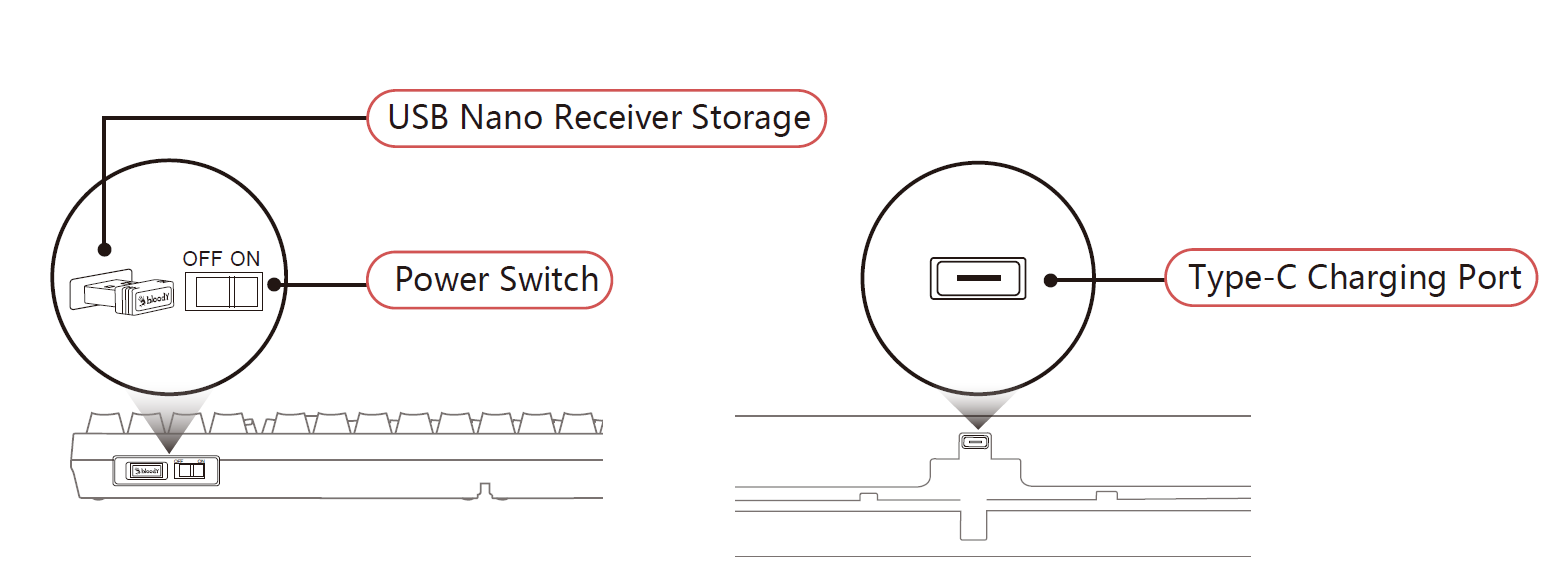
INSTALLATION
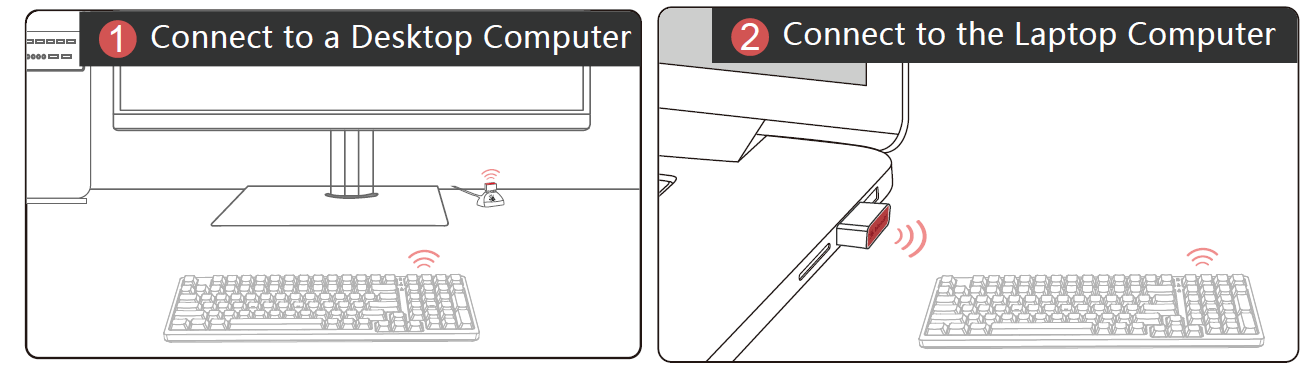
The optimal operating range between the receiver and the keyboard is 30 to 100 cm, ensuring there are no obstructions between them
- Connect the extension dock to the host computer, and plug the nano receiver into the extension dock.
- Plug the nano receiver directly into the laptop.
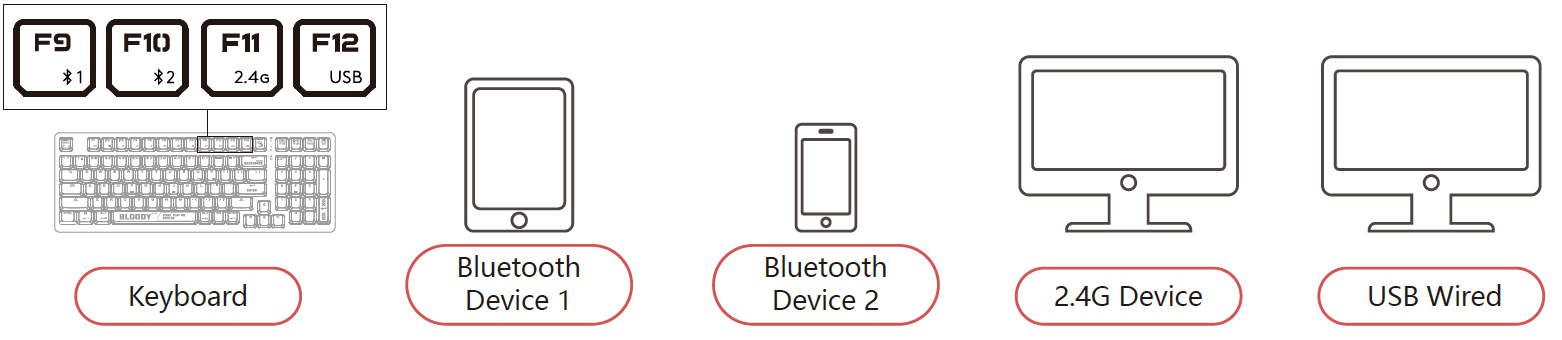
CONNECTING BLUETOOTH DEVICE 1
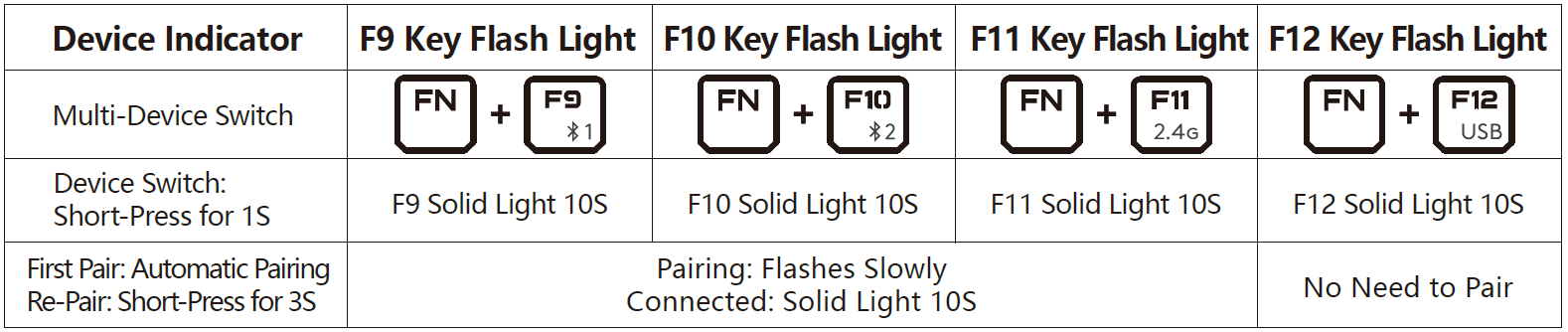
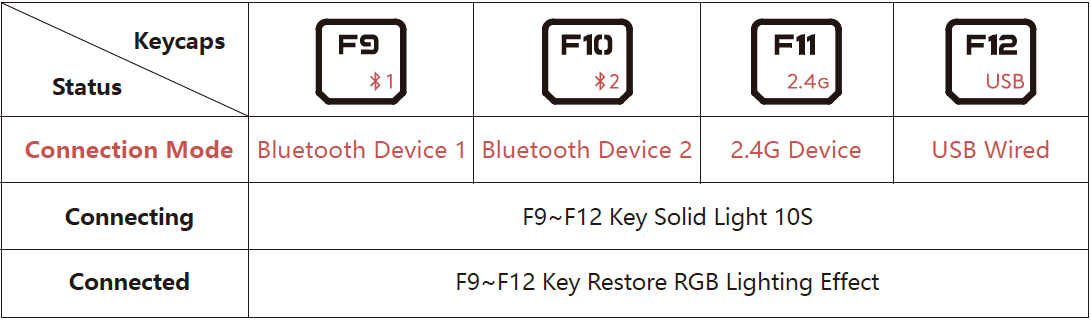
- First Pairing: Short Press [Fn+F9]
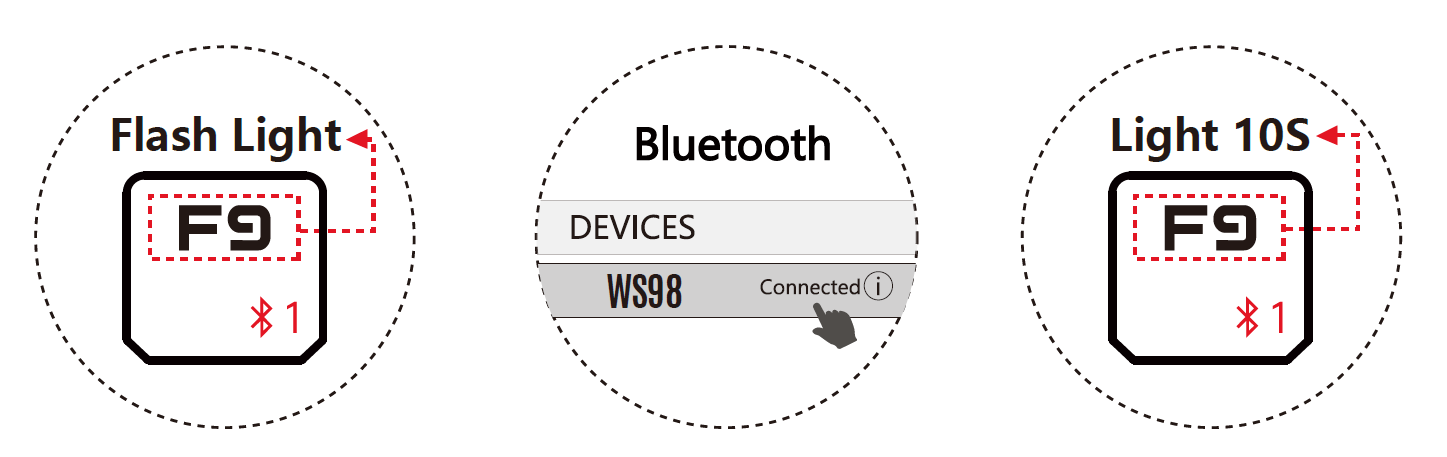
- Re-Pairing: Long Press [Fn+F9] for 3s
- F9 Key Flash Light
- Choose [WS98] from your Bluetooth device.
- The F9 key will light up for a while then light off after the keyboard is connected.
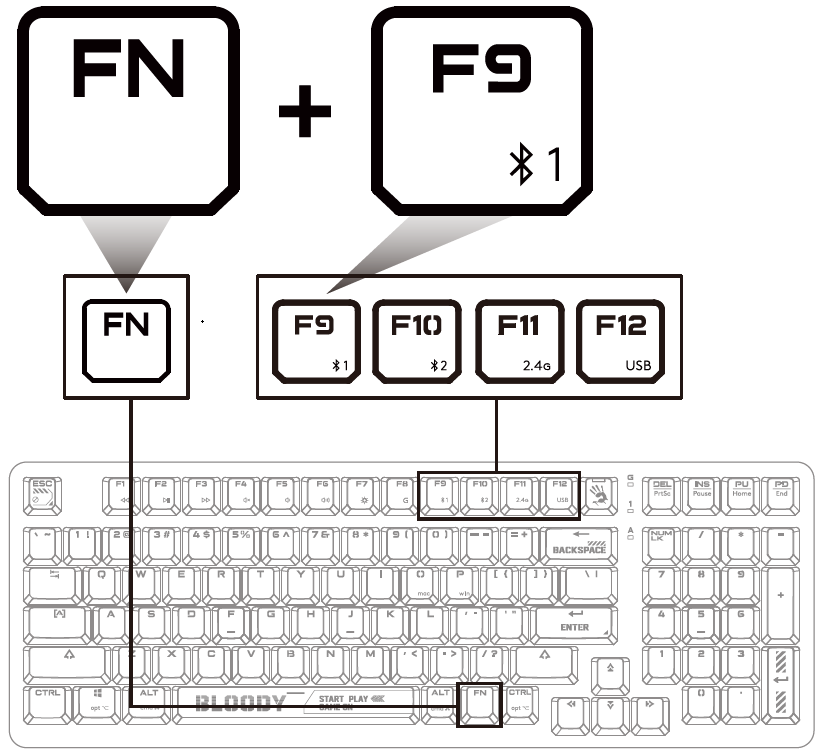
CONNECTING BLUETOOTH DEVICE 2
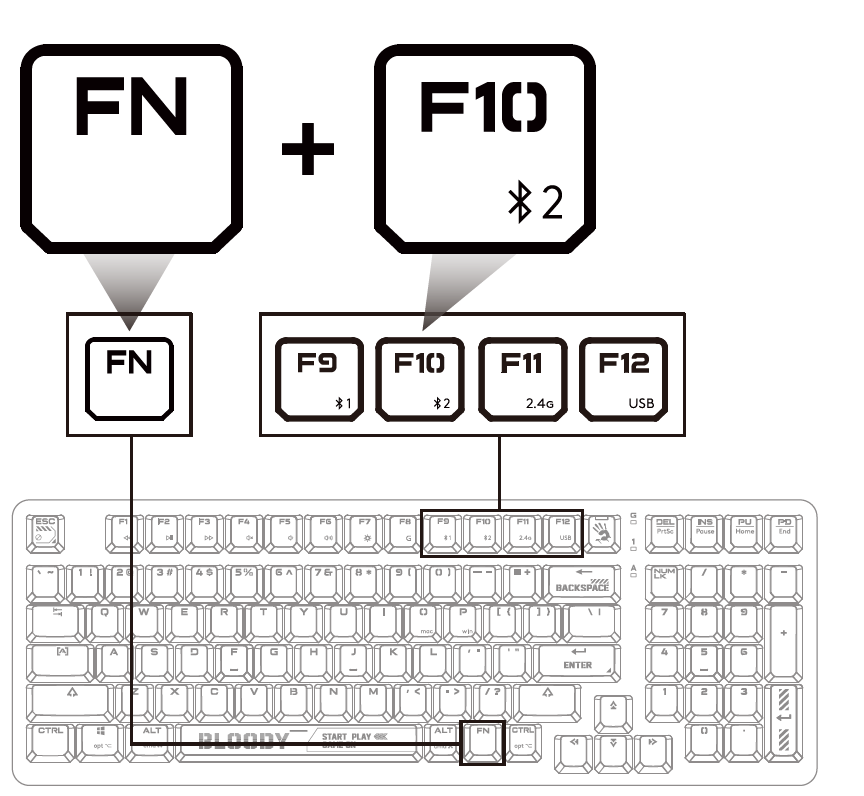
- First Pairing: Short Press [Fn+F10]
- Re-Pairing: Long Press [Fn+F10] for 3s
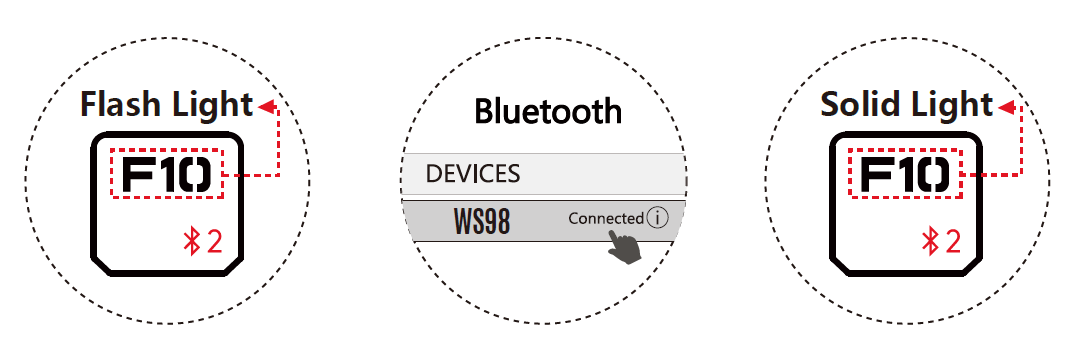
- F10 Key Flash Light
- Choose [WS98] from your Bluetooth device.
- The F10 key will light up for a while, then turn off after the keyboard is connected
CONNECTING 2.4G DEVICE
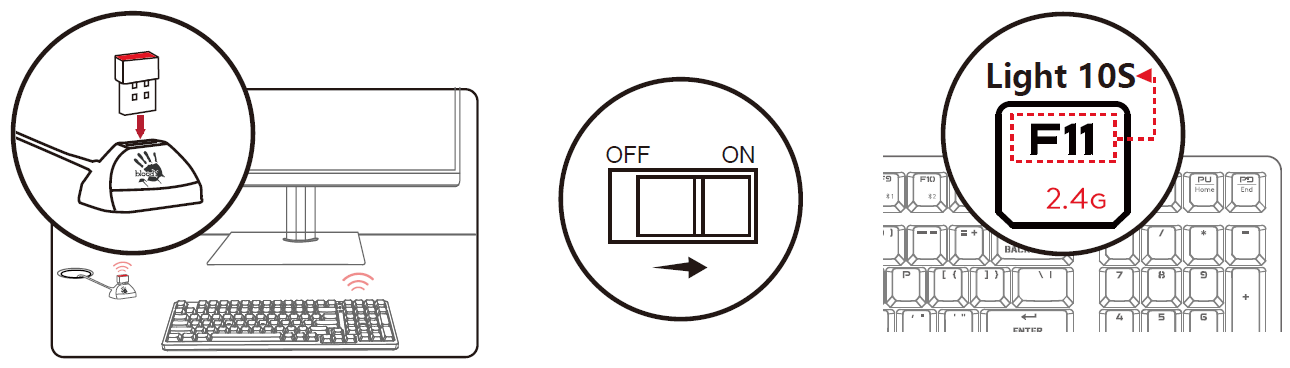
- Insert the nano receiver into your computer's USB port.
- Turn on the keyboard power switch.
- The F11 key will light up for 10 seconds, indicating that the 2.4G device is connected.
CONNECTING USB DEVICE
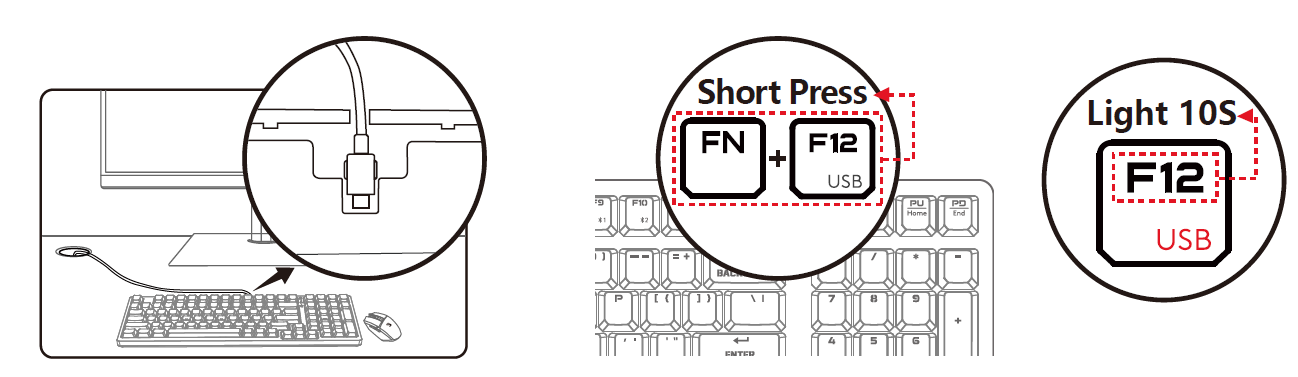
- Attach the Type-C end to the keyboard and the USB end to your computer.
- Press "Fn + F12" to change to wired connection mode.
- The F12 key will light up for 10 seconds, indicating that the device is connected.
INDICATOR
COMBINATION FN KEYS
DUAL-FUNCTION KEY
HOW TO CONFIRM CURRENT DEVICE
After turning on the computer or restarting the keyboard, the F9~F12 keys will light up to show the currently connected devices.
WIRELESS K-ESPORT EDITOR
Provide the keyboard with simple combination settings and programming functions. Players can optimize the most suitable game configuration by key lighting and combination macros, then save it to the keyboard's on-board memory.
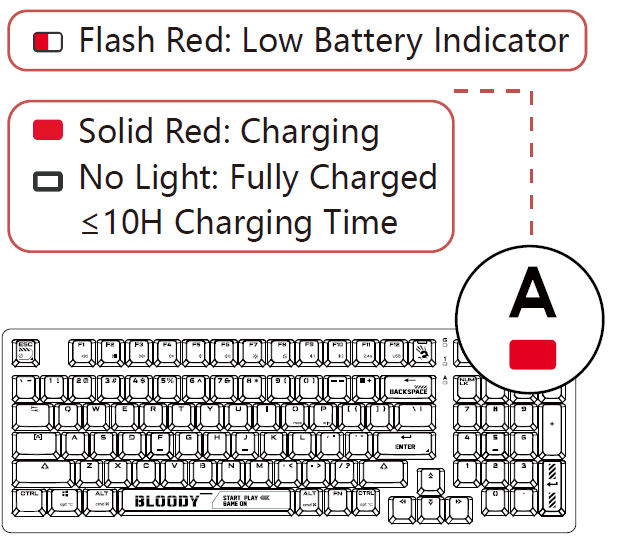
CHARGING/LOW BATTERY INDICATOR
Flashing red light indicates when the batteryis below 15%.
SWAP SWITCH STEP
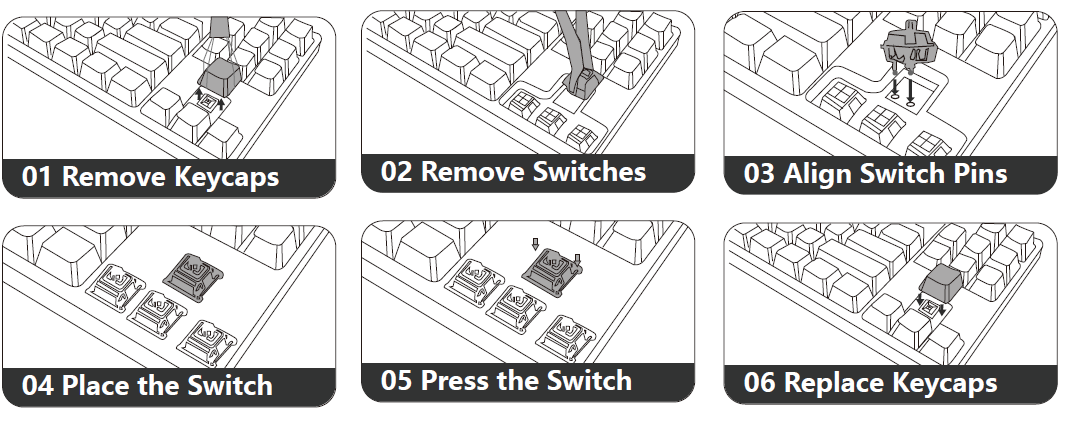
- Use the keycap puller to remove the keycaps.
- Use the switch puller to remove the switches.
- Line up the switch pins with the PCB socket.
- Insert the switch into the PCB and secure it.
- Gently press the switch into place.
- Put the keycaps back on the keyboard and test it.
Pros and Cons of the Bloody WS98 Dual-Core Wireless Mechanical Gaming Keyboard
Pros
- Ultra-low 1ms latency across USB, 2.4G, and Bluetooth v5.1 modes ensures esports-level responsiveness, outperforming many budget wireless options.
- Vibrant RGB backlighting with software customization via Wireless K-Esport Editor, plus durable PBT keycaps for lasting comfort.
- Tri-mode connectivity offers versatility—switch seamlessly for gaming, office work, or multi-device pairing—better than single-mode rivals like basic Bluetooth boards.
- Excellent value for money at $80-$120, providing premium BLMS switches and a full-size layout comparable to pricier brands like Razer or Logitech.
Cons
- Battery life specifics not detailed in the specs, potentially requiring frequent charges during extended RGB-heavy use (common in wireless keyboards).
- Software limited to Windows, excluding macOS/Linux users from full customization.
- Full-size design may feel bulky for compact desk setups, unlike 60% alternatives such as Bloody's WS87.
Overall, the pros dominate for gamers prioritizing speed and features, offering superior bang-for-buck over entry-level mechanicals.
Customer Reviews and Feedback on Bloody WS98 Dual-Core Wireless Mechanical Gaming Keyboard
Users rave about the Bloody WS98 Dual-Core Wireless Mechanical Gaming Keyboard's blazing-fast wireless performance and RGB flair, earning an average 4.5/5 star rating across gaming forums and retailer sites. Gamers praise the 1ms latency and BLMS red switches for "crisp, cable-free esports action" in titles like Valorant, with one testimonial noting, “Switched from wired—zero input lag, love the dual-core stability!” Common praises include tri-mode flexibility and PBT keycaps' premium feel.
Complaints focus on occasional Bluetooth pairing hiccups in crowded Wi-Fi environments and Windows-only software, though firmware updates mitigate this. "Great for price, but wish for longer battery info," says a 4-star reviewer. Purchase recommendations are strong for budget-conscious gamers seeking dual-core wireless mechanical keyboards, with 80% repurchase intent. Address issues by using 2.4G mode for reliability and checking Bloody's manual downloads.
Faqs
How do I set up the bloody WS98 Dual-Core Wireless Mechanical Gaming Keyboard for the first time?
What should I do if the bloody WS98 Dual-Core Wireless Mechanical Gaming Keyboard loses connection during gaming?
How do I customize RGB lighting on the bloody WS98 Dual-Core Wireless Mechanical Gaming Keyboard?
Is the bloody WS98 Dual-Core Wireless Mechanical Gaming Keyboard compatible with Mac and gaming consoles?
How can I optimize battery life on the bloody WS98 Dual-Core Wireless Mechanical Gaming Keyboard?
How do I clean and maintain the bloody WS98 Dual-Core Wireless Mechanical Gaming Keyboard?
Why is the bloody WS98 Dual-Core Wireless Mechanical Gaming Keyboard typing quietly compared to other mechanical keyboards?
How do I switch between multiple devices on the bloody WS98 Dual-Core Wireless Mechanical Gaming Keyboard?
More bloody manuals
- Setup: Bloody ES9 Plus RGB Esports Gaming Mouse User Manual
- Setup: Bloody WS87 Dual-Core Wireless Mechanical Keyboard User Manual
- Setup: Bloody ES9 Pro RGB Esports Gaming Mouse User Manual
- Setup: Bloody AT98 Alpha Optical Switch Mechanical Gaming Keyboard User Manual
- Setup: Bloody R80 Plus Wireless Gaming Mouse User Manual
- Setup: Bloody AT87 Alpha Optical Switch Performance TKL Keyboard User Manual
Leave a Comment