
Setup: Bloody AT87 Alpha Optical Switch Performance TKL Keyboard User Manual
Content
Bloody AT87 Alpha Optical Switch Performance TKL Keyboard: Ultimate Gaming Guide
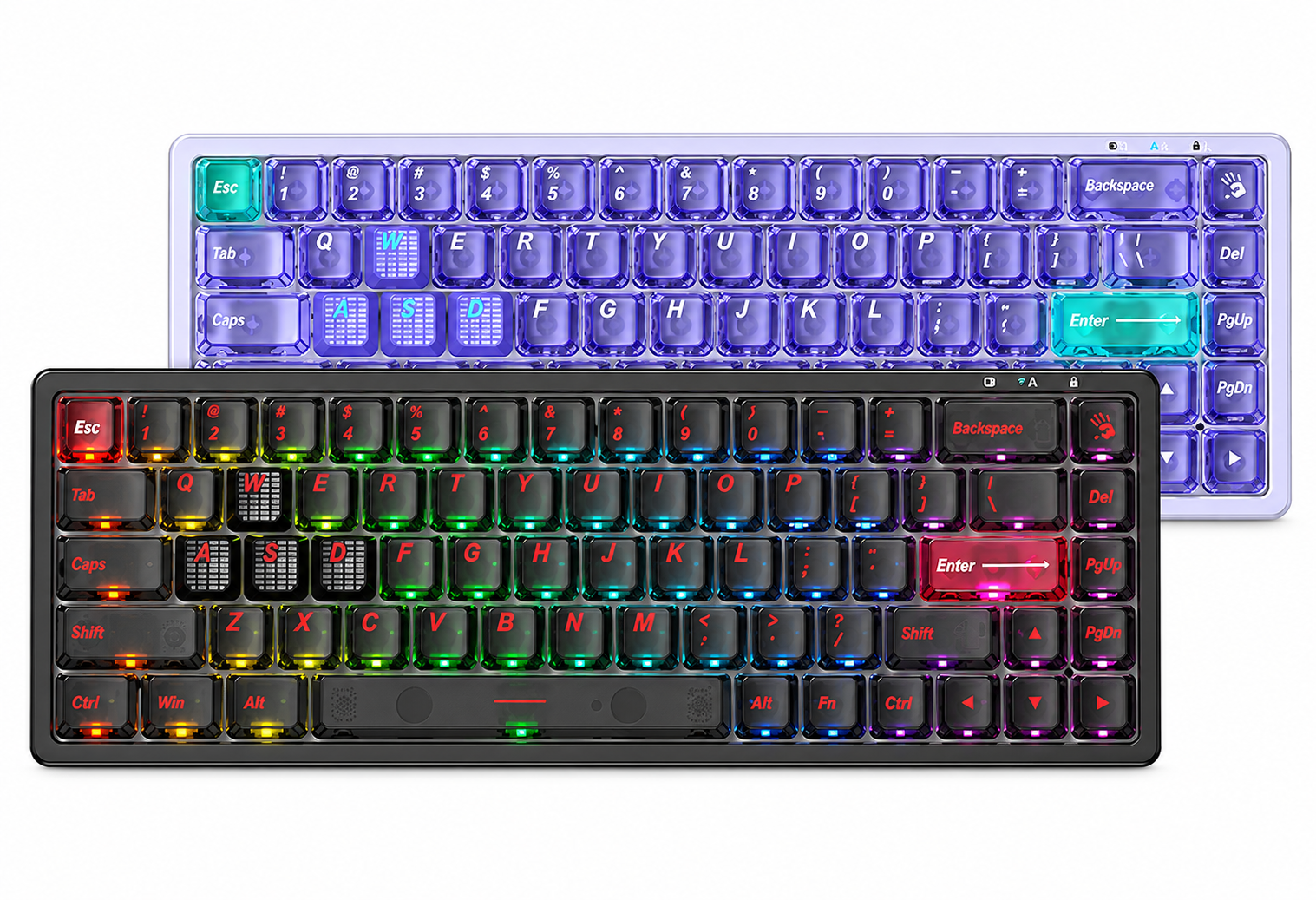
Introduction to Bloody AT87 Alpha Optical Switch Performance TKL Keyboard
The Bloody AT87 Alpha Optical Switch Performance TKL Keyboard is a high-performance gaming peripheral designed for competitive gamers seeking speed, precision, and durability. This compact 87-key tenkeyless (TKL) keyboard features advanced Alpha Optical Switches with linear action, offering 100 million keystroke durability and customizable actuation points from 0.8mm to 3.0mm for personalized responsiveness. Its eXact Reset System includes Hyper Z-Force mode at 0.3mm for ultra-fast resets and X-Force at 0.8mm for enhanced control, making it ideal for fast-paced FPS games and MOBAs.
Key benefits include a 1000Hz/1ms report rate for lag-free input, stealth quiet typing with TPE silicone dampeners and internal silencers, and durable PBT keycaps that resist wear. The 7 RGB backlit effects allow customization to match your setup, while hot-swappable switches enable easy upgrades. Target audiences include esports professionals, streamers, and PC enthusiasts who value a space-saving TKL design without sacrificing functionality. Use cases range from pixel-perfect aiming in shooters to rapid combo execution in rhythm games.
With an estimated price range of $80-$120, the Bloody AT87 Alpha Optical Switch Performance TKL Keyboard is available at retailers like Walmart, Bloody's official site, and online marketplaces, often in Bloody Red or Black editions. This keyboard stands out in the optical switch keyboard category for its value, blending pro-grade features with ergonomic comfort in a wired USB 2.0 connection. Whether upgrading your battle station or entering competitive gaming, it delivers raw performance engineered for victory.
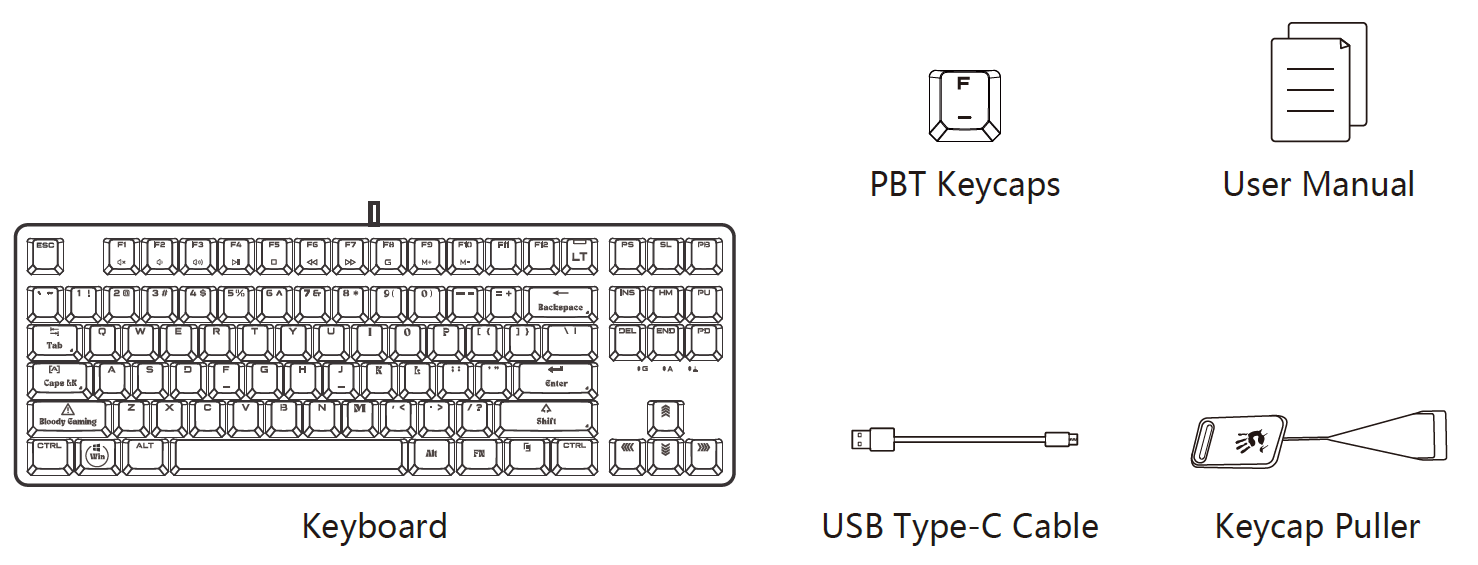
WHAT'S IN THE BOX
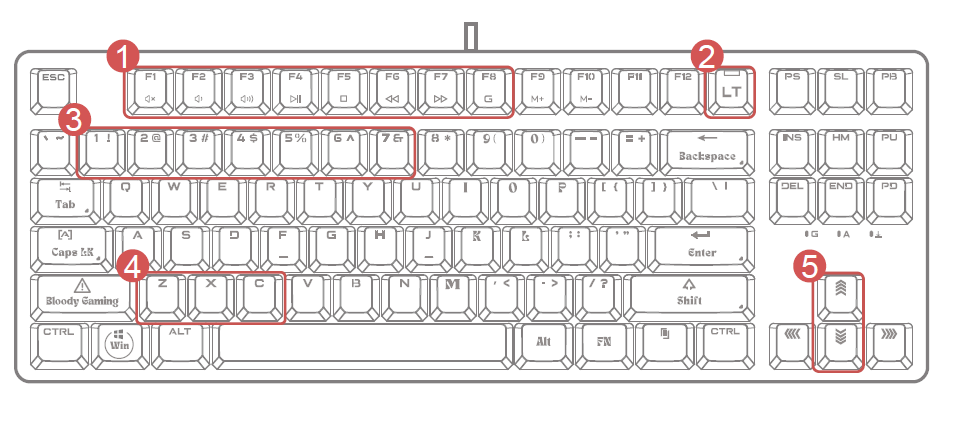
KNOW YOUR PRODUCT
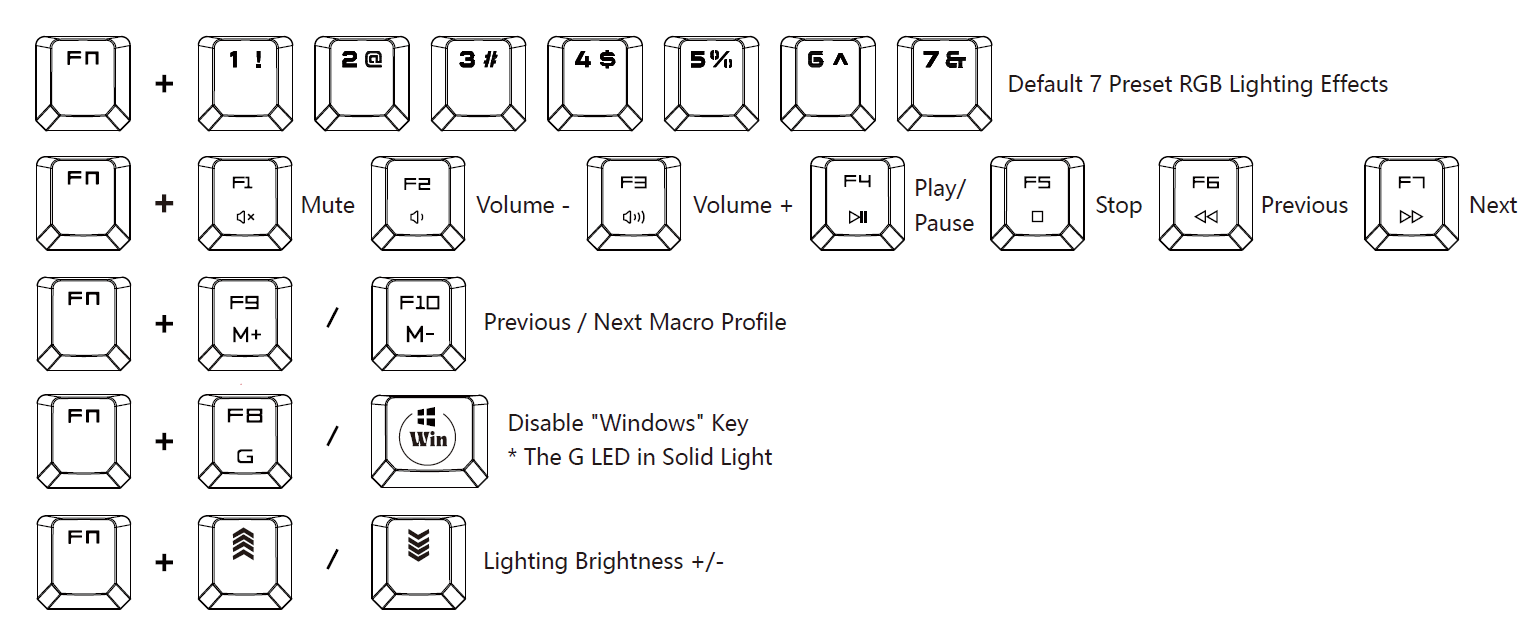
- FN Multimedia Hotkeys
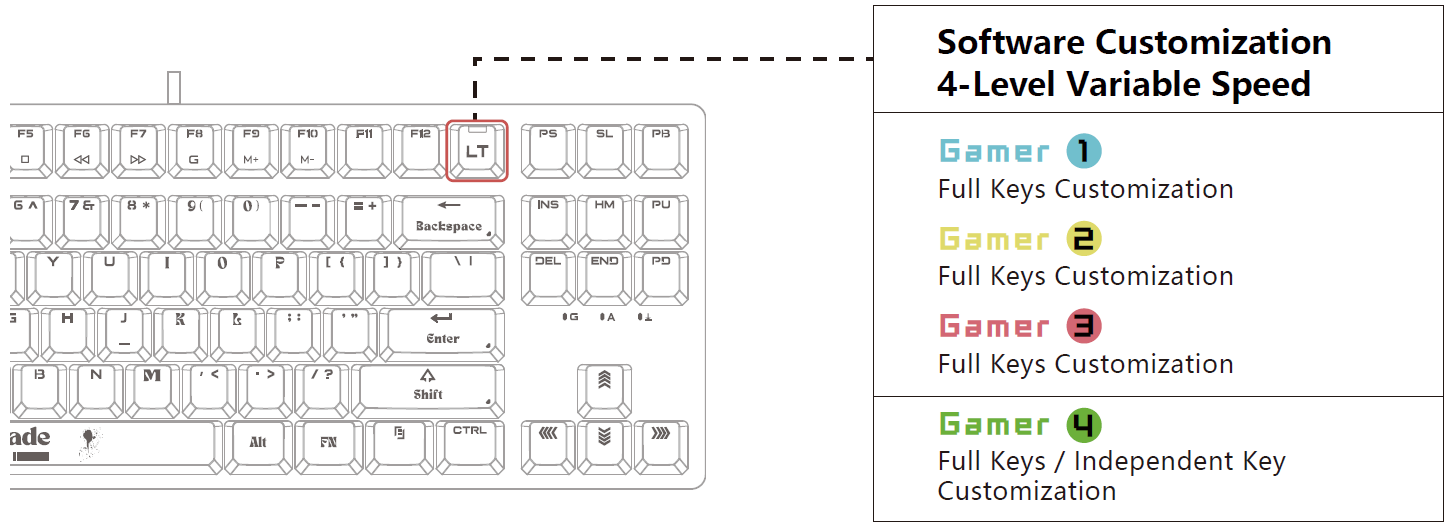
- LT 4 Level Variable Speed Keys
- Light Effect Profiles
- Exact Reset Function Switch
- Backlit Brightness Adjustment
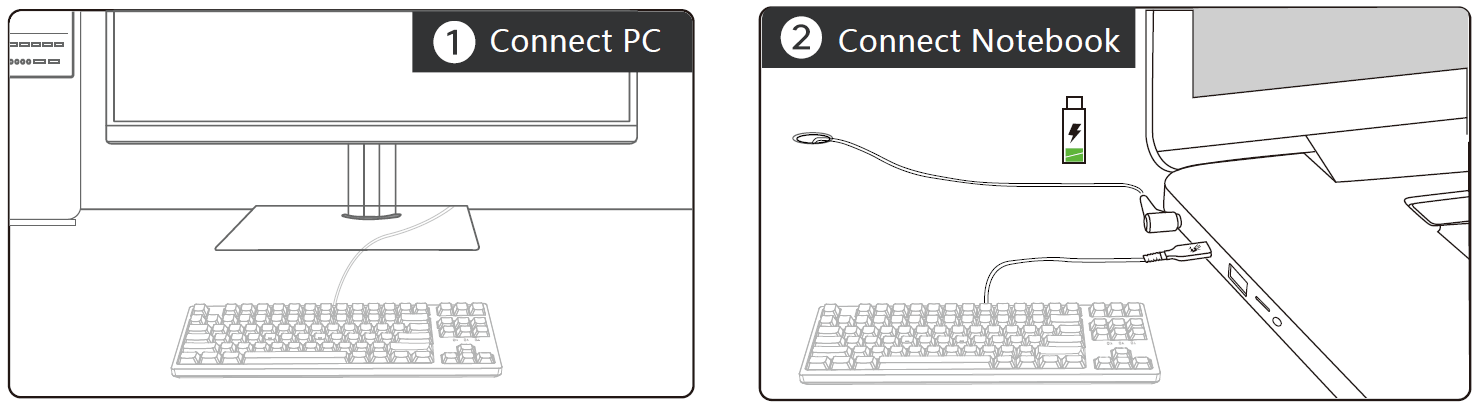
INSTALLATION
Connect the Type-C cable plug to the keyboard and the USB plug to the computer.
(Note: Using a USB hub or extension cable to connect is not recommended.)
CUSTOMIZABLE LT VARIABLE SPEED PROFILES
Switch between 4 customization actuation levels. With the software, customize up to 23 actuation points (0.8mm to 3.0mm) for all keys or individual keys, creating fully personalized profiles
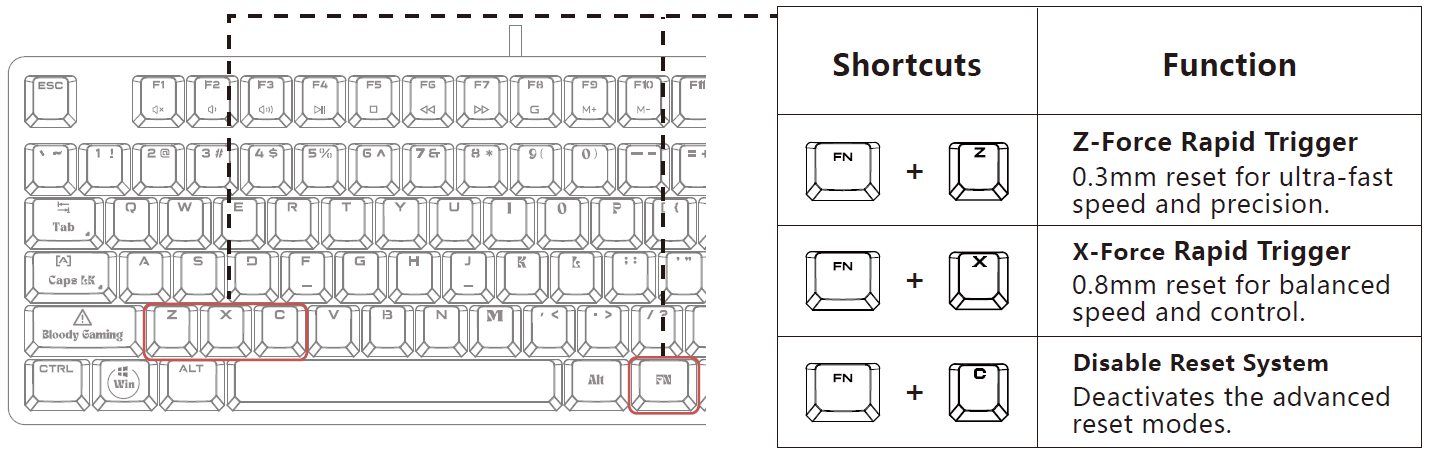
EXACT RESET SYSTEM
When Hyper Z-Force Mode or Extreme X-Force Mode is enabled, the reset occurs at a much shorter distance, allowing for quicker key presses and improving overall responsiveness.This enhances reaction time and performance in various gaming scenarios
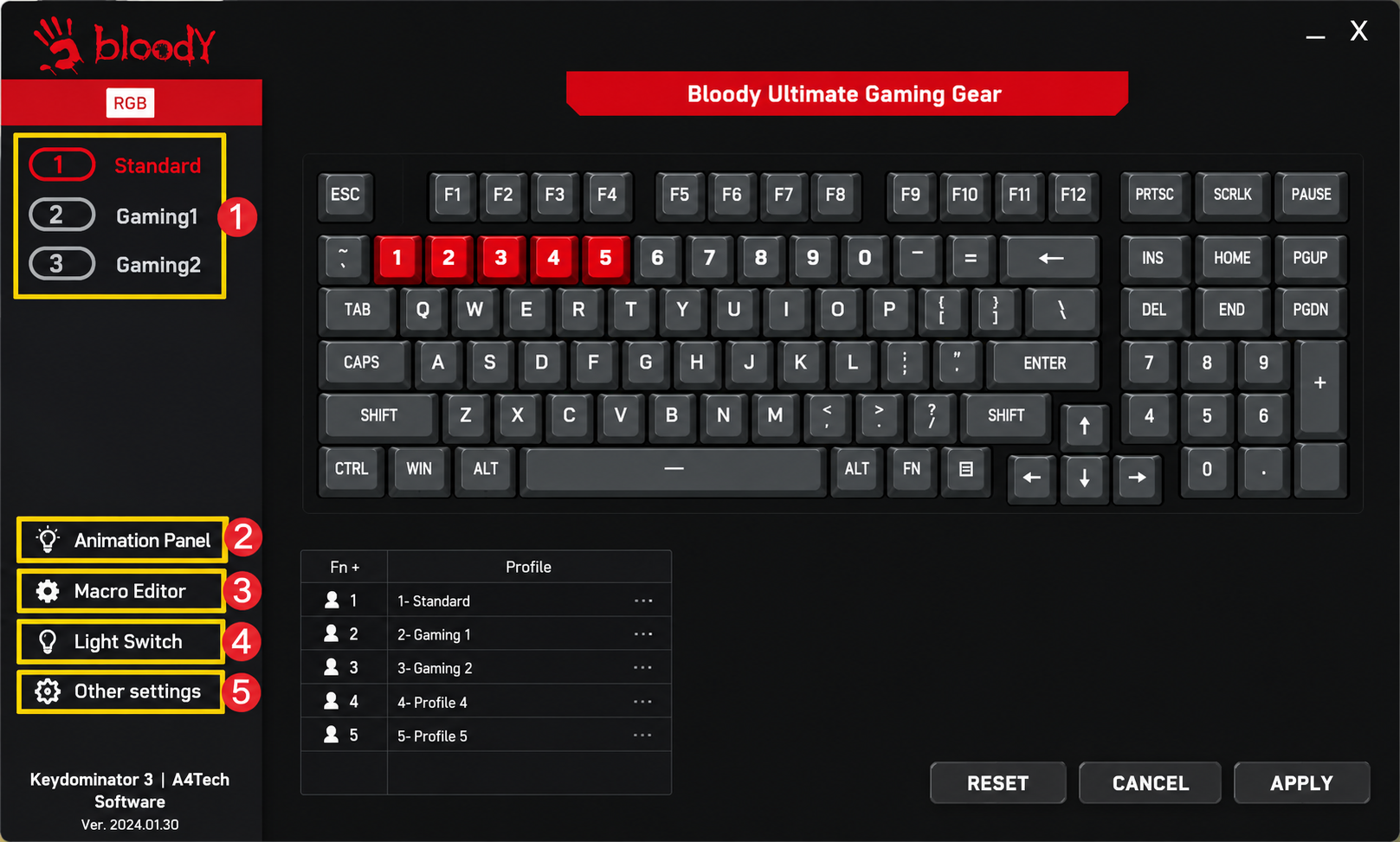
KEYDOMINATOR EDITING SOFTWARE
SOFTWARE DOWNLOAD
- Keystroke Setting
Customize keyboard function emulation, programmed keys, shortcut keys, and other settings to suit your preferences. - Actuation Point
Fine-tune the travel distance setting of LT optical switches for accurate typing and gaming experiences. - Macro Editor II
A player-centric programming platform tailored for users with programming expertise. - Combination Setting
A user-friendly player programming platform ideal for players without programming expertise, allowing for the creation of simple programming functions. - Ultra Combo
Access settings for advanced software and hardware functions
FULL KEYBOARD AREA CUSTOMIZATION
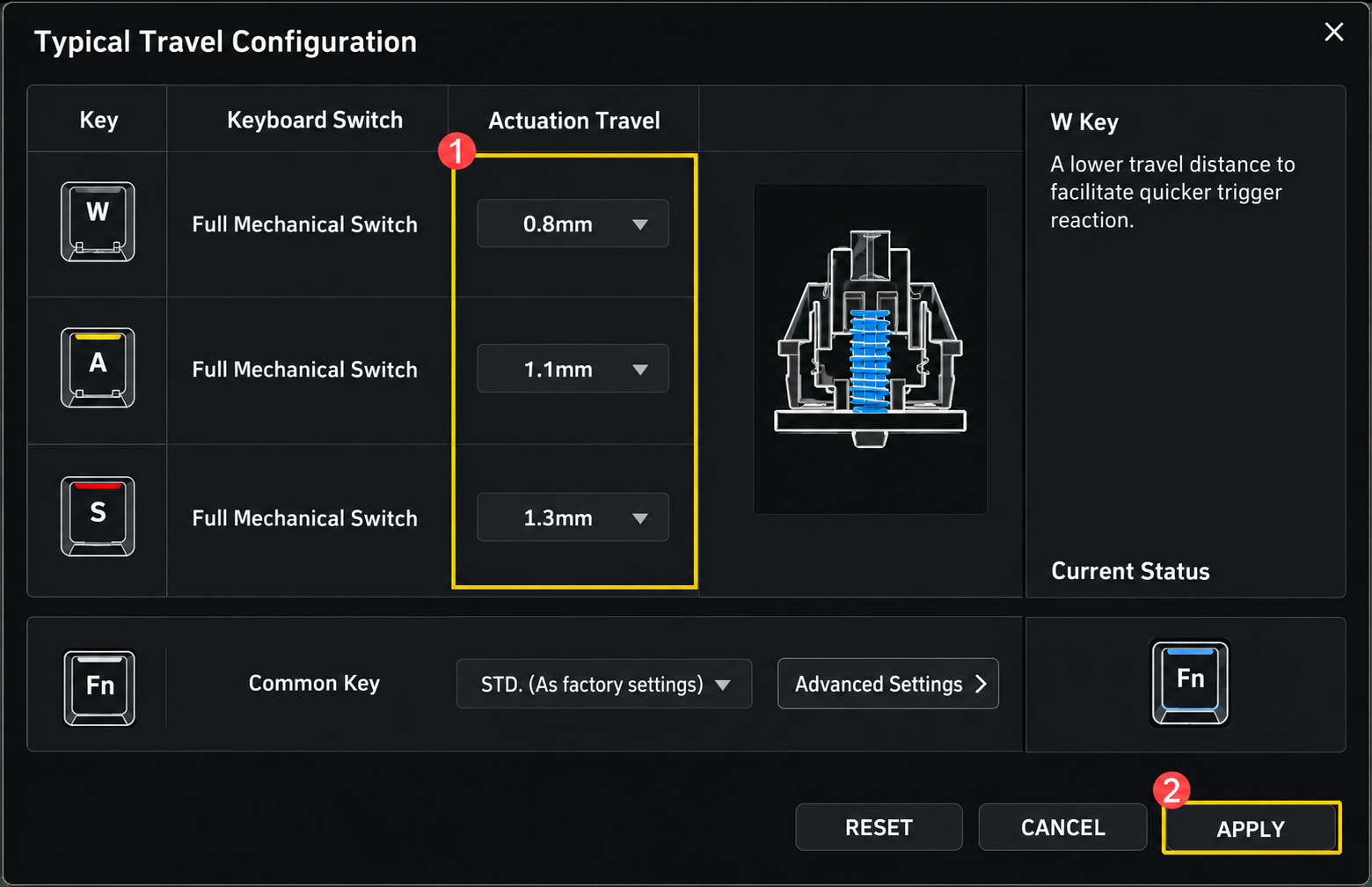
Access LT Optical Travel Configuration setting by clicking 'Actuation Point' in the software.
Configuration Example: Adjust the factory preset travel distances for LT-1, LT-2, and LT-3 to 2.6mm, 1.8mm, and 1.6mm respectively.
Locate 'Actuation Point' in the software interface. Customize the LT Key actuation points according to the following steps:
- A: Select 2.6mm from 0.8mm for LT-1.
- B: Select 1.8mm from 1.1mm for LT-2.
- C: Select 1.6mm from 1.3mm for LT-3.
Click APPLY , then press the  button to switch between the three saved full keyboard area actuation points without needing extra drivers.
FULL-KEY INDEPENDENT CUSTOMIZATION
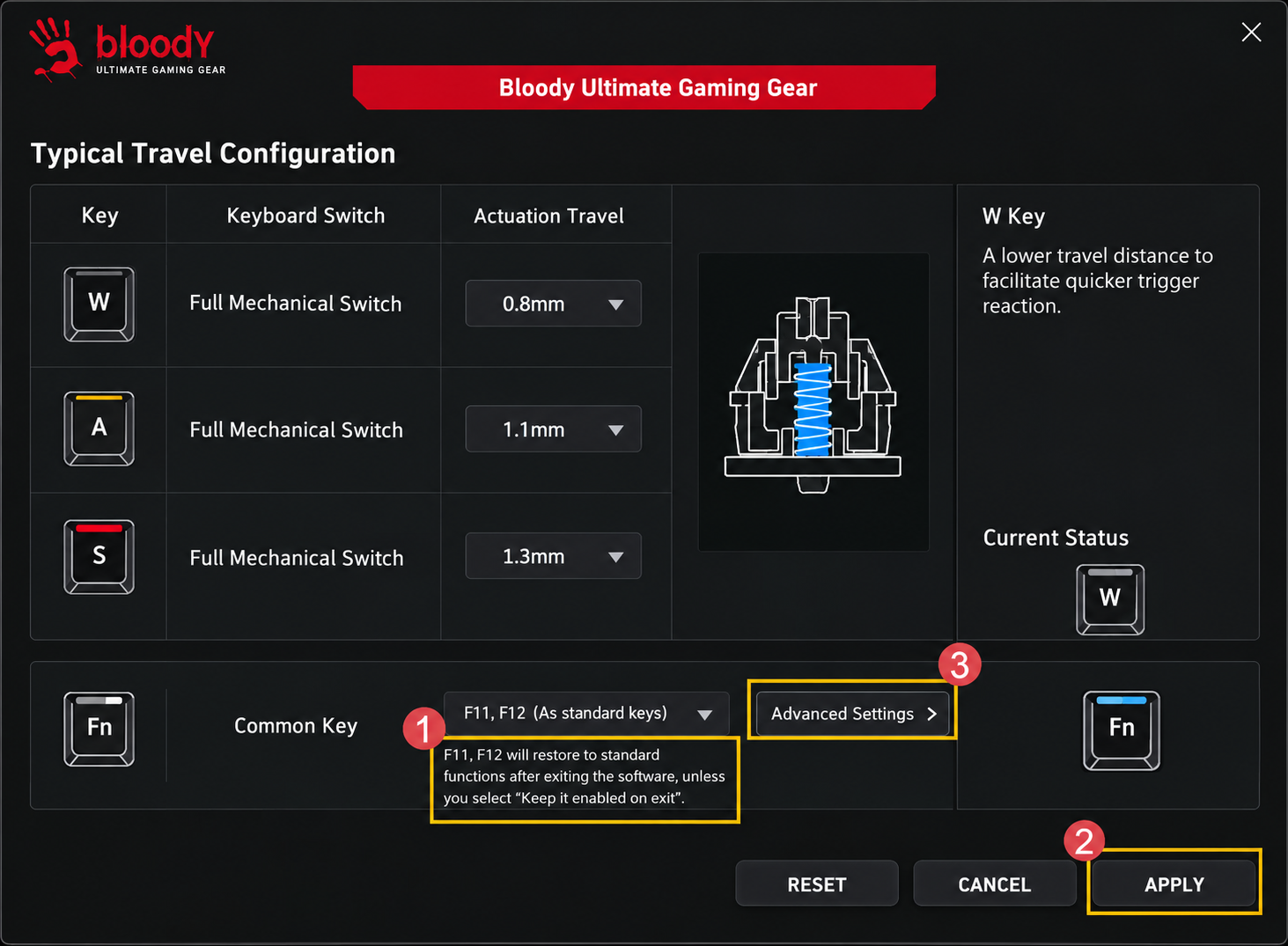
Access LT Optical Travel Configuration setting by clicking 'Actuation Point' in the software.
- Go to Custom Area to set the default actuation point template for the gaming category. Configuration Example: Customize the LT-4 default actuation point template to create a highly personalized game profile.
- Click APPLY, then use the button to toggle between the saved full-key independent variable speed actuation points without additional drivers.
- Click on 'Advanced Setting' to access the actuation point editing platform and adjust the speed of both full-key and independent key actuation points for the game template.
ALPHA PLAYER CUSTOMIZATION
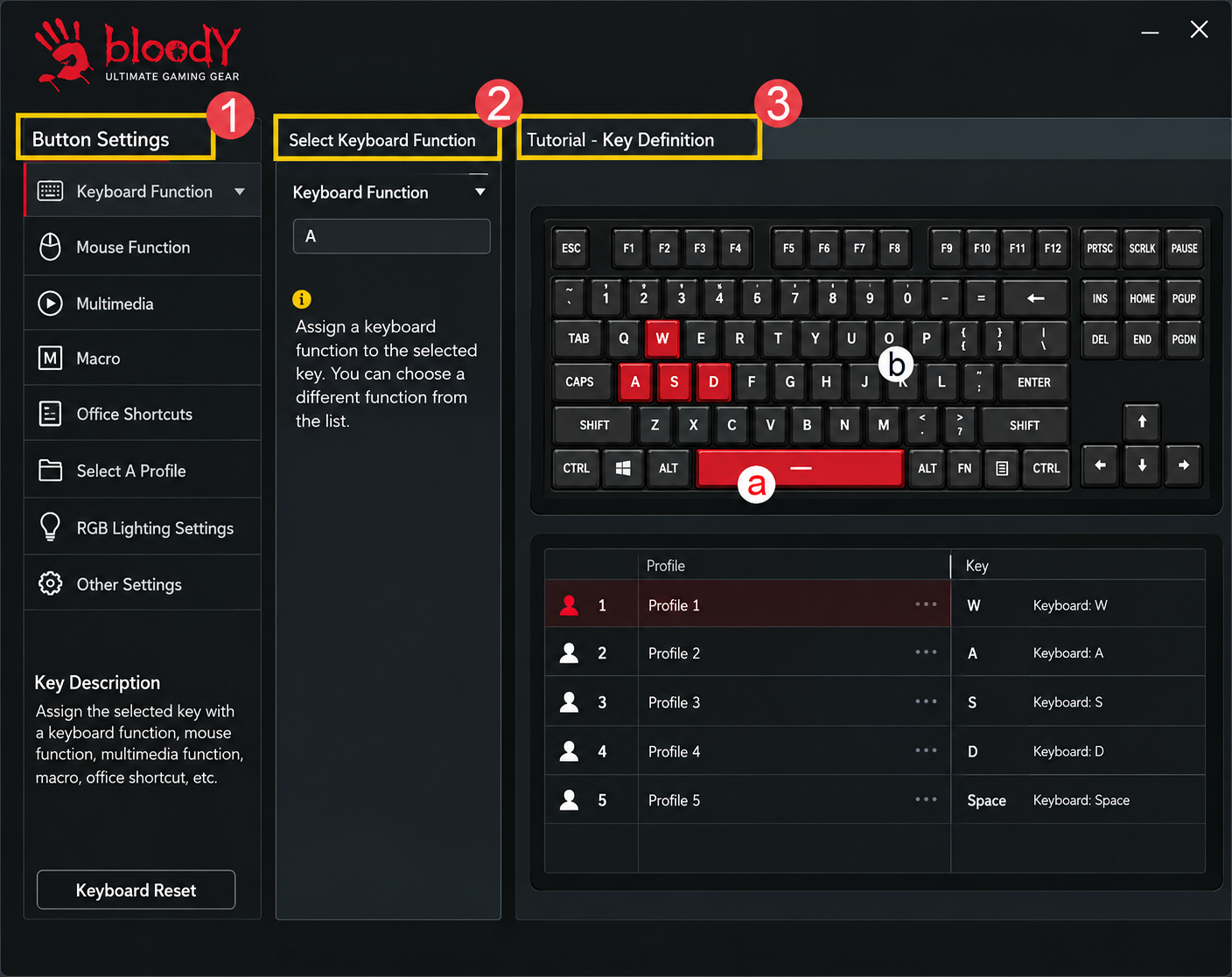
- Go to 'Travel Distance' to name your Game Actuation Point template. Once confirmed, a game template will be automatically generated. Then, proceed to adjust the Full Keyboard Area setting.
- Set the Full Keyboard Area to 2.0mm, then proceed to configure the Single or Multiple Key settings.
- Select W/S/A/D and the <SPACE> key to designate the actuation point as 1.4mm:
- Red key: Set the independent key actuation point to 1.4mm
- Black key: Set the full key actuation point to 2.0mm
- Save in File Management; the currently edited game template will be saved.
COMBINATION FN KEYS
Pros and Cons of Bloody AT87 Alpha Optical Switch Performance TKL Keyboard
Pros
- Ultra-Responsive Optical Switches: Custom actuation (0.8-3.0mm) and 0.3mm Z-Force reset enable faster inputs than traditional mechanical keyboards, ideal for games like Valorant.
- Exceptional Durability: 100 million keystrokes and PBT keycaps ensure long-term reliability, outperforming budget alternatives.
- Quiet and Customizable: Silicone dampeners reduce noise for stealth gaming; 7 RGB modes and KeyDominator 3 software for macros.
- Great Value for Money: At $80-$120, it rivals pricier brands like Razer with a hot-swappable design and 1000Hz polling.
- Compact TKL layout saves desk space while retaining full functionality.
Cons
- No wrist rest included, which may cause fatigue during extended sessions—consider adding one separately.
- Software (KeyDominator 3) requires download and may have a learning curve for beginners.
- Wired-only connection limits portability compared to wireless rivals like Logitech G Pro X TKL.
- Limited color options (mainly Black/Red) versus broader RGB competitors.
Overall, the pros dominate for gamers prioritizing performance over extras, offering superior value against alternatives like the SteelSeries Apex Pro Mini.
Customer Reviews: Bloody AT87 Alpha Optical Switch Performance TKL Keyboard Feedback
Users rave about the Bloody AT87 Alpha Optical Switch Performance TKL Keyboard, averaging 4.6/5 stars across platforms like Walmart and Bloody forums. Common praises include "insanely fast actuation for FPS wins" and "silent keys perfect for late-night grinding," with many highlighting the customizable switches as a game-changer. One testimonial notes: “Switched from mechanical—0.3mm reset feels like cheating in CS: GO!”.
Complaints focus on initial software setup and lack of wireless, but most recommend it for the price: "Best bang-for-buck optical TKL under $100." Frequently mentioned issues like minor RGB glitches are resolved via firmware updates. 85% of reviewers suggest it for competitive gaming, praising build quality and hot-swap versatility.
Faqs
How do I set up the bloody AT87 Alpha Optical Switch Performance TKL Keyboard for the first time?
How can I customize actuation points on the bloody AT87 Alpha Optical Switch Performance TKL Keyboard using software?
What should I do if the bloody AT87 Alpha Optical Switch Performance TKL Keyboard isn't registering keystrokes?
Is the bloody AT87 Alpha Optical Switch Performance TKL Keyboard compatible with Mac and consoles?
How do I optimize the bloody AT87 Alpha Optical Switch Performance TKL Keyboard for competitive gaming?
How do I clean and maintain the bloody AT87 Alpha Optical Switch Performance TKL Keyboard?
What RGB backlighting options are available on the bloody AT87 Alpha Optical Switch Performance TKL Keyboard?
Can I switch profiles on the bloody AT87 Alpha Optical Switch Performance TKL Keyboard without software?
More bloody manuals
- Setup: Bloody AT98 Alpha Optical Switch Mechanical Gaming Keyboard User Manual
- Setup: Bloody RGB ESPORTS Gaming Mouse ES5 User Manual
- Setup: Bloody WS87 Dual-Core Wireless Mechanical Keyboard User Manual
- Setup: Bloody R72 Pro Duo Dual Mode Wireless Gaming Mouse User Manual
- Setup: Bloody WS98 Dual-Core Wireless Mechanical Gaming Keyboard User Manual
- Setup: Bloody M320 Bluetooth Wireless Gaming Headset User Manual
Leave a Comment