
Setup: Bloody M320 Bluetooth Wireless Gaming Headset User Manual
Content
Bloody M320 Bluetooth Wireless Gaming Headset: Complete Product Manual
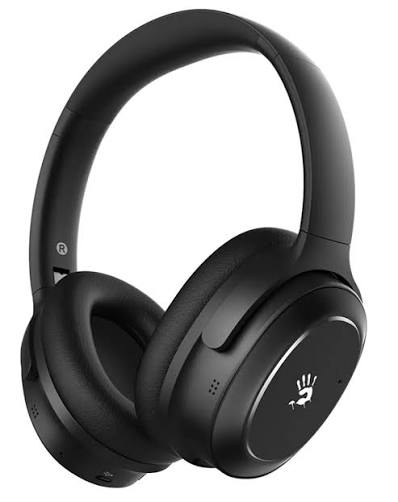
Introduction: Overview and Key Features
The Bloody M320 Bluetooth Wireless Gaming Headset represents a professional-grade audio solution designed for gamers, streamers, and audio enthusiasts seeking premium sound quality with advanced noise cancellation technology. This over-ear gaming headset combines cutting-edge wireless connectivity with immersive audio performance, making it an ideal choice for competitive gaming, content creation, and everyday listening.
The Bloody M320 gaming headset delivers exceptional value through its combination of active noise cancellation, dual-connectivity options, and lightweight ergonomic design. Featuring five built-in omnidirectional microphones with noise cancellation capabilities, this wireless gaming headphone ensures crystal-clear communication during online multiplayer sessions and streaming broadcasts. The headset's 40mm graphene drivers produce high-resolution immersive sound with 3D surround capabilities, providing a competitive edge in fast-paced gaming environments.
Designed for gaming professionals and casual players alike, the Bloody M320 Bluetooth wireless gaming headset offers remarkable versatility across multiple platforms including PC, laptops, smartphones, and gaming consoles. The device features Bluetooth v5.0 technology with aptX HD support, delivering stable connections within a 10-meter operating range while maintaining 40ms low latency performance. The lightweight construction at approximately 252 grams ensures comfortable extended wear sessions, while the ergonomic 3D earpads provide superior comfort during marathon gaming sessions.
The Bloody M320 is available at competitive price points ranging from $80-$150 USD depending on retailer and regional availability, making it an accessible option for gamers seeking professional-quality audio without premium pricing. This gaming headset supports dual-connectivity functionality, allowing seamless switching between multiple devices, though users should note occasional connection delay of 2-5 seconds when switching between paired devices.
Technical Specifications and Hardware Details
- Graphene Driver: 40 mm
- Frequency Response: 20 Hz – 20 kHz
- Impedance: 32 Ω
- Sensitivity: 100 dB
- Microphone Type: Omnidirectional (CVC Noise Cancelling)
- Microphone Frequency Response: 1–10 kHz
- Microphone Sensitivity: -42 dB
- Wired Mode: 4-Pin 3.5 mm Audio
- Wireless Mode: Bluetooth 5.0
- Operating Distance: Up to 10 m (32 feet)
- Battery Type: 500 mAh Lithium Battery
- Charging Time: 1.5 Hours
- Playback Time:
- ANC Off: Up to 25 Hours (at 50% Volume)
- ANC On: Up to 12 Hours (at 50% Volume)
- Cable Length:
- USB Type-C Charging Cable: 60 cm
- 3.5 mm Audio Cable: 150 cm
- Weight: 252 g
Understanding the technical specifications of your Bloody M320 Bluetooth wireless gaming headset ensures optimal performance and proper usage. The device features a 500mAh lithium battery providing extended battery life, with quick-charge capability delivering three hours of playback time from just 15 minutes of charging. The headset operates across Bluetooth v5.0 and 3.5mm wired audio connections, offering flexible connectivity options for various gaming setups.
The audio architecture includes 40mm drivers with a frequency range spanning 20 to 20,000 Hz, delivering comprehensive audio spectrum coverage for immersive gaming experiences. The headset maintains 32-ohm impedance with 100 dB sensitivity, ensuring powerful output suitable for competitive gaming applications. The omnidirectional microphones feature a frequency range from 100 to 10,000 Hz with -42 dB sensitivity, capturing voice communication with exceptional clarity while filtering background noise during online gameplay.
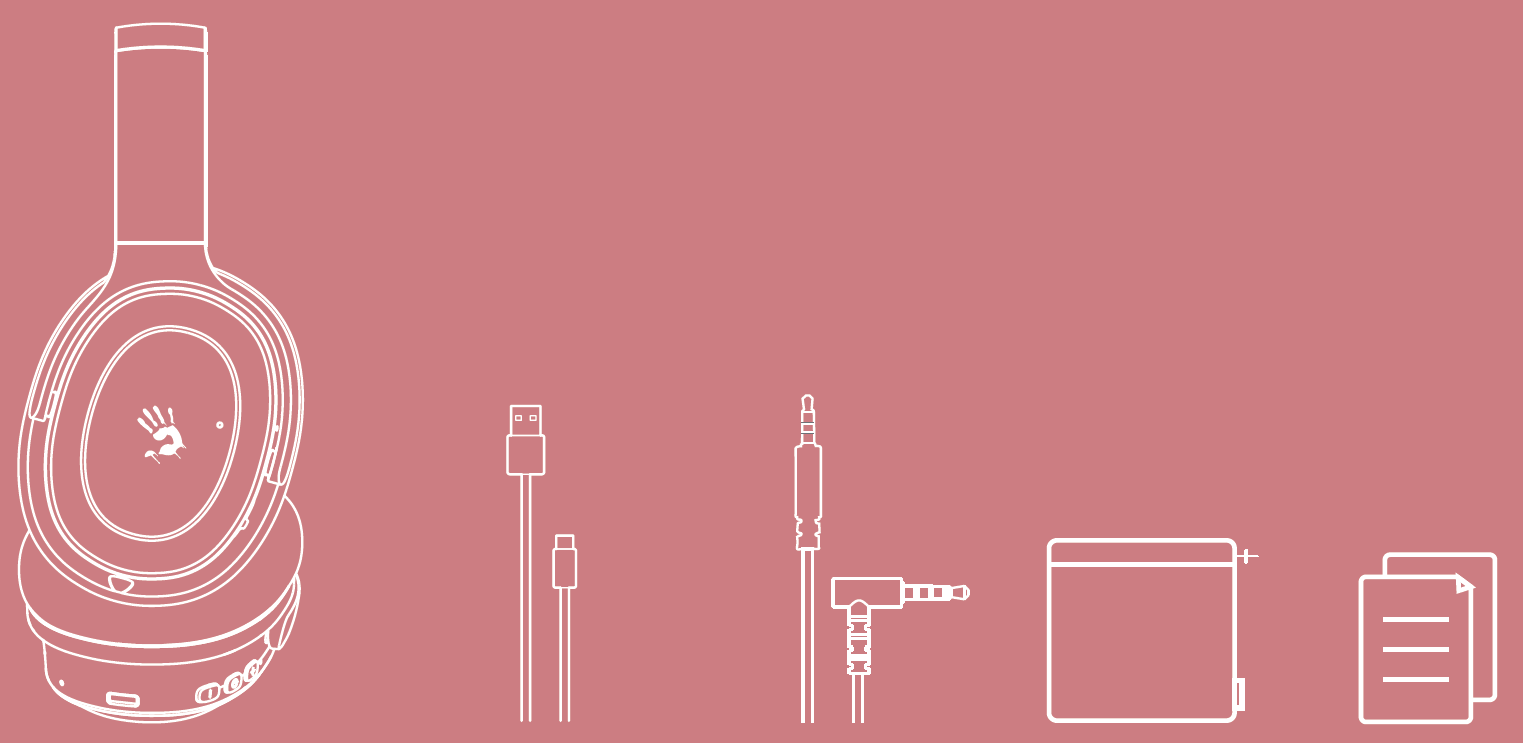
WHAT'S IN THE BOX
- Noise-Cancelling Bluetooth Headset × 1
- USB Type-C Charging Cable × 1
- AUX 4-Pin 3.5 mm Audio Cable × 1
- Travel Pouch × 1
- User Manual × 1
KNOW YOUR PRODUCT
- Hybrid Active Noise Cancelling Technology
- Qualcomm QCC3034 Master Chipset
- Individual Austrian AMS3415 IC
- Supports Qualcomm aptX HD Sound
- Customized 40 mm Graphene Speaker Units
- Multi-Point Connection
- Extremely Lightweight: 252 g
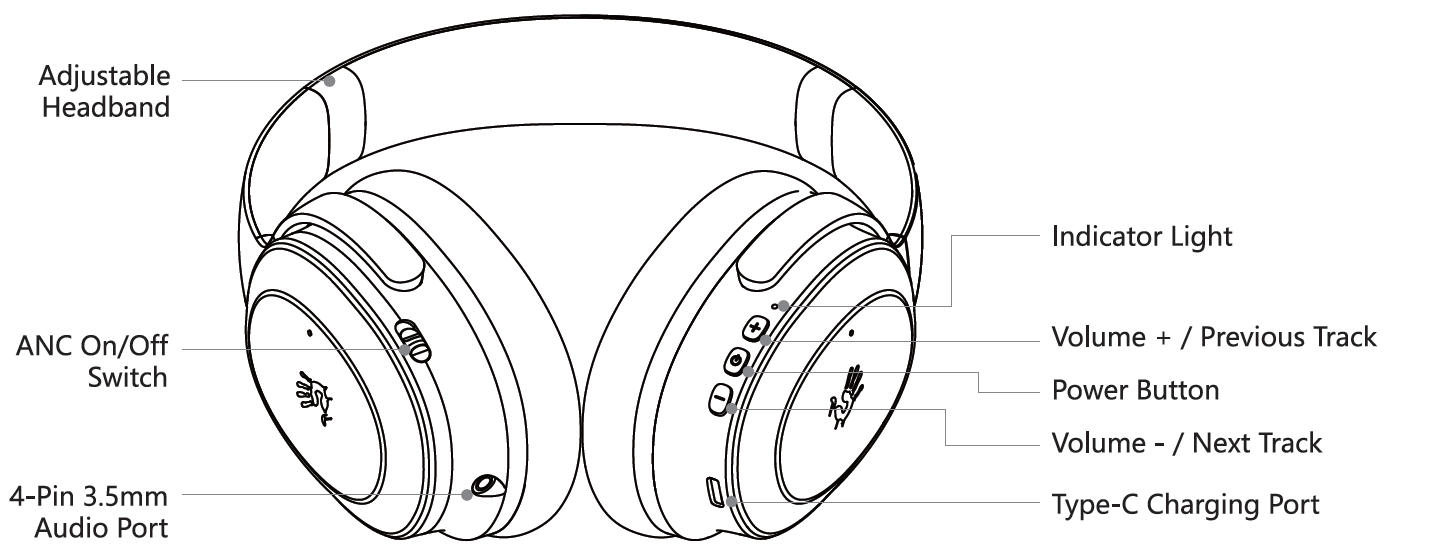
CONTROL ON YOUR FINGERS
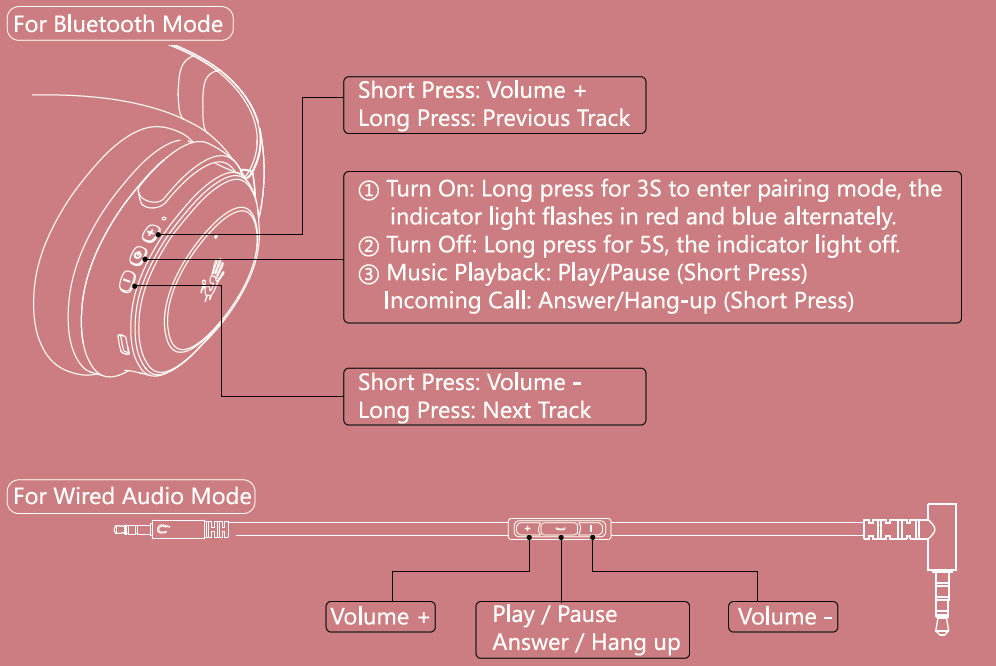
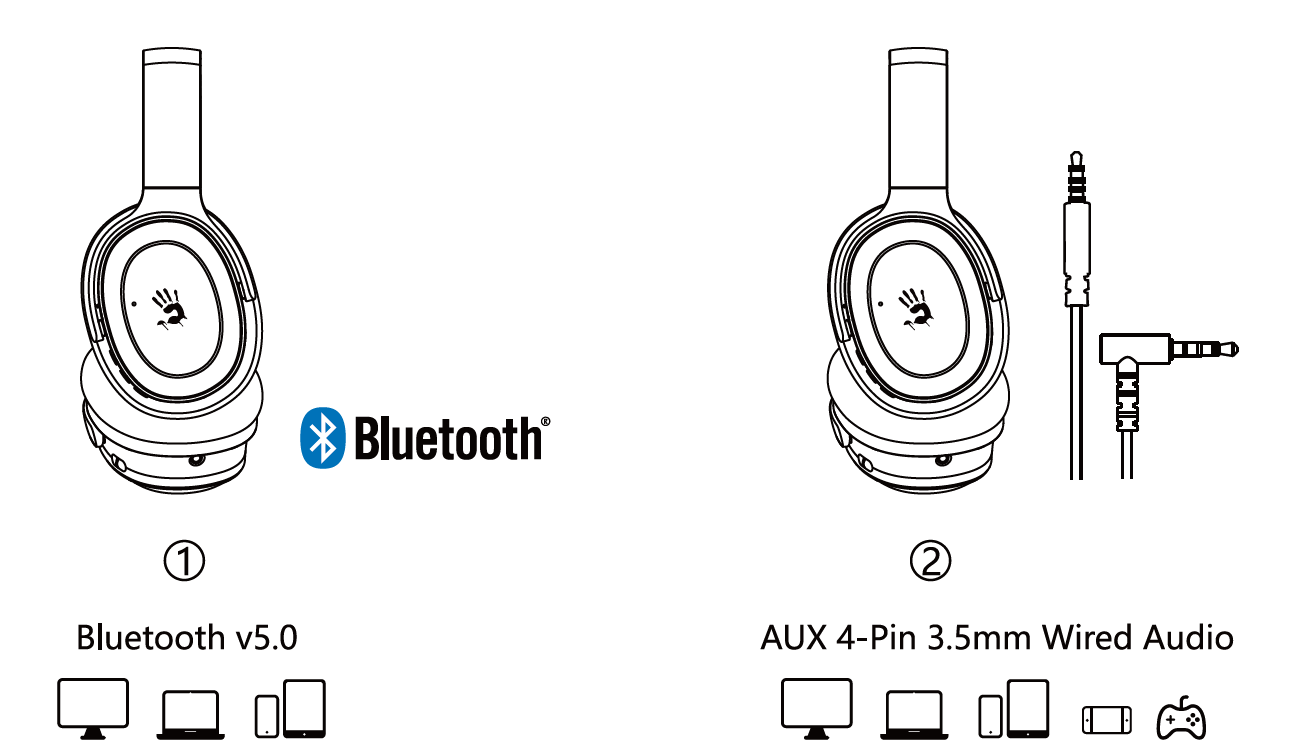
WIDE COMPATIBILITY
Note: You can only choose one mode to connect the headset. Can not operate different modes at the same time.
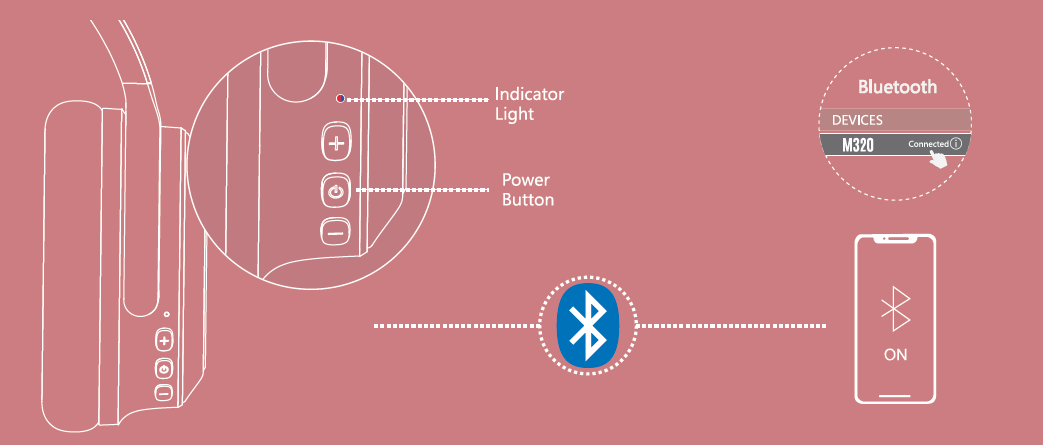
CONNECTING BLUETOOTH DEVICE
- Long press the power button for 3S, the indicator light flashes in red and blue alternately when pairing.
- Choose "M320" from your Bluetooth device.
- The indicator light off after the headset is connected..
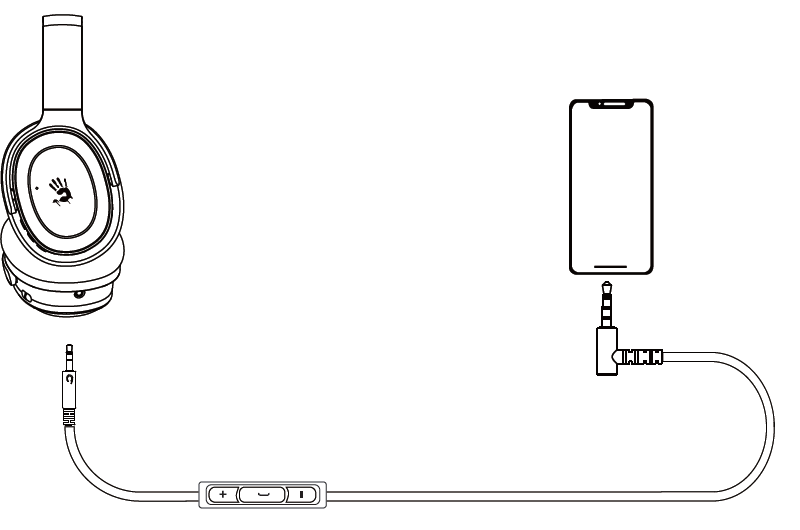
CONNECTING WIRED DEVICE
The AUX 4-Pin 3.5mm audio cable is included. Just plug into the headset and enjoy it.
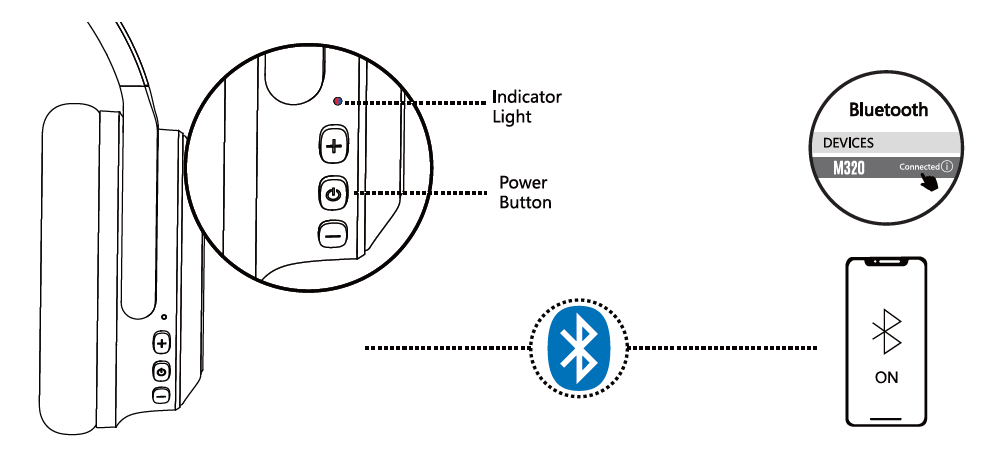
CONNECTING BLUETOOTH DEVICE
The device you connected last time will be remembered. Automatically connects back to the last device after power on.
CHARGING/LOW BATTERY INDICATOR
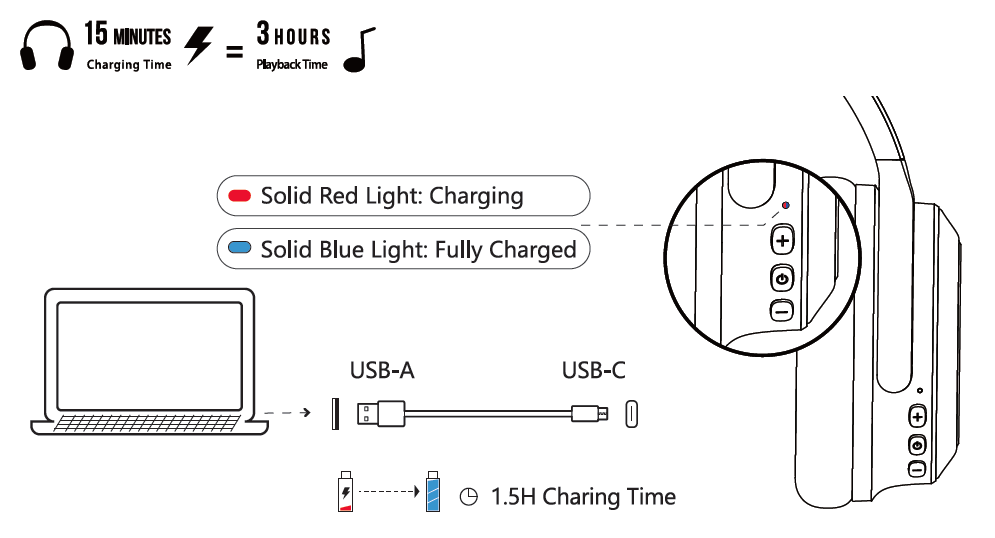
Advantages: Why Choose the Bloody M320 Gaming Headset
- Superior Audio Performance: The Bloody M320 Bluetooth wireless gaming headset delivers exceptional sound quality through premium 40mm graphene drivers supporting high-resolution audio. The 3D surround sound technology creates immersive spatial awareness crucial for competitive gaming, allowing players to pinpoint enemy positions through directional audio cues. The frequency response spanning 20-20,000 Hz ensures accurate reproduction across all audio ranges from deep bass to crisp treble.
- Advanced Noise Cancellation Technology: The active noise cancellation system effectively eliminates background distractions, creating an isolated audio environment perfect for focused gaming sessions. The dual microphone design with omnidirectional pickup patterns captures your voice clearly while suppressing ambient noise, ensuring teammates hear your communication without interference.
- Exceptional Comfort and Lightweight Design: Weighing only 252 grams, the Bloody M320 gaming headset minimizes neck strain during extended gaming marathons. The ergonomic 3D earpads conform to individual ear shapes, providing customized comfort for different head sizes. The over-ear design distributes weight evenly across the head, preventing pressure points during long-duration sessions.
- Dual-Connectivity and Flexible Charging: The dual-connectivity feature enables quick switching between gaming PC and mobile devices, though users should anticipate minor switching delays. The quick-charge capability delivers impressive battery life with just 15 minutes of charging providing three hours of playback, perfect for gamers with limited time between sessions.
- Professional-Grade Microphone Array: Five built-in omnidirectional microphones with integrated noise cancellation ensure crystal-clear voice communication during multiplayer gaming. The -42 dB sensitivity provides excellent voice pickup from various angles without requiring repositioning.
Disadvantages: Considerations Before Purchase
- Active Noise Cancellation White Noise: The ANC system produces noticeable white noise in silent environments, which some users find distracting. This characteristic is typical of active noise cancellation technology but may require adjustment time. Users seeking complete silence should disable ANC and rely on passive isolation instead.
- Dual-Connectivity Switching Delays: The dual-connectivity mode experiences notable delays when switching between paired devices, ranging from 2 seconds between smartphones to 5 seconds when switching from smartphone to PC. This limitation may frustrate users requiring seamless rapid switching between multiple gaming platforms.
- Limited Cable Length: The included 3.5mm auxiliary cable measures only one meter, potentially restricting placement flexibility in some gaming setups. Users requiring longer cable runs should purchase extended cables separately, adding to the total investment.
- Bluetooth Version Consideration: While the Bluetooth v5.0 connectivity provides stable connections, competing models feature newer Bluetooth 5.3 technology. However, real-world latency performance remains comparable to newer standards due to audio chip quality and antenna design.
- Price-to-Feature Ratio: At the $80-$150 price range, the Bloody M320 gaming headset offers solid value but lacks some premium features found in higher-priced competitors. Users on extremely tight budgets may find more affordable alternatives, though quality compromises would be significant.
Customer Reviews and User Feedback
Users consistently praise the Bloody M320 Bluetooth wireless gaming headset for its exceptional audio quality and comfortable fit during extended gaming sessions. Gaming enthusiasts highlight the effective 3D surround sound capabilities that provide competitive advantages in shooters and strategy games through superior directional audio cues. The lightweight construction and ergonomic design receive particular acclaim from streamers and content creators who wear headsets for 8+ hours daily.
The active noise cancellation feature earns recognition for its effectiveness in blocking environmental distractions, though users note the white noise characteristic requires familiarity. Multiplayer gamers appreciate the five-microphone array delivering clear team communication without background interference. The quick-charge functionality receives positive feedback from mobile gamers and travelers requiring rapid battery top-ups.
Common user concerns center on the dual-connectivity switching delays, which some players find inconvenient when rapidly alternating between gaming PC and mobile streaming devices. A minority of users report the white noise from ANC as a significant distraction, though most adapt after brief acclimation periods. The short auxiliary cable receives criticism from users with non-standard desk setups or gaming configurations.
Overall customer satisfaction remains high, with the Bloody M320 gaming headset earning strong recommendations for competitive gamers, content creators, and audio enthusiasts seeking professional-quality wireless gaming audio at accessible price points. The headset particularly appeals to players prioritizing sound quality and comfort over cutting-edge features.
Setup and Getting Started with Your Gaming Headset
Initial setup of your Bloody M320 Bluetooth wireless gaming headset requires minimal configuration. Power on the device and activate pairing mode by holding the power button for five seconds until the LED indicator flashes blue. On your gaming device, navigate to Bluetooth settings and select "Bloody M320" from the available devices list. Once paired, the headset automatically reconnects to previously paired devices within range.
For wired connectivity, connect the 3.5mm audio cable to your gaming device's headphone jack. No additional drivers are required for standard audio functionality, though updating your device's Bluetooth drivers ensures optimal performance with aptX HD codec support.
Maintenance and Care Instructions
Protect your Bloody M320 gaming headset investment through proper maintenance. Gently clean the earpads and headband monthly using a soft, slightly damp microfiber cloth, avoiding excessive moisture. Store the headset in a cool, dry environment away from direct sunlight and extreme temperatures. Keep the device away from water exposure and moisture-heavy environments.
Charge the battery regularly and avoid completely draining the 500mAh lithium battery frequently. Replace the earpads if they become worn or uncomfortable, as most gaming headset manufacturers offer replacement pad kits. Inspect the 3.5mm audio cable regularly for damage and replace if fraying or internal wire exposure appears.
Troubleshooting Guide: Common Issues and Solutions
- Bluetooth Connection Issues: If your Bloody M320 gaming headset fails to connect via Bluetooth, first ensure the device is powered on and in pairing mode by holding the power button for five seconds. Clear the headset's Bluetooth pairing list by resetting the device, then attempt pairing again with your target device. Verify your gaming device supports Bluetooth v5.0 or higher, and ensure no other devices are actively paired. If connection problems persist, update your gaming device's Bluetooth drivers to the latest version.
- Audio Quality and Latency Problems: The Bloody M320 Bluetooth wireless gaming headset may experience latency issues if your Bluetooth adapter lacks quality components. Ensure you're within the 10-meter operating range and free from interference sources like microwave ovens or wireless routers. For gaming applications, confirm aptX HD codec support is enabled on your device. If audio cuts out intermittently, reduce the number of paired devices or disable dual-connectivity mode temporarily.
- Active Noise Cancellation Issues: The ANC feature on this gaming headset produces subtle white noise that's only noticeable in complete silence. This is normal behavior and indicates the ANC system is functioning properly. If you find this distracting, simply disable the active noise cancellation feature through the headset controls. The passive noise isolation remains effective even without ANC enabled.
- Microphone Not Detected: If your gaming applications fail to recognize the built-in microphones on the Bloody M320, check your device's audio settings and set the headset as the default recording device. Ensure microphone permissions are granted for your specific gaming application. Test the microphone in your operating system's audio settings to confirm functionality.
- Battery Not Holding Charge: If battery life decreases significantly, perform a full discharge-recharge cycle by completely draining the battery before charging to full capacity. For warranty support and advanced technical assistance, contact Bloody Gaming customer support through their official website or authorized retailers. Most units include a 30-day return window for defective products.
Warranty and Customer Support
The Bloody M320 Bluetooth wireless gaming headset includes manufacturer warranty coverage protecting against manufacturing defects. Warranty terms typically provide 30-day return windows through authorized retailers and the official Bloody Gaming website. For technical support, contact Bloody Gaming through their official website or reach out to authorized retailers in your region. Customer service representatives assist with troubleshooting, warranty claims, and product-related questions.
International customers should verify regional warranty coverage and support availability before purchase, as policies may vary by country. Most warranty claims process within 5-10 business days following proper documentation submission.
Conclusion: Is the Bloody M320 Right for You?
The Bloody M320 Bluetooth wireless gaming headset represents an excellent choice for gamers, streamers, and audio enthusiasts seeking professional-quality wireless audio at accessible price points. The combination of advanced noise cancellation, lightweight ergonomic design, and powerful audio performance delivers genuine value across competitive gaming, content creation, and entertainment applications.
This gaming headset excels for players prioritizing comfort during extended sessions, requiring clear team communication through its five-microphone array, and seeking immersive 3D surround sound for competitive gaming advantages. The dual-connectivity functionality and quick-charge capabilities add practical versatility for users managing multiple gaming platforms.
Consider alternative options only if you require seamless rapid device switching without delays, prefer newer Bluetooth 5.3 technology, or need premium features beyond the Bloody M320's specifications. For most gaming applications and audio requirements, the Bloody M320 Bluetooth wireless gaming headset delivers exceptional performance justifying its investment.
```
More bloody manuals
- Setup: Bloody R72 Pro Duo Dual Mode Wireless Gaming Mouse User Manual
- Setup: Bloody MH360 Bluetooth v5.3 Headphones User Manual
- Setup: Bloody RGB ESPORTS Gaming Mouse ES5 User Manual
- Usage: Bloody MH390 Wireless Headset User Manual
- Setup: Bloody AT87 Alpha Optical Switch Performance TKL Keyboard User Manual
- Setup: Bloody GR230 All-in-One Wireless Gaming Headset User Manual
Leave a Comment