
Usage: Bloody MH390 Wireless Headset User Manual
Content
Bloody MH390 Wireless Headset: Complete Product Manual and Guide
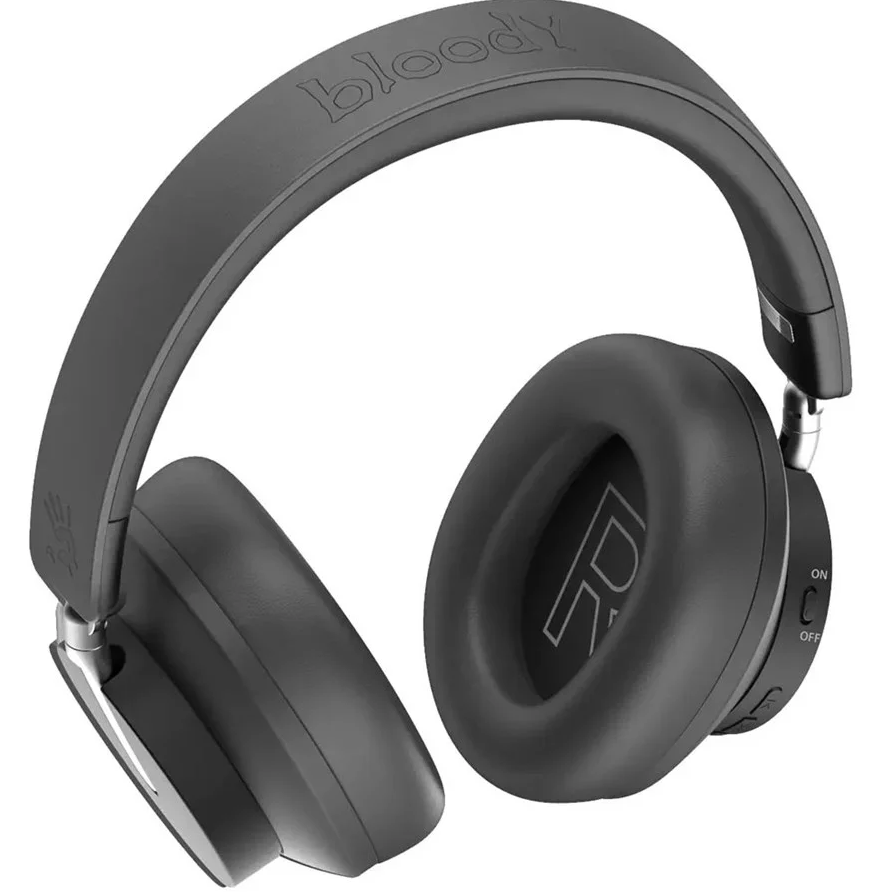
Introduction to the Bloody MH390 Wireless Headset
The Bloody MH390 Wireless Headset represents a modern solution for users seeking reliable audio performance combined with extended battery life and wireless convenience. This Bluetooth v5.3 wireless headset delivers impressive sound quality through its 40mm hybrid diaphragm speakers, making it an excellent choice for gamers, remote workers, and music enthusiasts alike. With an impressive 35-hour playback time powered by a 400mAh lithium battery, the Bloody MH390 ensures you stay connected throughout your day without constant recharging interruptions.
Designed with comfort and practicality in mind, the Bloody MH390 features protein leather ear pads and a 90-degree flat foldable design that makes it portable and convenient for travel. The headset includes an ENC omnidirectional microphone with built-in noise cancellation, making it suitable for both entertainment and professional communication purposes. Whether you're gaming, attending virtual meetings, or enjoying your favorite music, this wireless headset provides the versatility needed for modern digital lifestyles.
The Bloody MH390 Wireless Headset is priced at Rs. 7,700 in Pakistan and is available in both black and white color options. This mid-range gaming headset targets budget-conscious consumers who don't want to compromise on quality or features. The combination of Bluetooth 5.3 connectivity, extended battery life, and solid audio specifications makes it an attractive option for those seeking value-for-money wireless audio solutions.
Key Technical Specifications
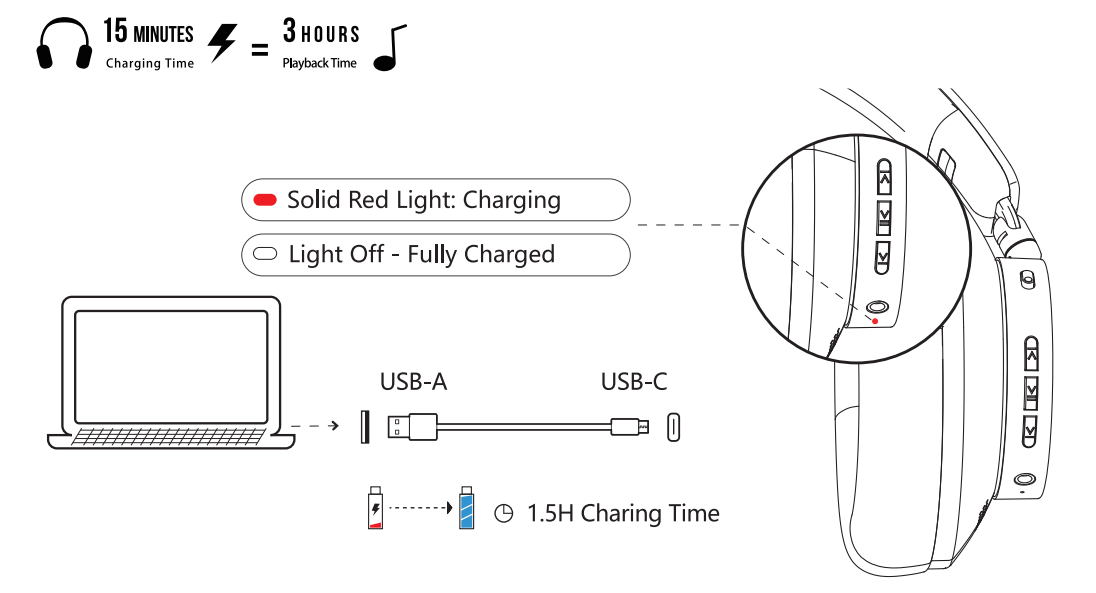
- Connection Features: The Bloody MH390 operates on Bluetooth v5.3 with an operating range of up to 10 meters (32 feet), ensuring stable wireless connectivity throughout your space. The 400mAh lithium battery provides up to 35 hours of continuous playback time, supported by USB Type-C fast charging capability.
- Audio Performance: Equipped with a 40mm hybrid diaphragm speaker unit, the headset delivers a frequency range of 20Hz to 20KHz with 100dB sensitivity and 32-ohm impedance. The microphone features ENC (Electronic Noise Cancellation) omnidirectional technology with a 100Hz-10KHz frequency range and -42dB sensitivity, ideal for clear voice communication.
- Connectivity and Cables: The package includes a 100 cm 3.5 mm audio cable for wired connectivity and a 50cm USB Type-C charging cable. The wide compatibility ensures the Bloody MH390 works seamlessly with various devices, including computers, smartphones, tablets, and gaming consoles.
WHAT'S IN THE BOX
- Bluetooth Headset
- USB Type-C Rechargeable Cable
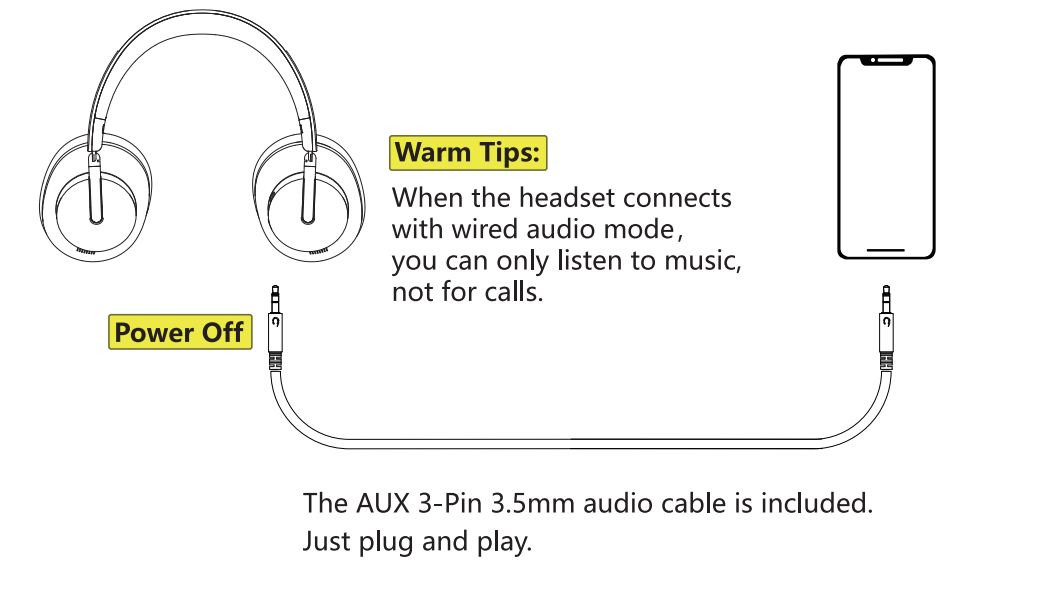
- AUX 3-Pin 3.5mm Audio Cable
- User Manual
KNOW YOUR PRODUCT
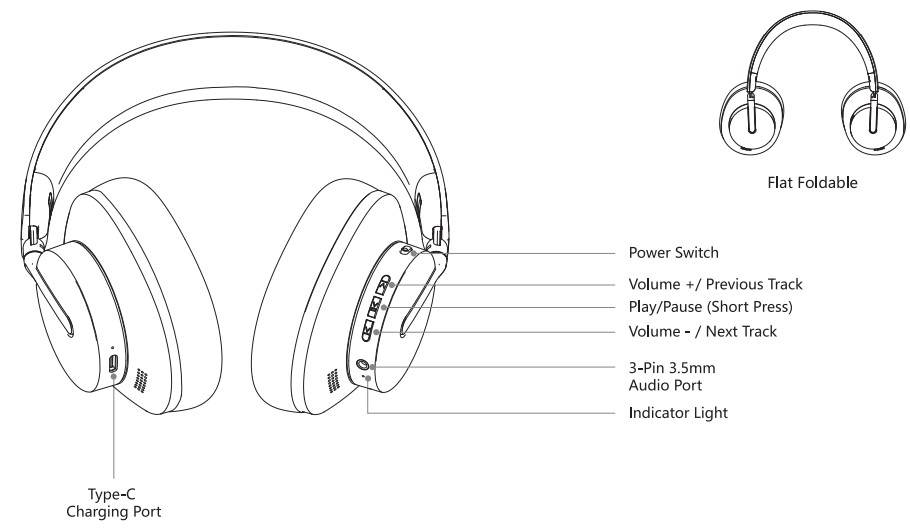
CONTROL ON YOUR FINGERS
- Power Switch
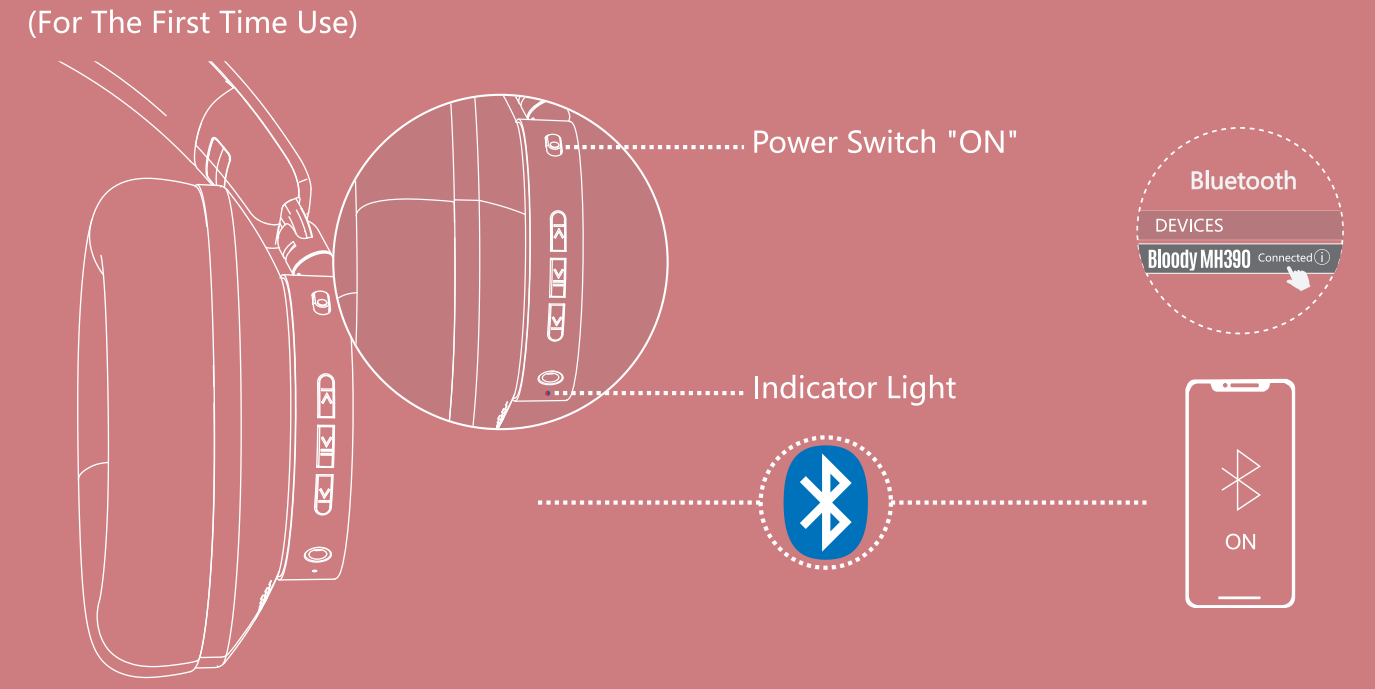
- ON: Enter pairing mode; the indicator light flashes in red and blue alternately.
- OFF: Power Off
- Short Press: Volume +
- Long Press: Next Track
- Music Playback: Play/Pause (Short Press)
- Incoming Call: Answer/Hang-up (Short Press)
- Short Press: Volume -
- Long Press: Previous Track
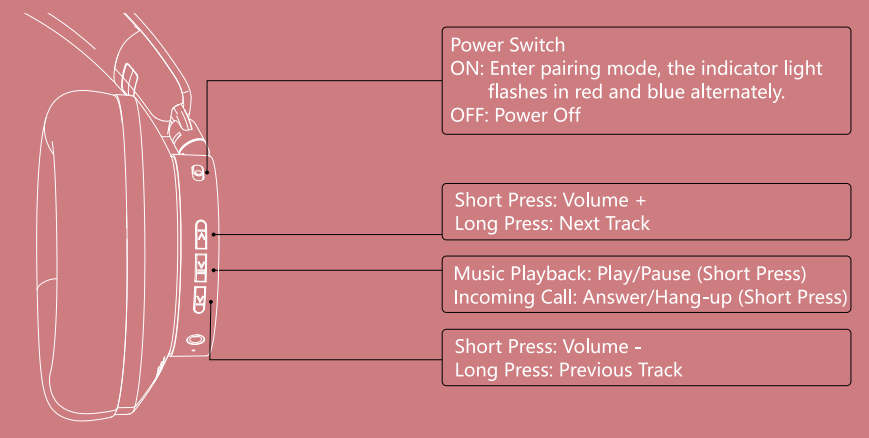
WIDE COMPATIBILITY
Note: You can only choose one mode to connect the headset. Can not operate different modes at the same time.
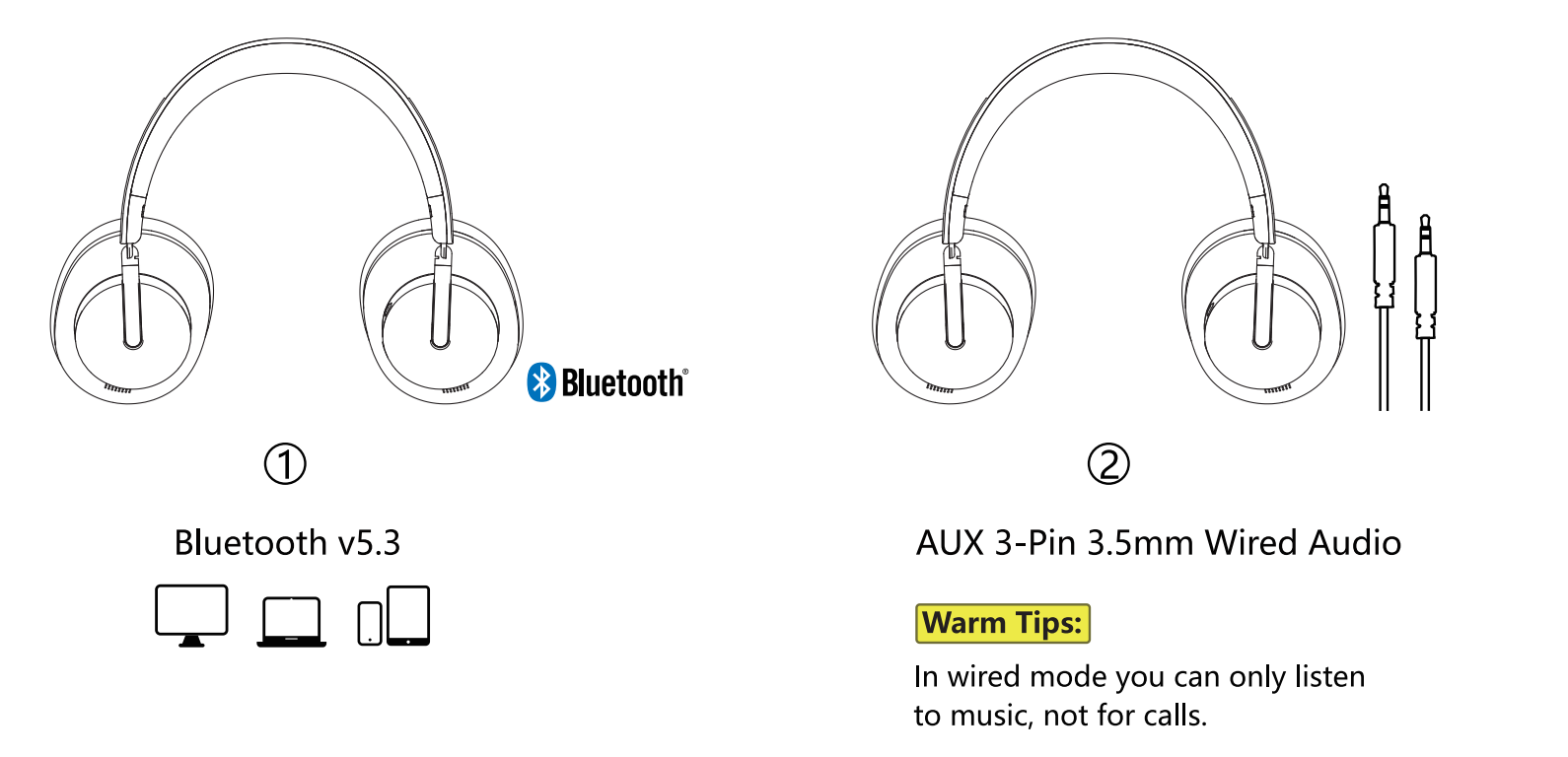
CONNECTING BLUETOOTH DEVICE
- Turn the power switch to "ON", the indicator light flashes red and Blue alternately when pairing.
- Choose "Bloody MH390" from your Bluetooth device.
- The indicator flashes in Blue slowly after the headset is connected.
CONNECTING WIRED DEVICE
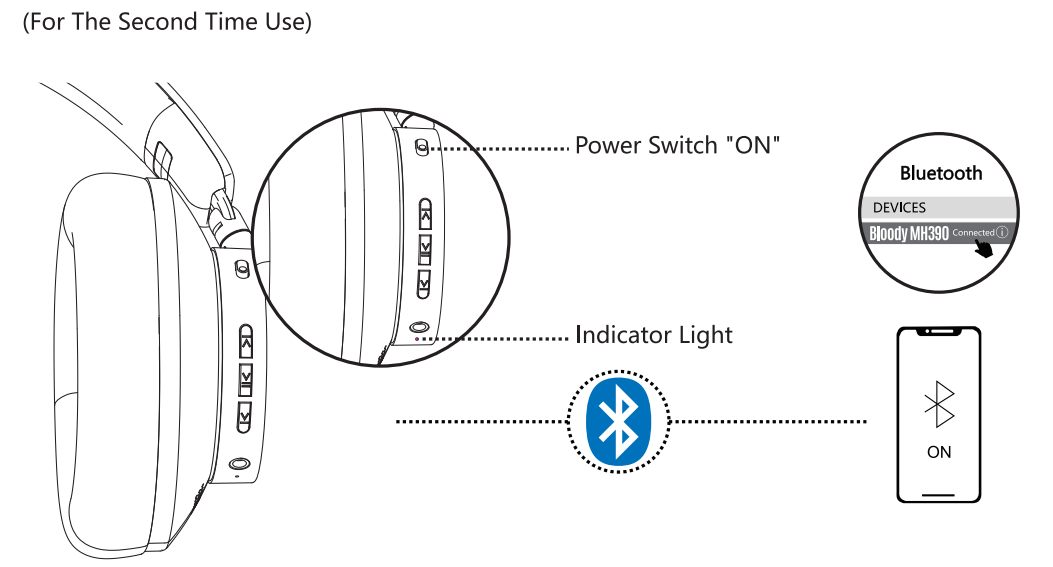
The device you connected last time will be remembered. Automatically connects back to the last device after power on.
Warm Tips:
Make sure the Bluetooth device is turned on
CHARGING/LOW BATTERY INDICATOR
Troubleshooting Common Issues with Your Bloody MH390
Bluetooth Connection Problems
If your Bloody MH390 fails to connect via Bluetooth, first ensure the headset is powered on and in pairing mode. Reset the connection by forgetting the device from your phone or computer's Bluetooth settings, then re-pair by holding the power button for 10 seconds until the LED indicator flashes. Ensure you're within the 10-meter operating range and that no other devices are interfering with the connection. If problems persist, perform a factory reset by holding the power button for 15 seconds while the device is off.
Battery and Charging Issues
If the Bloody MH390 won't charge, inspect the USB Type-C port for debris or damage and clean gently with a dry cloth. Try using a different USB charger to rule out charger malfunction. If the battery drains quickly despite the advertised 35-hour playback time, disable Bluetooth features you're not using and reduce volume levels. Ensure the device is fully powered off while charging. If the battery still fails to hold a charge, contact Bloody customer support, as the lithium battery may require replacement.
Audio Quality Problems
If you experience muffled or distorted sound, check that the ear pads are properly positioned and not obstructed. Clean the speaker grilles gently to remove dust accumulation. Adjust the volume to optimal levels—very high volumes may cause audio distortion. Verify that your connected device's audio output settings are correct and that no equalizer presets are causing sound quality degradation. For persistent audio issues, reset the headset to factory settings.
Microphone and Call Quality
If callers report poor audio quality, ensure the ENC omni-directional microphone isn't covered or blocked. Test the microphone with different applications to isolate the problem. Check your device's microphone settings and permissions. Clean the microphone area gently, and ensure you're in a quiet environment for optimal noise cancellation performance.
Warranty and Support
The Bloody MH390 Wireless Headset comes with manufacturer warranty coverage. For technical support, contact Bloody's official customer service through their website or authorized retailers in your region. Keep your purchase receipt and product documentation for warranty claims. Most retailers offer 30-day return policies for defective units.
Advantages and Disadvantages of the Bloody MH390
Advantages of the Bloody MH390 Wireless Headset
- Exceptional Battery Life: The 35-hour playback time significantly exceeds many competitors in this price range, making it ideal for extended use without frequent charging.
- Latest Bluetooth Technology: Bluetooth v5.3 provides improved connectivity stability and energy efficiency compared to older standards.
- Comfortable Design: Protein leather ear pads and adjustable metal components ensure comfortable wear during extended gaming or work sessions.
- Noise Cancellation Microphone: The ENC omni-directional microphone with built-in noise cancellation delivers clear voice communication for gaming teams and professional calls.
- Portable Form Factor: The 90-degree flat foldable design makes the Bloody MH390 convenient for travel and storage without sacrificing durability.
- Affordable Price Point: At Rs. 7,700, the headset offers excellent value for money with premium features typically found in more expensive models.
- Wide Device Compatibility: Works seamlessly with smartphones, tablets, computers, and gaming consoles via Bluetooth or a 3.5mm audio cable.
Disadvantages of the Bloody MH390 Wireless Headset
- Non-Removable Ear Pads: The ear cushions are glued on rather than detachable, limiting replacement options and long-term customization.
- Sound Quality Considerations: Some users report the audio has a somewhat muffled character compared to premium alternatives, though it remains satisfactory for most uses.
- Limited Audio Chip Information: Specifications don't detail the audio chipset quality, which influences sound clarity and latency performance.
- Standard Cable Length: The included 100cm 3.5mm audio cable may be insufficient for some setups, requiring additional purchases.
- Latency in Gaming: While Bluetooth 5.3 improves connectivity, latency performance is comparable to older Bluetooth versions depending on device audio chips and antenna quality.
- Basic Control Scheme: Three-button control layout (forward, backward, pause/play) is functional but less intuitive than touch controls found on premium headsets.
Customer Reviews and Real-World Feedback
Users consistently praise the Bloody MH390 Wireless Headset for its impressive battery longevity, with many reporting the advertised 35-hour playback time matches real-world usage. The comfortable protein leather ear pads receive positive feedback from users who wear the headset for extended periods. Gamers appreciate the ENC microphone quality for team communication, though some note that the overall sound character is more suited to casual listening than competitive gaming.
Common praise highlights include the reliable Bluetooth 5.3 connectivity, affordable price point, and portable foldable design. Customers frequently mention the value-for-money proposition, making it an excellent choice for budget-conscious buyers. However, some users note that when compared to premium alternatives, the audio lacks the pronounced frequencies and rich bass that professional-grade headsets deliver. The non-removable ear pads are mentioned as a limitation for users seeking long-term customization options.
Overall customer satisfaction remains positive, with users recommending the Bloody MH390 for casual gaming, work-from-home scenarios, and general music listening. The headset is particularly recommended for those prioritizing battery life and portability over premium audio quality. Purchase recommendations suggest this model is ideal for students, remote workers, and casual gamers seeking reliable wireless audio without premium pricing.
Bloody MH390 vs. Competitive Alternatives
When compared to the Bloody M320 model, the MH390 features newer Bluetooth 5.3 technology, though the M320 reportedly delivers superior sound quality with more pronounced frequencies and richer bass. Both models share identical 40mm drivers and frequency ranges, but differ in audio chip quality and user interface design. The MH390 represents a more modern connectivity option at a competitive price point, making it suitable for users prioritizing wireless convenience and battery life over premium audio performance.
Recommended Use Cases for the Bloody MH390
The Bloody MH390 Wireless Headset excels in scenarios requiring extended battery life and reliable wireless connectivity. Remote workers benefit from the 35-hour playback time and clear ENC microphone for video calls. Casual gamers appreciate the comfortable fit and team communication capabilities. Students find value in the affordable price combined with solid audio performance. Travelers appreciate the foldable design and extended battery life for long flights or commutes. Music enthusiasts enjoy the balanced audio profile for everyday listening, though audiophiles may prefer premium alternatives.
Getting the Most from Your Bloody MH390 Wireless Headset
To maximize your experience with the Bloody MH390, charge the device fully before first use. Enable Bluetooth 5.3 on your device and follow the pairing instructions for stable connectivity. Adjust the headband and ear cups to fit comfortably, allowing the adjustable metal components to conform to your head shape. Experiment with volume levels to find your preferred audio balance. For gaming, test the microphone in different environments to understand optimal microphone placement. Clean the speaker grilles and microphone area regularly to maintain audio quality. Store the headset in the foldable position to protect it during transport and extend its lifespan.
```
More bloody manuals
- Setup: Bloody MH360 Bluetooth v5.3 Headphones User Manual
- Setup: Bloody GR230 All-in-One Wireless Gaming Headset User Manual
- Setup: Bloody M320 Bluetooth Wireless Gaming Headset User Manual
- Setup: Bloody R72 Pro Duo Dual Mode Wireless Gaming Mouse User Manual
- Setup: Bloody RGB ESPORTS Gaming Mouse ES5 User Manual
- Setup: Bloody AT87 Alpha Optical Switch Performance TKL Keyboard User Manual
Leave a Comment