
Setup: Bloody R72 Pro Duo Dual Mode Wireless Gaming Mouse User Manual
Content
Bloody R72 Pro Duo Dual Mode Wireless Gaming Mouse: Complete Product Manual & Guide
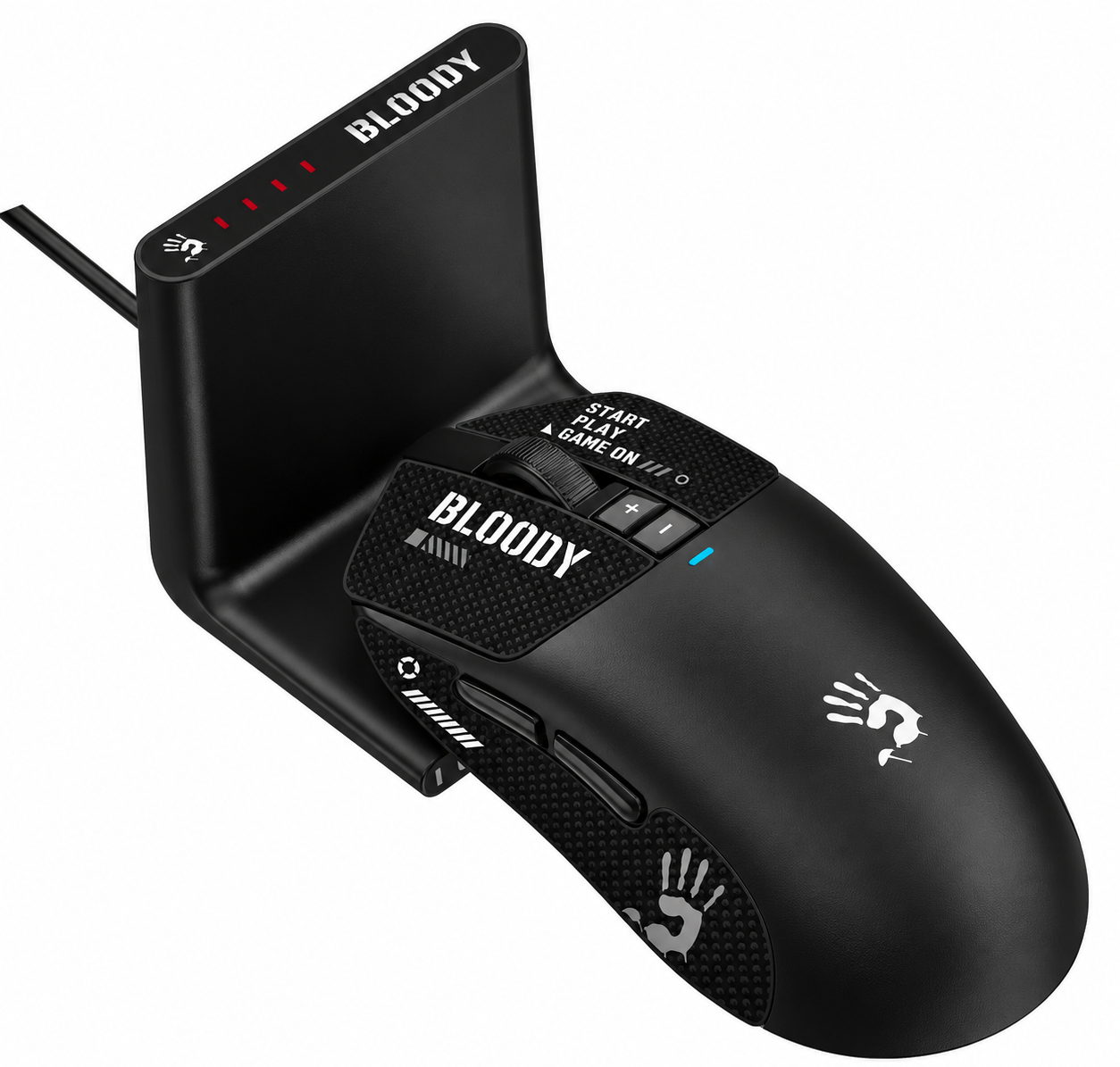
Introduction: Premium Gaming Performance Meets Wireless Convenience
The Bloody R72 Pro Duo Dual Mode Wireless Gaming Mouse represents a significant advancement in gaming peripheral technology, combining professional-grade performance with exceptional wireless reliability. This dual-mode gaming mouse delivers the precision and responsiveness that competitive gamers demand, whether you're engaged in fast-paced FPS titles like CS: GO or demanding esports competitions.
Featuring the advanced PAW3395 gaming optical engine, the R72 Pro Duo offers an impressive 26,000 CPI resolution with 650 IPS tracking speed and 50G acceleration, ensuring pixel-perfect accuracy in every scenario. The 1ms wireless transmission latency eliminates the delay concerns that traditionally plagued wireless gaming mice, providing performance equivalent to wired alternatives. With its dual connectivity options—2.4GHz wireless and USB wired modes—this gaming mouse adapts to any setup or preference, making it an ideal choice for both casual gamers and professional esports athletes.
The Bloody R72 Pro Duo Dual Mode Wireless Gaming Mouse is engineered for gamers who refuse to compromise on performance or convenience. Its 300 mAh lithium battery provides up to 80 hours of playtime on a single charge, while the rapid 1.5-hour charging time ensures minimal downtime. The ergonomic design accommodates various grip styles through proprietary AFC and RapidSnap Rebound technologies, making it suitable for extended gaming sessions without fatigue. Priced competitively in the mid-to-premium gaming mouse segment (typically $40-70 USD depending on region), the R72 Pro Duo offers exceptional value for performance-conscious gamers seeking wireless reliability with wired-equivalent responsiveness.
Technical Specifications & Performance Features
- Sensor & Tracking Performance: The PAW3395 gaming optical engine provides professional-grade tracking across all gaming surfaces. With adjustable resolution from 50 to 26,000 CPI, the R72 Pro Duo accommodates different sensitivity preferences. The 650 IPS tracking speed and 50G acceleration ensure consistent performance during rapid movements, while the 1000Hz adjustable report rate delivers ultra-responsive input registration.
- Connectivity Options: The dual-mode design offers both 2.4GHz wireless connectivity with a 10-meter operating range and USB wired connectivity via Type-C connection. The 1ms wireless transmission latency eliminates perceptible lag, providing competitive gaming performance without the cable restrictions of traditional wired mice.
- Battery & Power Management: The 300 mAh lithium battery supports up to 80 hours of wireless playtime, with charging completion in approximately 1.5 hours. The Bloody R72 Pro Duo Dual Mode Wireless Gaming Mouse includes both a soft braided USB Type-C cable (180 cm) and a standard PVC cable option.
- Durability & Build Quality: Micro-switches rated for over 30 million clicks on left and right buttons ensure long-term reliability. The scroll wheel withstands over 800,000 scrolls, meeting professional-grade durability standards.
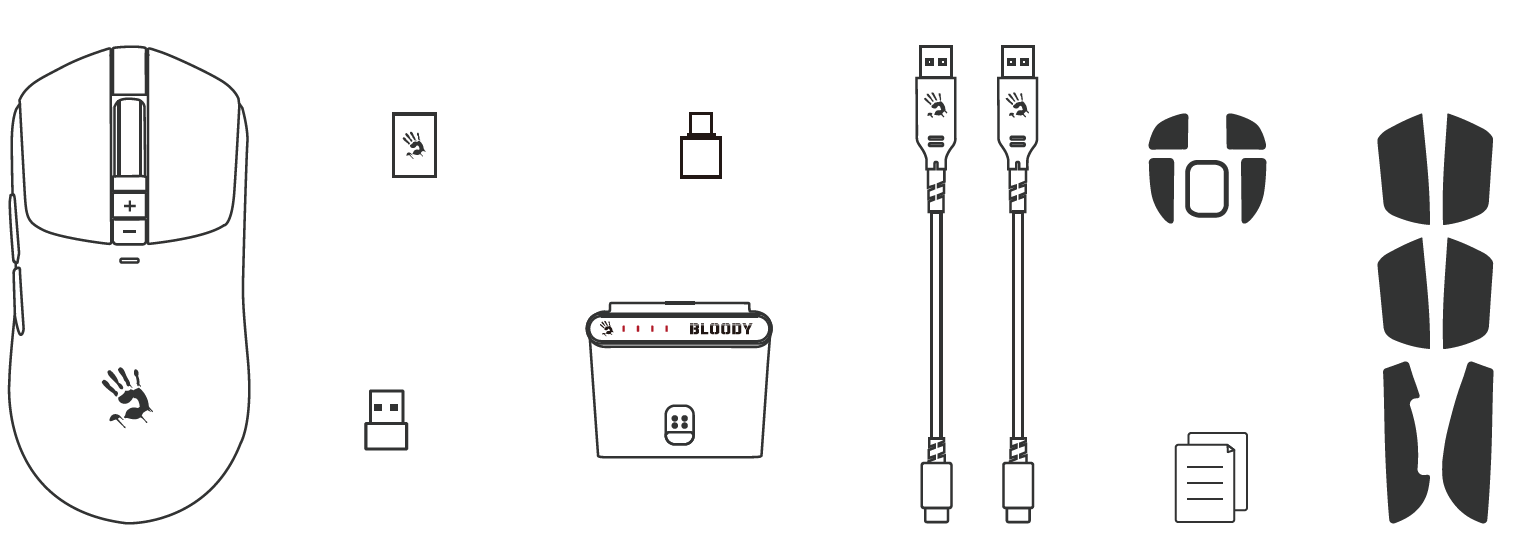
WHAT'S IN THE BOX
- USB to Type-C Adaptor
- USB Type-C Adaptor
- Wireless Mouse
- Nano USB Receiver
- Receiver Dock
- USB Type-C Cable *2
- User Manual
- Grip Tape
KNOW YOUR PRODUCT
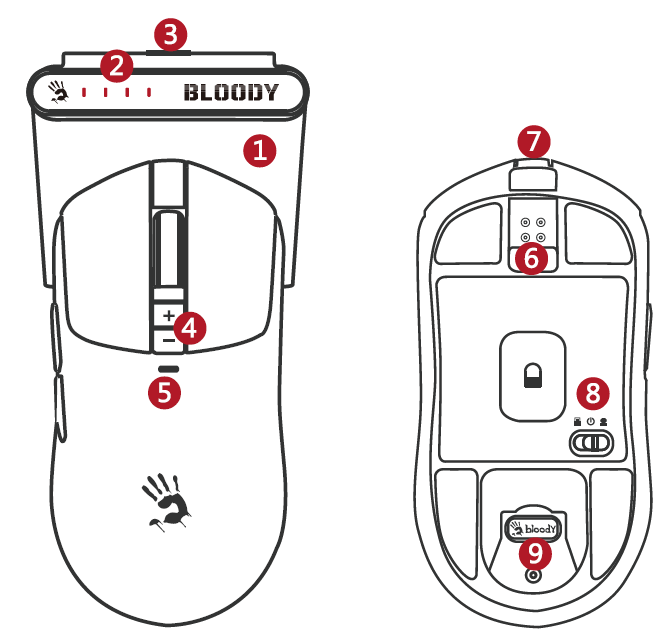
- L++ Multi-Function Charging Dock
- Four-Stage Battery Indicator
- Dock Type-C Input Port
- CPI +/− Adjustment
- Function Indicator
- Snap-On Magnetic Charging
- Mouse Type-C Input Port
- Dual 2.4G Receiver Switch
- 2.4G Receiver Storage
CPI ADJUSTMENT
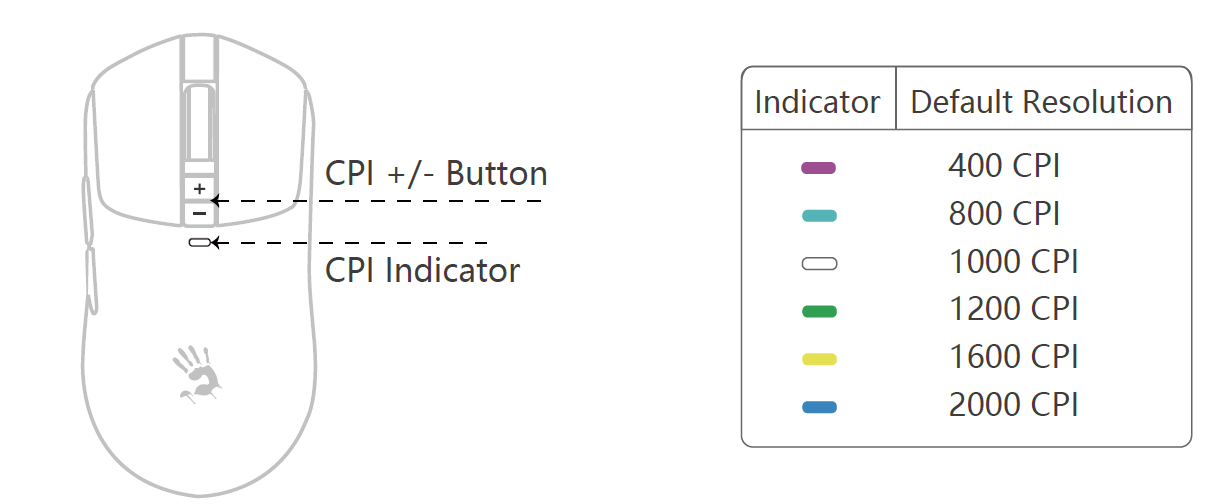
Press the CPI +/− button to switch between the default resolutions: 400, 800, 1,000, 1,200, 1,600, and 2,000 CPI. The CPI can be adjusted from 50 to 26,000 using the software.
DUAL 2.4G RECEIVER
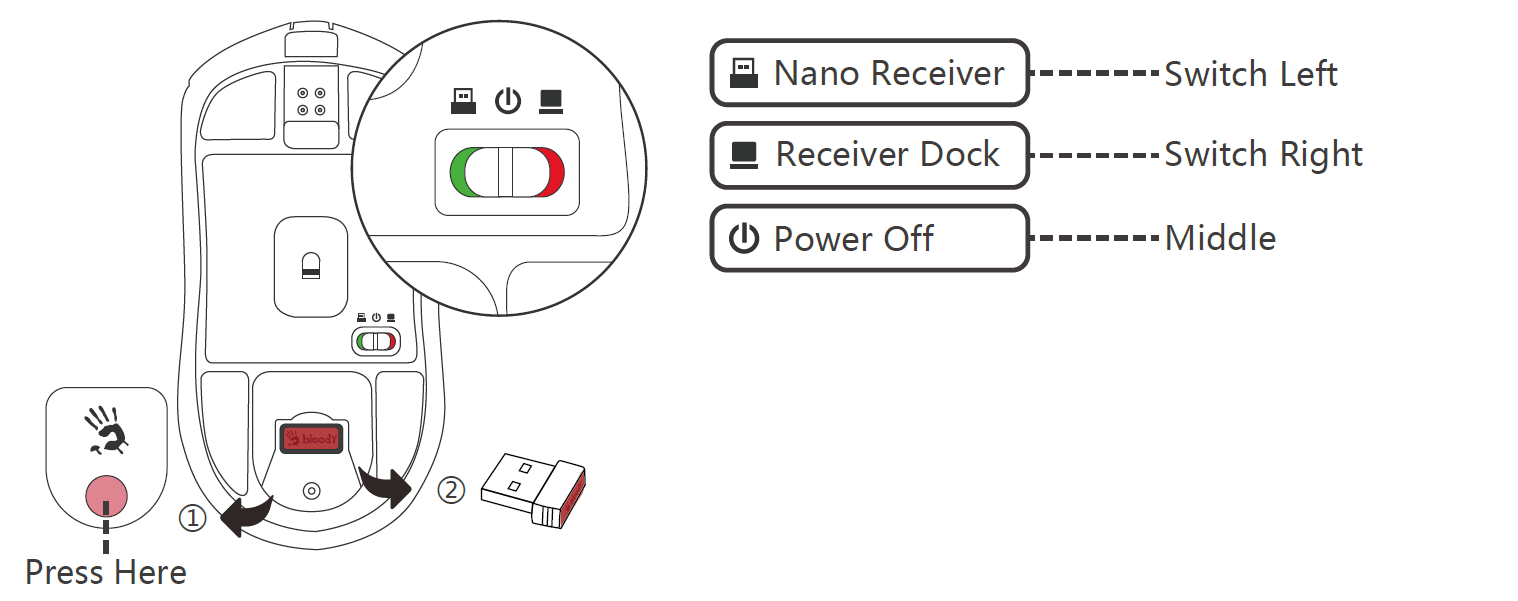
DUAL 2.4G RECEIVER SWITCH
If both receivers are connected, use the switch on the bottom of the mouse to select the active receiver.
Press to pop up the lid.
- Take out the nano receiver and put the lid back.
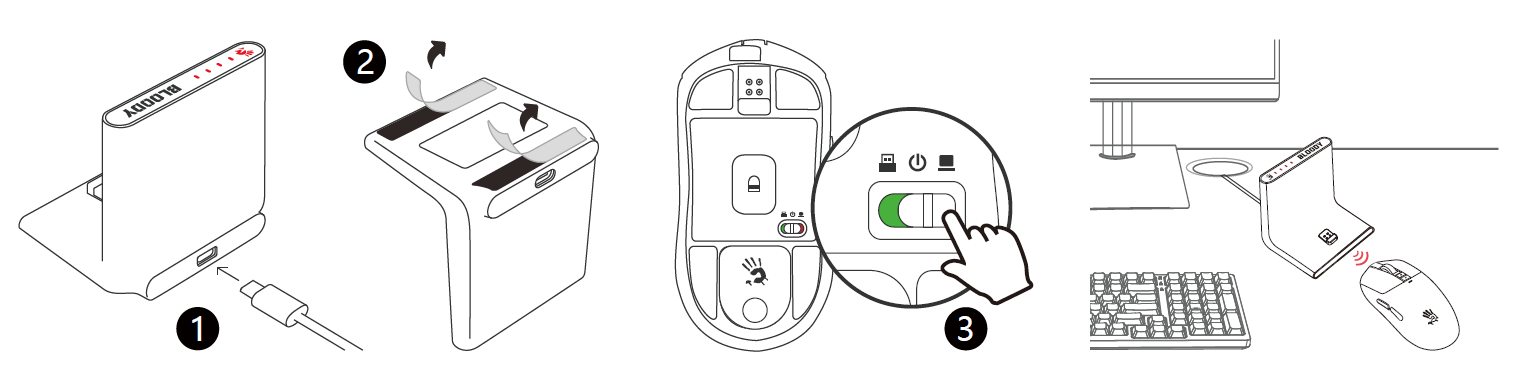
CONNECT RECEIVER DOCK
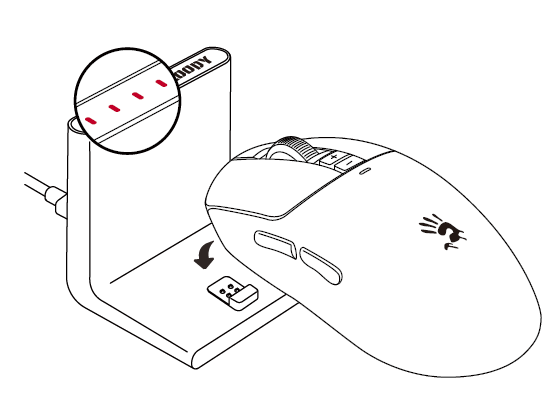
- Connect the Type-C cable to the receiver dock and the computer. The dock indicator will light up and then turn off after 15 seconds when not in use.
- Remove the transparent film from the bottom of the dock so that it sits securely on the desk.
- Move the switch to the right to connect to the receiver dock. The dock indicator will light up again when the mouse is successfully connected.
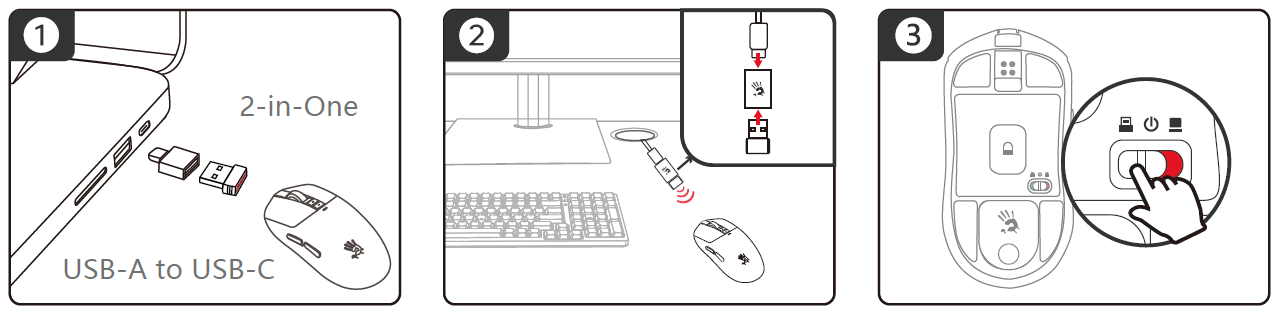
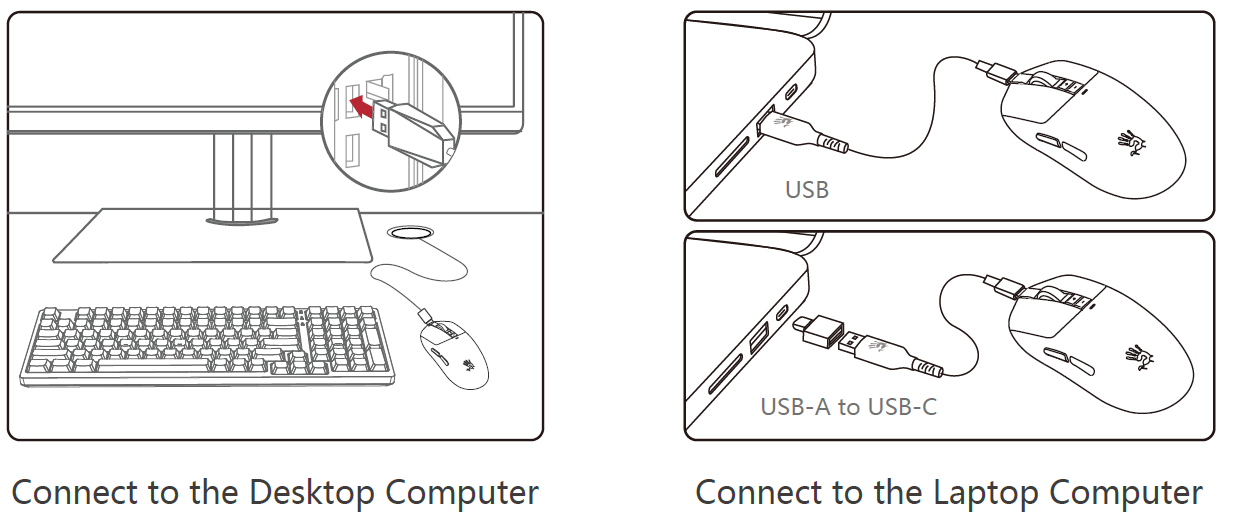
CONNECT 2.4G NANO RECEIVER
- Laptop Use: Plug the receiver into the laptop’s USB port, or use the Type-C adaptor to connect it to the laptop’s Type-C port.
- Desktop Use: Use the adaptor to connect the nano receiver to the USB Type-C cable, then connect the cable to the desktop computer to help reduce wireless signal interference.
- Move the switch to the left to connect to the nano receiver.
CONNECTING VIA USB WIRED MODE
The mouse will switch from wireless to wired mode when the USB Type-C cable is connected.
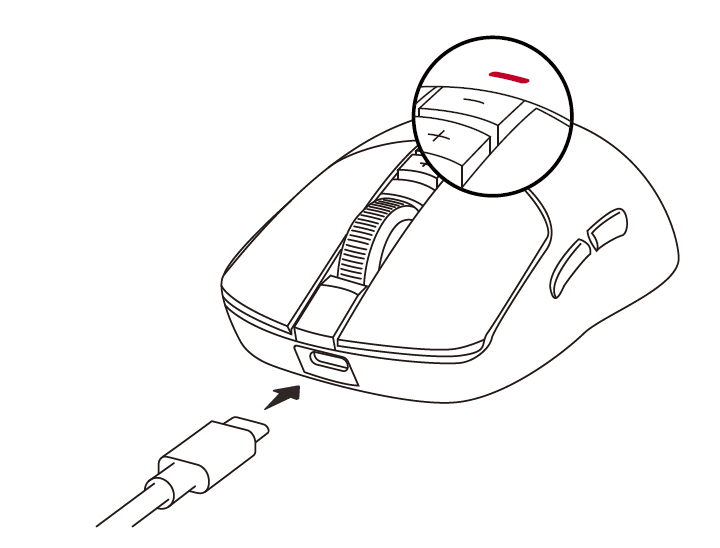
CHARGING & INDICATOR
- Dock Charging
- Dock Indicator (Battery Level)
- Type-C Charging
- Mouse Indicator
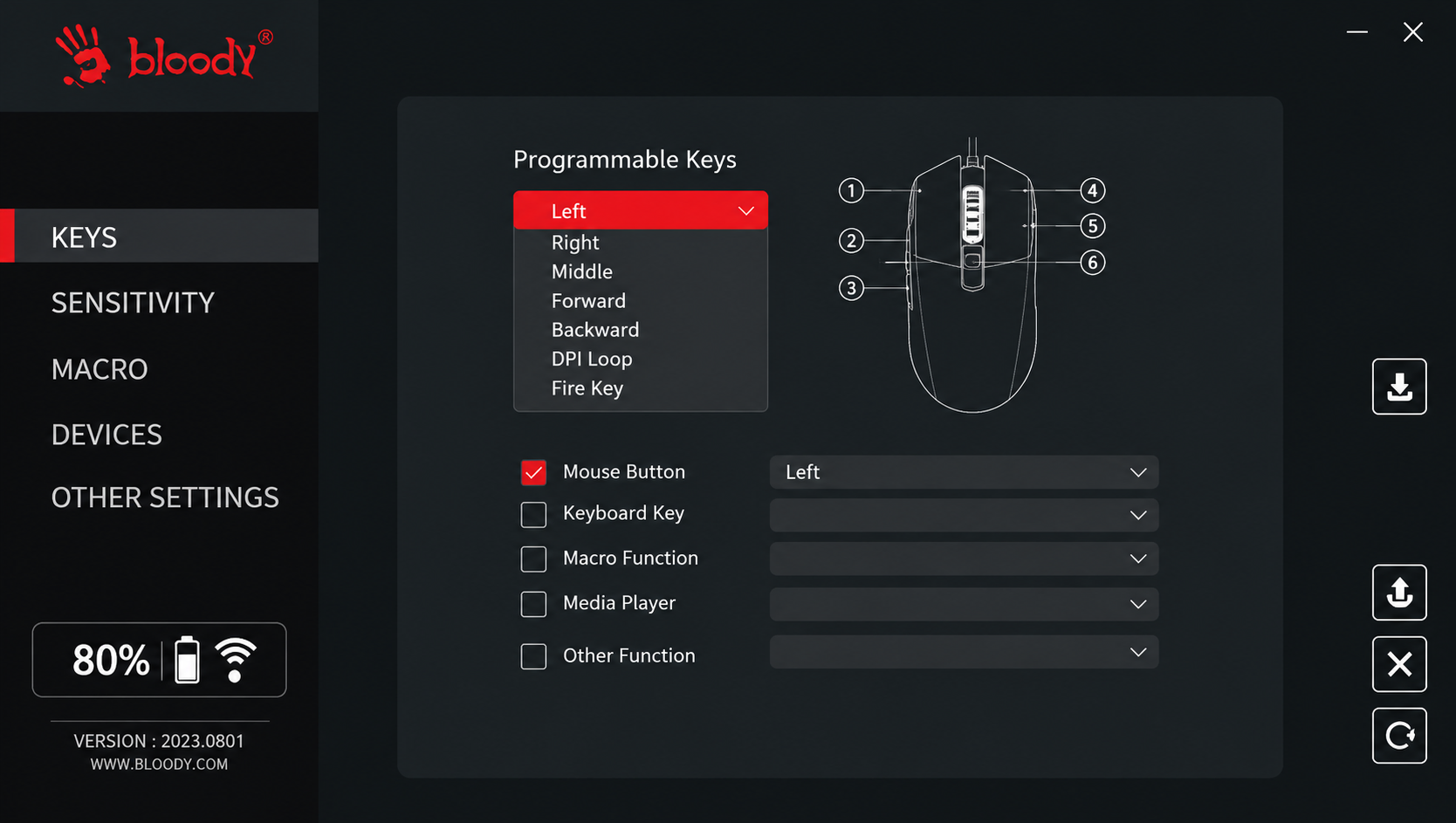
WIRELESS M-ESPORT EDITOR
Optimize your mouse settings using simple combinations and programming functions. Customize buttons, sensitivity, and macros, then save the settings to the mouse’s onboard memory.
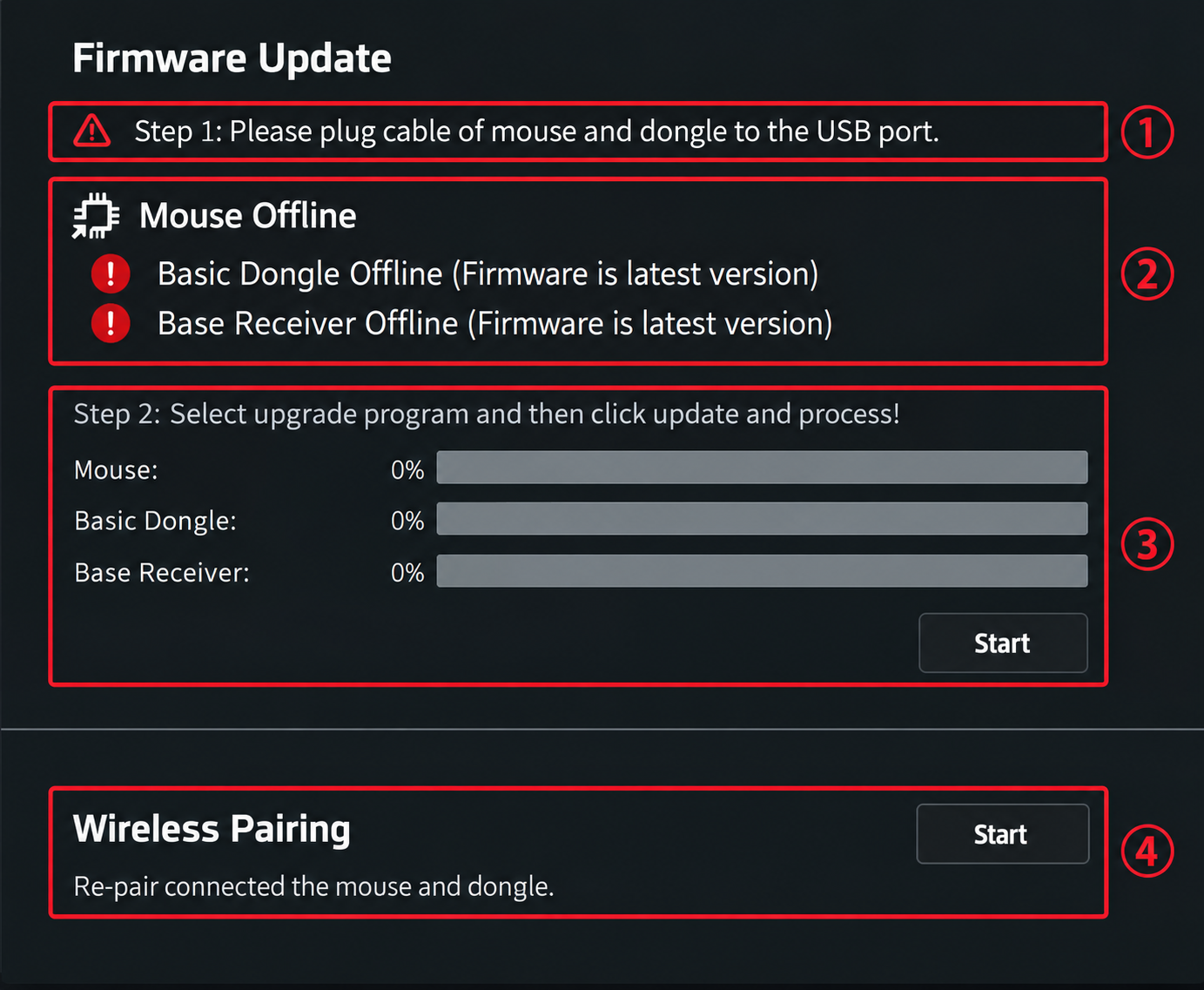
FIRMWARE UPDATE OPERATION
- Ensure that the USB connection is not interrupted during the update process.
- Plug both the mouse and dongle into USB ports.
- Confirm that the mouse and both receivers are online simultaneously.
- When prompted to upgrade the firmware, click the Upgrade button to complete the process.
WIRELESS RE-PAIRING OPERATION
Connect the mouse and both wireless receivers, then click the Pair Code button to re-pair them.
FIRMWARE UPDATE OPERATION
Ensure the USB connection is not interrupted during the update process.
- Plug both the mouse and dongle into the USB port.
- Confirm that the mouse and dual receivers are online simultaneously.
- When prompted to upgrade the firmware, click the Upgrade button to complete the process.
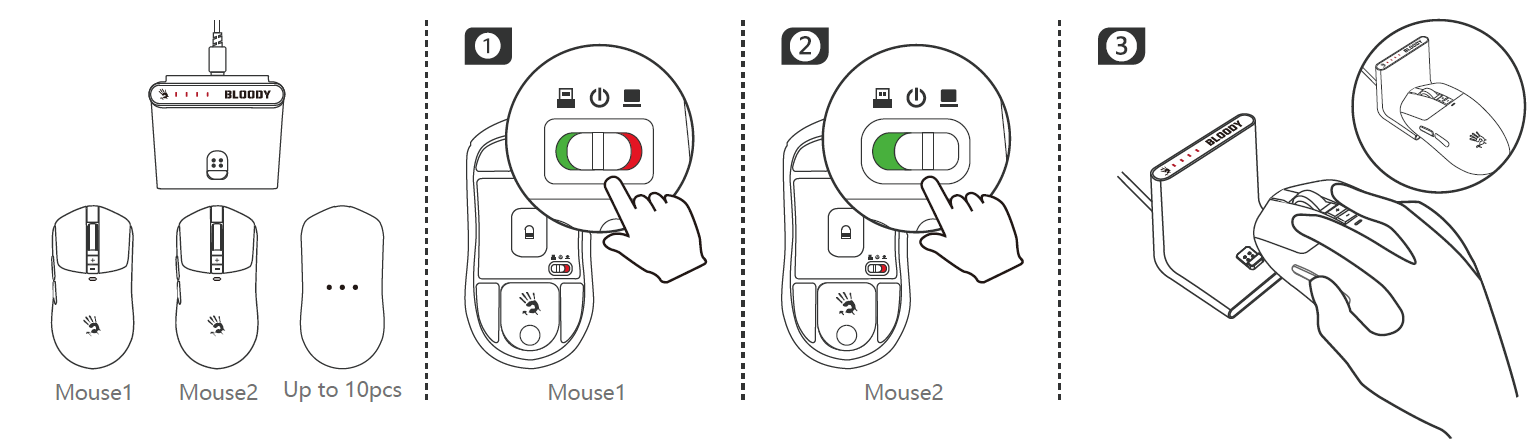
MULTI-MOUSE PAIRING STEPS
The L++ multi-function dock can pair with multiple wireless mice that support dual-connected wireless systems. Follow these steps:
- Turn off the paired Mouse 1 by moving its switch to the middle position.
- To pair Mouse 2, move its switch to the right to select Dock mode.
- Place Mouse 2 on the dock. It will attach magnetically for instant pairing.
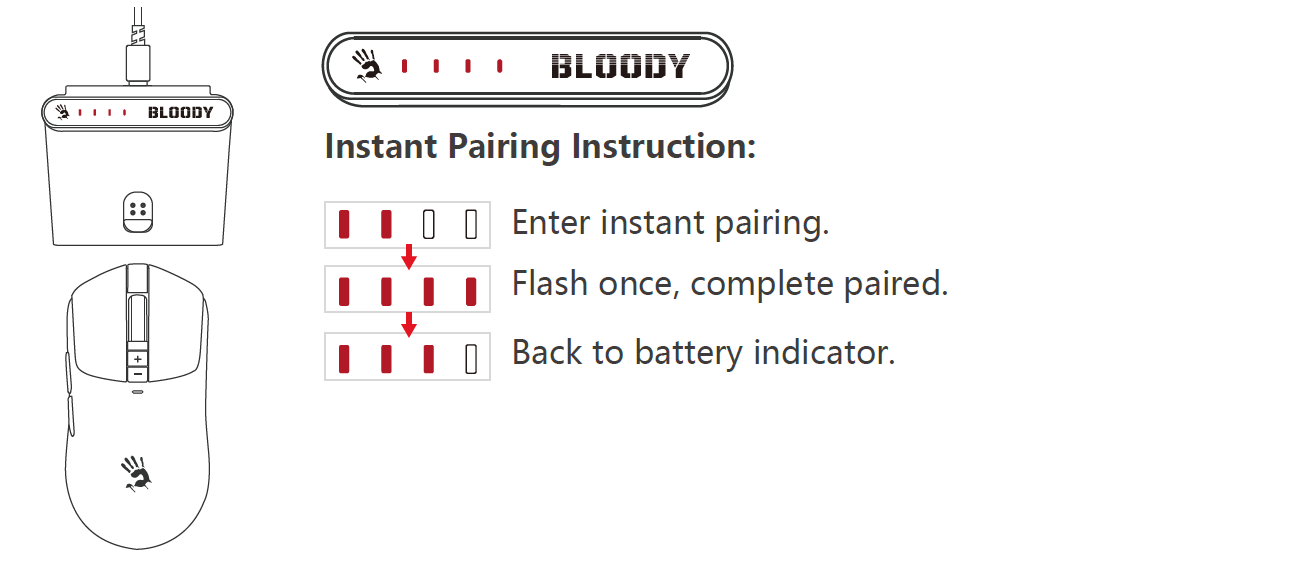
MULTI-MOUSE PAIRING STEPS
Mouse paired in instant pairing will be used first. Each time you put in the dock, it is only for charging function
Troubleshooting Guide: Solutions for Common Issues
- Connection Problems: If the Bloody R72 Pro Duo Dual Mode Wireless Gaming Mouse fails to connect wirelessly, first ensure the 2.4GHz receiver is properly plugged into a USB port and positioned within 10 meters of the mouse. Remove any potential wireless interference sources (microwaves, cordless phones, other 2.4GHz devices) and restart the connection by toggling the wireless switch off and on. If problems persist, try re-pairing the mouse by holding the pairing button for 3-5 seconds until the LED indicator flashes. For persistent connectivity issues, update your mouse driver software through the official Bloody website.
- Battery & Charging Issues: If the mouse won't power on, ensure it's fully charged by connecting the USB Type-C cable for at least 1.5 hours. A flashing LED indicates low battery—charge immediately to prevent connection drops during gaming. If the battery drains unusually fast, disable unused features in the gaming software or check for hardware defects by contacting customer support.
- Tracking & Cursor Problems: Erratic cursor movement often results from dirty sensor lenses. Clean the PAW3395 optical engine with a soft, dry cloth, removing dust and debris from the underside of the mouse. Ensure your gaming surface provides adequate contrast for the sensor; glossy or reflective surfaces may cause tracking inconsistencies. Adjust CPI settings through Bloody's gaming software to find optimal sensitivity levels for your specific gaming environment.
- Button & Scroll Issues: Unresponsive buttons may indicate dust accumulation around micro-switches. Clean the button mechanisms carefully with compressed air. If scroll functionality becomes inconsistent, clean the scroll wheel track and check for debris. These issues are typically resolved through preventive maintenance rather than requiring replacement.
Warranty & Support: The Bloody R72 Pro Duo Dual Mode Wireless Gaming Mouse includes manufacturer warranty coverage. Contact official Bloody support channels through their website or authorized retailers for hardware defects, warranty claims, or technical assistance beyond these troubleshooting steps.
Advantages & Disadvantages: Balanced Assessment
Strengths of the R72 Pro Duo
- Professional-Grade Sensor: The PAW3395 gaming optical engine delivers 26,000 CPI resolution and 650 IPS tracking, matching or exceeding specifications found in mice costing $100+. This ensures pixel-perfect accuracy for competitive FPS gaming.
- True Wireless Performance: The 1ms wireless transmission eliminates latency concerns, providing wired-equivalent responsiveness without cable restrictions. This represents a significant advantage over traditional wireless gaming mice.
- Exceptional Battery Life: Up to 80 hours of playtime between charges means weeks of gaming without charging interruptions. The 1.5-hour rapid charging ensures minimal downtime.
- Dual Connectivity Flexibility: Both 2.4GHz wireless and USB wired modes accommodate different gaming scenarios, travel situations, and personal preferences without purchasing separate mice.
- Ergonomic Design: The 125 x 63 x 40 mm form factor accommodates various grip styles through proprietary AFC and RapidSnap Rebound technologies, reducing hand fatigue during extended sessions.
- Outstanding Value: Competitive pricing ($40-70 USD) combined with flagship-level specifications offers exceptional value compared to similarly-performing alternatives from premium brands.
Limitations & Considerations
- Limited Customization: While the R72 Pro Duo offers software adjustability, some gamers may prefer more extensive RGB lighting options or programmable buttons compared to specialized gaming mice.
- Brand Recognition: Bloody/A4Tech has smaller market presence in Western markets compared to Razer, SteelSeries, or Logitech, potentially affecting local support availability and warranty coverage.
- Wireless Receiver Design: The external 2.4GHz receiver requires a dedicated USB port, which may be inconvenient for users with limited USB availability on gaming desks.
- Software Requirements: Full feature utilization requires installing Bloody's gaming software, adding setup complexity for users preferring plug-and-play functionality.
Customer Reviews & User Feedback
Users consistently praise the Bloody R72 Pro Duo Dual Mode Wireless Gaming Mouse for its exceptional wireless performance and affordability. Gamers report that the 1ms wireless transmission eliminates noticeable latency, with many noting performance matching dedicated wired gaming mice. The extended battery life receives particular commendation, with users appreciating weeks of gameplay between charging sessions.
Common praise highlights include the PAW3395 sensor's accuracy in competitive FPS games, the dual-mode connectivity flexibility, and the ergonomic design supporting extended gaming sessions. Professional and casual gamers alike report satisfaction with the mouse's reliability and build quality, with micro-switches consistently performing through millions of clicks.
Minor complaints focus on software installation requirements and limited Western market availability affecting support accessibility. Some users note the external wireless receiver as slightly inconvenient, though this concern rarely impacts overall satisfaction. Overall, the R72 Pro Duo maintains strong user ratings (4.5+ stars across major retailers), with most gamers recommending it as an excellent value gaming mouse for competitive play and casual use.
Who Should Purchase the Bloody R72 Pro Duo?
The Bloody R72 Pro Duo Dual Mode Wireless Gaming Mouse is ideal for competitive FPS gamers seeking wireless convenience without performance compromise, budget-conscious esports players wanting professional-grade specifications, and casual gamers appreciating extended battery life and dual connectivity options. Its specifications suit players of all skill levels, from beginners building their first gaming setup to professionals competing in organized tournaments.
```
Faqs
How do I set up the bloody R72 Pro Duo Dual Mode Wireless Gaming Mouse for the first time?
What should I do if the bloody R72 Pro Duo Dual Mode Wireless Gaming Mouse battery drains quickly?
How do I switch between dual modes on the bloody R72 Pro Duo Dual Mode Wireless Gaming Mouse?
Is the bloody R72 Pro Duo Dual Mode Wireless Gaming Mouse compatible with Mac and consoles?
How do I optimize performance on the bloody R72 Pro Duo Dual Mode Wireless Gaming Mouse for FPS games?
How do I clean and maintain the bloody R72 Pro Duo Dual Mode Wireless Gaming Mouse?
Why is the bloody R72 Pro Duo Dual Mode Wireless Gaming Mouse cursor lagging or skipping?
How do I customize buttons and DPI on the bloody R72 Pro Duo Dual Mode Wireless Gaming Mouse?
More bloody manuals
- Setup: Bloody RGB ESPORTS Gaming Mouse ES5 User Manual
- Setup: Bloody M320 Bluetooth Wireless Gaming Headset User Manual
- Setup: Bloody AT87 Alpha Optical Switch Performance TKL Keyboard User Manual
- Setup: Bloody MH360 Bluetooth v5.3 Headphones User Manual
- Setup: Bloody AT98 Alpha Optical Switch Mechanical Gaming Keyboard User Manual
- Usage: Bloody MH390 Wireless Headset User Manual
Leave a Comment