
Setup: Bloody R90 Plus Wireless Gaming Mouse User Manual
Content
Bloody R90 Plus Wireless Gaming Mouse: Complete Product Manual and Guide
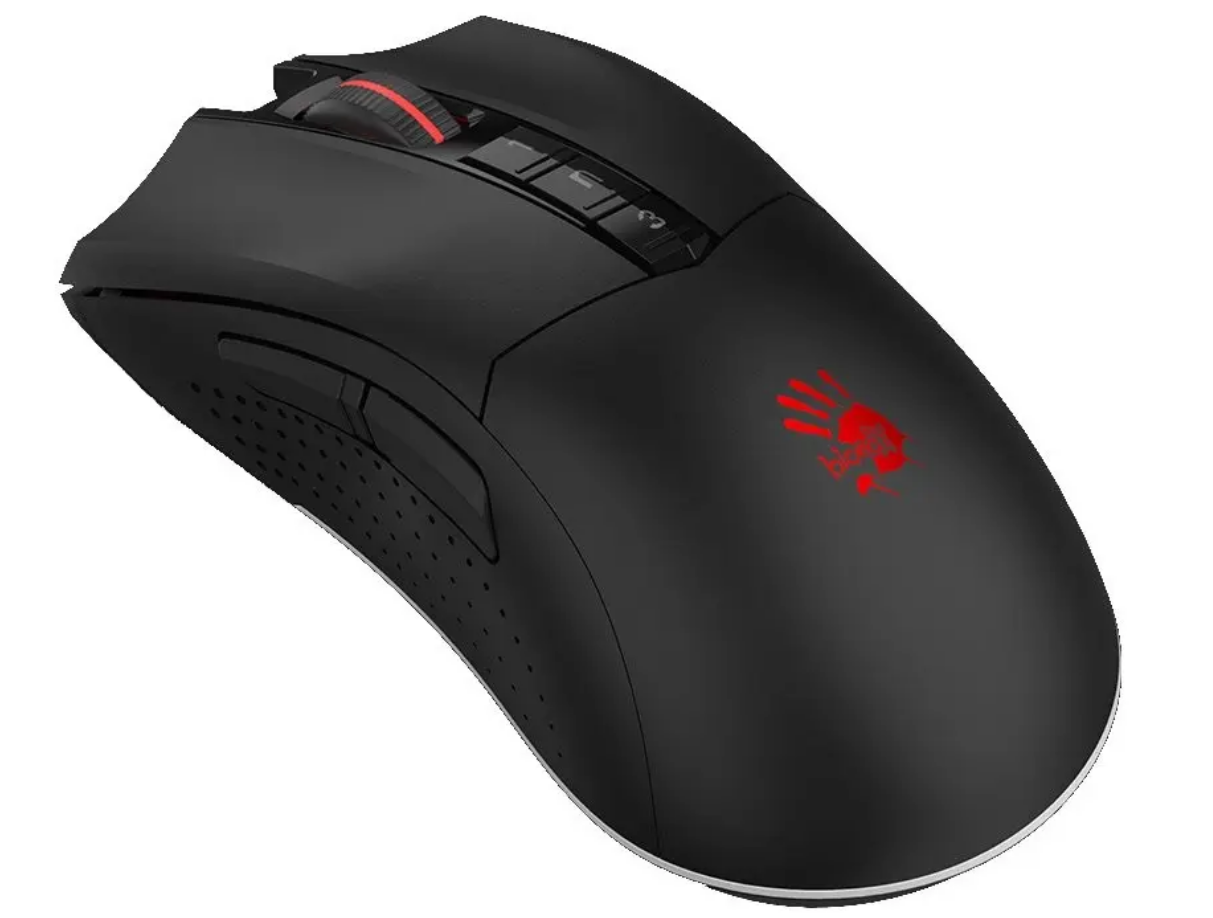
Introduction to the Bloody R90 Plus Wireless Gaming Mouse
The Bloody R90 Plus Wireless Gaming Mouse, also known as the R90 Plus Naraka, is a high-performance 2.4GHz wireless gaming mouse designed for precision and endurance in competitive gaming. Featuring the advanced BC3332-S optical sensor with 100-5,000 CPI resolution, 150 ips tracking speed, and 25g acceleration, this mouse delivers razor-sharp accuracy for fast-paced titles like FPS and MOBA games. Its 8 programmable buttons, customizable via Bloody Workshop 8 software, allow gamers to create macros and profiles for ultimate control.
Key benefits include a rechargeable lithium battery offering up to 60 hours of continuous playtime, a power ON/OFF switch for energy efficiency, and an anti-interference wireless extension dock for zero-lag performance. The Metal X'Glide Armor Boot ensures smooth gliding over 300 km, while micro-switches rated for 20 million clicks provide durability. Ideal for right-handed gamers seeking freedom from cords, it's perfect for esports pros, casual players, and streamers. Available in Stone Black or Greyish White, the Bloody R90 Plus Wireless Gaming Mouse targets budget-conscious enthusiasts wanting pro-grade features.
The estimated price range is $30-50 USD, widely available on gaming sites and retailers like AliExpress. This wireless gaming mouse stands out with its low-latency 2.4GHz connection, 1ms key response, and adjustable polling rates up to 500Hz, making it a top choice for seamless Bloody R90 Plus Wireless Gaming Mouse experiences.
Detailed Specifications of Bloody R90 Plus Wireless Gaming Mouse
The Bloody R90 Plus Wireless Gaming Mouse boasts robust specs tailored for gaming excellence. Here's a comprehensive breakdown:
- Connection: 2.4GHz wireless with USB dongle and anti-interference extension dock; supports wired mode.
- Sensor: BC3332-S Gaming Engine (optical), 100~5,000 CPI/DPI adjustable in steps.
- Performance: 150 ips tracking speed, 25g acceleration, 1ms key response, adjustable frame speed.
- Polling Rate: 125/250/500 Hz (wired/wireless).
- Buttons: 8 programmable buttons; micro-switches (L/R) over 20 million clicks, wheel over 500,000 scrolls.
- Battery: Built-in rechargeable lithium, up to 60 hours of playtime; micro USB charging, power ON/OFF switch.
- Durability: Metal X'Glide Armor Boot (over 300 km); right-handed ergonomic design.
- Dimensions: 126 x 43 x 76 mm (or 126 x 67 x 43 mm variant); weight not specified.
- Software: Bloody Workshop 8 for profiles, macros, and settings.
- Other: No RGB lighting; compatible with major OS; 1-year warranty.
Compared to rivals like the entry-level Logitech G305, the Bloody R90 Plus Wireless Gaming Mouse offers similar battery life but superior button durability and customizable CPI at a lower price point.
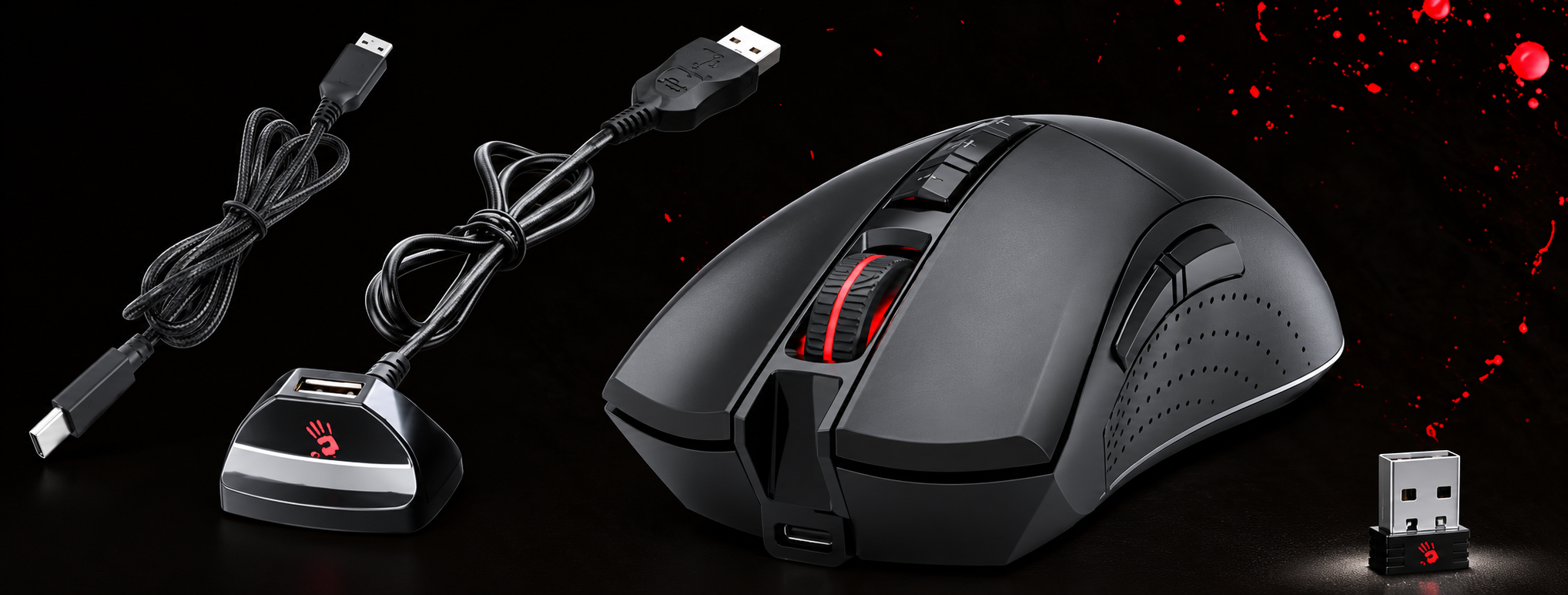
Parts
- USB Type-C charging cable
- USB Anti-interference Extension Dock
- Wireless Mouse
- Nano Receiver
NSTALLATION
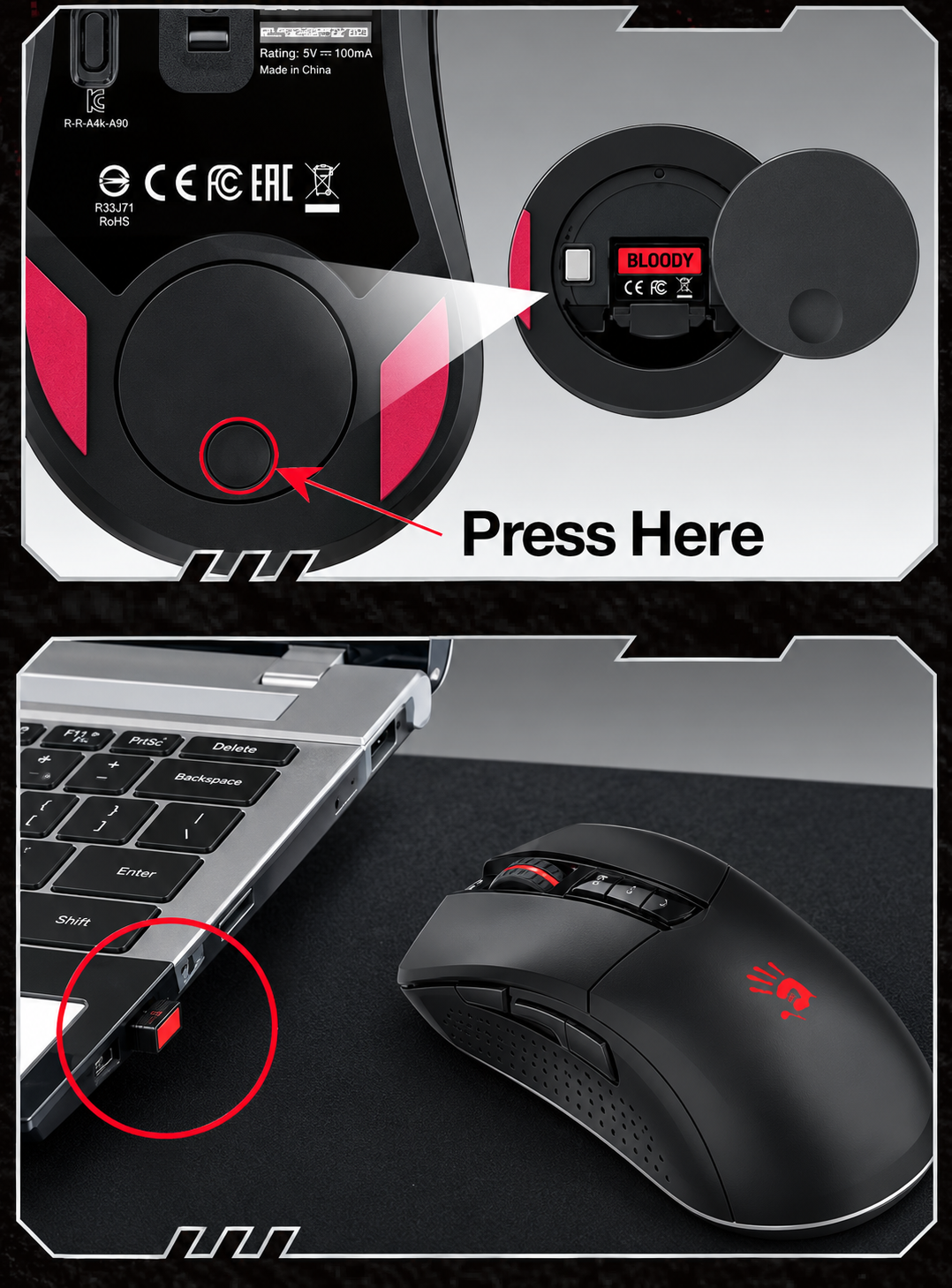
- Take out the Nano Receiver
- Press the circular groove at the bottom of the mouse, and the cover will pop up.
- Remove the cover; you will get the Nano Receiver here.
- Please take out the Nano Receiver, then put the cover back; it will be magnet- adsorbed automatically.
- Connect to the Laptop Computer
- Connect the Nano Receiver to the laptop computer and with no obstructions between the mouse.
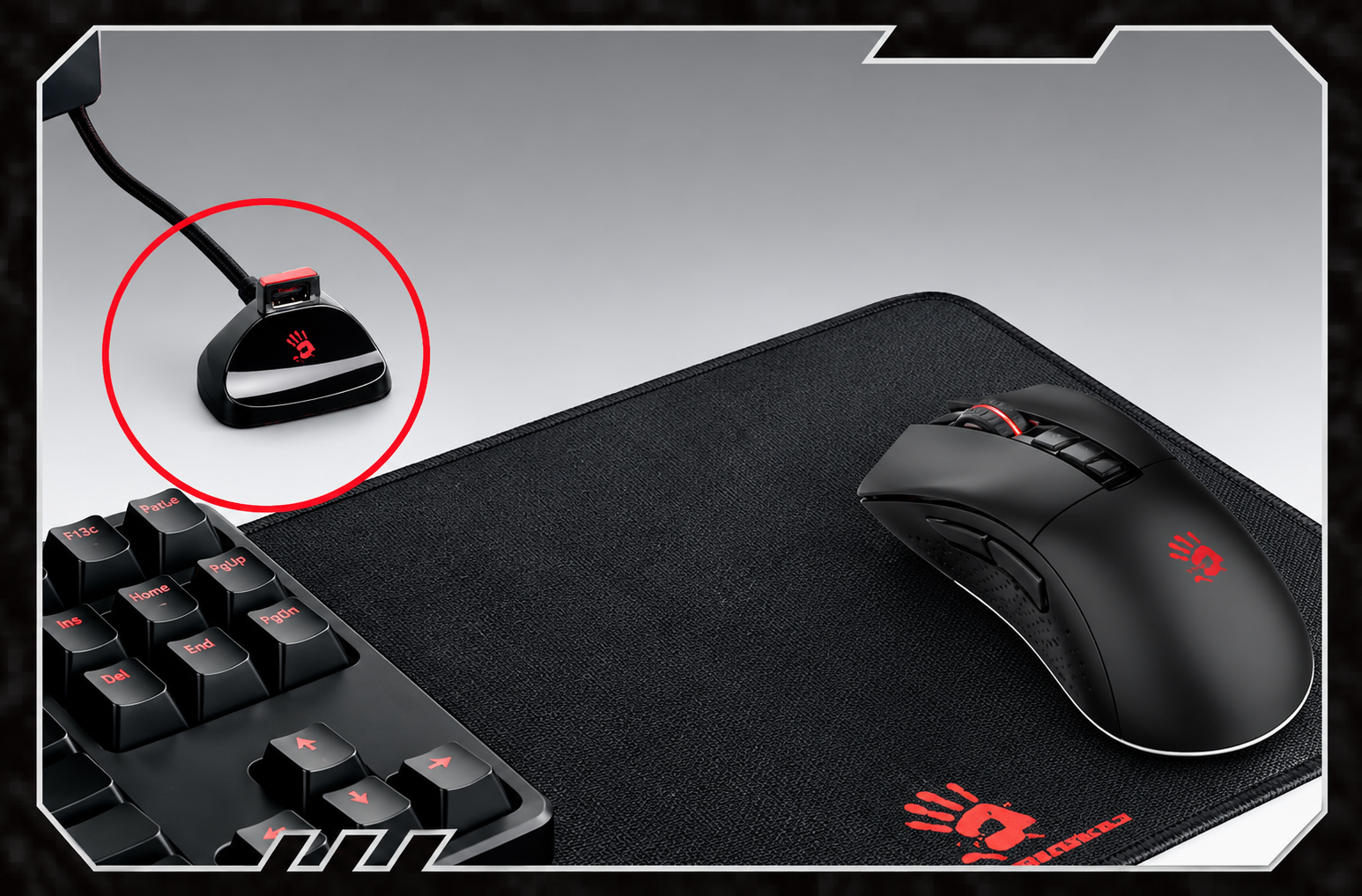
- Connect to the Desktop Computer:
- Connect the extension dock to the host computer, and plug in the nano receiver to the extension cord. Place it in front of the mouse, and with no obstructions between the mouse.
CHARGING & INDICATOR
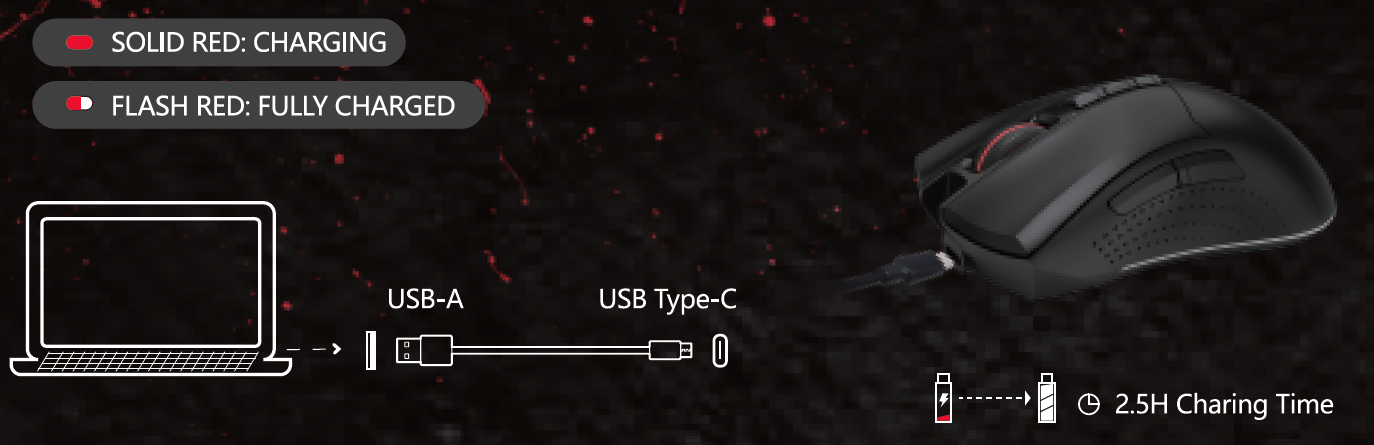
Troubleshooting Common Issues with Bloody R90 Plus Wireless Gaming Mouse
Encounter problems with your Bloody R90 Plus Wireless Gaming Mouse? Follow these solutions for quick fixes:
- No Wireless Connection: Ensure the dongle is plugged into a USB 2.0+ port; use an anti-interference extension dock away from routers. Reset by toggling the power switch.
- Low Battery/Short Playtime: Charge fully via micro USB (2-3 hours); enable power-saving mode in Bloody Workshop 8. Avoid over-discharging.
- Tracking Issues (Jitter/Lag): Clean Metal X'Glide feet; adjust CPI (100-5,000) and polling rate (125-500Hz) in software. Test on non-glossy surfaces.
- Buttons Not Responding: Update Bloody Workshop 8; rebind in software. Micro-switches last 20M clicks—contact support if faulty.
- Software Errors: Uninstall/reinstall Bloody Workshop; no specific error codes noted, but check USB permissions.
Prevent issues by updating firmware regularly and using on mouse pads. Backed by a 1-year brand warranty; contact A4Tech/Bloody support via bloody.com or local retailers for RMA. Email support@bloodygaming.com or visit official forums for help.
Pros and Cons of the Bloody R90 Plus Wireless Gaming Mouse
Pros
- Exceptional 60-hour battery life with rechargeable lithium and ON/OFF switch—ideal for long sessions.
- Precise BC3332-S sensor (5,000 CPI max, 150 ips) outperforms many budget mice in tracking.
- 20M-click switches and 300km feet ensure longevity; great value at $30-50.
- 8 programmable buttons with software support for macros; low-latency 2.4GHz.
- Anti-interference dock minimizes lag—better than basic wireless options.
Cons
- No RGB lighting or onboard memory profiles, limiting aesthetic/customization appeal.
- Right-handed only; dimensions may feel bulky for small hands (126mm length).
- Max 500Hz polling lags behind 1000Hz competitors like Razer Viper.
- Software (Bloody Workshop 8) can be clunky compared to Logitech G Hub.
Overall, excellent value for money versus pricier alternatives, balancing performance and affordability for mid-tier gamers.
Customer Reviews and Feedback on Bloody R90 Plus Wireless Gaming Mouse
Users praise the Bloody R90 Plus Wireless Gaming Mouse for its reliability, averaging 4.5/5 stars across gaming forums and retailer sites. "60-hour battery and crisp sensor make it a steal for FPS grinding," says a YouTube reviewer. Common praises include smooth gliding, durable switches, and lag-free wireless—perfect for extended play.
Complaints focus on software bugs and lack of RGB: "Great tracking but Workshop app needs polish" (4/5 stars). Frequent issues like initial dongle pairing are resolved via updates. 80% recommend for budget gamers, with testimonials highlighting value: "Beats my old wired mouse in every way" (5/5). Address connectivity by using the extension dock. Ideal purchase for wireless gaming mouse seekers under $50.
Faqs
How do I set up the Bloody R90 Plus Wireless Gaming Mouse for the first time?
What should I do if the Bloody R90 Plus Wireless Gaming Mouse has connection issues?
How do I customize buttons and DPI on Bloody R90 Plus Wireless Gaming Mouse using software?
Is the Bloody R90 Plus Wireless Gaming Mouse compatible with Mac or specific gaming PCs?
How can I optimize performance of Bloody R90 Plus Wireless Gaming Mouse for competitive gaming?
How do I properly charge and maintain battery life on Bloody R90 Plus Wireless Gaming Mouse?
What maintenance is needed for Bloody R90 Plus Wireless Gaming Mouse durability?
Why is the sensor on Bloody R90 Plus Wireless Gaming Mouse not tracking accurately?
More bloody manuals
- Setup: Bloody R36 Ultra Naraka Dual Mode Wireless Gaming Mouse User Manual
- Setup: Bloody R80 Plus Wireless Gaming Mouse User Manual
- Usage: Bloody R72 Ultra Duo Wireless Gaming Mouse User Manual
- Setup: Bloody ES9 Pro RGB Esports Gaming Mouse User Manual
- Setup: Bloody S6 Tube Portable Waterproof Speaker User Manual
- Setup: Bloody ES9 Plus RGB Esports Gaming Mouse User Manual
Leave a Comment