
Setup & Pairing: Bose On-Ear Wireless Headphones User Manual
Content
Bose On-Ear Wireless Headphones
Introduction
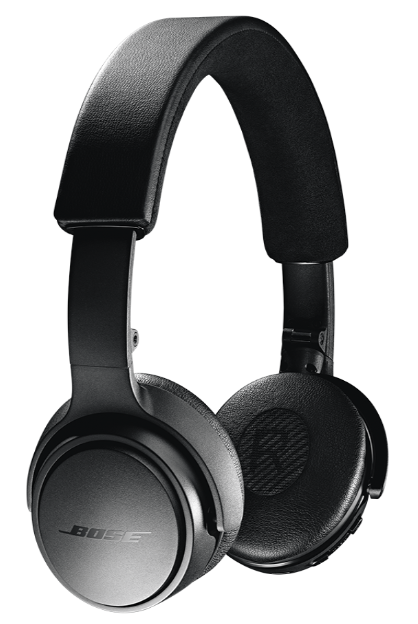
The Bose On-Ear Wireless Headphones offer a perfect blend of premium sound quality, comfort, and wireless convenience tailored for everyday music lovers and on-the-go professionals. Designed with Bose’s signature audio technology, these headphones deliver crisp mids and treble, enhanced by Active EQ that automatically adjusts sound levels for consistent clarity at any volume. Their advanced dual-microphone system ensures clear calls by reducing ambient noise, making them ideal for commuters, remote workers, and casual listeners who demand both high-quality audio and seamless communication.
With a lightweight, adjustable design and leather ear cushions ensuring comfortable extended wear, these headphones suit users looking for reliable wireless connectivity and stylish portability. The headphones support Bluetooth multipoint connectivity, allowing simultaneous connection to two devices and effortless switching, perfect for multitasking across phone and computer.
These headphones typically range from $150 to $200, available through Bose’s official website and leading retailers. Their blend of intuitive controls, durable build, and Bose’s wireless expertise positions them well for anyone seeking dependable on-ear wireless headphones for daily use, travel, or work-from-home setups.
Specifications of Bose On-Ear Wireless Headphones
- Bluetooth Connectivity: Bluetooth 4.2 with multipoint support; effective wireless range up to 10 meters (33 feet)
- Battery Life: Up to 15 hours of wireless playback; rechargeable lithium-ion battery with approx. 3-hour full charge
- Audio Technology: Active EQ for balanced sound; TriPort acoustic architecture enhances clarity and bass
- Microphone System: Two advanced microphones with noise reduction for clear calls, even in noisy environments
- Controls: On-earcup buttons for power, pairing, volume, and call management
- Design: Adjustable headband, leather ear cushions, foldable structure for portability, and a hard carry case included
- Weight: Approximately 170 grams for lightweight comfort
- Compatibility: Works with most Bluetooth-enabled devices; no app support for current models
Compared to similar on-ear wireless headphones like the SoundLink Around-Ear Wireless II, the Bose On-Ear model has slightly shorter battery life but excels in call clarity and multipoint Bluetooth connectivity, offering competitive performance in a compact design.
WHAT’S IN THE CARTON?
Contents
Confirm that the following parts are included:

Important Safety Instructions
- Read these instructions.
- Keep these instructions.
- Heed all warnings.
- Follow all instructions.
- Do not use this apparatus near water.
- Clean only with a dry cloth.
- Only use attachments/accessories specified by the manufacturer.
- Refer all servicing to qualified personnel. Servicing is required when the apparatus has been damaged in any way, such as power-supply cord or plug is damaged, liquid has been spilled or objects have fallen into the apparatus, the apparatus has been exposed to rain or moisture, does not operate normally, or has been dropped.
HEADPHONE CONTROLS
The headphone controls are located on the right earcup.
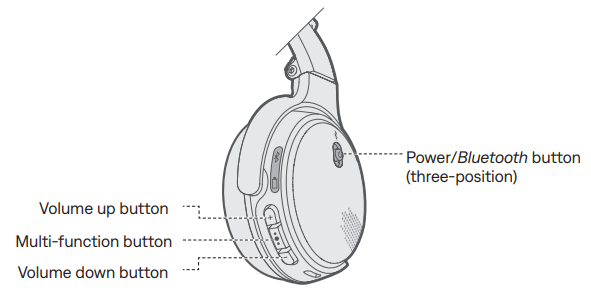
Headphone functions
The headphone controls are located on the right earcup.
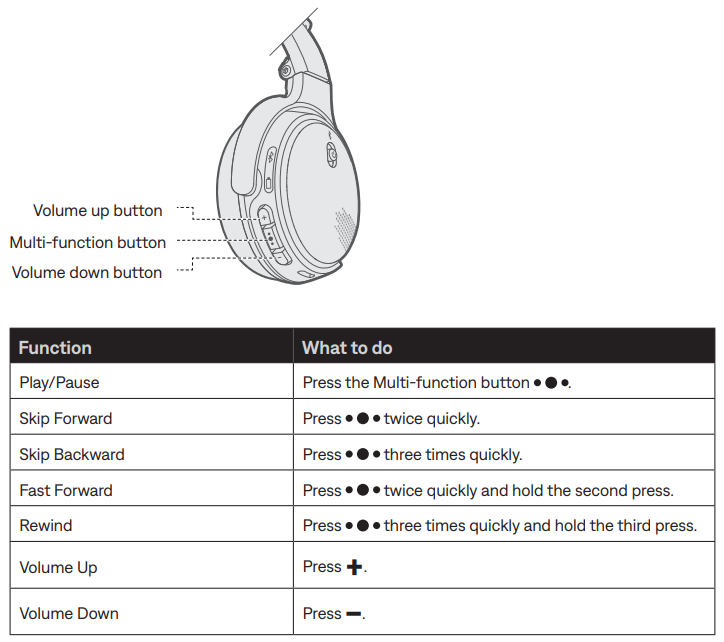
Media playback and volume functions
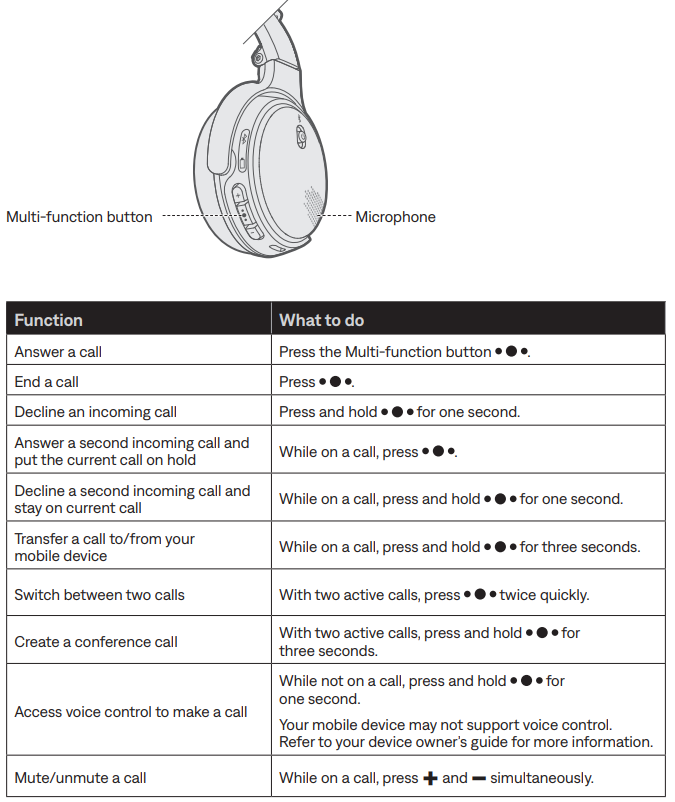
Call functions
BATTERY CHARGING
Connect the USB cable
CAUTION: Use this product only with an agency-approved power supply that meets local regulatory requirements (for example: UL, CSA, VDE, CCC).
Plug the small end of the USB cable into the micro-USB connector on the right earcup.
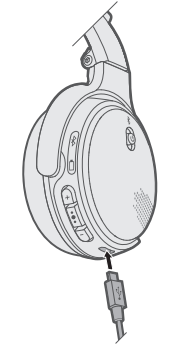
- Plug the other end of the USB cable into a wall charger or computer that is powered on.
Notes:
- The headphones do not play while charging.
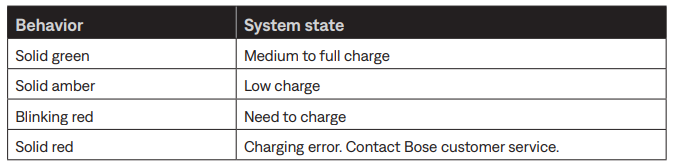
- While charging, the battery indicator glows amber.
- When the battery is fully charged, the battery indicator glows green.
- Allow up to three hours to fully charge the battery. A full charge will power the headphones for up to 15 hours. A 15-minute partial charge will power the headphones for 2 hours.
Check the headphone charging status.
Each time you power on the headphones, the voice prompt announces the headphone battery charge level. To visually check the battery, the indicator is located on the right earcup.
While the headphones are in use, the battery indicator blinks red when the battery needs charging. For more information, see “Battery indicator” on page 14.
Note: If connected to an Apple device, the device displays the headphone battery level near the upper right corner of the screen and in the notification center.
STATUS INDICATORS
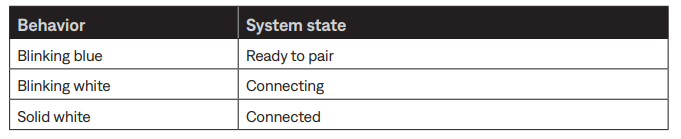
The Bluetooth and battery indicators are located on the right earcup.
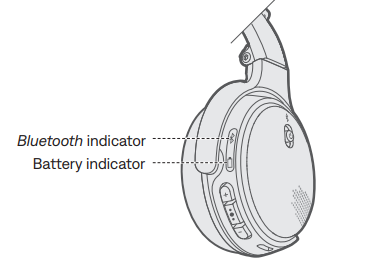
Bluetooth indicator
Shows the connection status of a mobile device.
Battery indicator
Shows the battery charge level.
WIRED CONNECTIONS
Connect the 3.5 mm audio cable
Use the supplied cable to connect a non-wireless device to the headphones, or if the headphone battery is depleted.
Note: Connecting to a device with the cable disables the headphones’ microphone, preventing you from using the headphones for phone calls or voice commands.
- Power off the headphones (see page 9).
Insert the cable into the connector on the left earcup.
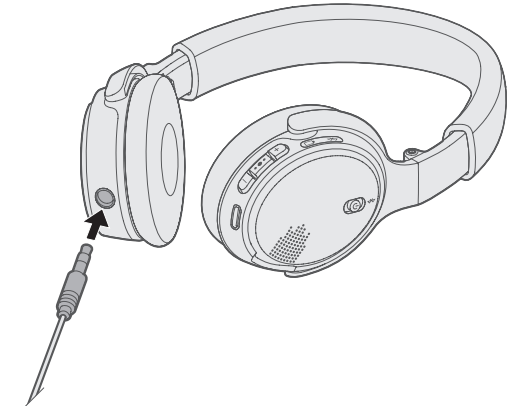
- Insert the other end of the cable into the connector on your device.
CARE AND MAINTENANCE
Store the headphones
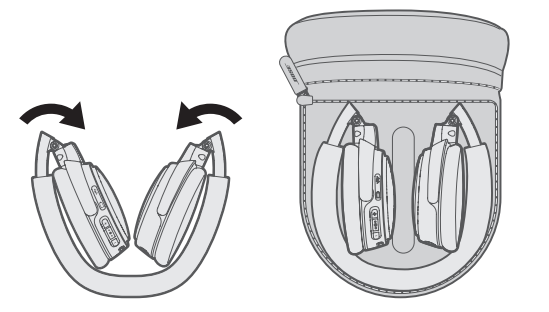
The earcups fold inward for easy, convenient storage. Place the folded headphones into the case with the soft divider between the two earcups.
Notes:
- Turn the headphones off when not in use.
- Fully charge the battery before storing the headphones for more than a few months.
Clean the headphones
Your headphones may require periodic cleaning.
- Wipe the outside surfaces with a soft, dry cloth.
- Do not allow moisture to get inside the earcups or the audio input connector.
Replacement parts and accessories
Replacement parts and accessories can be ordered through Bose customer service. Visit: global.Bose.com/Support/OEW
Troubleshooting Bose On-Ear Wireless Headphones
Common solutions
If you experience problems with your headphones:
- Power on the headphones (see page 9).
- Check the state of the status indicators (see page 14).
- Make sure your mobile device supports Bluetooth (see page 16).
- Charge the battery (see page 12).
- Increase the volume on your headphones, device, and music app.
- Try connecting another device (see page 16).
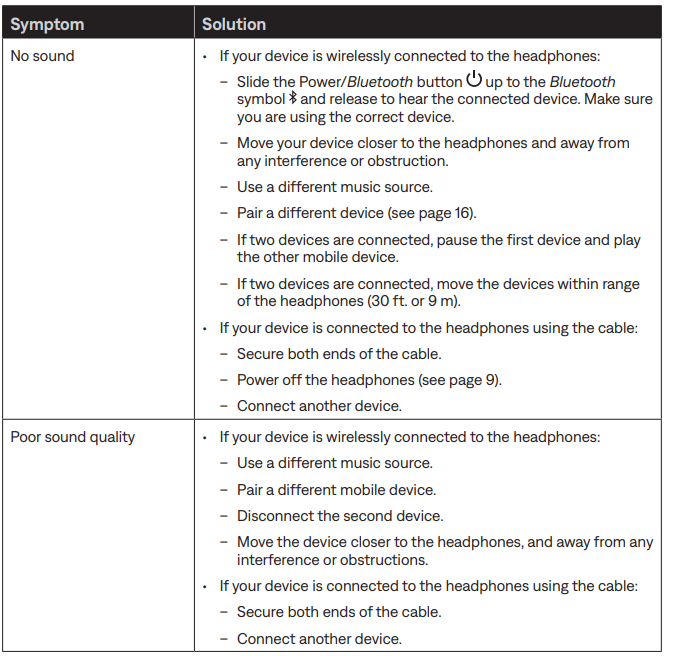
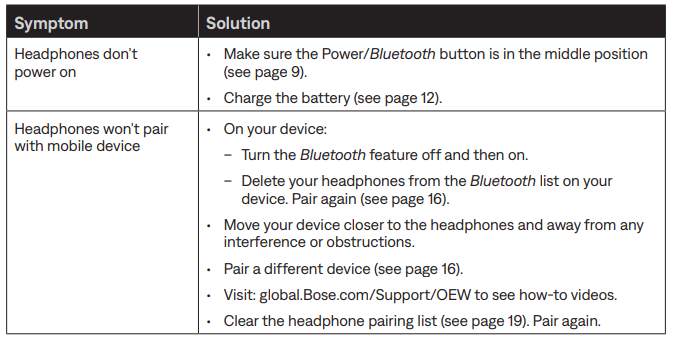
If you could not resolve your issue, use the table below to identify symptoms and solutions to common problems. If you are still unable to find a resolution, contact Bose customer service. Visit: global.Bose.com/Support/OEW
Preventive measures include regular charging, avoiding exposure to water or extreme temperatures, and storing in the hard carry case. Bose provides a limited warranty covering defects, with customer support reachable through the official Bose website or authorized retailers for repairs and technical assistance.
Limited warranty
- The headphones are covered by a limited warranty. Visit our website at global.Bose.com/warranty for details of the limited warranty.
- To register your product, visit global.Bose.com/register for instructions. Failure to register will not affect your limited warranty rights.
Pros & Cons of Bose On-Ear Wireless Headphones
Pros:
- Excellent call clarity: Dual-microphone system effectively reduces background noise for clear conversations.
- Multipoint Bluetooth: Simultaneous connection to two devices enables seamless switching without re-pairing.
- Comfortable design: Adjustable headband and soft leather ear cushions provide all-day comfort.
- Balanced sound profile: Active EQ delivers consistent audio quality with a focus on mids and treble.
- Portable and durable: Foldable design with a protective hard case for travel convenience.
Cons:
- Battery life: Moderate 15-hour playtime, less than some competitors offering 20+ hours.
- No app support: Lacks dedicated app control for customization or firmware updates.
- Limited bass emphasis: May not satisfy bass-heavy music preferences compared to some rivals.
- Older Bluetooth version: Bluetooth 4.2 rather than newer versions might affect range in crowded environments.
Compared to alternatives like Bose’s SoundLink Around-Ear Wireless II, the On-Ear model is more compact and better for portability but compromises slightly on battery duration and bass depth, offering a solid mid-range choice for style-conscious users.
Customer Reviews of Bose On-Ear Wireless Headphones
Users praise the Bose On-Ear Wireless Headphones for their crisp sound and exceptional call quality, highlighting the dual-microphone system’s effectiveness in noisy places. Many reviewers appreciate the comfortable fit and lightweight design, making them ideal for extended wear. The intuitive control buttons and reliable Bluetooth multipoint connectivity also receive frequent positive mentions.
Common complaints include the moderate battery life, which some users find insufficient for long trips, and the lack of an app to customize settings or update firmware. Some audiophiles note that the bass response may feel subdued compared to other wireless headphones.
Overall, the headphones hold an average rating of around 4 out of 5 stars, with recommendations focused on commuters, remote workers, and casual music listeners seeking reliable wireless performance combined with clear voice calls.
More bose manuals
- Setup & Pairing: Bose AE2i Audio Headphones User Manual
- Pairing: Bose SoundLink Flex Portable Speaker (2 Gen) User Manual
- Setup: Bose SoundTrue Around-Ear Headphones User Manual
- Pairing: Bose SoundLink Revolve + Il Bluetooth Speaker User Manual
- Pairing: Bose Quiet Comfort Ultra Earbuds (2 GEN) User Manual
- Pairing & Setup: Bose SoundLink Flex Bluetooth Speaker User Manual
Leave a Comment