
Pairing & Setup: Bose SoundLink Flex Bluetooth Speaker User Manual
Content
Bose SoundLink Flex Bluetooth Speaker
Introduction
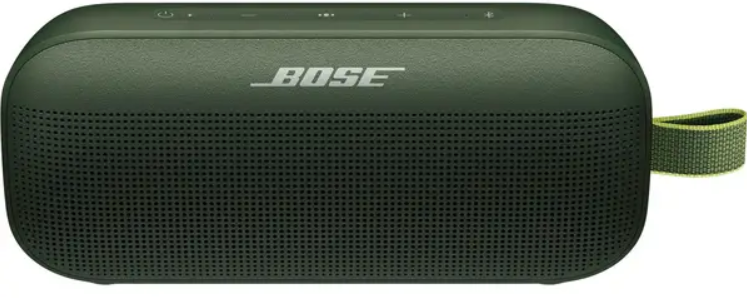
The Bose SoundLink Flex Bluetooth Speaker delivers a powerful audio experience in a compact, rugged design ideal for music lovers on the go. Designed with portability and durability in mind, this speaker features PositionIQ™ technology,, which automatically detects the speaker's orientation and optimizes the sound output, ensuring rich, balanced audio no matter how it is positioned. Its weatherproof and dustproof IP67 rating makes it perfect for outdoor adventures, beach days, or even shower playlists, appealing to active users who want premium sound quality in tough environments.
With up to 12 hours of battery life on a single charge, the SoundLink Flex supports extended playback for daily use, travel, or outdoor events. The Bluetooth 4.2 connection offers reliable wireless streaming up to 30 feet (9 meters), making it easy to pair with smartphones, tablets, or laptops without the hassle of cables. The speaker’s compact size, measuring approximately 7.9 inches by 3.5 inches by 2 inches and weighing just 1.3 pounds, ensures easy portability without sacrificing sound performance.
Targeted towards music enthusiasts, outdoor adventurers, and anyone needing a versatile portable speaker, the SoundLink Flex blends Bose’s signature high-fidelity sound with rugged durability. The estimated price range typically falls between $130 to $160, available through major electronics retailers and Bose’s official website, making it a competitive choice for premium portable Bluetooth speakers.
Specifications
- Audio Technology: One custom-designed transducer and two passive radiators for rich bass and clear sound
- PositionIQ Technology: Automatically adjusts EQ based on speaker orientation (vertical, horizontal, flat)
- Connectivity: Bluetooth 4.2 with a stable range up to 30 ft (9 m); supports pairing with the last 8 devices
- Durability: IP67 certified for dust-tight and waterproof protection; floats on water
- Battery Life: Up to 12 hours of playback, depending on volume and content type
- Dimensions & Weight: 20.1 cm x 9 cm x 5.2 cm (7.9" x 3.5" x 2"); 0.6 kg (1.3 lbs)
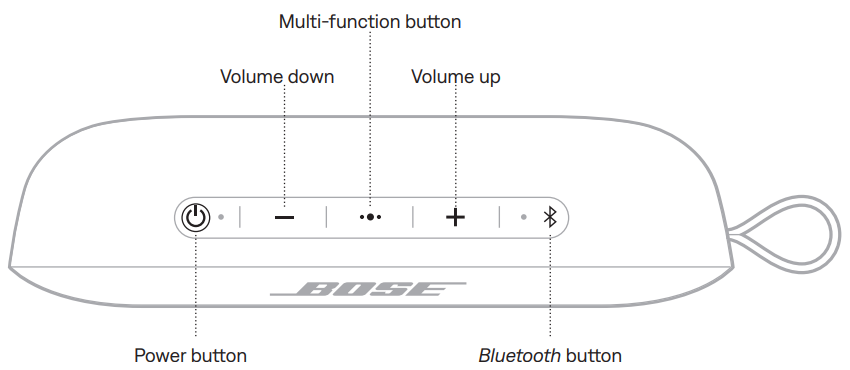
- Controls: Power, volume, multifunction (play/pause, skip, voice assistant), and Bluetooth pairing buttons
- Compatibility: Compatible with iOS, Android, and other Bluetooth-enabled devices
- Additional Features: No Wi-Fi or auxiliary input; microphone for calls and voice commands
Compared to similar portable speakers like the Bose SoundLink Micro and Bose Portable Smart Speaker, the Flex offers improved sound balance and bass depth while maintaining portability and ruggedness. However, it lacks voice assistant integration and graphic EQ customization found in higher-end models.
WHAT’S IN THE BOX

Important Safety Instructions
- Read these instructions.
- Keep these instructions.
- Heed all warnings.
- Follow all instructions.
- Do not place near any heat sources such as radiators, heat registers, stoves, or other apparatus (including amplifiers) that produce heat.
- Refer all servicing to qualified personnel. Servicing is required when the apparatus does not operate normally or has been physically damaged.
- If the speaker is exposed to salt or chlorinated water, gently rinse with fresh water following the exposure to remove residue.
- Make sure the connector port is fully dried out before charging.
- Do not charge the speaker when wet.
DOWNLOAD THE BOSE CONNECT APP
On your mobile device, download the Bose Connect app.
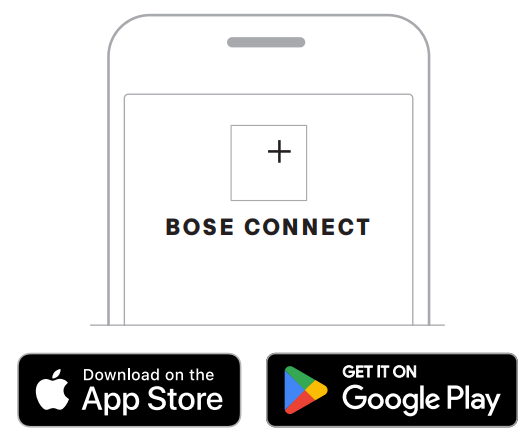
- Follow the app instructions.
STRAP CONFIGURATIONS
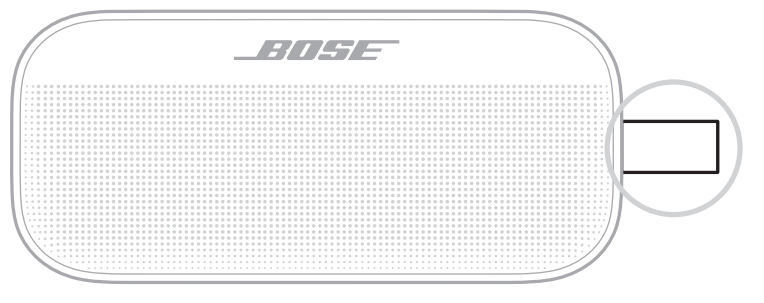
You can use the strap as a finger loop to easily carry the speaker. You can also attach it to a carabiner or a cord.
SPEAKER CONTROLS
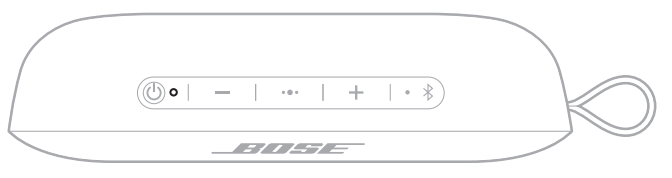
Controls are located on the top of the speaker.
BATTERY
CHARGE THE SPEAKER
Charge your speaker using the USB-C® charging cable (wall-charger not provided).
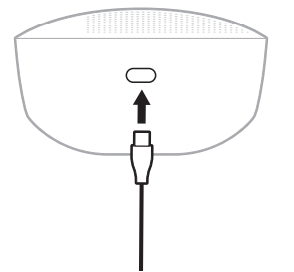
While charging, the battery light blinks white. When the battery is fully charged, the battery light glows solid white.
Charging time
Allow up to 4 hours to fully charge the battery.
With typical usage, the battery lasts up to 12 hours. Battery performance varies with the content played and the volume at which it’s played.
Hear the battery level..
- Each time you power on the speaker, a voice prompt announces the battery level. When the speaker is in use, a voice prompt announces if the battery needs to be charged.
- Voice prompts must be enabled to hear the battery level (see page 22).
- To hear the battery charge level while using your speaker, press and hold the Power button I until you hear a voice prompt.
NOTE: To visually check the battery, press and hold I while viewing the battery light.
CONNECT AN ADDITIONAL MOBILE DEVICE
You can store up to eight paired devices in the speaker pairing list, and your speaker can be actively connected to two devices at a time.
To connect an additional device, download the Bose Connect app (see page 11) or use the Bluetooth menu on your mobile device (see page 24).
NOTE: You can play audio from only one device at a time.
IDENTIFY CONNECTED MOBILE DEVICES
Press BT to hear which devices are currently connected.
SWITCH BETWEEN TWO CONNECTED MOBILE DEVICES
- Pause audio on your first device.
- Play audio on your second device.
RECONNECT A PREVIOUSLY CONNECTED DEVICE
NOTE: The device must be within range (30 ft or 9 m) and powered on.
- Press the Bluetooth button l to hear which device is connected.
- Press BT again within 3 seconds to connect to the next device in the speaker pairing list.
- Repeat until you hear the correct device name.
- Play audio on the connected device.
CARE AND MAINTENANCE
CLEAN THE SPEAKER
Your speaker may require periodic cleaning.
- Clean the surface of the speaker with a soft, damp cloth (water only).
- Do not use any solvents, chemicals,, or cleaning solutions containing alcohol, ammonia , or abrasives.
- If the speaker is exposed to salt or chlorinated water, gently rinse with fresh water following the exposure to remove residue. Make sure the connector port is fully dried out before charging.
REPLACEMENT PARTS AND ACCESSORIES
Replacement parts and accessories can be ordered through Bose customer service.
Troubleshooting Common Issues with the Bose SoundLink Flex Bluetooth Speaker
- Bluetooth Connectivity Problems: If pairing fails or audio drops, ensure the speaker is within 30 feet without obstacles. Restart both the speaker and the device, clear the Bluetooth cache, and re-pair.
- Audio Distortion at High Volume: Reduce volume below 65% to prevent compression and distortion.
- Battery Charging Issues: Use the supplied USB-C cable and a compatible charger. If charging does not start, try a different outlet or cable. Reset the speaker by powering it off and on.
- Speaker Not Turning On: Charge fully before use. If unresponsive, perform a reset by holding the power button for 10 seconds.
- Error Codes: Bose does not specify error codes; persistent issues should be addressed with customer support.
Preventive measures include avoiding exposure to extreme temperatures, keeping the charging port clean, and regularly updating connected device software. The SoundLink Flex is backed by Bose’s limited warranty, typically one year, with customer support accessible through Bose’s official website or authorized retailers.
For direct assistance, contact Bose Support via their website or call their dedicated helpline.
COMMON SOLUTIONS
If you experience problems with your speaker:
- Power on the speaker (see page 14).
- Check the state of the status lights (see page 20).
- Make sure your mobile device supports Bluetooth technology (see page 24).
- Charge the battery (see page 18).
- Increase the volume on your speaker, device, and Bose Connect app
- Move your device closer to the speaker and away from any interference or obstruction.
- Try connecting another device (see page 26).
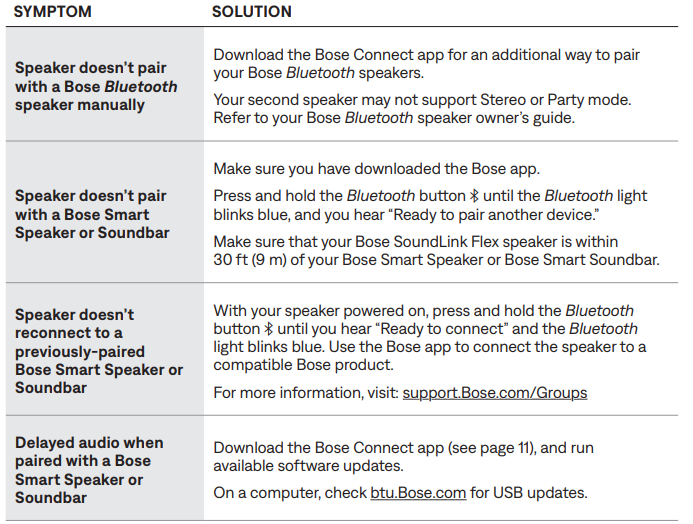
If you could not resolve your issue, see the table below to identify symptoms and solutions to common problems. If you are unable to resolve your issue, contact Bose customer service.
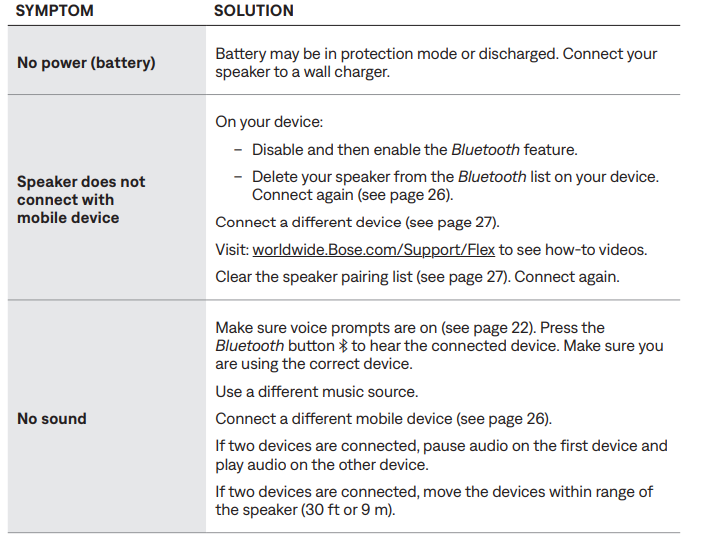
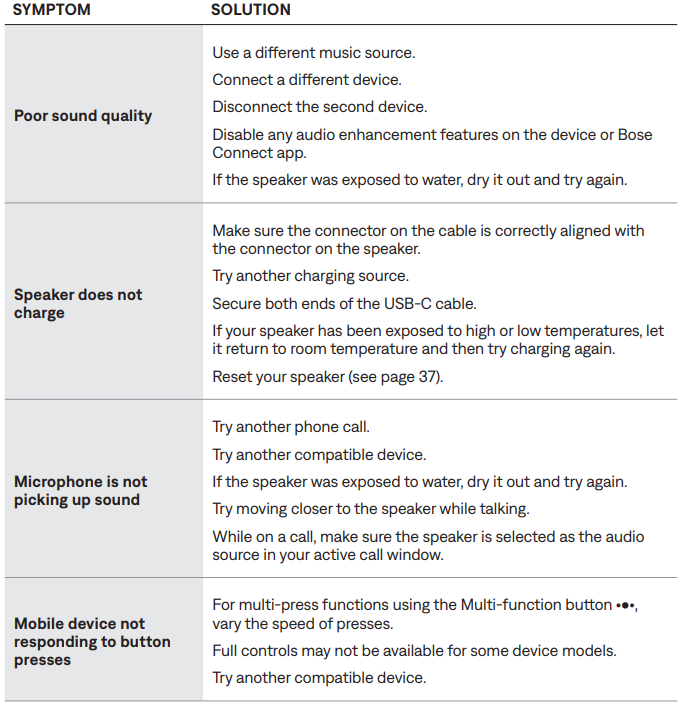
LIMITED WARRANTY
- Your speaker is covered by a limited warranty. Visit our website for details of the limited warranty.
- To register your product, for the instructions. Failure to register will not affect your limited warranty rights.
Pros & Cons of the Bose SoundLink Flex Bluetooth Speaker
- Pros:
- Exceptional sound quality with clear highs and strong bass for its size
- Unique PositionIQ technology for optimized audio in any orientation
- Robust IP67 rating offering dust and water resistance, plus floatability
- Long-lasting 12-hour battery suitable for all-day use
- Lightweight and portable design for easy outdoor use
- Cons:
- Bluetooth 4.2 is slightly outdated compared to newer Bluetooth 5.0 devices
- No auxiliary or Wi-Fi connectivity limits versatility
- Lacks a graphic equalizer or sound presets for user customization
- Battery life may be reduced significantly at high volumes (>65%)
- Not ideal for very loud parties due to compression at max volume
Overall, the Bose SoundLink Flex Bluetooth Speaker provides excellent value for money by combining rugged durability with premium sound quality, especially for outdoor enthusiasts who prioritize portability and weather resistance.
Customer Reviews and Feedback on Bose SoundLink Flex Bluetooth Speaker
Users consistently praise the SoundLink Flex for its crisp, well-balanced sound and impressive bass for a compact speaker. Many highlight the convenience of PositionIQ technology, noting how it seamlessly adapts sound when the speaker is repositioned. The rugged design and IP67 rating receive positive mentions for enabling worry-free use near water and dust.
Common complaints focus on the battery life, which some find shorter than competitors at similar volume levels, and the lack of Bluetooth 5.0,, causing occasional connection drops in crowded wireless environments. Some users also wish for more sound customization options and Wi-Fi connectivity.
Star ratings average around 4.5 out of 5, with testimonials recommending the speaker for outdoor activities, travel, and everyday use. Many recommend the SoundLink Flex as a reliable, high-quality Bluetooth speaker for those valuing durability and sound clarity over advanced smart features.
Faqs
How do I set up the bose SoundLink Flex Bluetooth Speaker for the first time?
What should I do if my bose SoundLink Flex Bluetooth Speaker is not connecting to my phone?
Can I use the bose SoundLink Flex Bluetooth Speaker with both Android and iOS devices?
How can I optimize the audio performance of my bose SoundLink Flex Bluetooth Speaker?
What are the key features of the bose SoundLink Flex Bluetooth Speaker that enhance its usability?
How do I maintain and clean my bose SoundLink Flex Bluetooth Speaker to ensure longevity?
What troubleshooting steps can I take if the bose SoundLink Flex Bluetooth Speaker battery is not charging properly?
How can I connect two bose SoundLink Flex Bluetooth Speakers together for stereo sound?
More bose manuals
- Pairing: Bose SoundLink Revolve + Il Bluetooth Speaker User Manual
- Setup: Bose Soundlink Max Portable Speaker User Manual
- Pairing: Bose SoundLink Flex Portable Speaker (2 Gen) User Manual
- Setup: Bose Soundlink Revolve+ Speaker User Manual
- Setup & Pairing: Bose On-Ear Wireless Headphones User Manual
- Pairing & Setup: Bose SoundLink® Bluetooth Speaker III User Manual
Leave a Comment