
Setup: Bose Soundlink Revolve+ Speaker User Manual
Content
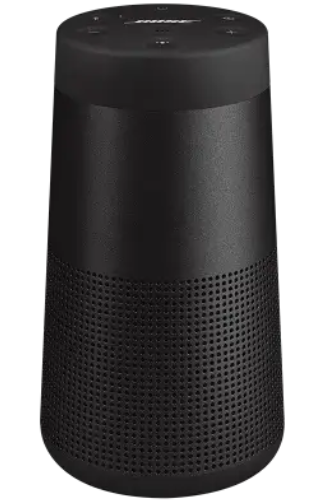
Bose Soundlink Revolve+ Speaker
Introduction
The Bose Soundlink Revolve+ Speaker is a premium portable Bluetooth speaker designed to deliver immersive 360-degree sound with deep bass and crystal-clear audio. Its unique cylindrical design and omnidirectional acoustic deflector ensure sound radiates evenly in every direction, making it ideal for both indoor and outdoor use. Equipped with a durable aluminum body and a flexible handle, this speaker combines portability with robust build quality, perfect for music lovers who want high-quality audio on the go.
This speaker is well-suited for casual listeners, audiophiles, and outdoor enthusiasts who seek exceptional sound clarity and volume in a compact package. Its water and dust resistance (rated IPX4) make it reliable for poolside parties, beach trips, or backyard gatherings. The rechargeable battery offers up to 17 hours of playtime, supporting extended use without frequent charging interruptions.
Priced typically in the range of $250 to $300 USD, the Bose Soundlink Revolve+ is widely available through authorized Bose retailers and online platforms. Its blend of advanced technology, convenience, and stylish design makes it a compelling choice for users wanting high-performance wireless audio solutions.
Specifications of the Bose Soundlink Revolve+ Speaker
- Sound Output: 360° omnidirectional sound with a downward-facing full-range transducer and dual passive radiators for deep bass.
- Battery Life: Up to 17 hours of wireless playback on a single charge.
- Wireless Connectivity: Bluetooth 4.2 with NFC pairing support; wireless range up to 30 feet (9 meters).
- Durability: Water and dust resistant with an IPX4 rating; rugged aluminum and silicone materials.
- Dimensions & Weight: Approximately 7.25" H x 4.13" W x 4.13" D; weighs roughly 2 lbs.
- Controls & Features: Multi-function buttons for playback, volume control, speakerphone with built-in microphone, voice assistant support via connected device, Party Mode for linking two Bose speakers, and Bose Connect app compatibility.
- Portability: Flexible carrying handle enhances ease of transport.
- Input Voltage: 5V
- Input Current: 1.6A
Compared to similar models like the smaller SoundLink Revolve, the Revolve+ offers louder, more room-filling sound and longer battery life, along with enhanced portability due to the handle. It is also competitive with other premium Bluetooth speakers in its class, balancing size, power, and durability effectively.
Important Safety Instructions
- Read these instructions.
- Keep these instructions.
- Heed all warnings.
- Follow all instructions.
- Do not install near any heat sources such as radiators, heat registers, stoves, or other apparatus (including amplifiers) that produce heat.
- Only use attachments/accessories specified by the manufacturer.
- Unplug this apparatus during lightning storms or when unused for long periods of time.
- Refer all servicing to qualified personnel. Servicing is required when the apparatus has been damaged in any way, such as power-supply cord or plug is damaged, objects have fallen into the apparatus, it does not operate normally, or it has been dropped.
THE BOSE® CONNECT APP
Download the free Bose® Connect app to easily manage Bluetooth® connections, unlock features, and access future updates.

Features
- Easily connect to and switch between multiple mobile devices with a single swipe.
- Disable voice prompts.
- Customize speaker settings, like voice prompt language.
- Configure your speakers to play in Party mode or Stereo mode.
- Compatible with most Apple and Android™ systems.
- Keep your speaker up-to-date with the latest software.
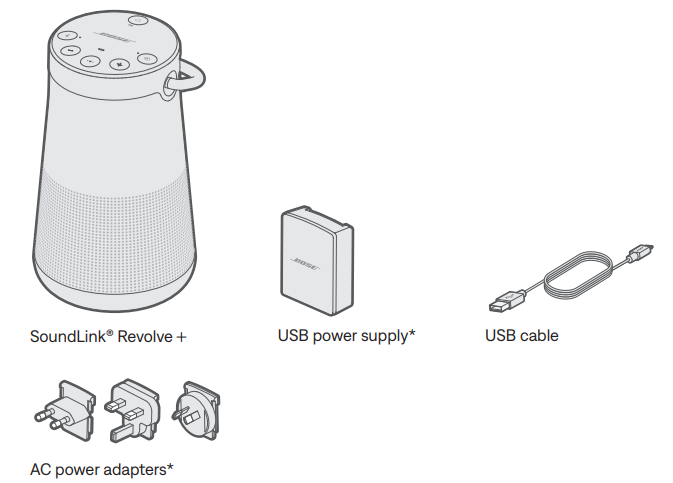
Unpacking
Carefully unpack the carton and confirm that the following parts are included:
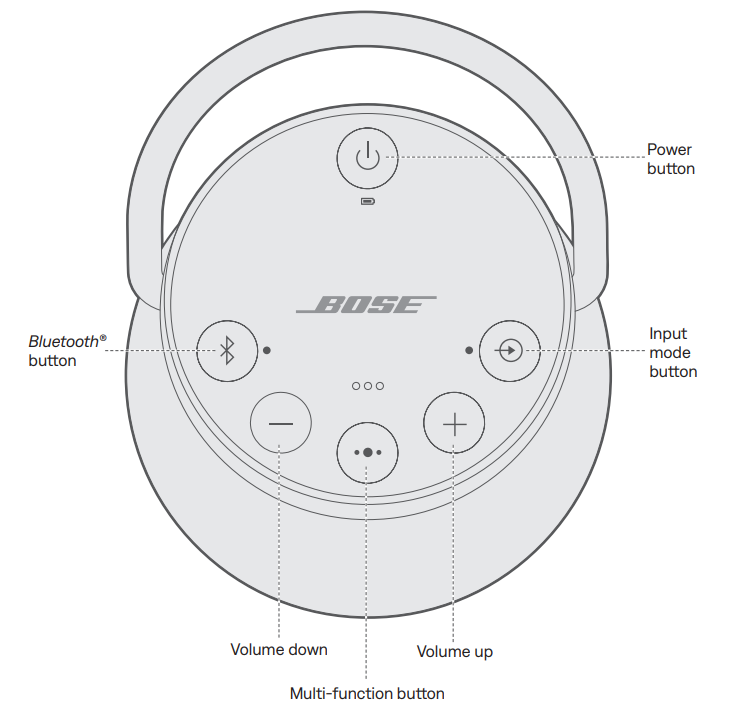
CONTROL BUTTONS
The button pad enables you to power on your speaker and control your speaker’ playback, volume, and speakerphone.
Note: Certain mobile devices may not support these functions.
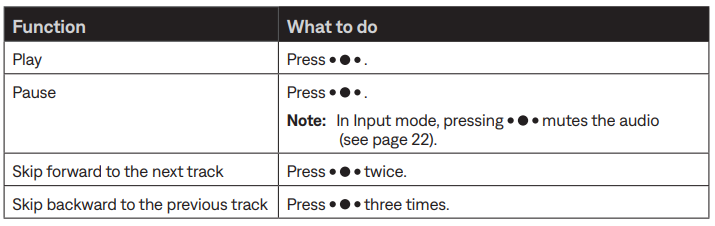
Media playback functions
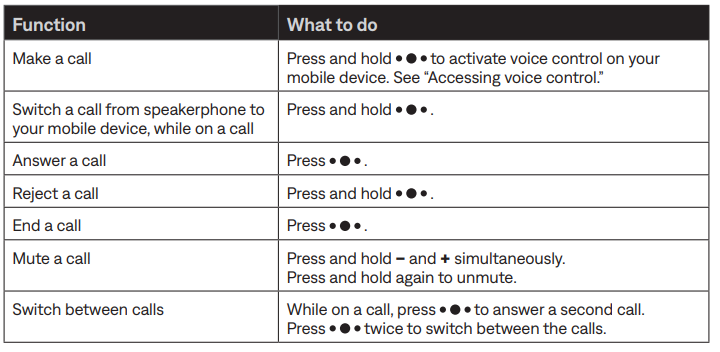
Call functions
Pairing your mobile device
When you power on your speaker for the first time, the speaker automatically searches for your mobile device.
- On your device, turn on the Bluetooth® feature.
Tip: The Bluetooth feature is usually found in the Settings menu. - Select your Bose® Revolve + SoundLink® speaker from the device list.
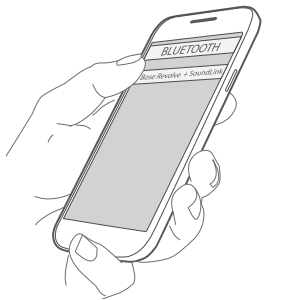
Once paired, you hear “Connected to <mobile device name>,” and the Bluetooth indicator glows solid white.
Note: To pair an additional device, see page 20.
Pairing a mobile device with NFC
Note: When you power on your speaker for the first time, make sure a language is selected before you pair your mobile device with NFC.
- Unlock your mobile device, and turn on the Bluetooth® and NFC features. Refer to your device owner’s guide to learn more about these features.
- Tap and hold the NFC touchpoint on your device to the top center of your speaker. The target area is the Bose® logo.
Your device may prompt you to accept pairing.
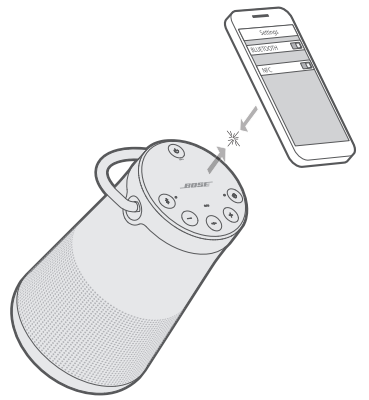
Once paired, you hear “Connected to <mobile device name>,” and the Bluetooth indicator glows solid white.
CARE AND MAINTENANCE
Cleaning
- Clean the surface of the speaker and handle with a soft, damp cloth (water only).
- Do not use any sprays near the speaker. Do not use any solvents, chemicals, or cleaning solutions containing alcohol, ammonia , or abrasives.
- Do not allow liquids to spill into any openings.
TROUBLESHOOTING
If you experience problems with your Bluetooth® speaker:
Check the battery indicator (see page 25). Charge your speaker if necessary.
- Make sure all cables are securely attached.
- Check the state of status indicators (see page 25).
- Place your speaker according to placement guidelines (see page 12).
- Make sure your mobile device supports Bluetooth or pairing via NFC technology (see page 17).
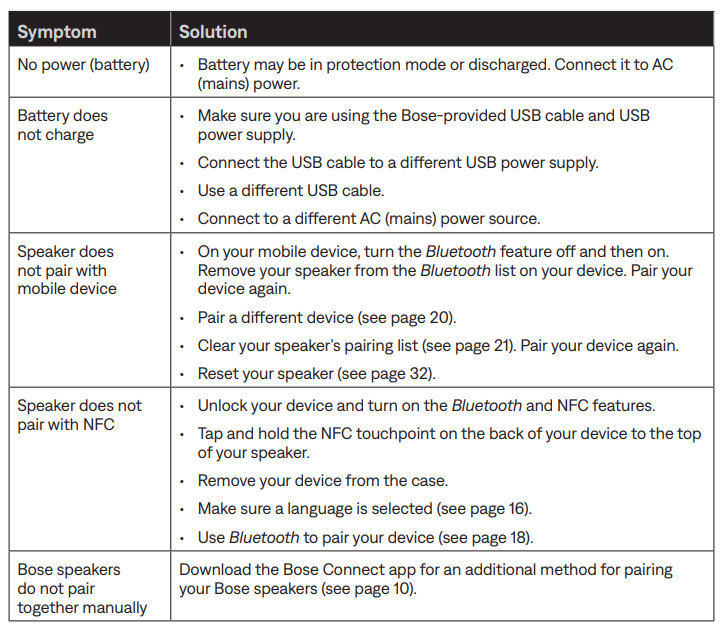
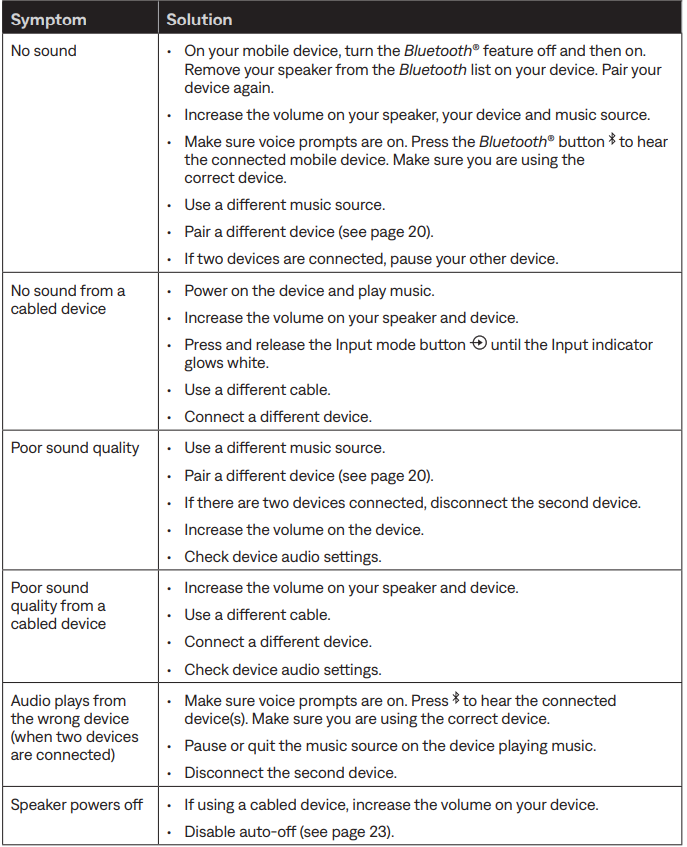
If you could not resolve your issue, see the table below to identify symptoms and solutions to common problems. If you are unable to resolve your issue, contact Bose® customer service.
Common solutions
The following table lists symptoms and possible solutions to common problems.
Limited warranty
Your speaker is covered by a limited warranty. Visit our website at global.Bose.com/warranty for details of the limited warranty.
To register your product, visit global.Bose.com/register for instructions. Failure to register will not affect your limited warranty rights.
Pros & Cons of Bose Soundlink Revolve+ Speaker
- Pros:
- Impressive 360-degree soundstage with rich bass and clear mids.
- Long battery life up to 17 hours supports all-day use.
- Durable, water-resistant design suitable for outdoor environments.
- Convenient carrying handle enhances portability.
- Compatible with the Bose Connect app for easy control and multi-speaker pairing.
- Cons:
- Heavier and larger than some competitors, which may impact pocket portability.
- Sound compresses at maximum volume, slightly reducing clarity.
- Does not support Wi-Fi or multi-room audio natively.
- Relatively premium price point compared to basic portable speakers.
Overall, the value for money is justified by the Bose SoundLink Revolve+’s superior sound quality, build, and battery life, which outperform many in its segment. Alternatives like JBL Charge 5 offer longer battery but less refined audio, making the Revolve+ a strong choice for audiophiles.
Customer Reviews and Feedback on Bose Soundlink Revolve+ Speaker
Users consistently praise the Bose Soundlink Revolve+ Speaker for its clear, immersive 360-degree sound and robust bass response. Many highlight its excellent portability , aided by the built-in handle, and appreciate the long battery life for outdoor use. The water resistance feature is frequently mentioned as a big plus for poolside or beach trips.
Common complaints include occasional connectivity dropouts and the noticeable compression of audio at the highest volume settings. Some users find it slightly heavy compared to ultra-compact speakers,s but agree that his trade-off is worthwhile for improved sound quality. Star ratings for this speaker typically average around 4.5 out of 5, with recommendations emphasizing its suitability for parties, travel, and everyday listening.
Overall, customers recommend the Bose Soundlink Revolve+ for those seeking a balance of premium sound, durability, and portability in a wireless speaker.
Faqs
How do I set up my bose Soundlink Revolve+ Speaker for the first time?
What should I do if my bose Soundlink Revolve+ Speaker is not pairing with my device?
Can I connect the bose Soundlink Revolve+ Speaker to multiple devices at once?
How do I use the multi-function button on the bose Soundlink Revolve+ Speaker?
Is the bose Soundlink Revolve+ Speaker compatible with NFC for quick pairing?
What are the best practices for maintaining and caring for my bose Soundlink Revolve+ Speaker?
How can I optimize the sound performance of my bose Soundlink Revolve+ Speaker?
What troubleshooting steps can I take if my bose Soundlink Revolve+ Speaker battery isn’t charging?
More bose manuals
- Setup: Bose Soundlink Max Portable Speaker User Manual
- Pairing & Setup: Bose SoundLink® Bluetooth Speaker III User Manual
- Pairing & Setup: Bose SoundLink Flex Bluetooth Speaker User Manual
- Setup & Pairing: Bose Soundlink Color II User Manual
- Pairing: Bose SoundLink Revolve + Il Bluetooth Speaker User Manual
- Pairing & Setup: Bose Quiet Comfort Earbuds User Manual
Leave a Comment