
Setup: Bose Soundlink Max Portable Speaker User Manual
Content
Bose SoundLink Max Portable Speaker
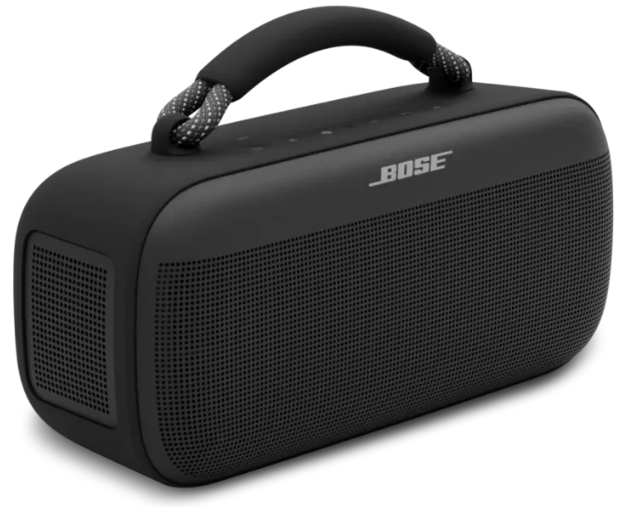
Introduction: Premium Portable Audio Excellence
The Bose SoundLink Max Portable Speaker represents a significant advancement in portable audio technology, combining professional-grade sound quality with exceptional portability. This powerful Bluetooth speaker delivers impressive audio performance in a compact, travel-friendly design that weighs just 2.13kg. The Bose SoundLink Max is engineered for music enthusiasts, outdoor adventurers, and party-goers who refuse to compromise on sound quality while maintaining mobility.
With its distinctive design and robust feature set, the Bose SoundLink Max portable speaker stands out in the premium portable speaker market. The device features Snapdragon Sound technology, stereo audio capabilities, and exceptional battery longevity that ensures your music never stops, whether you're hosting a backyard gathering or exploring remote locations. The speaker's IP67 waterproof rating makes it suitable for beach trips, poolside use, and unpredictable weather conditions.
Priced at approximately $399, the Bose SoundLink Max targets discerning consumers who value audio fidelity and durability. This portable Bluetooth speaker is ideal for social gatherings, travel, outdoor recreation, and anyone seeking a high-performance audio solution beyond standard consumer speakers. The combination of big-speaker energy with grab-and-go convenience makes the Bose SoundLink Max an excellent investment for those seeking reliable, premium audio on the move.
WHAT’S IN THE BOX
CONTENTS
Confirm that the following parts are included:

Technical Specifications & Features
Physical Dimensions and Build Quality:
- Weight: 2.13kg (4.6 lbs)
- Dimensions: 120mm (H) x 265mm (W) x 105mm (D)
- Waterproof Rating: IP67 (submersible in water, dust-proof)
- Detachable, replaceable rope handle with optional shoulder sling accessory
- Durable construction suitable for outdoor environments
Audio Technology and Driver Configuration:
- 2 x 89mm transducers for mid and bass frequencies
- 1 x 23mm tweeter for high-frequency clarity
- 2 x 104x79mm racetrack passive radiators for bass enhancement
- Class D amplification for efficient power delivery
- Stereo sound capability with decent directivity
Connectivity and Codec Support:
- Bluetooth 5.3 with SBC, AAC, and aptX Adaptive codec support
- Snapdragon Sound technology for optimized audio quality
- Google Fast Pair for seamless device pairing
- Bose SimpleSync for multi-speaker connectivity
- Multipoint connection supporting up to two simultaneous devices
- 3.5mm auxiliary input for wired audio connections
- USB-C port for charging and power output functionality
Battery and Power Performance:
- Battery Life: Up to 20 hours on a single charge
- Charging Port: USB-C with fast charging capability
- Input Rating: 5/9/15/20V, 3A Max
- Output Rating: 5V, 3A
- Auto-off timer feature to conserve battery
Control Interface and User Experience:
- Power button with single/double/triple press functions
- Bluetooth connectivity button
- Dedicated shortcut button (customizable via Bose app)
- Volume up and down buttons with rapid adjustment capability
- Play/pause button with track skip functionality
- LED indicators for volume limits and connection status
- Graphic EQ and sound presets available through the Bose app
Important Safety Instructions
- Do not block any ventilation openings. Install in accordance with the manufacturer’s instructions.
- If the speaker is exposed to salt or chlorinated water, gently rinse with fresh water following the exposure to remove residue. Make sure the connector port is fully dried out before charging.
- Only use attachments/accessories specified by the manufacturer.
- Refer all servicing to qualified personnel. Servicing is required when the apparatus does not operate normally, or has been physically damaged.
WARNINGS/CAUTIONS
Contains small parts which may be a choking hazard. Not suitable for children under age 3.
This product contains magnetic material. Consult your physician on whether this might affect your implantable medical device.
- Keep the product away from fire and heat sources. Do NOT place naked flame sources, such as lighted candles, on or near the product.
- Do NOT make unauthorized alterations to this product.
- Use this product only with an agency-approved LPS power supply that meets local regulatory requirements (e.g., UL, CSA, VDE, CCC).
- The battery provided with this product may present a risk of fire, explosion, or chemical burn if mishandled, incorrectly replaced, or replaced with an incorrect type.
- Do not expose products containing batteries to excessive heat (e.g., from storage in direct sunlight, fire, or the like).
- If the battery leaks, do not allow the liquid to come in contact with the skin or eyes. If contact is made, seek medical advice.
- The product label is located on the bottom of the product.
CONNECT TO A DEVICE
You can connect the speaker to your device using any of the following:
- Your device’s Bluetooth settings (see “Using your device’s Bluetooth settings” below)
- The Bose app (see page 13)
- Fast Pair (Android devices only) (see page 17)
Using the Bose app
The Bose app lets you set up and control the speaker from any mobile device, such as a smartphone or tablet.
Using the app, you can manage Bluetooth connections, manage speaker settings, adjust the audio, choose your voice prompt language, and get any future updates and new features made available by Bose.
NOTE: If you’ve already downloaded the Bose app for another Bose product, you can add the speaker from the product list screen.
On your device, download the Bose app.
- Follow the app instructions to add the speaker.
RECONNECT TO A DEVICE
Reconnect to the most recently-connected device.
When powered on, the speaker connects to the two most recently connected devices.
NOTES:
- The devices must be within range (30 ft or 9 m) and powered on.
- Make sure the Bluetooth feature is enabled on your devices.
CONNECT AN ADDITIONAL DEVICE
speaker can be actively connected to two devices at a time (multi-point connection).
To connect an additional device, see page 12.
NOTES:
- You can only play audio from one device at a time.
- To manage or disable the multi-point connection feature, use the Bose app. To access this option, tap Source on the product control screen.
- Disabling the multi-point connection feature disconnects the second connected device.
SWITCH BETWEEN TWO CONNECTED DEVICES
- Pause audio on your first device.
- Play audio on your second device.
DISCONNECT A DEVICE
Use the device’s Bluetooth settings or the Bose app.
NOTE: Disabling the Bluetooth feature on your device disconnects the speaker and all other Bluetooth-connected products.
SPEAKER CONTROLS
Controls are located on the top of the speaker.

Auto-off timer
- The auto-off timer conserves the battery when the speaker is operating on battery power. The speaker switches off when the audio has stopped and the buttons have not been pressed for 20 minutes.
To wake the speaker, press the Power button I or the Bluetooth button l.
NOTE: To change the timer setting, use the Bose app. You can access this option from the Settings menu.
Disable the auto-off timer.
- Press and hold the Play/Pause button F and the Volume up button H simultaneously. You hear “Auto-off disabled.”
Repeat to re-enable the auto-off timer.
TIP: You can also disable the auto-off timer using the Bose app.
CHARGE THE SPEAKER
CAUTION: Do not attempt to charge the speaker while the speaker is wet. Doing so may cause damage to the speaker. The speaker is waterproof, but the USB-C port must be fully dried out before charging. If moisture is detected, the Power light slowly blinks white and amber (see page 27).
NOTE: Make sure you’re using the Bose-provided USB-C cable or a similar USB-C cable providing a minimum of 5V p, 3A.
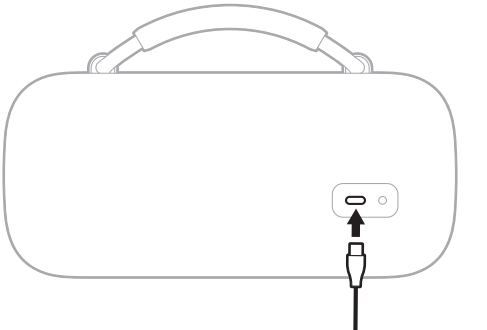
Connect one end of the USB-C cable to the USB-C port on the back of the speaker.
Connect the other end of the cable to a power source such as a USB-C power supply or a computer.
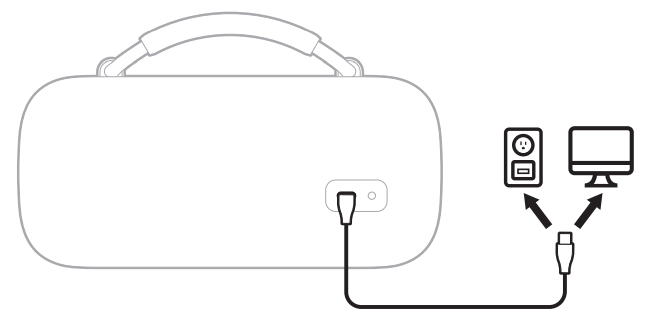
The Power light slowly pulses white. When the battery is fully charged, the Power light glows solid white.
Charging time
- Allow up to 5 hours to fully charge the battery.1
- A full charge powers the speaker up to 20 hours.2 At maximum volume, the battery lasts up to 3 hours.3
- Charging time and battery performance vary with the USB power supply capability, music content, speaker volume, and whether charging an external device.
Hear the battery level..
- Each time you power on the speaker, a voice prompt announces the battery level. When the speaker is in use, a voice prompt announces if the battery needs to be charged.
- While using the speaker, press and hold the Power button I until you hear a voice prompt announce the battery level.
View the battery level
The Power light glows according to the battery level (see page 27).
TIP: You can also view the battery level using the Bose app. You can access this option on the product control screen.
CHARGE YOUR DEVICE
CAUTION: Do not attempt to charge your device while the speaker is wet. Doing so may cause damage to the speaker. The speaker is waterproof, but the USB-C port must be fully dried out before charging. If moisture is detected, the Power light slowly blinks white and amber (see page 27).
Connect one end of the USB-C cable to the USB-C port on the back of the speaker.
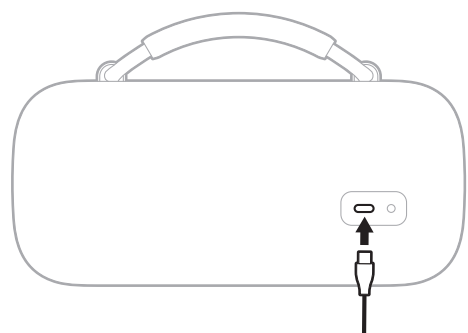
Connect the other end of the cable to the USB-C port on your device.
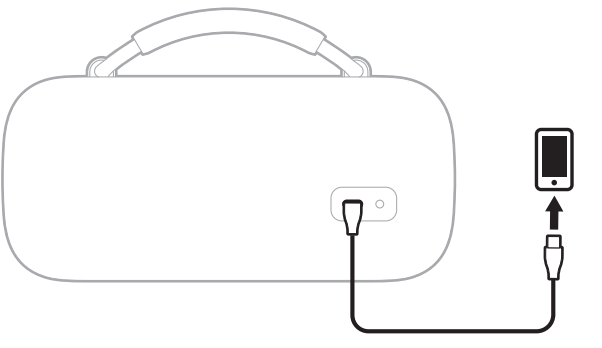
Charging status displays on your device.
CONNECT BOSE PRODUCTS
CONNECT TO A BOSE SMART SPEAKER OR SOUNDBAR
With Bose SimpleSync technology, you can connect the speaker to a Bose Smart Speaker or Bose Smart Soundbar to listen to the same audio in two different rooms at the same time.
NOTE: SimpleSync technology has a Bluetooth range of up to 30 ft (9 m). Walls and construction materials can affect reception.
Compatible products
You can connect the speaker to any Bose Smart Speaker or Bose Smart Soundbar.
Popular compatible products include:
- Bose Smart Ultra Soundbar/Bose Ultra Soundbar
- Bose Smart Soundbar 900
- Bose Smart Soundbar 700/Bose Soundbar 700
- Bose Smart Soundbar 600
- Bose Soundbar 500
- Bose Smart Speaker 500/Bose Home Speaker 500
- Bose Home Speaker 300
- Bose Portable Smart Speaker/Bose Portable Home Speaker
New products are added periodically. For a complete list and more information.
CARE AND MAINTENANCE
UPDATE THE SPEAKER
- The speaker begins updating automatically when connected to the Bose app and an update is available. Follow the app instructions. When the update begins, the Power light blinks white 3 times (repeated) until the update is complete.
- You can also update the speaker using the Bose updater website. On your computer, visit: bbtu.Btu.Bose.ose.comcom and follow the on-screen instructions. When the update begins, the Power light quickly blinks white for 10 seconds.
CLEAN THE SPEAKER
The speaker may require periodic cleaning.
- Clean the surface of the speaker with a soft, damp cloth (water only). Make sure the USB-C port is fully dried out before charging. If moisture is detected, the Power light slowly blinks white and amber (see page 27).
- Do not use any solvents, chemicals, or cleaning solutions containing alcohol, ammonia, or abrasives.
- If the speaker is exposed to salt or chlorinated water, gently rinse with fresh water following the exposure to remove residue.
STORE THE SPEAKER
When not in use, store the speaker in a cool place.
CAUTION: Do NOT store the speaker for extended periods when the battery is fully charged or has a low charge (see page 27).
REPLACEMENT PARTS AND ACCESSORIES
Replacement parts and accessories can be ordered through Bose customer service. Visit: support.Bsupport.Bose.ose.com/com/sl-maxsl-max
TROUBLESHOOTING
TRY THESE SOLUTIONS FIRST
If you experience problems with the speaker:
- Power the speaker off and then on again (see page 19).
- Charge the speaker (see page 24).
- Check the status lights (see page 27).
- Make sure your device supports Bluetooth connections (see page 12).
- Increase the volume on the speaker, your device, and your music app.
- Move your device closer to the speaker (30 ft or 9 m) and away from any interference or obstructions.
- Connect another device (see page 12).
OTHER SOLUTIONS
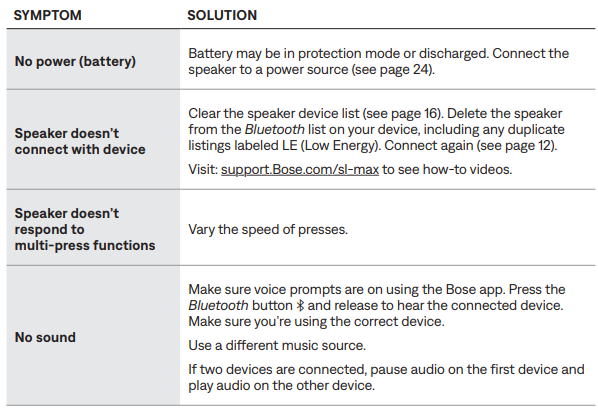
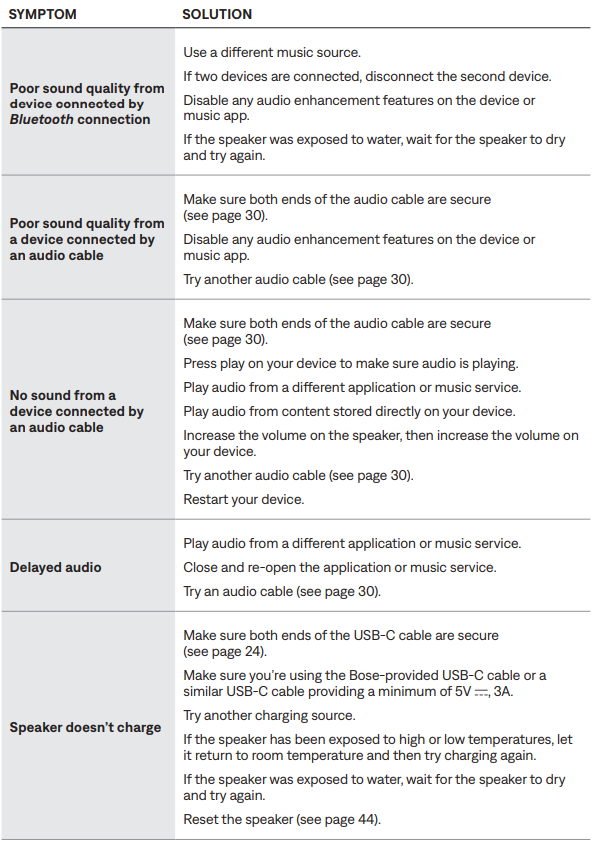
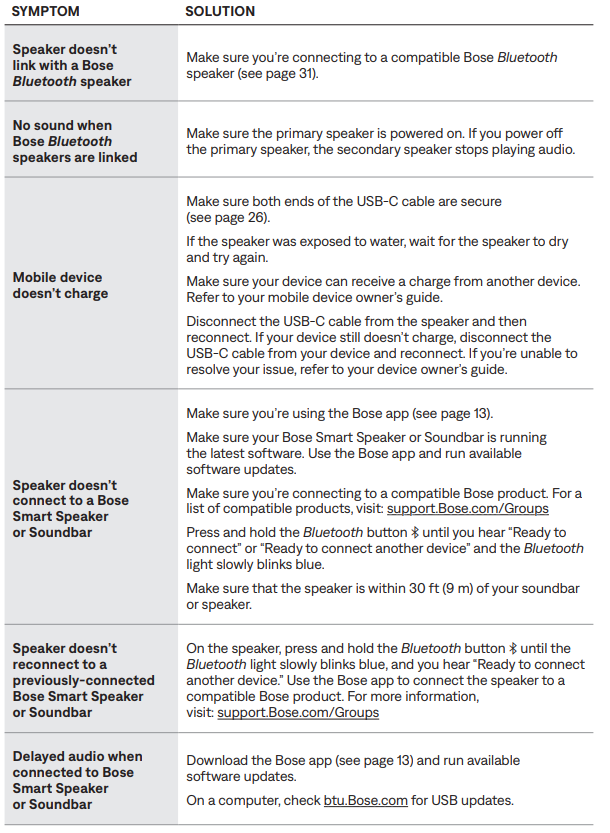
Common Issues
- Connectivity Problems:
If the Bose SoundLink Max portable speaker fails to connect to your device, ensure Bluetooth is enabled on both the speaker and your device. Press and hold the Bluetooth button for three seconds to enter pairing mode, and verify that your device appears in the available Bluetooth networks list. Clear previously paired devices from the speaker's memory by accessing the Bluetooth settings through the Bose app. If connectivity remains unstable, restart both devices and attempt pairing again. - Battery Issues:
Should the speaker fail to hold a charge or drain rapidly, first ensure the device is fully charged using the original USB-C cable for at least three hours. Verify that the auto-off timer is properly configured to prevent unnecessary power drain. Disable unnecessary features like multipoint connection if not required. If battery degradation persists, the internal battery may require professional service covered under the limited Bose warranty. - Audio Quality Concerns:
For distorted or low-quality audio, adjust the volume settings on both the speaker and your connected device to prevent clipping. Access the Bose app to reset the graphic EQ to default settings or select appropriate presets for your music genre. Verify that your connected device is within the effective Bluetooth range (typically 10 meters). Check that auxiliary cables are properly inserted into the 3.5mm jack, as loose connections cause audio degradation. - Water Damage and Protection:
Although the Bose SoundLink Max features IP67 protectioprotectsect the USB-C and 3.5mm ports from prolonged water exposure or sand accumulation. If water enters these ports, allow the speaker to dry completely before attempting to charge or use. Never submerge the speaker in saltwater, as this causes corrosion. For warranty claims related to water damage, contact Bose customer support with proof of purchase. - Support Resources:
Access comprehensive support through the official Bose website, which provides detailed troubleshooting guides, firmware updates, and warranty information. The Bose app offers real-time diagnostics and customization options. Limited warranty coverage applies to manufacturing defects for one year from the purchase date. Contact Bose customer service through their website for technical assistance, replacement options, or warranty claims.
LIMITED WARRANTY
- The speaker is covered by a limited warranty. Visit our website at wworldwide.Borldwide.Bose.ose.com/com/WWarrarrananttyy for details of the limited warranty.
- To register your product, for instructions. Failure to register will not affect your limited warranty rights.
Advantages & Disadvantages Analysis
Key Strengths of the Bose SoundLink Max:
- Exceptional Battery Life: The 20-hour battery capacity ensures extended usage without frequent charging, ideal for extended outdoor events or travel
- Impressive Audio Output: Gets loud with minimal compression at maximum volume, suitable for outdoor parties and large gatherings
- Robust Durability: IP67 waterproof rating with dust protection makes this portable Bluetooth speaker suitable for beach use, poolside environments, and unpredictable weather
- Advanced Connectivity: Snapdragon Sound technology, multipoint connection, and multiple codec support ensure superior audio quality and seamless device switching
- Stereo Capability: Unlike previous SoundLink models, this speaker delivers stereo audio with decent directivity
- Portable Design: Weighing just 2.13kg with a detachable handle makes transportation effortless
- Customization Options: Graphic EQ and sound presets via the Bose app provide personalized audio tuning
Notable Limitations:
- Price Point: At $399, the Bose SoundLink Max is positioned in the premium market segment, making it less accessible for budget-conscious consumers
- Limited Stereo Separation: While stereo-capable, the speaker produces minimal left-right channel separation compared to wider speakers
- Port Protection: USB-C and 3.5mm ports lack protective flaps or covers, leaving them vulnerable to sand and debris in beach environments
- No Voice Assistant Integration: The speaker lacks built-in voice assistant functionality, limiting hands-free control options
- No Room Correction: Absence of room correction features may limit sound optimization in various acoustic environments
- Weight Consideration: At 4.6 lbs, it's heavier than ultra-portable competitors, though still manageable for most users
- Directivity Limitations: Audio consistency varies depending on the listening position relative to the speaker
Value Proposition:
The Bose SoundLink Max portable speaker delivers excellent value for consumers prioritizing audio quality, durability, and battery longevity over budget constraints. The combination of premium sound engineering, robust construction, and extended battery life justifies the $399 investment for serious audio enthusiasts. Compared to alternatives in the same price range, this Bose speaker offers superior connectivity features and proven reliability.
User Feedback & Customer Reviews
- Overall Customer Satisfaction:
Users consistently praise the Bose SoundLink Max for its impressive audio quality and substantial battery endurance. The portable Bluetooth speaker receives particular acclaim for delivering concert-level sound in a compact, travel-friendly form factor. Customers appreciate the sturdy construction and detachable handle design, which facilitates easy transportation to parties, camping trips, and outdoor events. - Commonly Praised Features:
The extended 20-hour battery life emerges as a standout feature, with users reporting reliable performance throughout multi-day outdoor adventures. The IP67 waterproof rating receives consistent recognition for enabling worry-free usage in beach and poolside environments. Audio performance, particularly the dynamic bass response and overall clarity, garners frequent positive mentions. Users appreciate the customizable sound settings through the Bose app, allowing personalization of audio characteristics for different music genres. - Frequently Mentioned Concerns:
The primary complaint centers on the exposed USB-C and 3.5mm ports, with beach users noting vulnerability to sand infiltration. Some customers mention that the $399 price point represents a significant investment compared to budget alternatives. A minority of users report that stereo separation could be more pronounced, though most acknowledge that this is typical for compact speakers. The absence of voice assistant integration frustrates users accustomed to hands-free control features. - Purchase Recommendations:
The Bose SoundLink Max is highly recommended for outdoor enthusiasts, party hosts, and travelers who prioritize superior audio quality and durability. This portable speaker suits professionals requiring reliable audio for events and presentations. Conversely, budget-conscious consumers or those seeking ultra-lightweight options may consider alternatives. The speaker proves ideal for individuals with established Bose ecosystems seeking compatibility with SimpleSync multi-speaker functionality.
Conclusion
The Bose SoundLink Max Portable Speaker represents a premium offering in the portable audio market, combining professional audio engineering with exceptional portability. This comprehensive manual demonstrates that the Bose SoundLink Max delivers on its promise of big-speaker energy in a grab-and-go format. Whether you're hosting outdoor gatherings, embarking on adventures, or simply seeking superior portable audio, this speaker provides the performance and reliability necessary to satisfy discerning audio enthusiasts worldwide.
Faqs
How do I set up the bose SoundLink Max Portable Speaker for the first time?
What should I do if my bose SoundLink Max Portable Speaker won’t connect via Bluetooth?
Can I charge my phone using the bose SoundLink Max Portable Speaker’s USB-C port?
How do I use the AUX input on the bose SoundLink Max Portable Speaker?
What are the key features that make the bose SoundLink Max Portable Speaker suitable for outdoor use?
How can I optimize the sound performance of my bose SoundLink Max Portable Speaker?
How do I maintain and clean my bose SoundLink Max Portable Speaker to ensure longevity?
What troubleshooting steps can I take if the bose SoundLink Max Portable Speaker battery does not charge properly?
More bose manuals
- Pairing & Setup: Bose SoundLink Flex Bluetooth Speaker User Manual
- Setup: Bose Soundlink Revolve+ Speaker User Manual
- Pairing: Bose SoundLink Revolve + Il Bluetooth Speaker User Manual
- Pairing & Setup: Bose SoundLink® Bluetooth Speaker III User Manual
- Pairing: Bose SoundLink Flex Portable Speaker (2 Gen) User Manual
- Setup & Pairing: Bose Soundlink Color II User Manual
Leave a Comment