
Pairing: Bose SoundLink Revolve + Il Bluetooth Speaker User Manual
Content
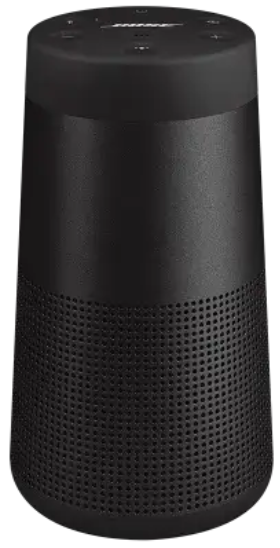
Bose SoundLink Revolve + II Bluetooth Speaker
Introduction
The Bose SoundLink Revolve + II Bluetooth Speaker is a premium portable audio solution designed for music lovers who demand immersive, room-filling sound. With its sleek, cylindrical design and durable build, this speaker delivers a true 360-degree audio experience, making it perfect for gatherings, outdoor events, or simply enjoying music at home. The SoundLink Revolve + II stands out with its powerful dual passive radiators, downward-facing transducer, and omnidirectional acoustic deflector, ensuring balanced sound and deep bass from every angle.
Key benefits include up to 17 hours of battery life, Bluetooth multipoint connectivity, and water resistance (IP55 rating), making it ideal for both indoor and outdoor use. The built-in carrying handle enhances portability, while Party Mode and Stereo Mode allow for flexible audio setups with compatible Bose speakers. The Bose SoundLink Revolve + II is perfect for casual listeners, party hosts, and anyone seeking a reliable, high-performance Bluetooth speaker.
Available at major electronics retailers, the Bose SoundLink Revolve + II Bluetooth Speaker typically retails between $250 and $300, offering excellent value for its advanced features and premium sound quality.
Specifications of the Bose SoundLink Revolve + II Bluetooth Speaker
- Battery Life: Up to 17 hours
- Wireless Range: Up to 9 meters (30 feet)
- Connectivity: Bluetooth 4.2, NFC, 3.5mm auxiliary input
- Audio Output: 8W, mono (downmixes stereo to mono)
- Dimensions: 114 in³ (1,872 cm³)
- Weight: 2.0 lbs (0.9 kg)
- Water Resistance: IP55 (dust and splash resistant)
- Controls: Volume, playback, call management, voice assistant activation
- Multi-Device Pairing: Stores up to 8 paired devices, connects to 2 simultaneously
- Additional Features: Party Mode, Stereo Mode, Bose Connect app support, USB charging cradle compatibility
TECHNICAL INFORMATION
- Input Voltage: 5V
- Input Current: 1.6A
Compared to similar models like the JBL Flip 6 or Sony SRS-XB33, the Bose SoundLink Revolve + II excels in sound clarity, battery life, and build quality, making it a top choice for discerning audio enthusiasts.
WHAT’S IN THE BOX
CONTENTS
Confirm that the following parts are included:

Important Safety Instructions
- Read these instructions.
- Keep these instructions.
- Heed all warnings.
- Follow all instructions.
- Do not install near any heat sources such as radiators, heat registers, stoves, or other apparatus (including amplifiers) that produce heat.
- Only use attachments/accessories specified by the manufacturer.
- Unplug this apparatus during lightning storms or when unused for long periods of time.
- Refer all servicing to qualified personnel. Servicing is required when the apparatus has been damaged in any way, such as power-supply cord or plug is damaged, objects have fallen into the apparatus, it does not operate normally, or it has been dropped.
DOWNLOAD THE BOSE CONNECT APP
On your mobile device, download the Bose Connect app.

- Follow the app instructions.
SPEAKER PLACEMENT
PLACEMENT GUIDELINES
- For best Bluetooth performance, place your mobile device within 33 ft (10 m) of your speaker, and make sure there is a clear line of sight between you and your speaker. Moving your device farther away, or not having a clear line of sight may impact sound quality, and your device may disconnect from your speaker.
- Keep other wireless equipment at least 3 ft (1 m) away from your speaker.
- Place your speaker and your device outside of and away from metal cabinets, other audio/video components, and direct heat sources.
CAUTIONS
- Stand your speaker on its base. Standing your speaker on any other side may cause damage to your speaker and affect sound quality.
- Avoid placing your speaker on wet or dirty surfaces.
CONNECT TO POWER
Your speaker ships with a partial charge. Before using your speaker for the first time, connect it to an AC (mains) outlet. Your speaker does not need to be fully charged, but it does require the initial connection to activate the battery.
Plug the small end of the USB cable into the micro-B USB connector on your speaker.
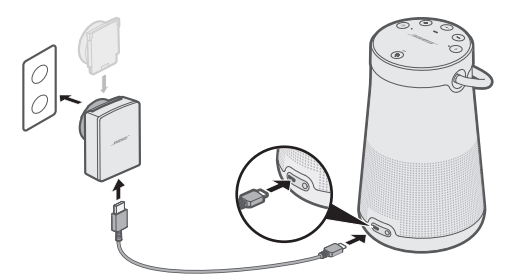
- Plug the other end into the USB power supply.
- Plug the USB power supply into an AC (mains) outlet.
SPEAKER CONTROLS
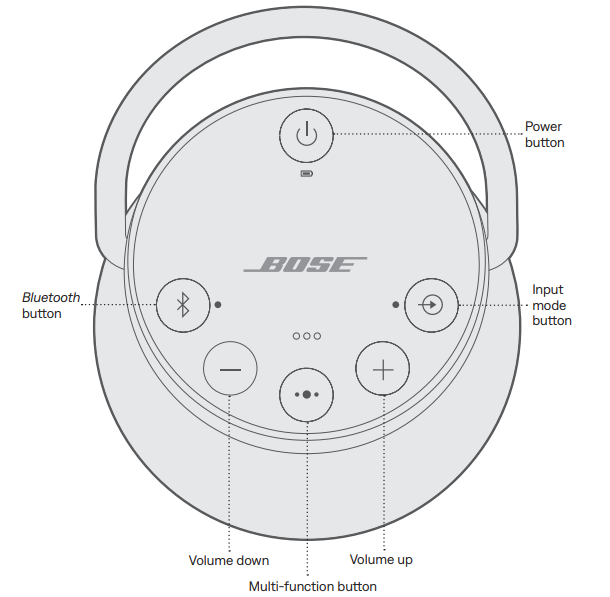
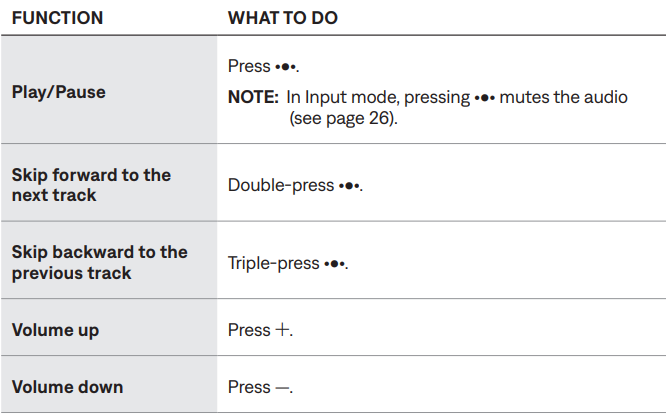
The button pad enables you to power on your speaker and control your speaker’s playback, volume, and speakerphone.
NOTE: Certain mobile devices may not support these functions.
MEDIA PLAYBACK AND VOLUME
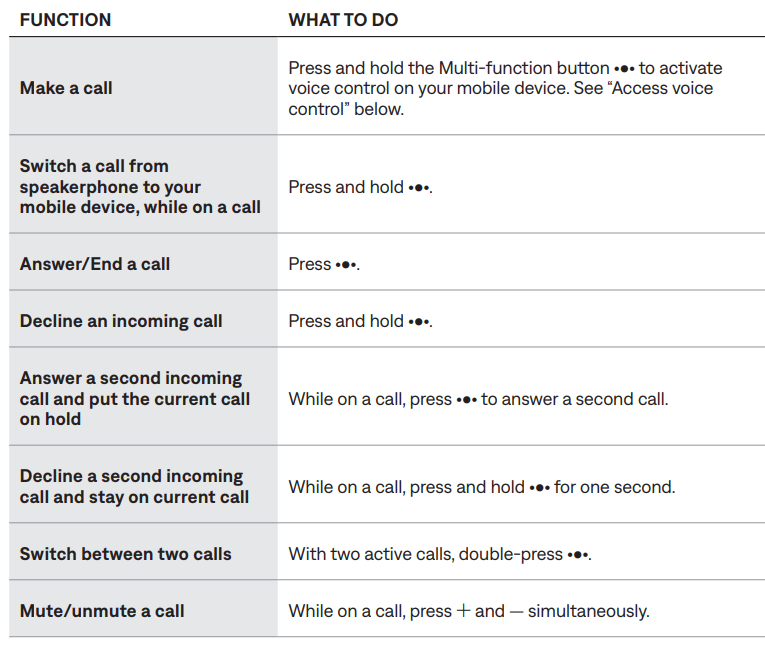
PHONE CALLS
PAIR YOUR MOBILE DEVICE
When you power on your speaker for the first time, the speaker automatically searches for your mobile device.
- On your device, turn on the Bluetooth feature.
TIP: The Bluetooth feature is usually found in the Settings menu. - Select your Bose Revolve + II SoundLink speaker from the device list.
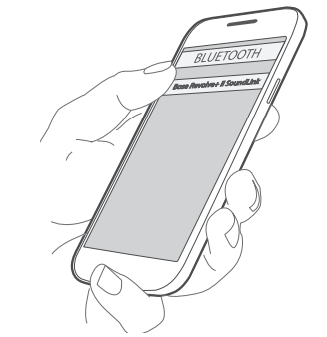
Once paired, you hear “Connected to <mobile device name>,” and the Bluetooth light glows solid white.
PAIR A MOBILE DEVICE WITH NFC
NOTE: When you power on your speaker for the first time, make sure a language is selected before you pair your mobile device with NFC.
- Unlock your mobile device, and turn on the Bluetooth and NFC features.
Refer to your device owner’s guide to learn more about these features. - Tap and hold the NFC touchpoint on your device to the top center of your speaker. The target area is the Bose logo.
Your device may prompt you to accept pairing.

Once paired, you hear “Connected to <mobile device name>,” and the tooth indicator turns green.
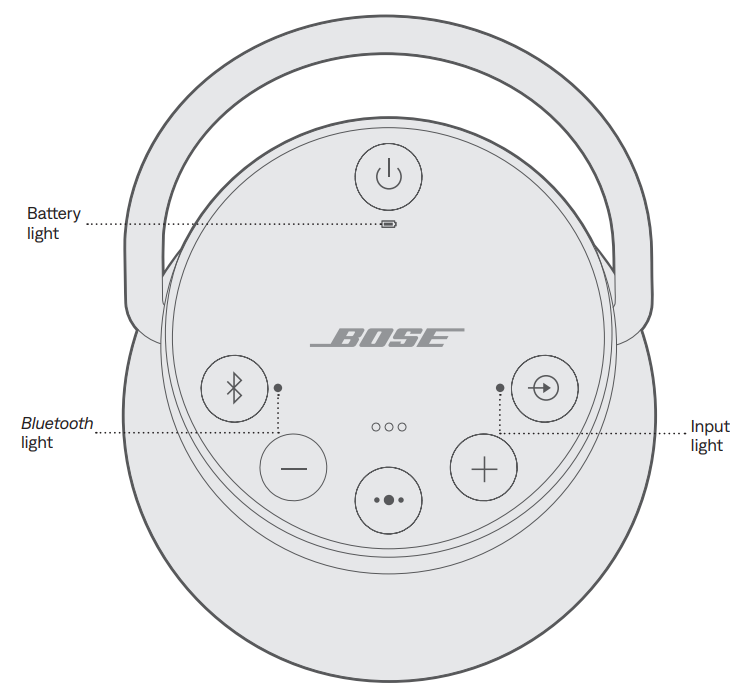
SPEAKER STATUS
The top of the speaker has a series of lights that glow according to the system state.
PAIR BOSE PRODUCTS
PAIR WITH A BOSE HOME SPEAKER OR SOUNDBAR
With Bose SimpleSync technology, you can pair your SoundLink Revolve + II speaker with a Bose Home Speaker or Bose Soundbar to listen to the same song in two different rooms at the same time.
NOTE: SimpleSync technology has a Bluetooth range of 30 ft (9 m). Walls and construction materials can affect reception.
Compatible products
You can pair your SoundLink Revolve + II speaker with any member of the Bose Home Speaker family.
Popular compatible products include:
- Bose Soundbar 700
- Bose Soundbar 500
- Bose Home Speaker 500
- Bose Home Speaker 300
- Bose Portable Home Speaker
Pair using the Bose app
- On your SoundLink Revolve + II speaker, press and hold the Bluetooth button l until the Bluetooth indicator blinks blue, and you hear “Ready to pair another device.”
- In the Bose app, from the My Bose screen, select your Bose Home Speaker or Bose Soundbar.
NOTE: To return to the My Bose screen, tap Z in the top-left corner of the screen. - Tap the product image in the bottom-right corner of the screen.
- Tap Group Speakers.
- Follow the app instructions to connect a new Bluetooth device using SimpleSync.
NOTES:
- Make sure that your SoundLink Revolve + II speaker is within 30 ft (9 m) of your Bose Home Speaker or Bose Soundbar.
- You can pair your SoundLink Revolve + II speaker with only one product at a time.
RECONNECT TO A BOSE HOME SPEAKER OR SOUNDBAR
Use the Bose app to reconnect the speaker to a previously paired compatible Bose product. For more information, visit: worldwide.Bose.com/Support/Groups
NOTES:
- Your Bose Home Speaker or Bose Soundbar must be within range (30 ft or 9 m) and powered on.
- If your SoundLink Revolve + II speaker doesn’t connect, see “Speaker does not reconnect to a previously-paired Bose Home Speaker or Bose Soundbar” on page 37.
CARE AND MAINTENANCE
CLEAN THE SPEAKER
- Clean the surface of the speaker and handle with a soft, damp cloth (water only).
- Do not use any sprays near the speaker. Do not use any solvents, chemicals, or cleaning solutions containing alcohol, ammonia o or abrasives.
- Do not allow liquids to spill into any openings.
REPLACEMENT PARTS AND ACCESSORIES
Replacement parts and accessories can be ordered through Bose customer service.
Troubleshooting the Bose SoundLink Revolve + II Bluetooth Speaker
- Connection Issues: Ensure Bluetooth is enabled on your device. Restart both the speaker and your device if pairing fails.
- No Sound: Check volume levels, ensure the speaker is not muted, and verify the audio source is correctly selected.
- Low Battery: Charge the speaker using the included USB cable or charging cradle.
- Distorted Audio: Reduce volume or move the speaker away from walls or obstacles.
- Water Damage: If exposed to water, dry the speaker thoroughly before use.
TRY THESE SOLUTIONS FIRST
If you experience problems with the speaker:
- Check the battery light 6 (see page 28). Charge your speaker if necessary.
- Secure all cables.
- Check the state of status lights (see page 28).
- Place your speaker according to placement guidelines (see page 13).
- Make sure your mobile device supports Bluetooth or pairing via NFC technology (see page 21).
OTHER SOLUTIONS
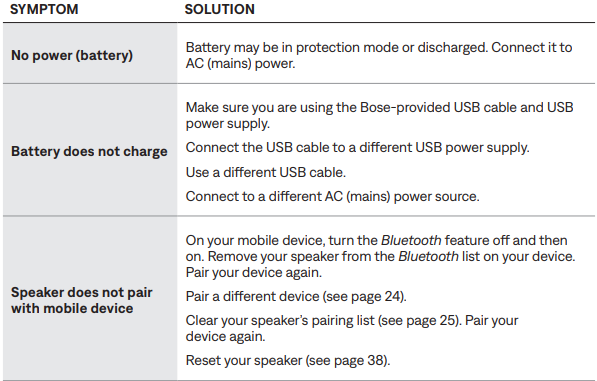
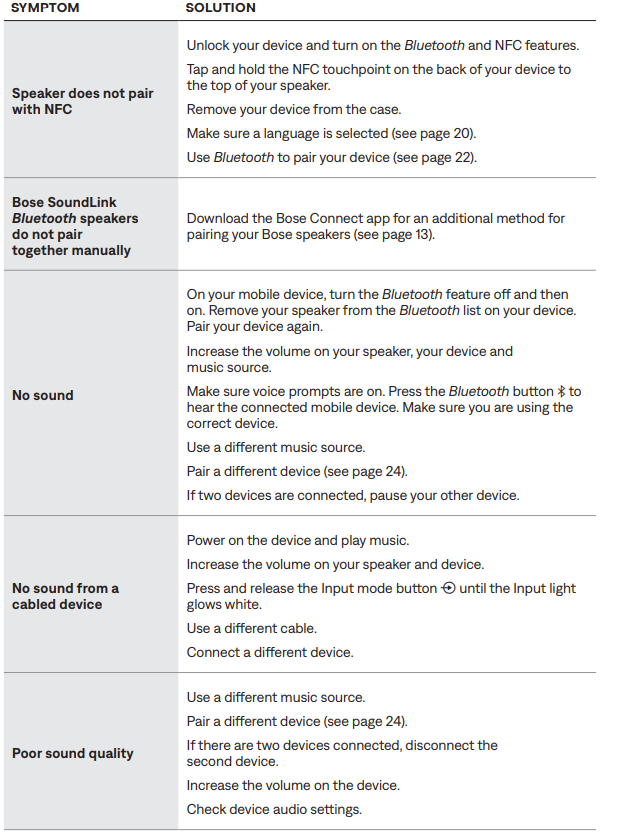
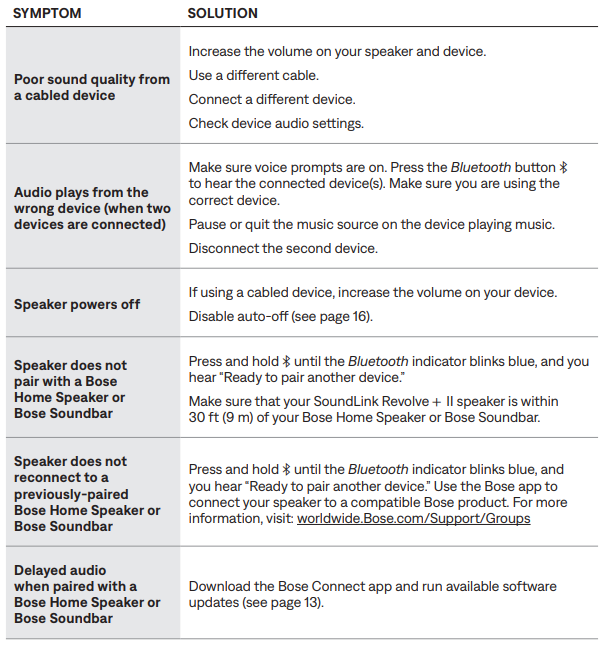
If you could not resolve your issue, see the table below to identify symptoms and solutions to common problems. If you are unable to resolve your issue, contact Bose customer service.
Preventive measures include regular cleaning, avoiding extreme temperatures, and using the charging cradle for optimal battery health. The Bose SoundLink Revolve + II comes with a limited warranty. For support, contact Bose customer service at 1-800-444-2673 or visit the official Bose website.
LIMITED WARRANTY
- The speaker is covered by a limited warranty. Visit our website at global.Bose.com/warranty for details of the limited warranty.
- To register your product, visit global.Bose.com/register for instructions. Failure to register will not affect your limited warranty rights
Pros & Cons of the Bose SoundLink Revolve + II Bluetooth Speaker
Pros
- Exceptional 360-degree sound quality
- Long battery life (up to 17 hours)
- Durable, water-resistant design (IP55)
- Easy multi-device pairing and management
- Convenient carrying handle for portability
Cons
- No built-in voice assistant (Alexa/Google Assistant)
- Audio downmixes to mono (not true stereo)
- Compression artifacts at maximum volume
- Higher price compared to some competitors
The Bose SoundLink Revolve + II offers excellent value for its premium features, making it a worthwhile investment for those seeking high-quality portable audio.
Customer Reviews of the Bose SoundLink Revolve + II Bluetooth Speaker
Users consistently praise the Bose SoundLink Revolve + II for its powerful sound, durability, and ease of use. Many highlight the 360-degree audio as a standout feature, perfect for parties and outdoor events. Common complaints include the lack of a built-in voice assistant and occasional audio distortion at high volumes. The speaker holds an average rating of 4.5 stars, with customers recommending it for its reliability and performance. Frequent mentions include its long battery life and robust build, making it a top pick among portable Bluetooth speakers.
Faqs
How do I set up the Bose SoundLink Revolve + II Bluetooth Speaker for the first time?
Why won’t my Bose SoundLink Revolve + II Bluetooth Speaker connect to my device?
Can I connect two devices to the Bose SoundLink Revolve + II Bluetooth Speaker at once?
How do I use the AUX input on the Bose SoundLink Revolve + II Bluetooth Speaker?
Can I disable the voice prompts on the Bose SoundLink Revolve + II Bluetooth Speaker?
How do I pair my Bose SoundLink Revolve + II Bluetooth Speaker with NFC?
How do I optimize the sound quality on my Bose SoundLink Revolve + II Bluetooth Speaker?
How should I maintain and care for my Bose SoundLink Revolve + II Bluetooth Speaker?
More bose manuals
- Pairing: Bose SoundLink Flex Portable Speaker (2 Gen) User Manual
- Pairing & Setup: Bose SoundLink Flex Bluetooth Speaker User Manual
- Setup & Pairing: Bose On-Ear Wireless Headphones User Manual
- Setup: Bose Soundlink Max Portable Speaker User Manual
- Setup & Pairing: Bose AE2i Audio Headphones User Manual
- Setup: Bose Soundlink Revolve+ Speaker User Manual
Leave a Comment