
Pairing & Setup: Bose QuietComfort Earbuds II User Manual
Content
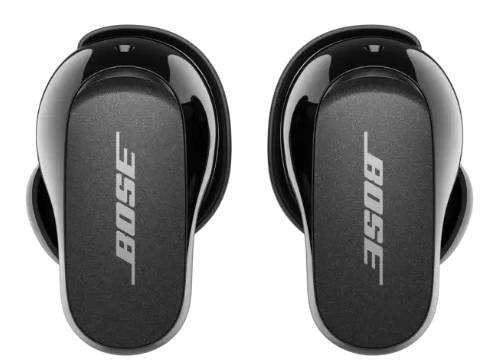
Bose QuietComfort Earbuds II
Introduction
The Bose QuietComfort Earbuds II redefine what’s possible in wireless earbuds, offering immersive sound, industry-leading noise cancellation, and a personalized listening experience. Designed for music lovers, commuters, remote workers, and fitness enthusiasts, these earbuds deliver lifelike audio tailored to your unique ear shape using CustomTune technology. With adjustable noise cancellation, intuitive touch controls, and a comfortable, secure fit, the Bose QuietComfort Earbuds II are ideal for everyday use,, whether you’re working, traveling, or relaxing.
Key benefits include up to 6 hours of battery life (24 hours with the charging case), Bluetooth 5.3 connectivity, IPX4 sweat and splash resistance, and a compact, lightweight design. The earbuds support voice assistants and offer customizable EQ settings for bass, mid-range, and treble. Priced at $199 (originally $279), the Bose QuietComfort Earbuds II are widely available through major retailers and Bose’s official website, making premium audio accessible to a broad audience.
CONTENTS
Confirm that the following parts are included:
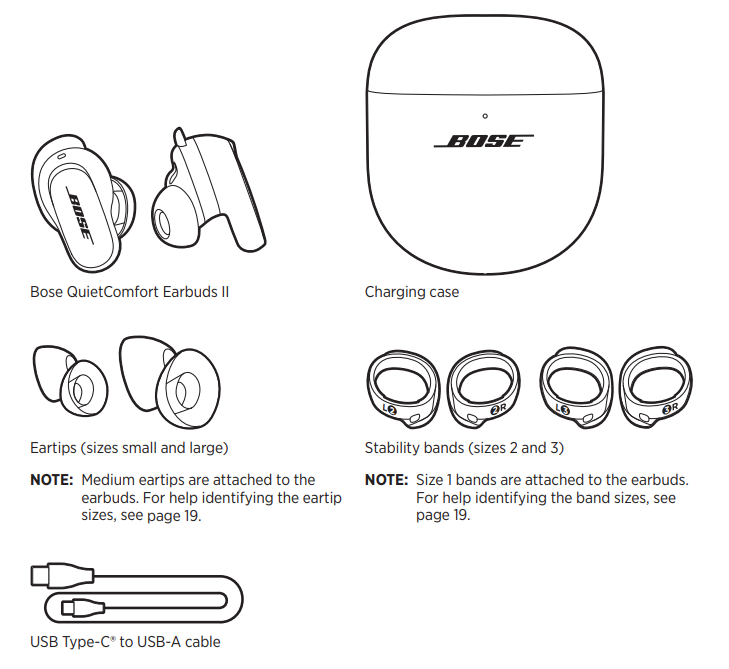
Specifications: Bose QuietComfort Earbuds II
- Battery Life: Up to 6 hours per charge, 24 hours with charging case
- Charging Time: 1 hour for earbuds, 3 hours for case, 20 minutes for 2 hours of playback
- Bluetooth: Version 5.3, range up to 30 feet
- Noise Cancellation: Adjustable ANC with 11 levels, customizable presets
- Sound Technology: CustomTune sound calibration, three-band EQ, auto-optimizer
- Fit Options: 9 combinations of eartips and stability bands
- Water Resistance: IPX4 rating (sweat, splash, spray)
- Controls: Touch-based swipe, tap, and long-press for playback, calls, volume, and ANC
- App Support: Bose Music app for EQ, ANC presets, fit test, and firmware updates
- Microphones: Built-in for clear calls and voice assistant access
- Weight: 30% smaller and lighter than the previous generation
- Charging: USB-C (no wireless charging)
Compared to competitors like AirPods Pro 2, the Bose QuietComfort Earbuds II offer superior noise cancellation, more customizable sound, and a more secure fit, making them a top choice for audiophiles and frequent travelers.
DOWNLOAD THE BOSE MUSIC APP
On your mobile device, download the Bose Music app.
NOTE: If you’re located in Mainland China, download the Bose8 app.
- Follow the app instructions.
CHECK YOUR FIT
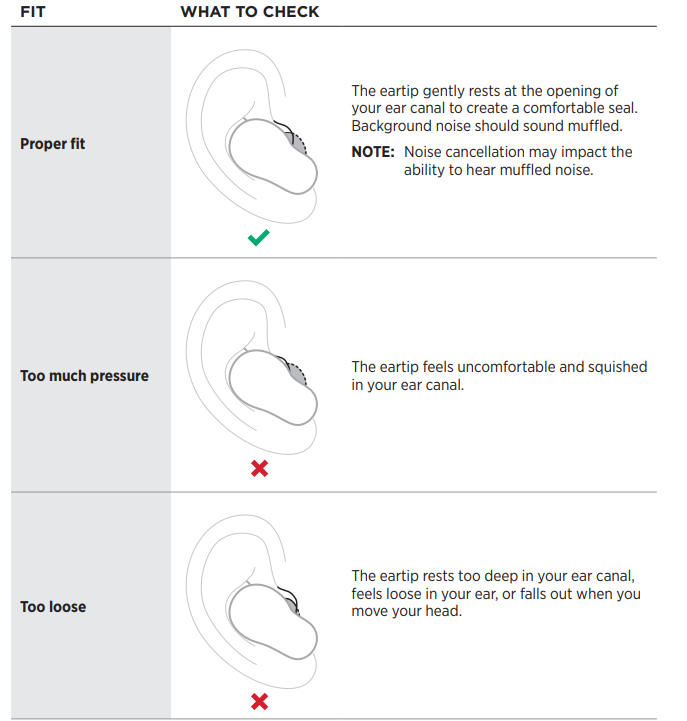
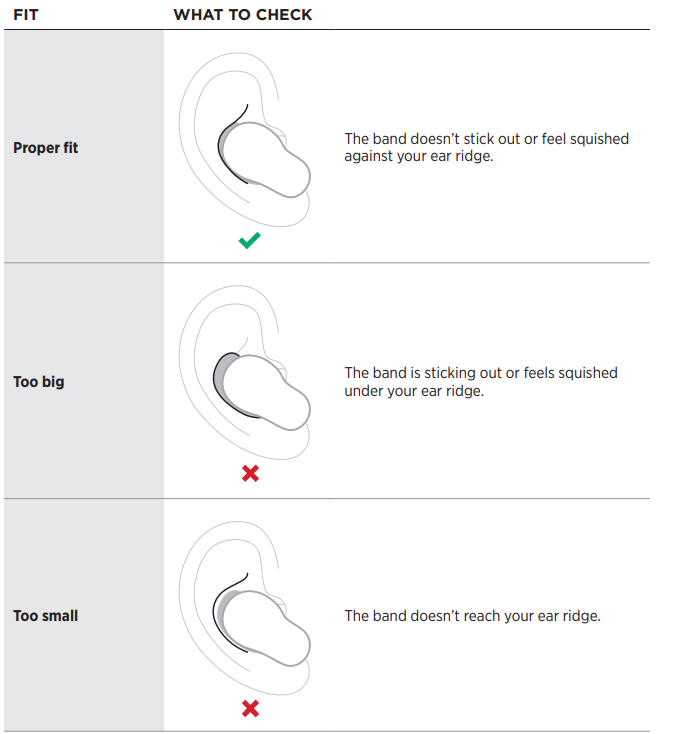
For the best fit, audio performance, and noise cancellation, use a mirror to make sure you’re using the correct size eartips and stability bands. You may need to try a different size eartip or stability band for each ear.
TIP: You can also check your fit using the Eartip Fit Test in the Bose Music app. You can access this option from the Settings menu.
Eartips
Stability bands
TRY ANOTHER SIZE
Wear the earbuds for an extended period of time. If the earbuds don’t feel comfortable or secure, or noise cancellation or sound quality isn’t as expected, try another size eartip or stability band.
You may need to try all three eartips or band sizes,, or use a different size eartip or band for each ear.
Eartips
The eartips come in small, medium, and large.

Medium eartips come attached to the earbuds. If they feel too small, try large eartips. If they feel too big, try small eartips.
Stability bands
The stability bands are marked with size 1 (small), 2 (medium), or 3 (large) and an R (right) or L (left).
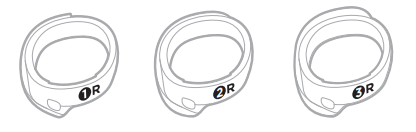
Size 1 bands come attached to the earbuds. If they feel too small, try size 2 bands.
CHANGE THE EARTIPS
Holding the earbud, gently squeeze the eartip and peel it away from the earbud.
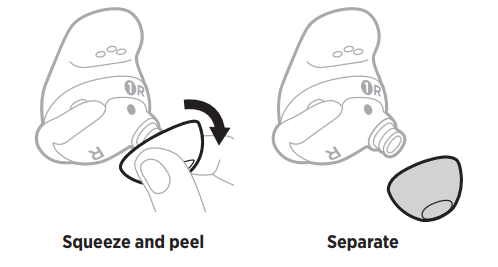
CAUTION: To prevent tearing, do NOT pull on the edge of the eartip.
- Choose a new eartip size (see page 19).
- Align the eartip with the earbud nozzle and press the eartip onto the nozzle until you feel it snap securely into place and hear it click.
- Repeat steps 1 – 3 for the other earbud, as needed.
NOTE: You may need to use a different size eartip for each ear. - Insert the earbuds (see page 16).
- Check the fit (see page 17).
NOTES:
- If you change the eartip, you may need to change the stability band so the band rests comfortably against your ear ridge (see page 21).
- To see how-to videos about changing the eartips, visit: support.Bosesupport.Bose..ccomom//QCEiiQCEii
- If you need additional eartip sizes, contact Bose customer service or visit: support.Bosesupport.Bose..ccomom//QCEiiQCEii
CHANGE THE STABILITY BANDS
Holding the earbud, gently grab the stability band scoop and peel the band toward you, over the eartip, and away from the earbud.
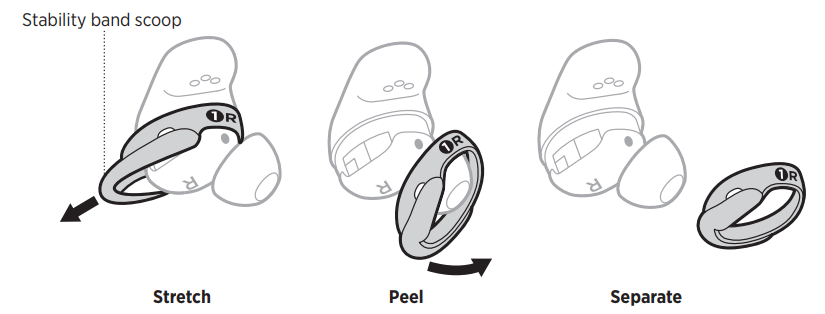
CAUTION: To prevent tearing, do NOT pull on the thin part of the band.
- Choose a new band size (see page 19).
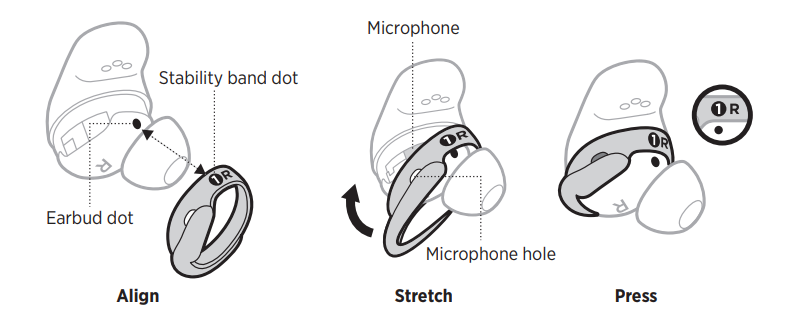
- With the band markings facing you and the band scoop facing away from you, align the dot on the band with the gray dot on the bottom of the earbud.
- Gently stretch the band over the eartip, making sure the dots align and the microphone hole on the band is over the microphone on the earbud so the microphone isn’t blocked.
- Press down until the band fits securely into place.
NOISE CANCELLATION
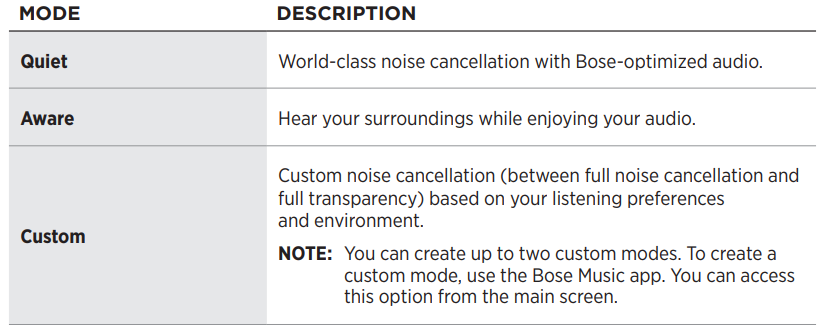
Noise cancelling reduces unwanted noise, providing a clearer and more lifelike audio performance. You can choose between two pre-configured nnoise-cancellingmodes modes, Quiet and Aware, or create up to two of your own custom modes.
- Quiet Mode allows you to block out distractions using the highest level of noise cancellation.
- Aware Mode provides full transparency and allows you to hear your surroundings while enjoying your audio.
- Aware Mode also includes ActiveSense™ technology to reduce sudden or loud noises.
- Choose your yournoise-cancelinge headphone based on your listening preferences nd environment.
NOISE CANCELLING MODES
CHARGE THE EARBUDS
Align the charging contacts on the left earbud with the charging pins on the left side of the charging case.
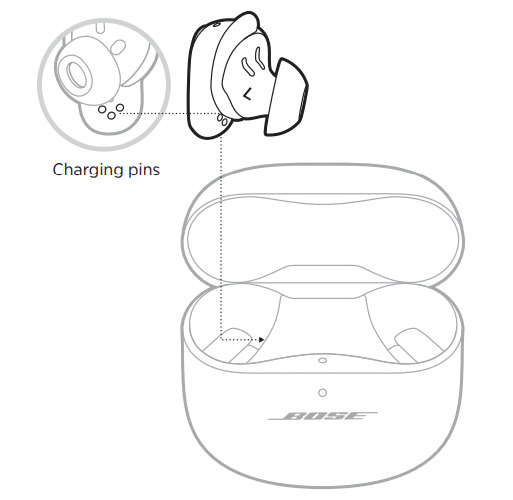
NOTE: Before charging, make sure the earbuds are at room temperature, between 46° F (8° C) and 102° F (39° C).
Place the earbud in the case until it magnetically snaps into place.
The earbuds' status light blinks white and then glows according to the charging status (see page 36).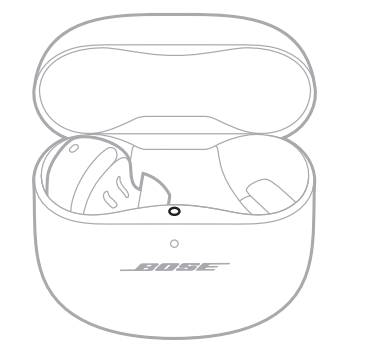
- Repeat steps 1 – 2 for the right earbud.
NOTE: The earbuds charge whether the case is open or closed.
CHARGE THE CHARGING CASE
CAUTION: Use this product only with an agency-approved LPS power supply that meets local regulations (e.g., UL, CSA, VDE, CCC).
- Connect the small end of the USB cable to the USB-C® port on the bottom of the charging case.
Connect the other end to a USB-A wall charger (not provided) or computer.
The charging case status light glows solid amber (see page 37).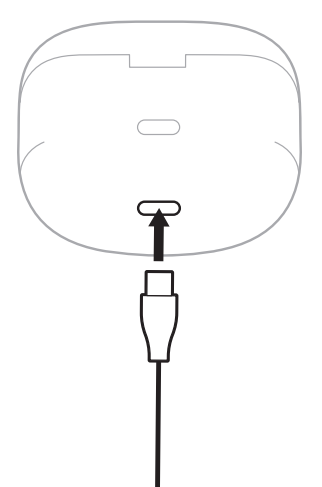
NOTE: Before charging, be sure the case is at room temperature, between 46° F (8° C) and 102° F (39° C).
CARE AND MAINTENANCE
STORE THE EARBUDS
When you’re not using the earbuds, store them in the charging case. Close the charging case to help preserve battery life and keep the charging case free of debris.
CLEAN THE EARBUDS AND CHARGING CASE
REPLACEMENT PARTS AND ACCESSORIES
Replacement parts and accessories can be ordered through Bose customer service. Visit: support.Bosesupport.Bose..ccomom//QCEiiQCEii
UPDATE THE EARBUDS
The earbuds begin updating automatically when connected to the Bose Music app and an update is available. Follow the app instructions.
UPDATE THE CHARGING CASE
Update the charging case using the Bose updater website. On your computer, visit: btu.Bosebtu.Bose..ccomom and follow the on-screen instructions.
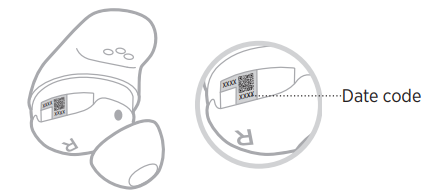
VIEW THE EARBUD DATE CODE
- Remove the stability band from the earbud (see page 21).
- The date code is located on the earbud in the wide area near the microphone.
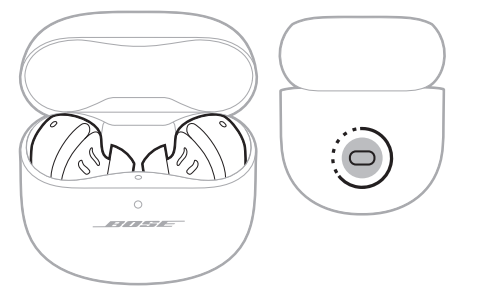
VIEW THE CHARGING CASE SERIAL NUMBER
- Remove the earbuds from the charging case.
- The charging case serial number is located below the earbuds' status light inside the earbud well.
Troubleshooting: Bose QuietComfort Earbuds II
Common issues with the Bose QuietComfort Earbuds II include connection problems, battery drain, and fit discomfort. If the earbuds won’t connect, ensure Bluetooth is enabled and reset the device. For battery issues, check for firmware updates and avoid extreme temperatures. If sound quality is poor, run the ear tip fit test in the Bose Music app and try different eartip sizes.
Preventive measures include regular cleaning, storing in a case when not in use, and updating firmware. If problems persist, consult the Bose support website or contact customer service. The Bose QuietComfort Earbuds II come with a limited warranty covering manufacturing defects. For help, visit Bose’s official support page or call their customer service hotline.
TRY THESE SOLUTIONS FIRST
If you experience problems with the earbuds, try these solutions first:
- Charge the earbuds and the charging case (see page 32).
- Power on the earbuds (see page 23).
- Check the earbuds status light (see page 36) and charging case status light (see page 37).
- Make sure your mobile device supports Bluetooth connections (see page 38).
- Download the Bose Music app and run available software updates (see page 14).
- Move your mobile device closer to the earbuds (30 ft or 9 m) and away from any interference or obstructions.
- Increase the volume on the earbuds, your mobile device, and the music app.
- Connect another mobile device (see page 14).
OTHER SOLUTIONS
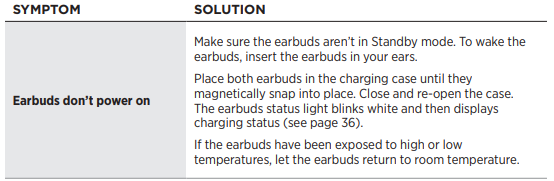
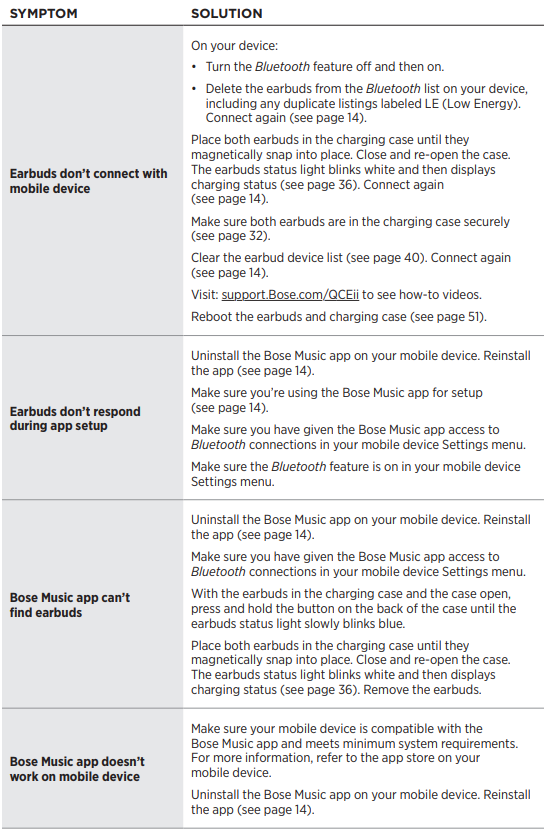
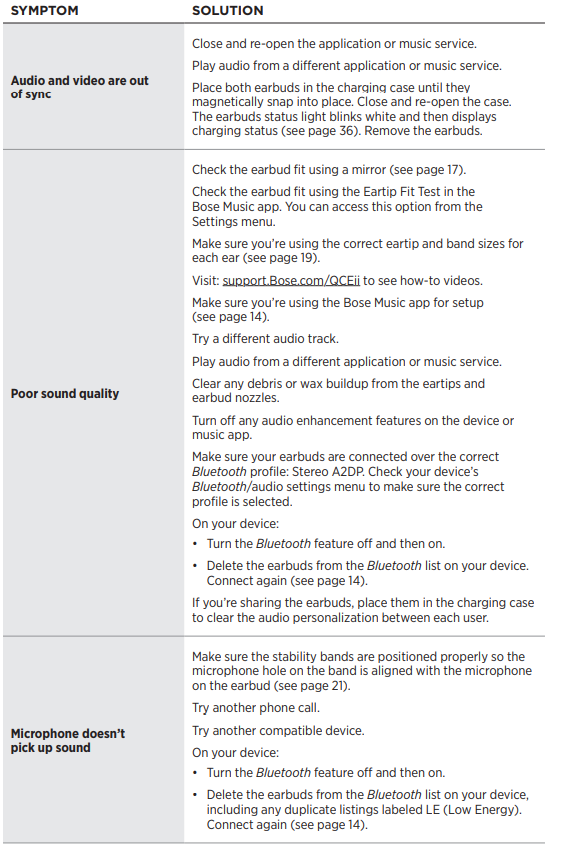
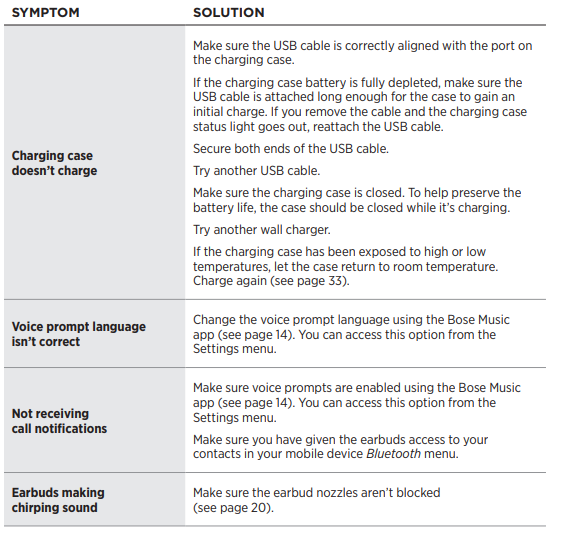
If you could not resolve your issue, see the table below to identify symptoms and solutions to common problems. If you’re unable to resolve your issue, contact Bose customer service.
LIMITED WARRANTY
- The earbuds are covered by a limited warranty.
- To register your product for instructions. Failure to register will not affect your limited warranty rights.
Pros & Cons: Bose QuietComfort Earbuds II
Pros
- Industry-leading noise cancellation with 11 adjustable levels
- CustomTune technology for personalized sound
- Comfortable, secure fit with multiple eartips and stability band options
- Intuitive touch controls and voice assistant support
- Long battery life and quick charging
- IPX4 water resistance for active lifestyles
Cons
- No wireless charging support
- Higher price point than some competitors
- An app is required for full customization
- Some users report fit issues with certain ear shapes
The Bose QuietComfort Earbuds II offer excellent value for money, especially for those prioritizing noise cancellation and sound quality over budget features.
Customer Reviews: Bose QuietComfort Earbuds II
Customers consistently rate the Bose QuietComfort Earbuds II 4.5/5 stars, praising their noise cancellation, comfort, and sound quality. Many users highlight the ease of use, long battery life, and effective fit test. Common complaints include the lack of wireless charging and occasional fit issues with certain ear shapes. Testimonials frequently mention the earbuds’ ability to block out background noise and deliver clear, balanced audio. Most reviewers recommend the Bose QuietComfort Earbuds II for anyone seeking premium wireless earbuds with top-tier noise cancellation and customizable sound.
Faqs
How do I set up my bose QuietComfort Earbuds II for the first time?
What should I do if my bose QuietComfort Earbuds II are not connecting to my device?
How can I customize the noise cancellation modes on bose QuietComfort Earbuds II?
Are bose QuietComfort Earbuds II compatible with voice assistants on smartphones?
How do I maintain and clean my bose QuietComfort Earbuds II for long-lasting performance?
What are the common troubleshooting steps if the touch controls on bose QuietComfort Earbuds II stop responding?
Can I use bose QuietComfort Earbuds II with multiple devices or switch between devices easily?
How do I optimize sound quality and fit with bose QuietComfort Earbuds II to enhance noise cancellation?
Tags
More bose manuals
- Setup & Pairing: Bose QuietComfort Earbuds User Manual
- Pairing: Bose Quiet Comfort Ultra Earbuds (2 GEN) User Manual
- Pairing & Setup: Bose Sport Earbuds User Manual
- Setup: Bose SoundTrue Around-Ear Headphones User Manual
- Pairing & Setup: Bose Soundsport Free Wireless User Manual
- Setup & Pairing: Bose AE2i Audio Headphones User Manual
Leave a Comment