
Pairing & Setup: Bose Soundsport Free Wireless User Manual
Content
Bose SoundSport Free Wireless
Introduction
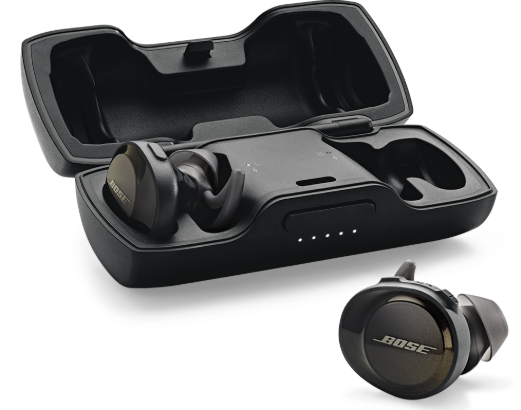
The Bose SoundSport Free Wireless earbuds are designed for active users seeking truly wireless freedom combined with reliable performance. As Bose’s original entry into truly wireless sport earbuds, these headphones offer a sweat- and water-resistant design, ensuring durability during intense workouts and outdoor activities. Their ergonomic StayHear+ Sport tips provide a secure, comfortable fit that prevents the earbuds from falling out when running, cycling, or training.
Equipped with volume-optimized EQ and advanced digital signal processing, the SoundSport Free delivers full, balanced sound at any volume, making it ideal for fitness enthusiasts who want to stay energized with high-quality music. The earbuds provide up to 5 hours of continuous playback on a single charge, complemented by a portable charging case for extended use throughout the day.
These headphones also support hands-free calls with a dual-microphone array built into the right earbud, compatible with voice assistants like Siri and Google Assistant. The Bose SoundSport Free Wireless are best suited for athletes, gym-goers, and anyone who prioritizes wireless convenience and robust sound in a compact form factor.
Typically priced around $120 to $150, they are widely available from Bose retailers and major online platforms, offering a competitive option for entry-level truly wireless sport earbuds.
Specifications of Bose SoundSport Free Wireless Earbuds
- Type: Truly wireless sport earbuds
- Battery Life: Up to 5 hours per charge; quick 15-minute charge gives 45 minutes of playback
- Charging Case: Portable case for multiple recharges
- Connectivity: Bluetooth 4.1, strong antenna for stable connection (2400 to 2483.5 MHz frequency band)
- Water Resistance: IPX4 rating — sweat- and water-resistant
- Controls: Multi-function button on right earbud for play/pause, call management, and voice assistant access; volume +/- buttons
- Fit: StayHear+ Sport tips in 3 sizes for a secure, comfortable fit
- Audio: Volume-optimized EQ with Bose digital signal processing for full, balanced sound across volumes
- Microphones: Dual-microphone array on right earbud for clear calls
- Dimensions & Weight: Earbuds approx. 30.5 x 25 x 30.5 mm; weight 18g (earbuds)
- Supported Profiles: Bluetooth HFP for calls; works with VoIP apps like Skype and FaceTime
Compared to other Bose models like the SoundSport Wireless (with a cable) or newer Bose Sport Earbuds, the SoundSport Free offers true wireless freedom but lacks noise cancellation and has higher latency, which may affect video or gaming use.
Contents
Confirm that the following parts are included:
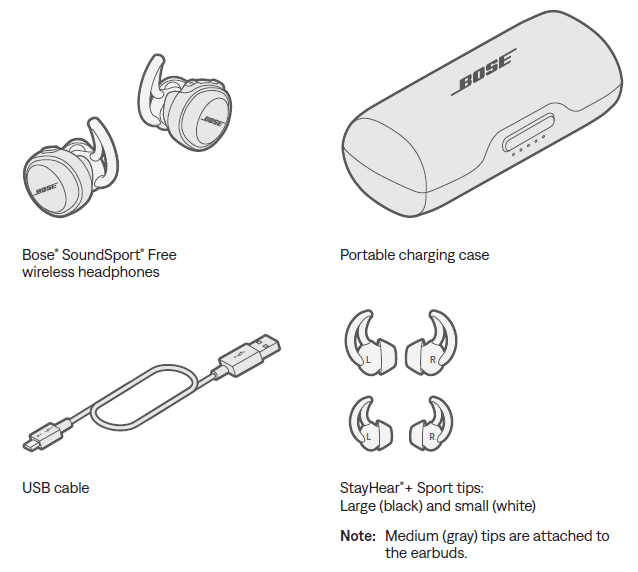
Headphones
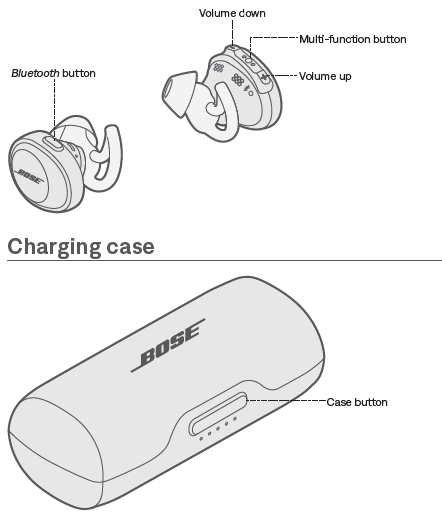
Open charging case
Firmly press the button on the front of the case.
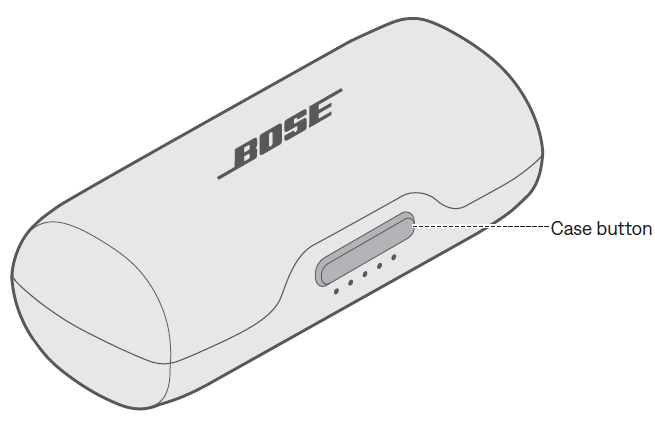
Note: When you press the case button, the front indicators glow according to the current battery level (see "Charging case battery indicators" on page 24).
Power on
- To power on, remove the headphones from the charging case.
- A voice prompt from the right earbud announces the battery level, and the Bluetooth indicator on each earbud blinks blue.
- Note: To hear the voice prompts, make sure you are wearing the headphones.
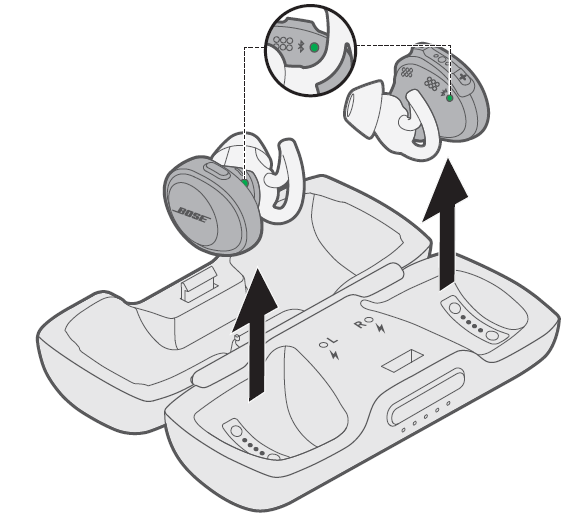
Standby timer
- The standby timer conserves the battery when the headphones are out of the charging case and not being used. The headphones switch to standby when audio has stopped, and you have not pressed any buttons for 20 minutes.
- To turn on the headphones, press the Bluetooth button on the left earbud and press any button on the right earbud.
- Note: To disable the timer or change the number of minutes it takes for your headphones to switch to standby, use the Bose® Connect app.
Power off
- To power off, place the headphones in the charging case.
- For information on how to properly store the earbuds, see "Charge the headphones" on page 19.
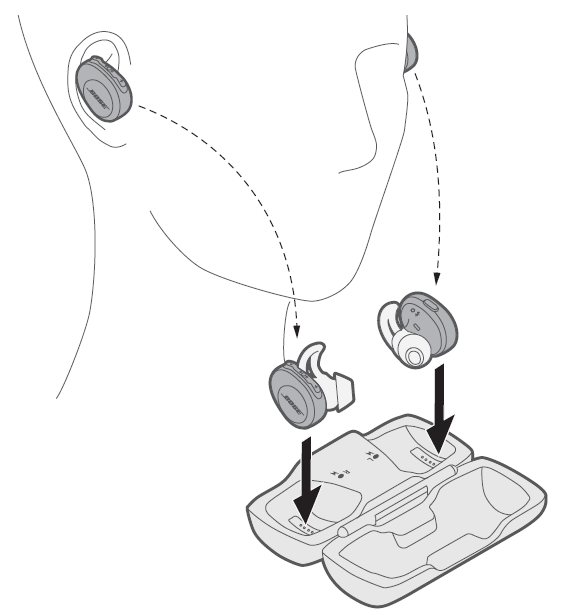
When an earbud is stored, its corresponding charging indicator glows according to charging status (see "Headphone charging indicators" on page 25).
Headphone functions
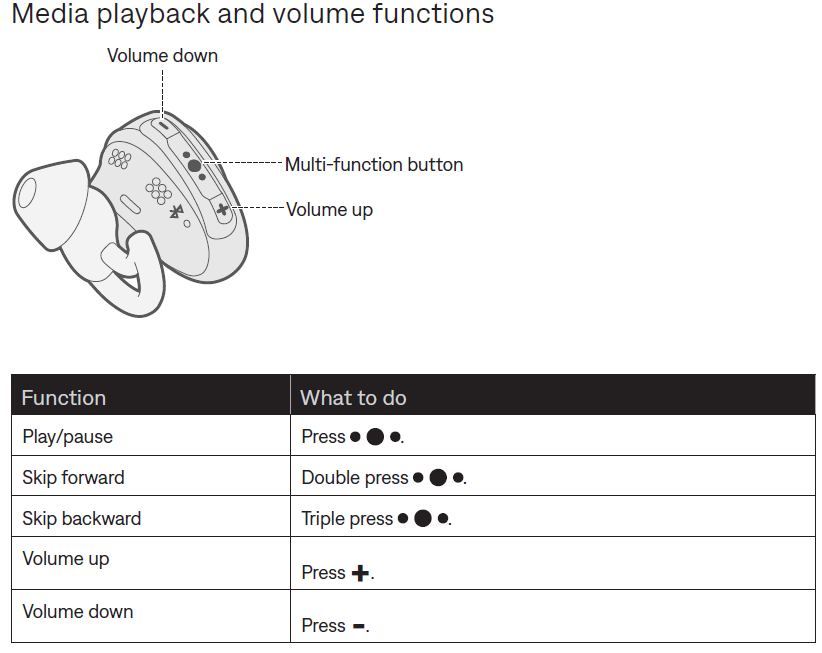
The headphone controls are located on the top of the right earbud.
Media playback and volume functions
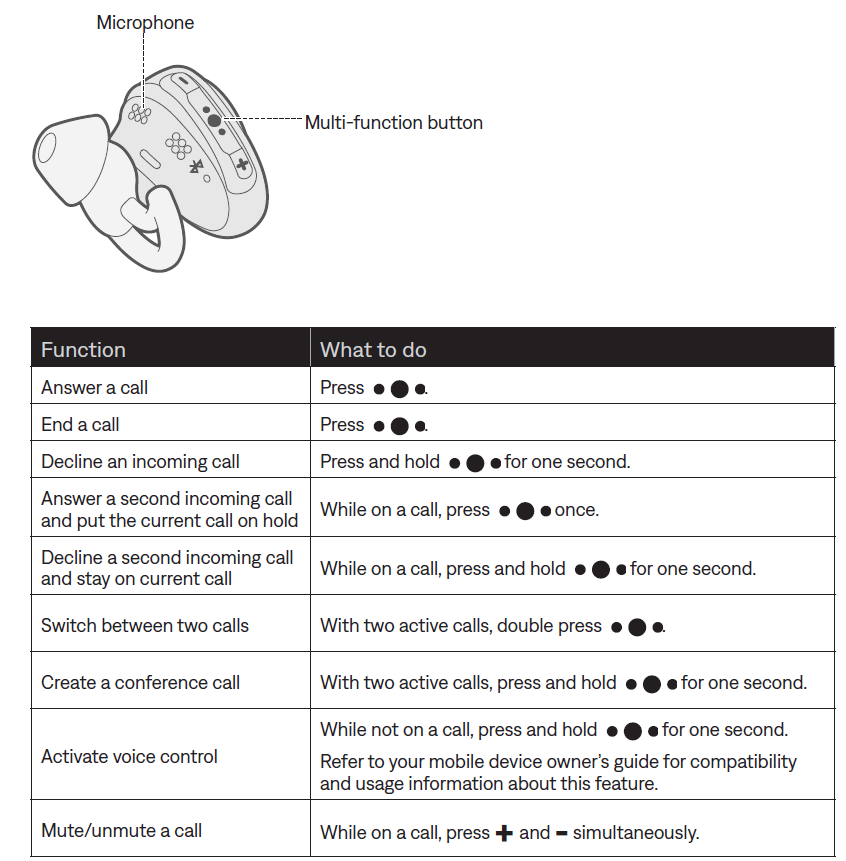
Call functions
The right earbud is used as a single headphone for phone calls. This lets you take calls and still hear surrounding sounds.
CARE AND MAINTENANCE
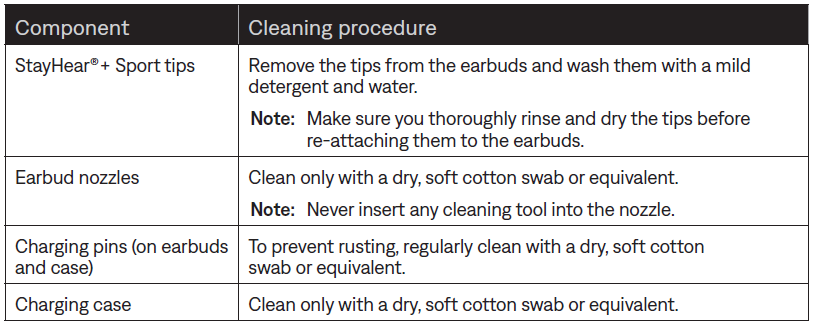
Clean the headphones and charging case
The headphones and charging case may require periodic cleaning.
Find your lost earbuds.
- Use the Bose® Connect app to help locate your lost earbuds.
- Note: The Find My Buds setting must be enabled in the Bose Connect app before the earbuds are lost.
Setup Guide for Bose SoundSport Free Wireless
Follow these steps to set up your Bose SoundSport Free Wireless earbuds for optimal performance:
- Charge the Earbuds and Case: Fully charge the earbuds in the portable charging case using the included USB cable before first use.
- Power On: Remove earbuds from the case; they turn on automatically.
- Activate Bluetooth on Your Device: Open the Bluetooth settings on your smartphone or tablet.
- Pairing: Select “Bose SoundSport Free” from the list of available devices. Voice prompts from the right earbud will confirm connection and battery status.
- Control Configuration: Use the multi-function button on the right earbud for play/pause, skip tracks, answer/end calls, and voice assistant activation. Volume buttons adjust the sound level.
- Customize Fit: Try different sizes of StayHear+ Sport tips included to ensure a snug, secure fit.
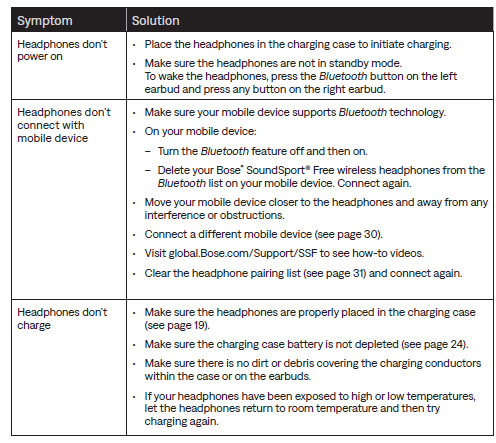
Troubleshooting Tips: If earbuds don’t connect, turn Bluetooth off and on, reset the earbuds by placing them back in the case, or restart your device. Avoid pairing near interference sources.
Safety Precautions: Do not attempt to remove the lithium-ion battery; avoid exposing earbuds to extreme heat or moisture beyond sweat and rain as per the PX4 rating. Dispose of batteries responsibly.
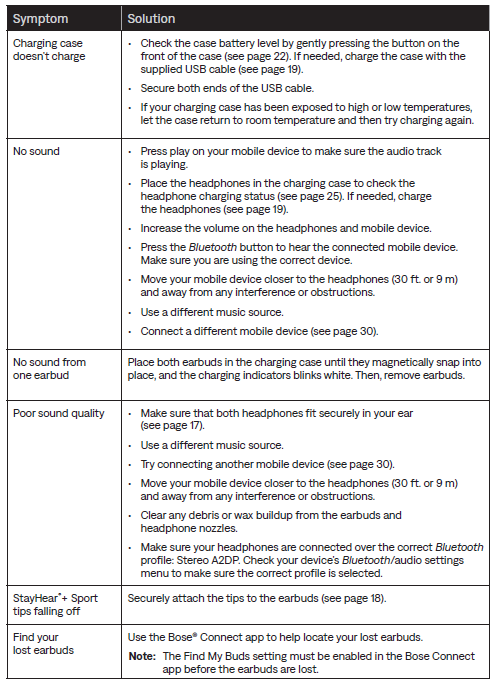
Troubleshooting Bose SoundSport Free Wireless Earbuds
Common solutions
Warranty & Support: Bose offers a standard limited warranty. For technical support or warranty claims, contact Bose customer service through their official website or local authorized dealers.
Pros & Cons of Bose SoundSport Free Wireless Earbuds
Pros
- Truly wireless design with secure StayHear+ Sport tips for active use
- Balanced, full sound with volume-optimized EQ and excellent stereo imaging
- Up to 5 hours of battery life with quick charging capabilities
- Integrated multi-function controls and voice assistant access on the right earbud
- Sweat- and water-resistant (IPX4), suitable for workouts and outdoor activities
Cons
- Call audio is limited to the right earbud only, which may be inconvenient for some users.
- Higher latency causes possible audio-video sync issues during gaming or video playback
- No active noise cancellation or advanced sound isolation features
- Bulkier design compared to newer sport earbuds with slimmer profiles
- Bluetooth 4.1 connectivity, lacking newer Bluetooth 5.x benefits
Customer Reviews of Bose SoundSport Free Wireless
Users generally praise the Bose SoundSport Free Wireless earbuds for their excellent sound quality and secure fit during exercise. Many highlight the rich bass and clear stereo separation as standout features, noting the earbuds stay comfortably in place even during vigorous workouts.
Common complaints include the limitation that phone call audio plays only in the right earbud, which some find inconvenient. Others mention occasional Bluetooth connection dropouts and the earbuds’ slightly bulky size. The battery life is considered decent but not exceptional compared to newer models.
On average, customers rate these earbuds around 4 out of 5 stars. Many recommend them as a solid option for sports and casual use, especially for users who prioritize sound quality and wireless freedom. However, those seeking advanced features like noise cancellation or multi-device connectivity may look elsewhere.
Faqs
How do I set up and pair my bose Soundsport Free Wireless earbuds for the first time?
What should I do if my bose Soundsport Free Wireless earbuds are not connecting to Bluetooth?
Can I use bose Soundsport Free Wireless earbuds with both Android and iOS devices?
How do I charge and monitor battery life on the bose Soundsport Free Wireless earbuds?
What are the main features of bose Soundsport Free Wireless that enhance sports and workout use?
How can I troubleshoot audio or connectivity dropouts on bose Soundsport Free Wireless earbuds?
How do I maintain and clean my bose Soundsport Free Wireless earbuds for optimal performance?
Is it possible to use only one earbud of the bose Soundsport Free Wireless at a time?
Tags
More bose manuals
Leave a Comment