
Pairing: Bose QuietComfort Ultra Earbuds User Manual
Content
bose QuietComfort Ultra Earbuds
Introduction
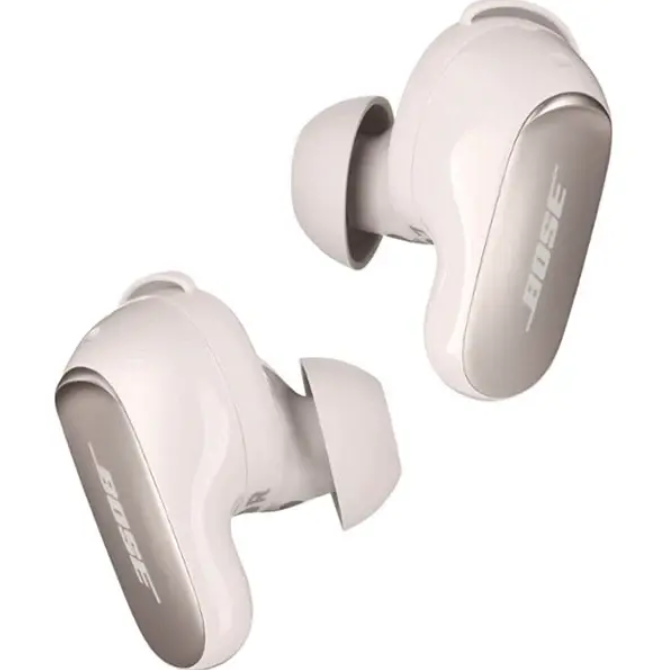
The Bose QuietComfort Ultra Earbuds represent Bose’s latest advancement in premium true wireless earbuds, combining industry-leading active noise cancellation (ANC) with immersive spatial audio capabilities. Designed for audiophiles and everyday listeners seeking exceptional sound clarity and comfort, these earbuds deliver a refined listening experience whether at work, exercising, or commuting. Their adaptive noise-cancelling technology intelligently blocks out ambient noise, while multiple listening modes, such as Quiet, Aware, and Immersio,n provide customizable sound environments tailored to user needs.
Perfect for frequent travelers, remote workers, and music enthusiasts, these earbuds also include advanced call quality features leveraging AI-powered background noise suppression, making them ideal for clear hands-free conversations. Backed by wireless charging and multipoint Bluetooth connectivity, thBosese QuietComfort Ultra Earbuds ensure uninterrupted listening across multiple devices.
Available worldwide through Bose’s official store and authorized retailers, the earbuds typically range between $279 and $329, depending on region and promotions. Their sleek metallic finish and ergonomic design enhance both aesthetics and stability during active use, standing out as a top choice among amongnoise-cancellingg earbuds in 2025.
Specifications of Bose QuietComfort Ultra Earbuds
- Design: In-ear, ergonomic fit with silicone eartips and stability bands.
- Noise Cancellation: Advanced ActiveSense adaptive noise cancelling with CustomTune technology that adjusts ANC based on ear shape and environment.
- Audio Codec Support: Snapdragon Sound certification with Qualcomm aptX Adaptive for hi-res, low-latency audio; supports Google Fast Pair.
- Battery Life: Up to 6 hours per charge (4 hours with immersive audio mode), with the charging case providing up to three full additional charges.
- Connectivity: Bluetooth 5.3 with multipoint pairing to switch seamlessly between two devices.
- Water Resistance: IPX4 rating, protecting against sweat and light splashes.
- Dimensions & Weight: Earbud approximately 1.18" x 0.49" x 0.98", weighing around 0.016 lb each.
- Additional Features: Cinema Mode for spatial audio video enhancement, AI-based call noise suppression, customizable ANC and immersion presets, wireless charging case.
Compared with competitors like Sony WF-1000XM5 and Apple AirPods Pro (2nd Gen), the Bose QuietComfort Ultra Earbuds excel in noise cancellation depth and hi-res audio codec support, particularly with Snapdragon Sound, which is unique for wireless earbuds in this price range.
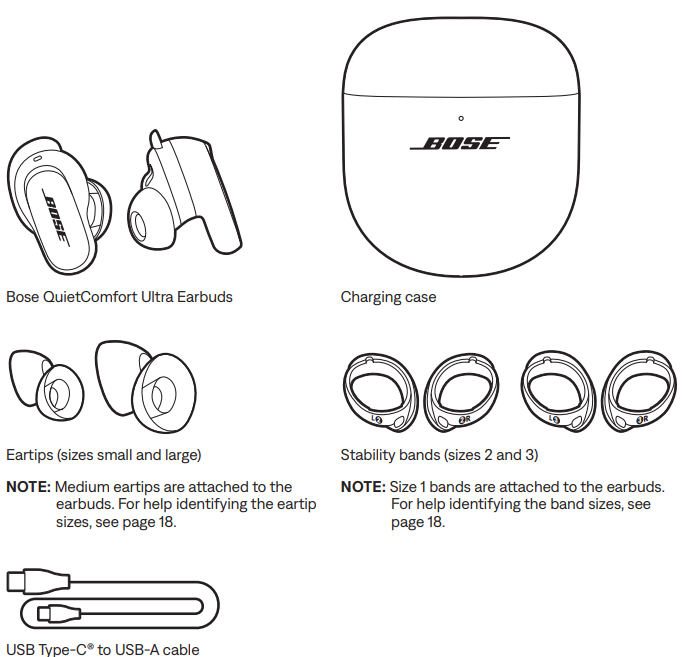
WHAT’S IN THE BOX
TOUCH CONTROL
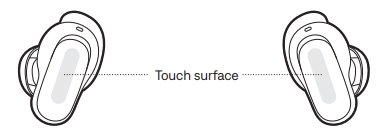
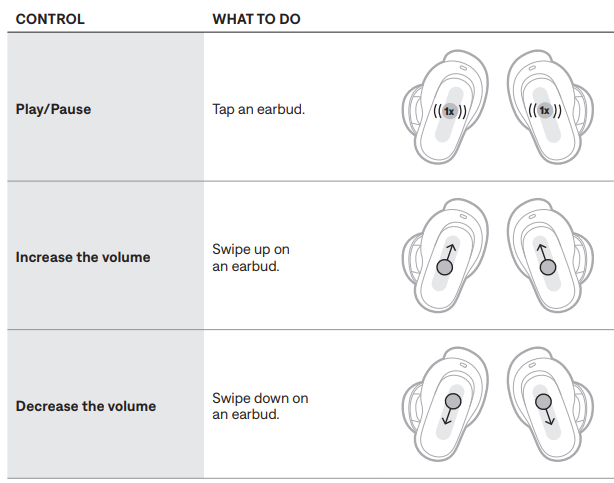
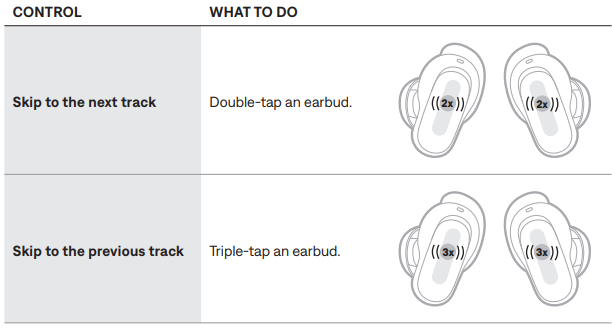
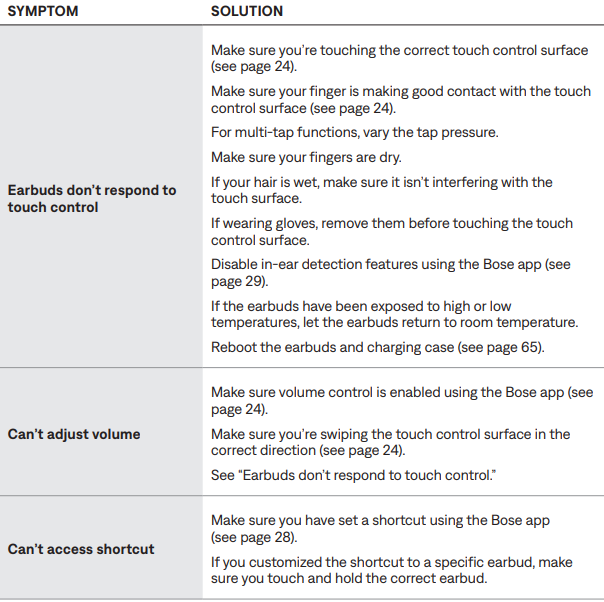
Use touch control by tapping or swiping the touch surface of either earbud. With touch control, you can play/pause audio, change the volume, and perform basic call functions, and use a shortcut to change the mode or change immersive audio settings (see page 28).
TOUCH SURFACE AREA
The touch surface is located on the outer surface of both earbuds. It controls media playback, volume, phone calls, and your shortcut.
MEDIA PLAYBACK AND VOLUME
PHONE CALLS
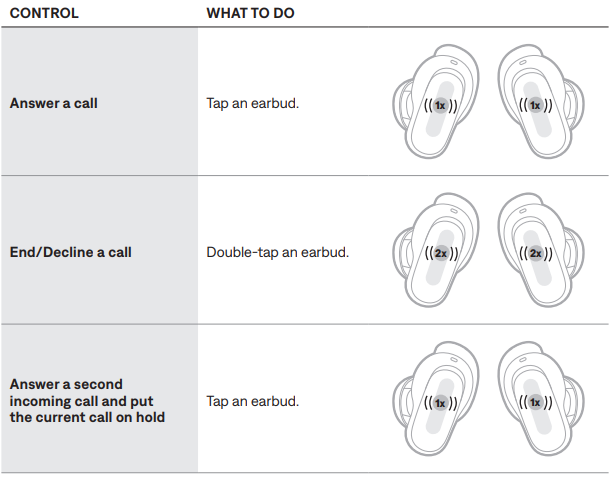
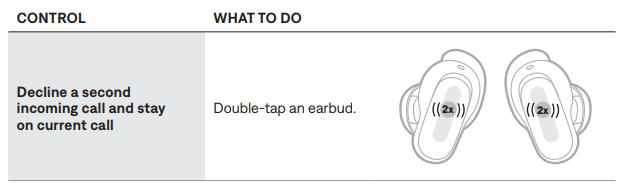
Call notifications
- A voice prompt announces incoming callers and call status.
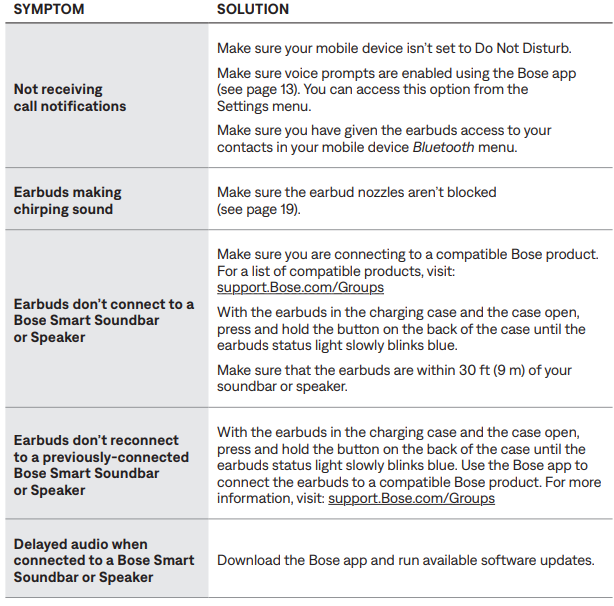
- To stop call notifications, disable voice prompts using the Bose app. You can access this option from the Settings menu.
MODES
For information about changing the mode, see page 34.
IMMERSIVE AUDIO SETTINGS
For information about changing the immersive audio setting, see page 32.
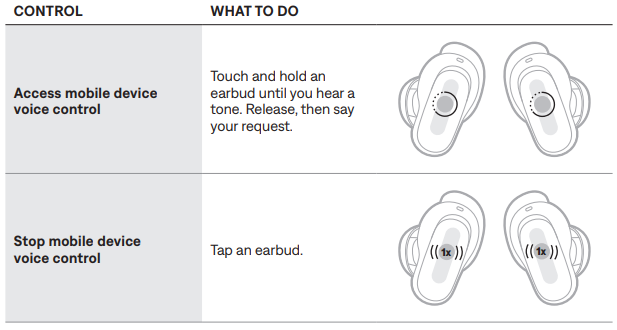
MOBILE DEVICE VOICE CONTROL
You can set a shortcut to access your mobile device's voice control using the earbuds. The microphone on the earbuds acts as an extension of the microphone on your mobile device.
NOTE: To access mobile device voice control using the earbuds, it must be set as a shortcut (see page 28).
CARE AND MAINTENANCE
STORE THE EARBUDS
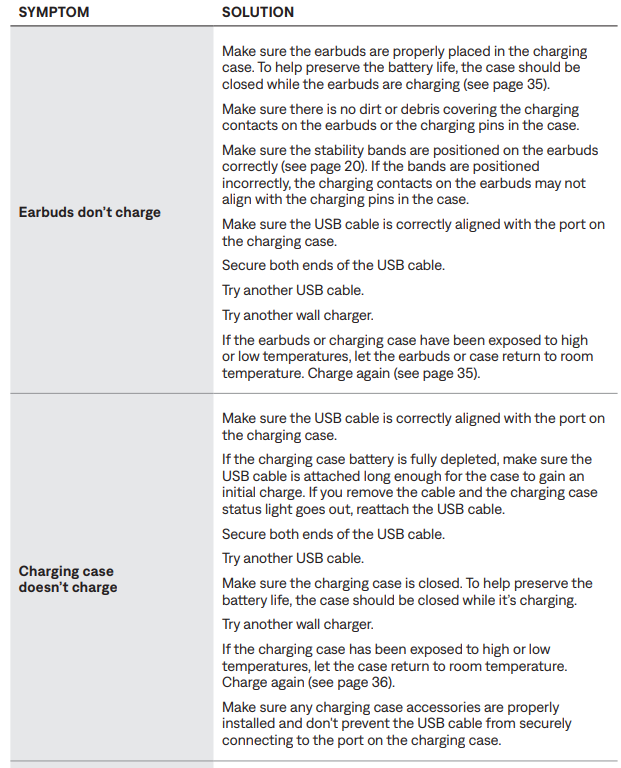
When you’re not using the earbuds, store them in the charging case. Close the charging case to help preserve battery life and keep the charging case free of debris.
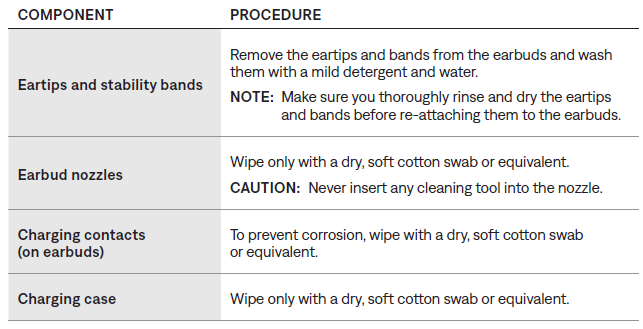
CLEAN THE EARBUDS AND CHARGING CASE
UPDATE THE EARBUDS
The earbuds begin updating automatically when connected to the Bose app and an update is available. Follow the app instructions.
UPDATE THE CHARGING CASE
Update the charging case using the Bose updater website
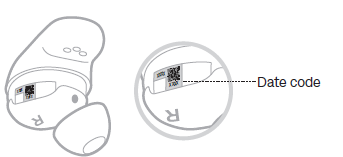
VIEW THE EARBUD DATE CODE
Remove the stability band from the earbud (see page 20).
The date code is located on the earbud in the wide area near the microphone.
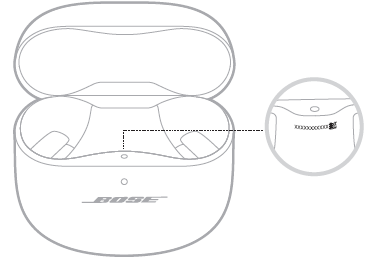
VIEW THE CHARGING CASE SERIAL NUMBER
Remove the earbuds from the charging case.
The charging case serial number is located below the earbuds' status light inside the earbud well.
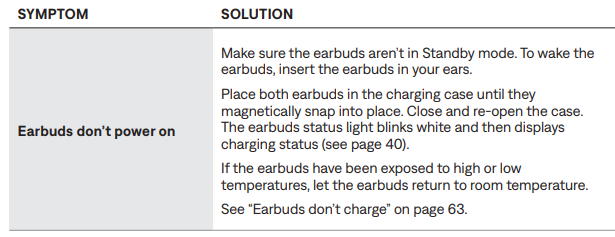
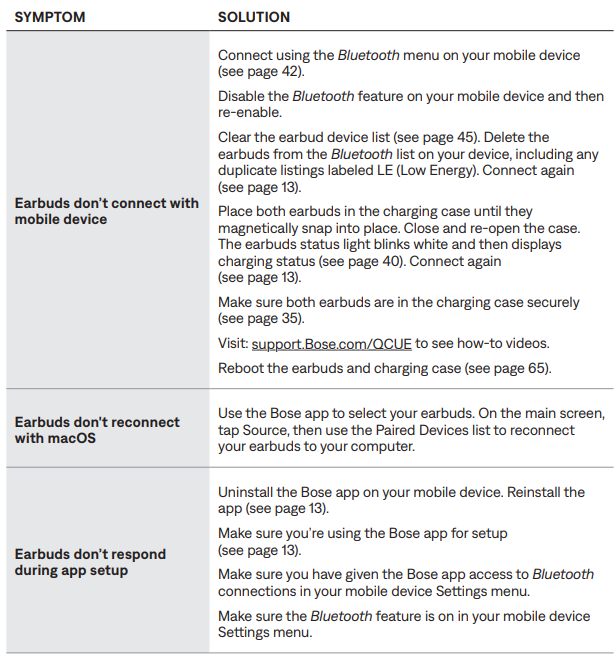
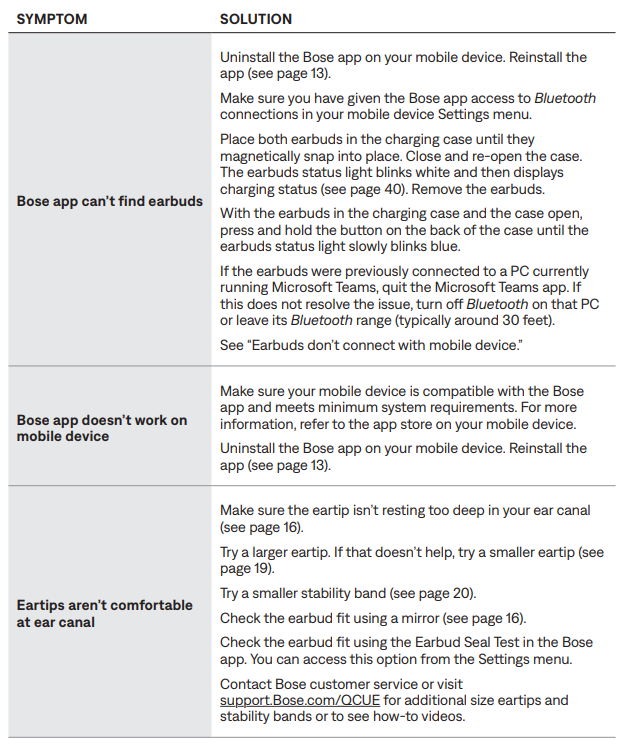
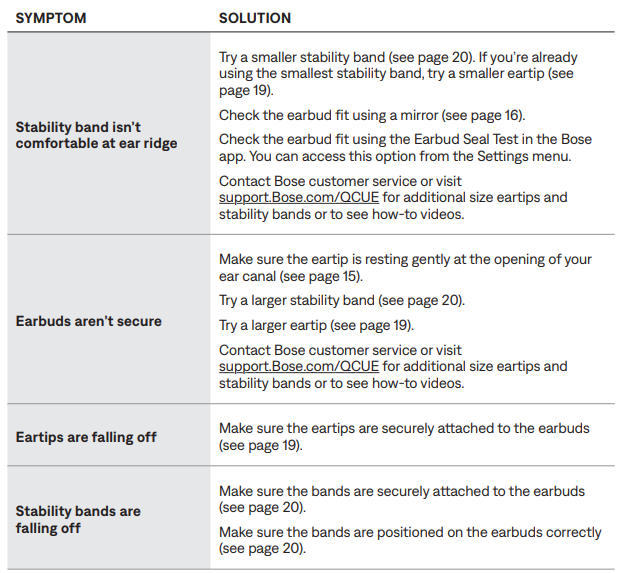
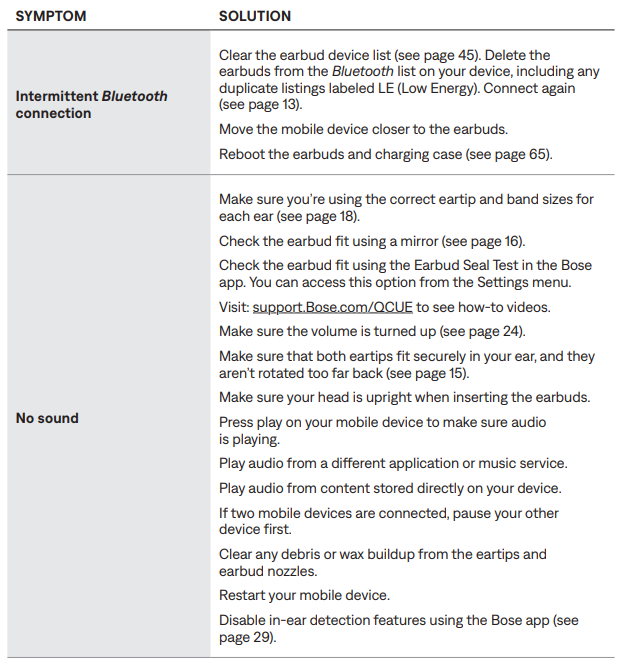
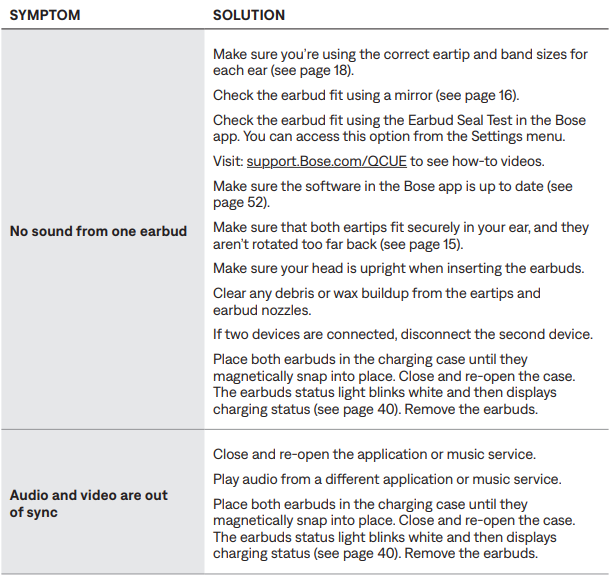
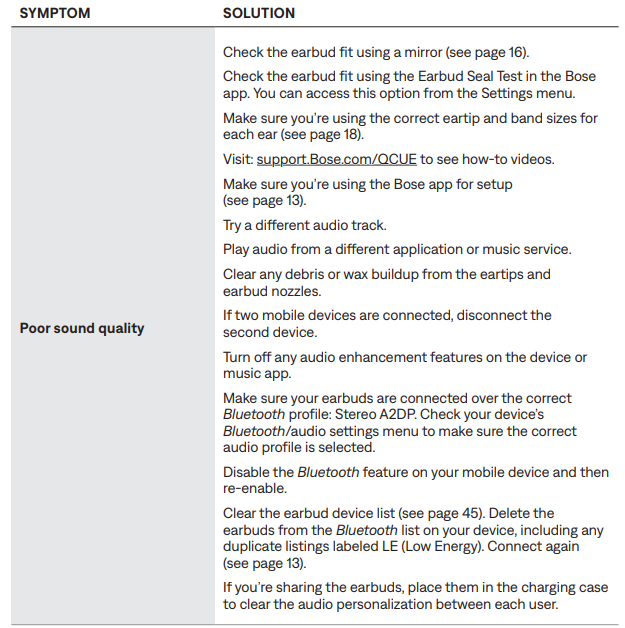
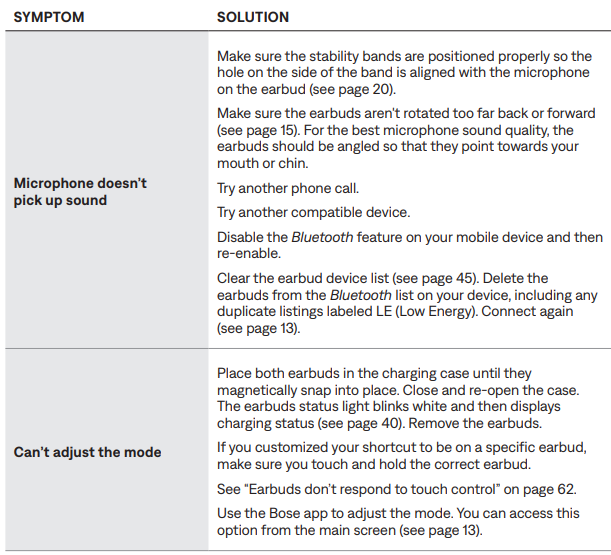
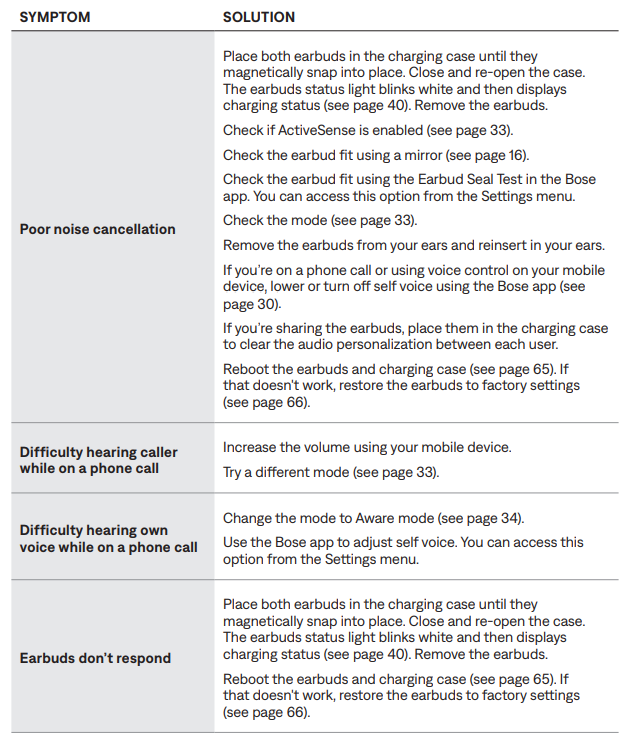
Troubleshooting for Bose Comfort Ultra Earbuds
Pros & Cons of Bose QuietComfort Ultra Earbuds
Pros
- Exceptional Noise Cancellation: Deep ANC performance surpassing many competitors, capable of reducing noise under 400Hz by up to 34dB.
- Hi-Res Audio Support: Snapdragon Sound and aptX Adaptive codecs deliver superior wireless audio quality with low latency.
- Customizable Sound Experience: CustomTune and multiple ANC/Immersive Audio modes adapt to both ear shape and environment.
- Comfort & Design: Stable, ergonomic fit with easy-to-swap stability bands and premium metallic finish.
- Wireless Charging & Multipoint Connectivity: Convenient charging options and seamless switching between devices.
Cons
- Price Point: Positioned at a premium tier, potentially costly for casual listeners.
- Battery Life: Up to 6 hours per charge is solid but lower than some rivals offering 8+ hours.
- Occasional ANC Variation: CustomTune adaptive ANC may cause slight sound profile shifts between sessions.
- Compatibility: Snapdragon Sound benefits primarily Android users with specific chipsets; less impact on iOS devices.
Customer Reviews of Bose QuietComfort Ultra Earbuds
Users widely praise the Bose QuietComfort Ultra Earbuds for their outstanding noise-cancelling capabilities and comfortable fit. Many reviewers highlight the clarity of calls even in noisy environments and the immersive audio experience provided by Cinema Mode. The wireless charging case and multipoint connectivity are also frequently commended for convenience. Common complaints include the earbuds’ premium price and occasional inconsistency in ANC tuning, which users note stabilizes after several uses. Overall, the earbuds receive an average rating of 4.5 out of 5 stars from verified buyers, with strong recommendations for travelers, remote workers, and audiophiles seeking top-tier wireless earbuds.
Faqs
How do I set up bose QuietComfort Ultra Earbuds for the first time?
Why won't my bose QuietComfort Ultra Earbuds connect to my phone?
How do I use touch controls on bose QuietComfort Ultra Earbuds?
Can I use bose QuietComfort Ultra Earbuds with Android and iPhone?
How do I clean and maintain my bose QuietComfort Ultra Earbuds?
What are the different modes on bose QuietComfort Ultra Earbuds?
How long does the battery last on bose QuietComfort Ultra Earbuds?
How do I ensure a secure fit with bose QuietComfort Ultra Earbuds?
Tags
More bose manuals
- Setup: Bose Ultra Open Earbuds User Manual
- Pairing & Setup: Bose Soundsport Free Wireless User Manual
- Setup: Bose Noise-Masking Sleepbuds User Manual
- Pairing & Setup: Bose Sport Earbuds User Manual
- Pairing: Bose QuietComfort 35 Wireless Headphones II User Manual
- Setup & Pairing: Bose QuietComfort Earbuds User Manual
Leave a Comment