
Setup: Bose Ultra Open Earbuds User Manual
Content
Bose Ultra Open Earbuds
Introduction
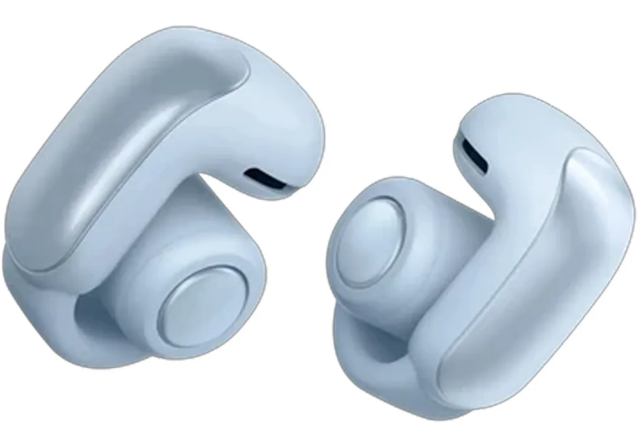
The Bose Ultra Open Earbuds redefine wireless audio with their innovative open-ear design, delivering immersive sound without blocking your surroundings. Perfect for active users, commuters, and anyone who values situational awareness, these earbuds combine comfort, privacy, and advanced audio technology. With up to 7 hours of playtime and a compact charging case, the Bose Ultra Open Earbuds are ideal for all-day listening, whether you're working out, walking, or taking calls on the go.
Key benefits include breakthrough OpenAudio technology for rich, private sound, Bluetooth multipoint connectivity for seamless device switching, and a lightweight, stable fit. The earbuds are water-resistant (IPX4), making them suitable for workouts and outdoor use. Priced at approximately $299, the Bose Ultra Open Earbuds are available at major retailers and online stores, offering a premium experience for music lovers and professionals alike.
Specifications: Bose Ultra Open Earbuds
- Design: Open-ear, cuff-shaped
- Driver Type: OpenAudio technology
- Connectivity: Bluetooth 5.3, AAC, SBC, Snapdragon Sound, AptX Adaptive
- Battery Life: Up to 7 hours (up to 4 hours with Immersive Audio or Auto Volume), 19.5 hours extra with charging case
- Water Resistance: IPX4 (earbuds), IPX1 (case)
- Microphones: Built-in, for calls and voice assistant
- Noise Canceling: No active noise cancellation
- Controls: Tactile button on each earbud, customizable shortcuts
- Charging: USB-C, estimated charge time: 1 hour
- Compatibility: Android, Apple iOS, Windows, macOS
- Weight: 0.1 lbs (earbuds), 0.097 lbs (case)
- Materials: Plastic (PC-ABS), metal, silicone, gold plating
Compared to similar open-ear models, the Bose Ultra Open Earbuds stand out with their spatialized Immersive Audio, multipoint Bluetooth, and robust build quality.
CONTENTS
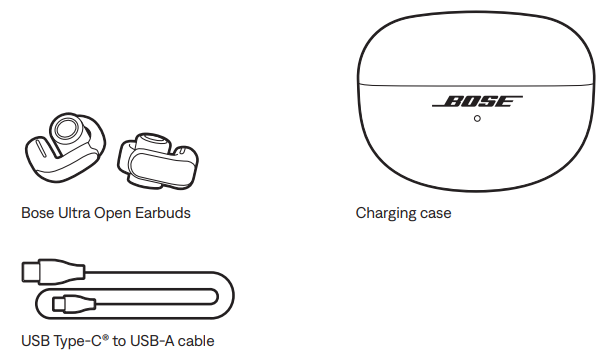
Confirm that the following parts are included:
EARBUD CONTROLS
A button is located on the top of the barrel-shaped part of each earbud. The buttons control media playback, volume, phone calls, and your shortcut (see page 20).
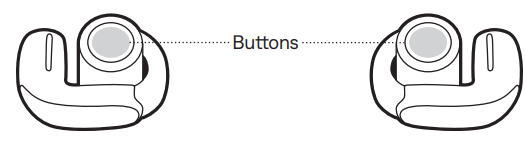
NOTE: You can use either earbud button to control all functions except for volume. When controlling volume, the left and right earbud buttons have different functions (see page 18).
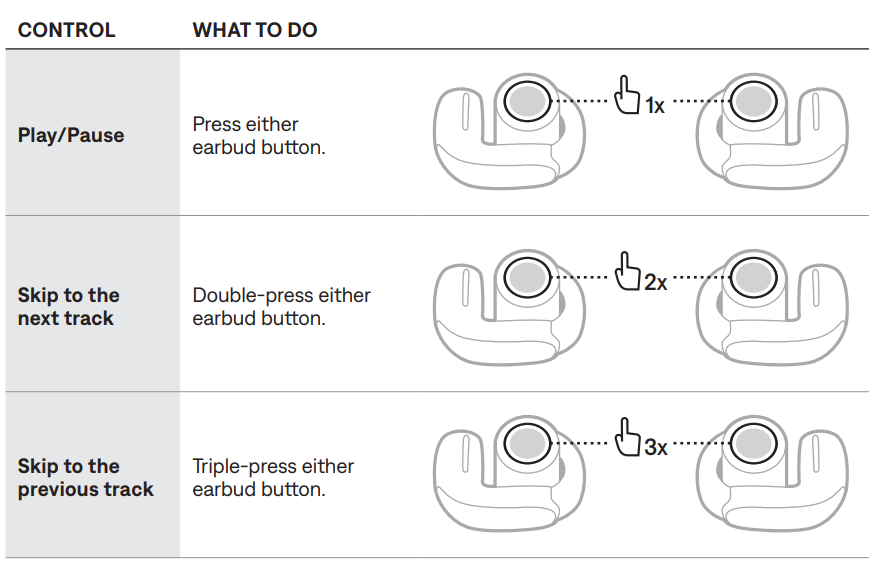
MEDIA PLAYBACK
VOLUME FUNCTIONS
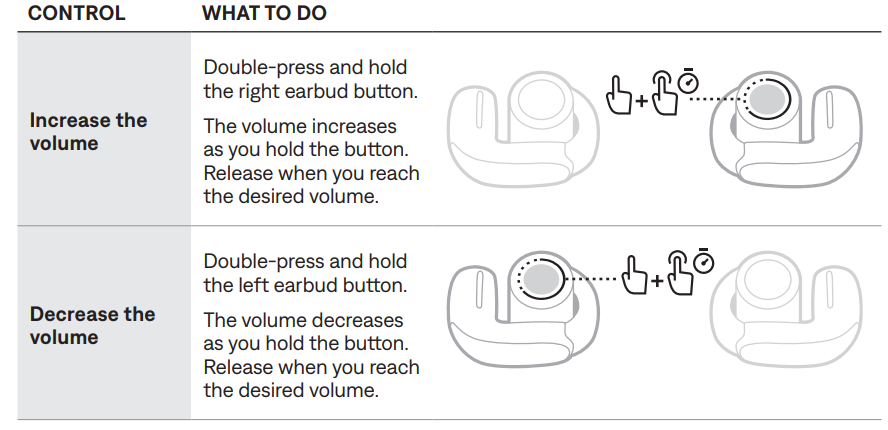
TIP: You can also increase or decrease the volume using the volume controls on your device or in the Bose app.
Auto Volume
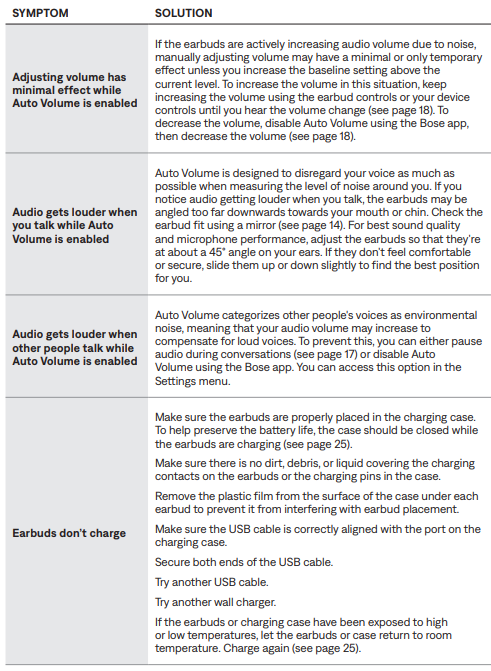
The earbuds can automatically adjust audio volume depending on the level of noise around you. This helps your audio stay at a consistent volume relative to your surroundings.
When Auto Volume is enabled and the noise level increases above your baseline volume setting, audio volume increases proportionally after a few seconds. When the noise level decreases, audio volume returns to your baseline setting.
NOTES:
- It may take several seconds for audio volume to increase in response to noise.
- When you make or receive a phone call, Auto Volume is temporarily disabled. When you end the call, Auto Volume returns to its previous setting.
Enable Auto Volume
- Auto Volume is disabled by default. To enable Auto Volume, use the Bose app. You can access this option from the Settings menu.
- Manually adjust volume when Auto Volume is enabled
- To manually adjust volume, use the earbud controls (see “Volume functions”) or the volume controls on your device until you hear the volume change.
NOTE: If the earbuds are actively increasing audio volume due to noise, manually adjusting volume may have a minimal or only temporary effect unless you increase the baseline setting above the current level. To decrease volume in this situation, disable Auto Volume using the Bose app.
PHONE CALLS
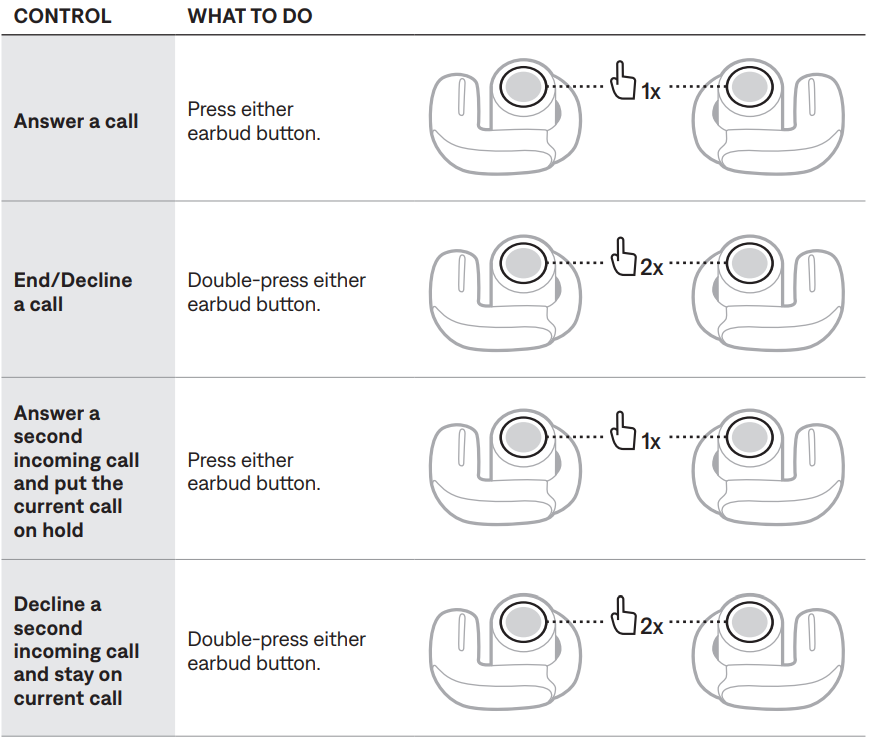
Call notifications
- A voice prompt announces incoming callers and call status.
- To stop call notifications, disable voice prompts using the Bose app. You can access this option from the Settings menu.
ADJUST THE AUDIO EQ
To adjust the bass, midrange, and treble, use the Bose app. You can access these options from the product control screen.
NOTE: At high volumes, the effects of these adjustments may be reduced to avoid distortion.
CARE AND MAINTENANCE
STORE THE EARBUDS
When you’re not using the earbuds, store them in the charging case. Close the charging case to help preserve battery life and keep the charging case free of debris.
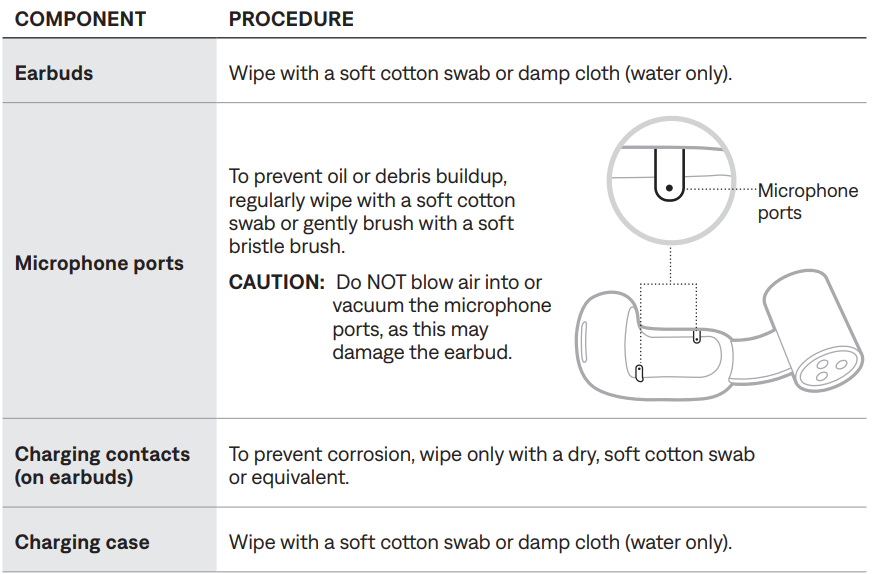
CLEAN THE EARBUDS AND CHARGING CASE
UPDATE THE EARBUDS
The earbuds begin updating automatically when connected to the Bose app and an update is available. Follow the app instructions.
UPDATE THE CHARGING CASE
If Bose customer service tells you to update the charging case, you can do so using the Bose updater website.
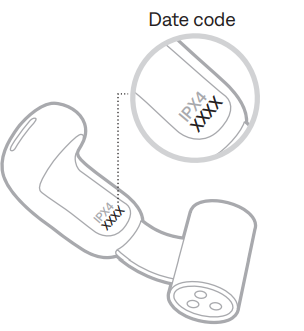
VIEW THE EARBUD DATE CODE
Remove the earbud from the charging case and flex the barrel open. The date code is located on the flat inner surface of the earbud.
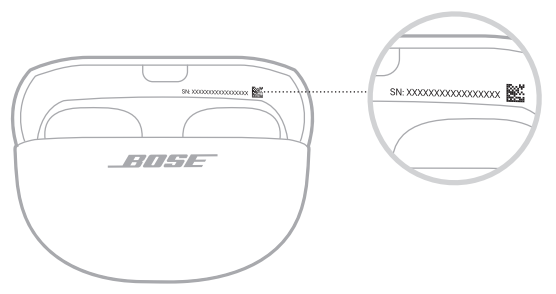
VIEW THE CHARGING CASE SERIAL NUMBER
Remove the earbuds from the charging case.
The charging case serial number is located in the charging case lid.
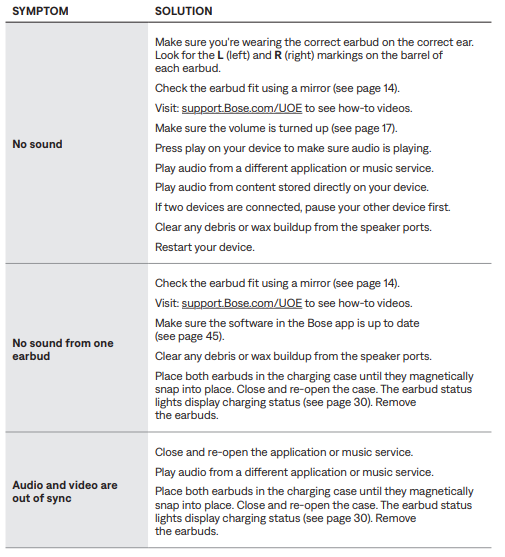
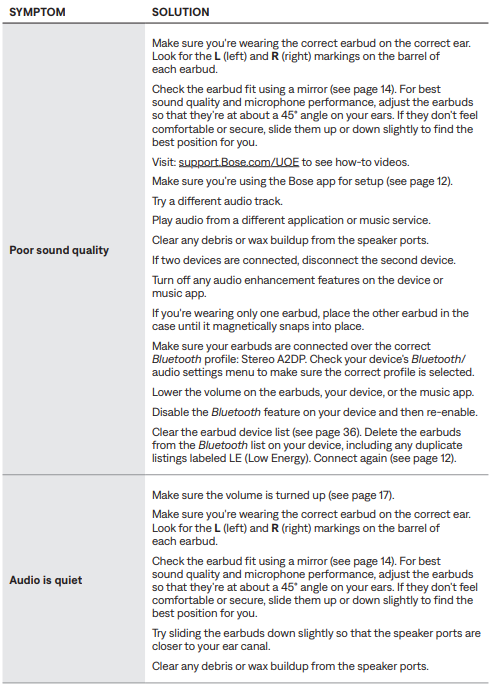
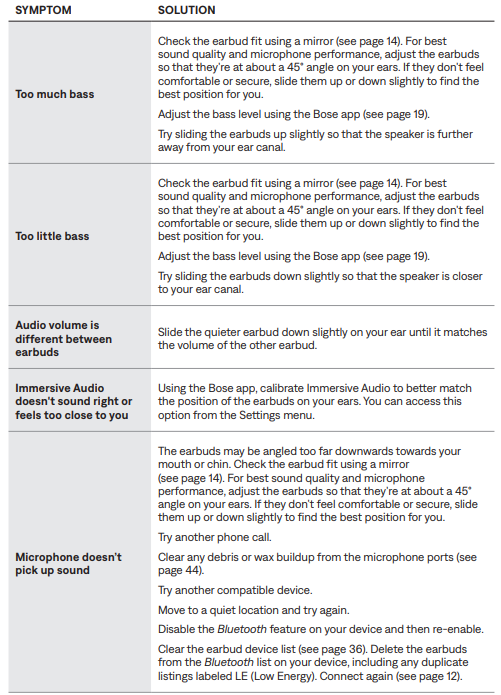
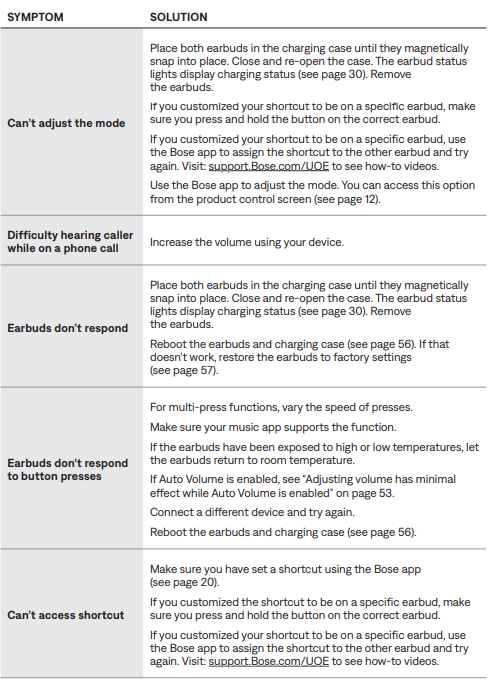
Troubleshooting: Bose Ultra Open Earbuds
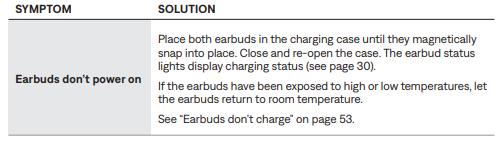
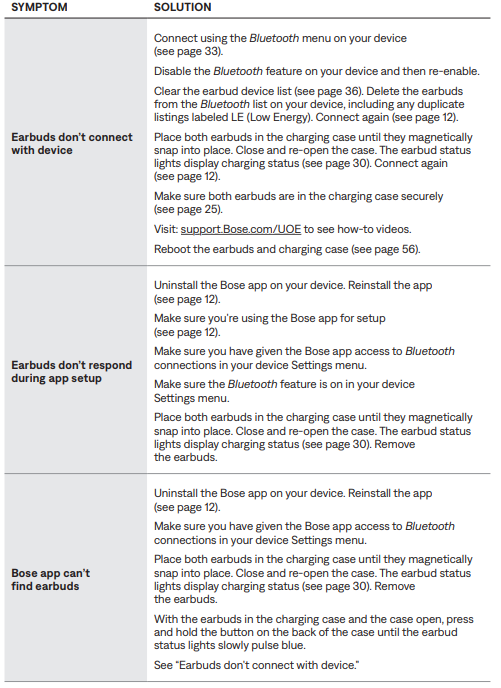
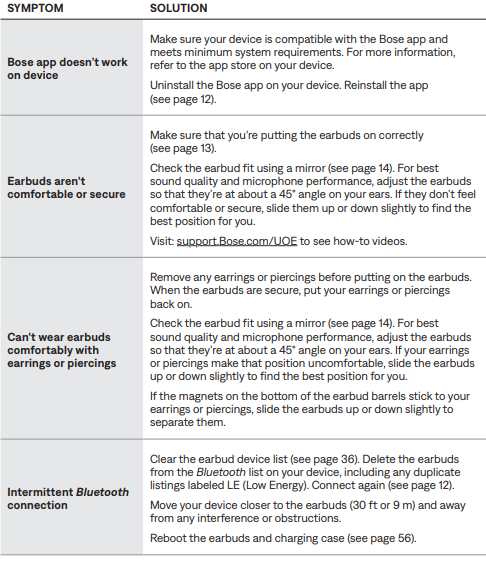
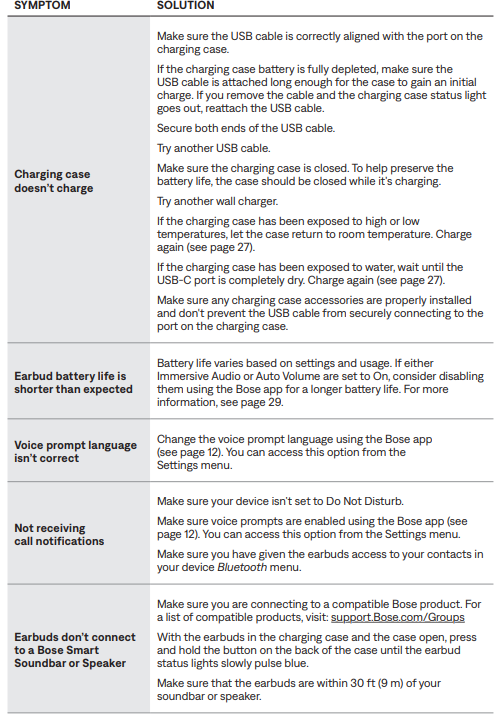
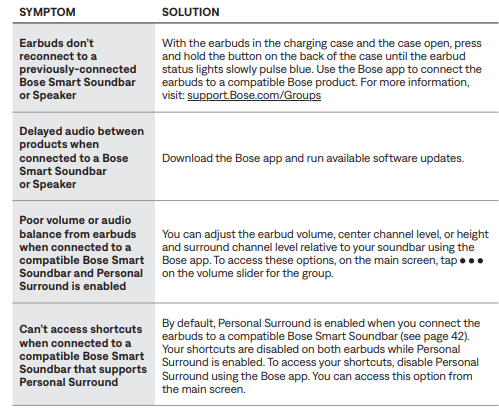
OTHER SOLUTIONS
Pros & Cons: Bose Ultra Open Earbuds
Pros
- Excellent situational awareness with open-ear design
- Rich, private sound with Immersive Audio
- Comfortable, stable fit for all-day wear
- Bluetooth multipoint for seamless device switching
- Water-resistant and durable build
Cons
- No active noise cancellation
- Bass response limited by open design
- Premium price point
- App required for full customization
The Bose Ultra Open Earbuds offer great value for users prioritizing comfort, safety, and audio quality over noise cancellation.
Customer Reviews: Bose Ultra Open Earbuds
Customers praise the Bose Ultra Open Earbuds for their comfort, clear audio, and innovative open design. Many highlight the ease of use and reliable Bluetooth connectivity. Common complaints include limited bass and the need for the Bose app for advanced features. The earbuds average 4.5 stars across major retailers, with users recommending them for outdoor activities and daily commutes. Frequent mentions include the secure fit and effective call quality.
Faqs
How do I set up my bose Ultra Open Earbuds for the first time?
What should I do if the bose Ultra Open Earbuds are not connecting to my device?
How do I wear bose Ultra Open Earbuds correctly for the best sound quality?
Can bose Ultra Open Earbuds connect to multiple devices at once?
How can I customize the sound settings on bose Ultra Open Earbuds?
What maintenance steps should I follow to keep bose Ultra Open Earbuds in good condition?
Why do I hear audio quieter in one ear when using bose Ultra Open Earbuds, and how can I fix it?
Are bose Ultra Open Earbuds water-resistant and suitable for active use?
More bose manuals
- Setup: Bose Noise-Masking Sleepbuds User Manual
- Pairing: Bose QuietComfort Ultra Earbuds User Manual
- Pairing: Bose QuietComfort 35 Wireless Headphones II User Manual
- Pairing & Setup: Bose Soundsport Free Wireless User Manual
- Setup: Bose QuietComfort 35 Wireless Headphones User Manual
- Pairing & Setup: Bose Sport Earbuds User Manual
Leave a Comment