
Setup: Bose Noise-Masking Sleepbuds User Manual
Content
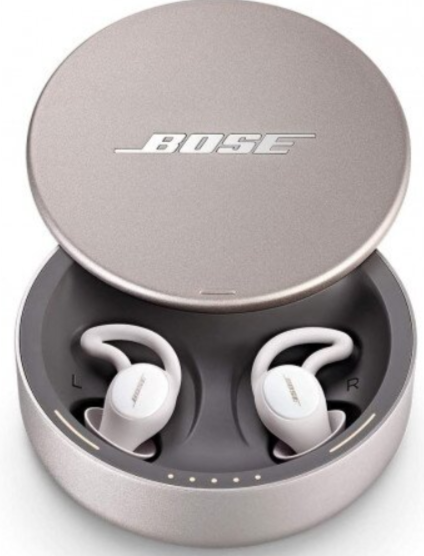
Bose Noise-Masking Sleepbuds
Introduction
The Bose Noise-Masking Sleepbuds are a revolutionary solution for anyone struggling with sleep disturbances caused by snoring, traffic, or household noises. Designed specifically for sleep, these wireless earbuds combine passive noise isolation with soothing, pre-loaded sounds to help you fall asleep faster and stay asleep longer. Unlike traditional headphones or active noise-canceling devices, Bose Sleepbuds use a unique noise-masking approach that physically blocks external sounds while playing calming audio to mask what remains.
Key benefits include a comfortable, secure fit for all sleeping positions, up to 10 hours of battery life per charge, and a compact charging case that provides three additional charges. The Sleepbuds are ideal for light sleepers, side sleepers, and anyone seeking a peaceful night’s rest without the bulk of over-ear headphones. With a clinically proven design and a user-friendly app for sound selection and alarm settings, Bose Noise-Masking Sleepbuds are a top choice for sleep technology.
Available for purchase online and in select retail stores, Bose Sleepbuds typically range from $249 to $299, depending on region and retailer. They are suitable for adults seeking a non-invasive, effective solution for sleep improvement.
Specifications: Bose Noise-Masking Sleepbuds
- Fit Style: True wireless, closed earcup
- Weight: 1.4 grams per earbud
- Battery Life: Up to 10 hours per charge; up to 40 hours total with charging case
- Charging Time: 8 hours for earbuds, 3 hours for case
- Bluetooth: Version 5.0 (Bluetooth Low Energy)
- Noise Reduction: Passive noise isolation (no active noise cancellation)
- Sound Library: Pre-loaded soothing sounds and noise-masking tracks
- App Compatibility: Bose Sleep app for sound selection, alarm, and volume control
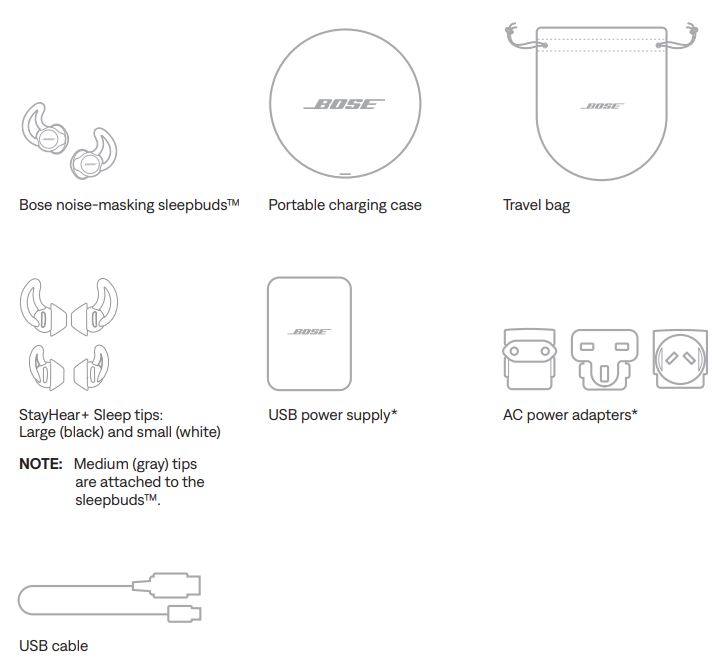
- Eartips: 3 pairs of StayHear+ Sleep tips (S/M/L)
- Dimensions: 1.108" x 0.91" per earbud
- Additional Features: Personal alarm, anti-friction coating, biometric and environmental sensors (on select models)
Compared to similar products, Bose Noise-Masking Sleepbuds offer superior comfort, longer battery life, and a more effective noise-masking approach than basic earplugs or standard wireless earbuds.
FEATURES
- Select masking sounds to play through your sleepbuds™.
- Add new sounds or replace sounds that you don’t listen to using the Sound Library.
- Set wake-up alarms.
- Name your sleepbuds™.
- Manage settings for Phone Call Alerts.
- Enable Dark Mode for nighttime use.
- Find answers to frequently asked questions.
- Keep your sleepbuds™ up to date and try new features with the latest software.
WHAT’S IN THE CARTON
CONTROLS
OPEN THE CHARGING CASE
With the Bose logo facing you, slide the lid of the charging case away from you to open.
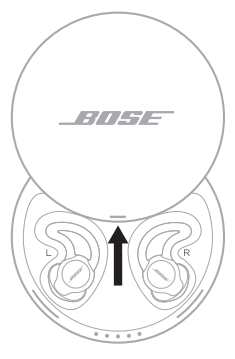
Lights on the inside rim of the case glow to show the current battery level and charging status of the case and sleepbuds™ (see page 25).
POWER ON
Remove the sleepbuds™ from the charging case.
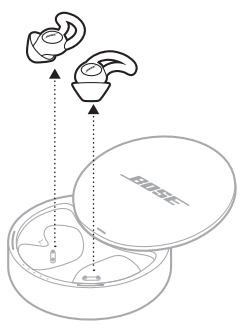
The sleepbuds™ automatically power on.
POWER OFF
- Place the sleepbuds™ in the charging case.
- For information about how to properly store the sleepbuds™, see “Charge the sleepbuds™” on page 21.
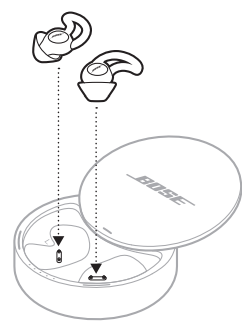
The sleepbuds™ automatically power off, and the corresponding charging lights blink white (see “Sleepbuds™ charging lights” on page 25).
CALL FUNCTIONS
To use the sleepbuds™ for call functions:
- Turn off Do Not Disturb on your mobile device. The sleepbuds™ follow your device Do Not Disturb setting.
- Set up Phone Call Alerts using the Bose Sleep app.
Once set, you can receive alerts through the sleepbuds™ and answer phone calls with your mobile device.
NOTE: Your sleepbuds™ use Bluetooth Low Energy to connect to your device and may periodically disconnect during the night. If you receive a call when your sleepbuds™ are disconnected, you won’t receive Phone Call Alerts.
Phone Call Alerts
- Phone Call Alerts are notifications sent through the sleepbuds™ that wake you when a phone call comes in.
- To enable Alerts and manage volume/sound settings, tap the gear icon in the Bose Sleep app.
Answer a phone call
Use your mobile device to answer calls. You can’t answer phone calls with he sleepbuds™.
- Remove the sleepbuds™ from your ears.
- Answer the call on your mobile device.
CARE AND MAINTENANCE
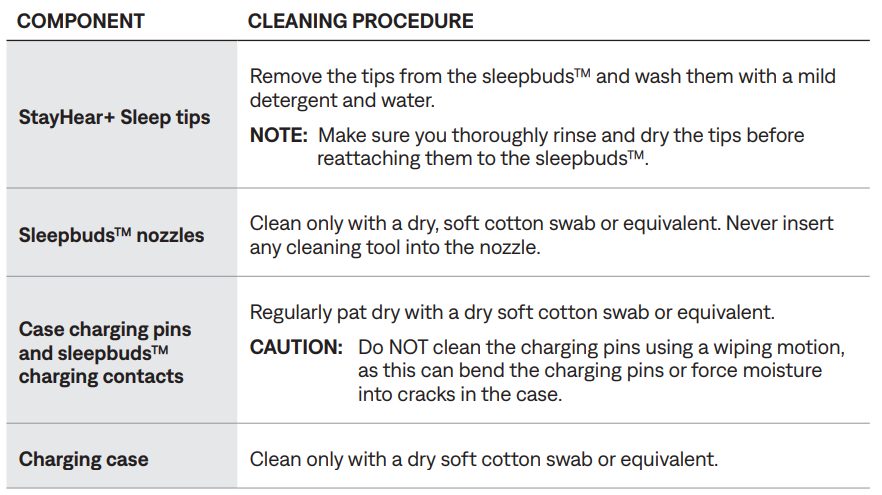
CLEAN THE SLEEPBUDS™ AND CHARGING CASE
Your sleepbuds™ and charging case may require periodic cleaning.
Troubleshooting: Bose Noise-Masking Sleepbuds
OTHER SOLUTIONS
.png)
.png)
.png)
.png)
Pros & Cons: Bose Noise-Masking Sleepbuds
Pros
- Effective passive noise isolation for sleep
- Comfortable, secure fit for all sleeping positions
- Long battery life with portable charging case
- User-friendly app for sound selection and alarm
- Clinically proven to help users fall asleep faster
Cons
- No active noise cancellation
- Cannot stream music or audio from other apps
- Higher price point than basic earplugs
- Limited sound library compared to streaming services
Bose Noise-Masking Sleepbuds offer excellent value for money for those prioritizing sleep quality over music playback. They outperform basic earplugs and standard wireless earbuds in comfort and noise-masking effectiveness.
Customer Reviews: Bose Noise-Masking Sleepbuds
Users consistently praise Bose Noise-Masking Sleepbuds for their comfort and effectiveness in blocking out snoring and traffic noise. Many report falling asleep faster and staying asleep longer. Common complaints include the inability to stream music and the higher price. Most reviews rate the product 4.5 out of 5 stars, with testimonials highlighting the secure fit and soothing sounds.
“These earbuds have transformed my sleep. I no longer wake up from my partner’s snoring.” – Sarah L., verified buyer
Worth every penny for anyone who struggles with sleep disturbances.” – Mark T., verified buyer
Purchase recommendations are strong for light sleepers and those seeking a non-invasive sleep aid. Frequently mentioned issues include the limited sound library and the need for regular charging.
Faqs
How do I set up bose Noise-Masking Sleepbuds for the first time?
What should I do if one earbud of my bose Noise-Masking Sleepbuds is not producing sound?
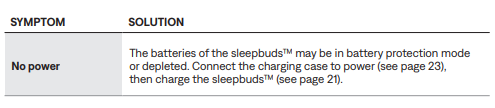
How can I troubleshoot if my bose Noise-Masking Sleepbuds won’t turn on or respond?
Are bose Noise-Masking Sleepbuds compatible with all smartphones and devices?
How can I optimize the noise-masking sound performance on bose Noise-Masking Sleepbuds?
What maintenance is required to keep bose Noise-Masking Sleepbuds working properly?
Why do my bose Noise-Masking Sleepbuds sometimes play sound from my phone speaker instead of earbuds?
How do I perform a factory reset on bose Noise-Masking Sleepbuds if troubleshooting fails?
Tags
More bose manuals
- Pairing: Bose QuietComfort 35 Wireless Headphones II User Manual
- Setup: Bose Ultra Open Earbuds User Manual
- Setup: Bose QuietComfort 35 Wireless Headphones User Manual
- Pairing: Bose QuietComfort Ultra Earbuds User Manual
- Setup: Bose Headphones 700 UC User Manual
- Pairing & Setup: Bose Soundsport Free Wireless User Manual
Leave a Comment