
Setup & Pairing: Bose QuietComfort Earbuds User Manual
Content
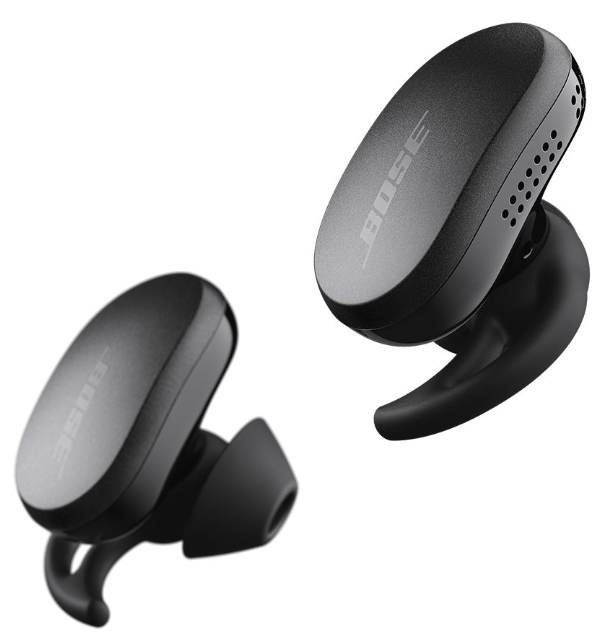
Bose QuietComfort Earbuds
Introduction:
The Bose QuietComfort Earbuds deliver a next-generation listening experience for music lovers, professionals, and active users. Renowned for their industry-leading noise cancellation, these true wireless earbuds combine advanced audio technology with a comfortable, secure fit. Whether you're commuting, working out, or relaxing at home, the Bose QuietComfort Earbuds offer immersive sound, customizable controls, and reliable connectivity.
Key benefits include CustomTune technology, which personalizes audio and noise cancellation to your unique ear shape, and adjustable noise cancellation modes for total control over your environment. The earbuds feature a sleek design, water and sweat resistance (IPX4), and up to 8.5 hours of battery life per charge, with a wireless charging case extending total listening time to over 30 hours. Ideal for audiophiles, remote workers, and fitness enthusiasts, these earbuds are available in multiple colors and typically retail between $249 and $299, depending on region and retailer.
Specifications
- Model: Bose QuietComfort Earbuds (2nd Gen)
- Driver Type: Dynamic drivers for rich, balanced sound
- Noise Cancellation: Adjustable ANC with Quiet, Aware, and Immersive modes
- CustomTune Technology: Personalizes sound and ANC to your ear canal
- Battery Life: Up to 8.5 hours per charge; up to 31.5 hours with case
- Charging: Wireless charging case, 20-minute quick charge for 3 hours
- Bluetooth: Version 5.3, multipoint connectivity, 30-foot range
- Water Resistance: IPX4 rating (sweat and splash resistant)
- Microphones: Built-in for clear calls and voice assistant access
- Controls: Touch and swipe controls for playback, volume, ANC, and calls
- Fit: Three sizes of eartips and stability bands for a secure fit
- Dimensions (Earbud): 1.14" H x 0.99" W x 0.83" D (0.024 lb)
- Dimensions (Case): 1.38" H x 2.76" W x 1.9" D (0.104–0.152 lb)
- App Support: Bose Music app for EQ, ANC, and control customization
Compared to competitors like Sony WF-1000XM5 and Apple AirPods Pro, the Bose QuietComfort Earbuds stand out for their superior noise cancellation, comfort, and personalized audio experience.
WHAT’S IN THE BOX
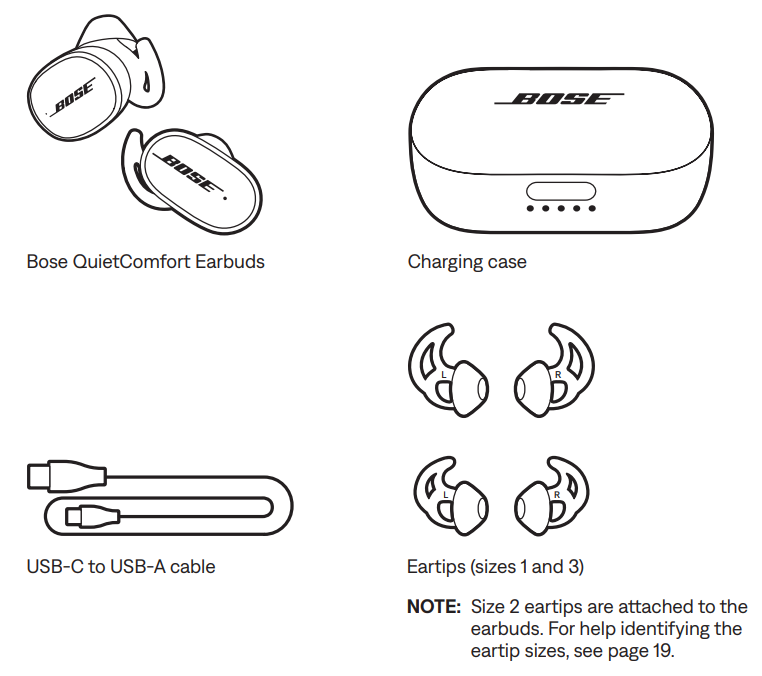
CONTENTS
Confirm that the following parts are included:
TOUCH CONTROL
Use touch control by tapping or swiping the touch surface of the earbuds. With touch control, you can play/pause audio, change the volume (if enabled), perform basic call functions, access mobile device voice control, adjust noise cancellation, and use a Shortcut (see page 30).
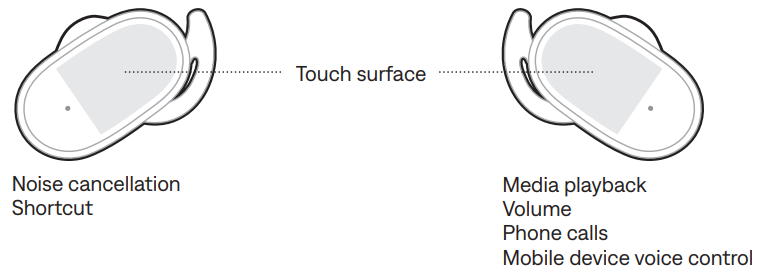
TOUCH SURFACE AREA
The touch surface is located on the outer surface of each earbud. The right earbud controls media playback, volume, phone calls, and mobile device voice control.
The left RBUD controls noise cancellation and your Shortcut.
MEDIA PLAYBACK AND VOLUME
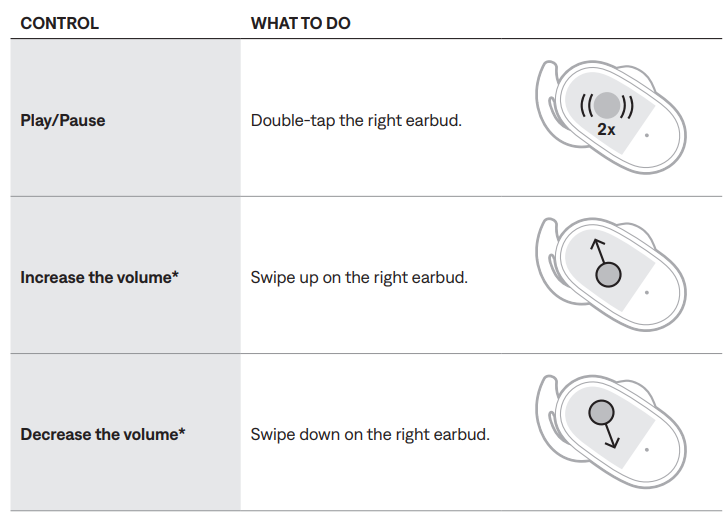
To enable this feature, use the Bose Music app. You can access this option from the Settings menu.
PHONE CALLS
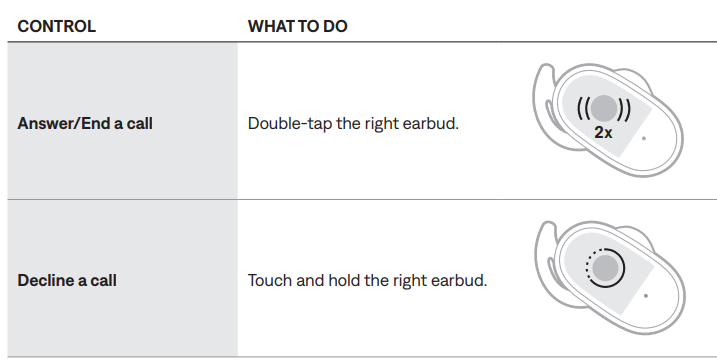
NOTE: The microphone is located on the right earbud. When talking on the phone, you must wear the right earbud. You hear audio from both earbuds.
Call notifications
- A voice prompt announces incoming callers and call status.
- To stop call notifications, disable voice prompts using the Bose Music app. You can access this option from the Settings menu.
NOISE CANCELLATION
To change the noise-cancelling mode, double-tap the left earbud (see page 28).
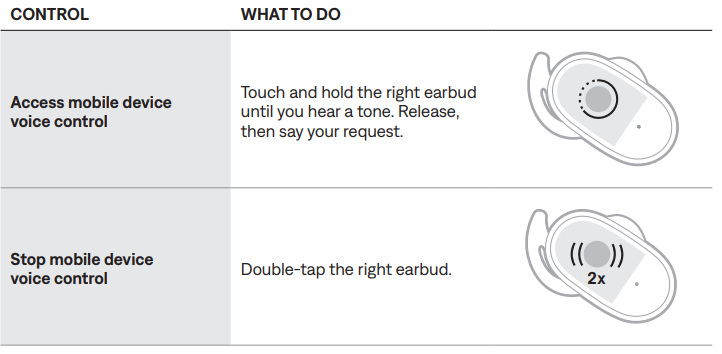
MOBILE DEVICE VOICE CONTROL
You can access your mobile device's voice control using the earbuds. The microphone on the right earbud acts as an extension of the microphone in your mobile device.
CARE AND MAINTENANCE
STORE THE EARBUDS
- When you’re not using the earbuds, store them in the charging case. Close the charging case to help preserve battery life and keep the charging case free of debris.
- When storing the earbuds for an extended period of time (more than 4 weeks), make sure they are stored at room temperature and the charging case battery level is greater than 40% (see page 36).
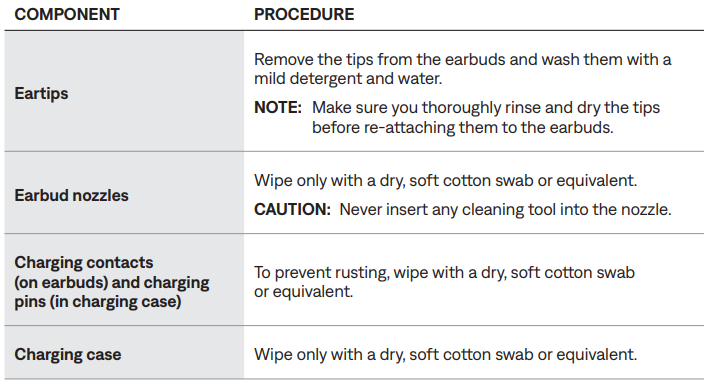
CLEAN THE EARBUDS AND CHARGING CASE
UPDATE THE EARBUDS
The earbuds and charging case begin updating automatically when connected to the Bose Music app and an update is available. Follow the app instructions.
TIP: You can also update the earbuds and charging case using the Bose updater website.
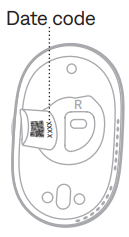
VIEW THE EARBUD DATE CODE
Remove the eartip from the earbud (see page 20). The date code is located on the earbud nozzle.
VIEW THE CHARGING CASE SERIAL NUMBER
Remove the right earbud from the charging case.
The charging case serial number is located on the left side of the right earbud well.
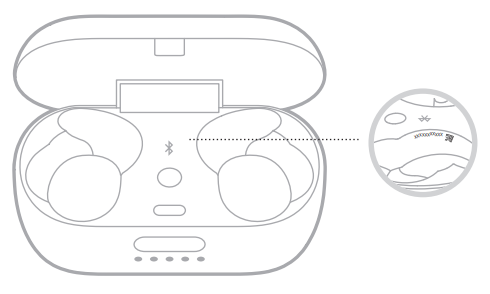
TIP: The charging case serial number is also located on the carton's outer label.
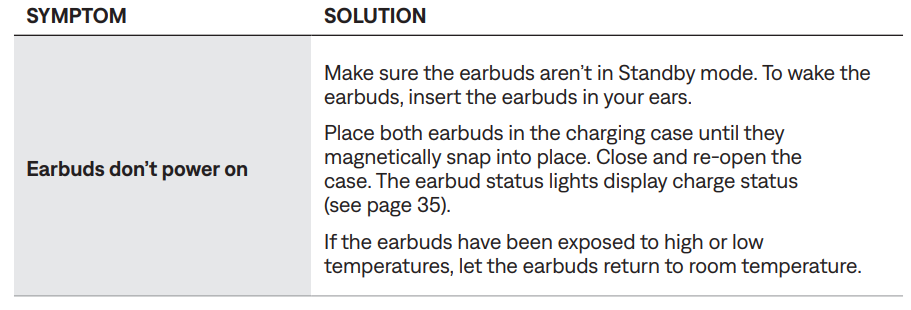
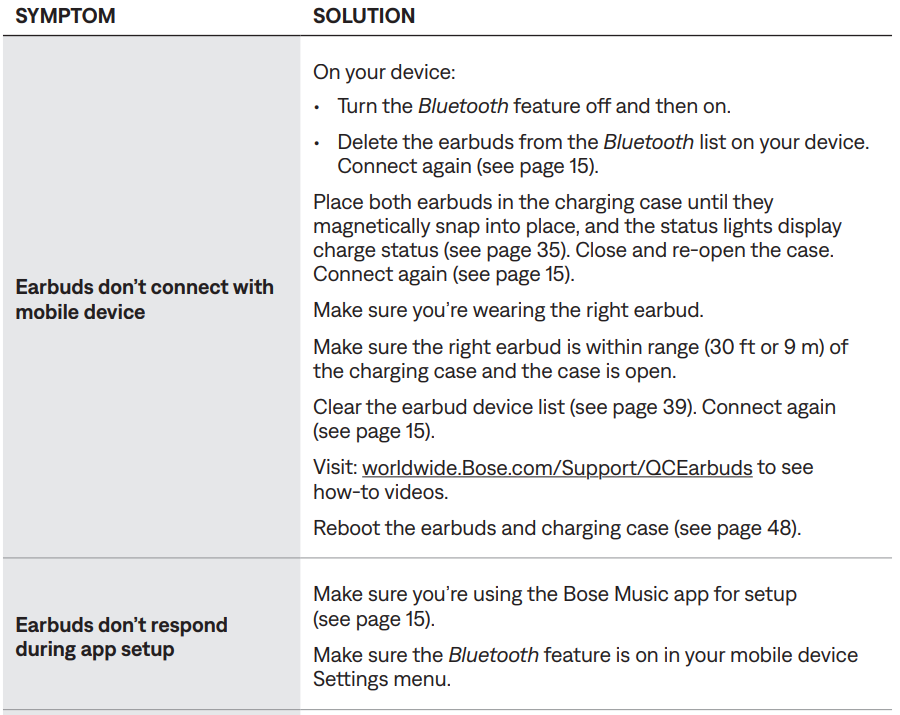
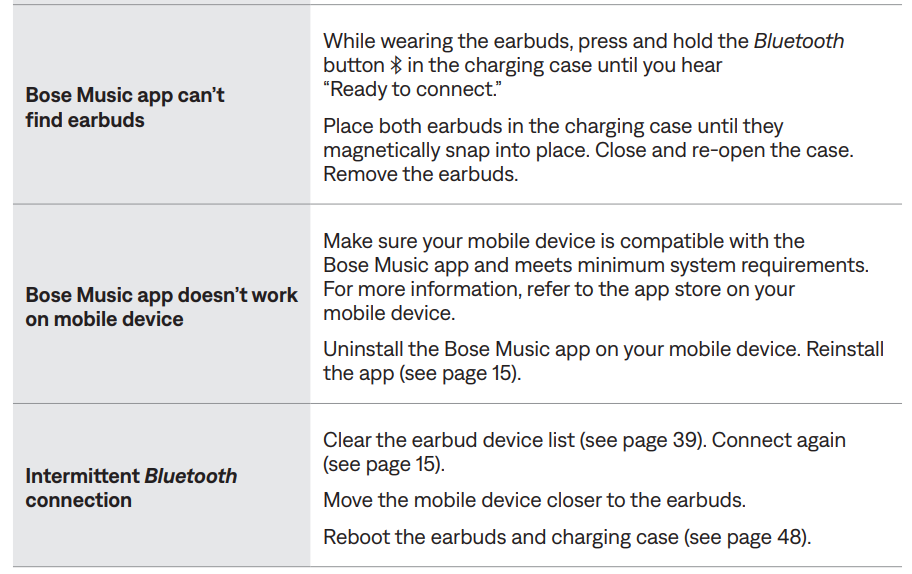
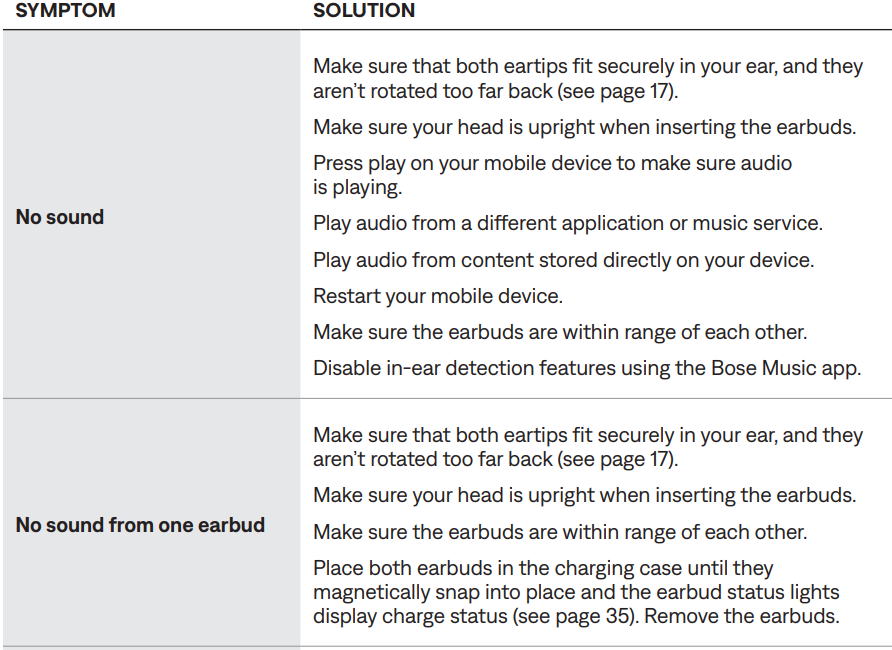
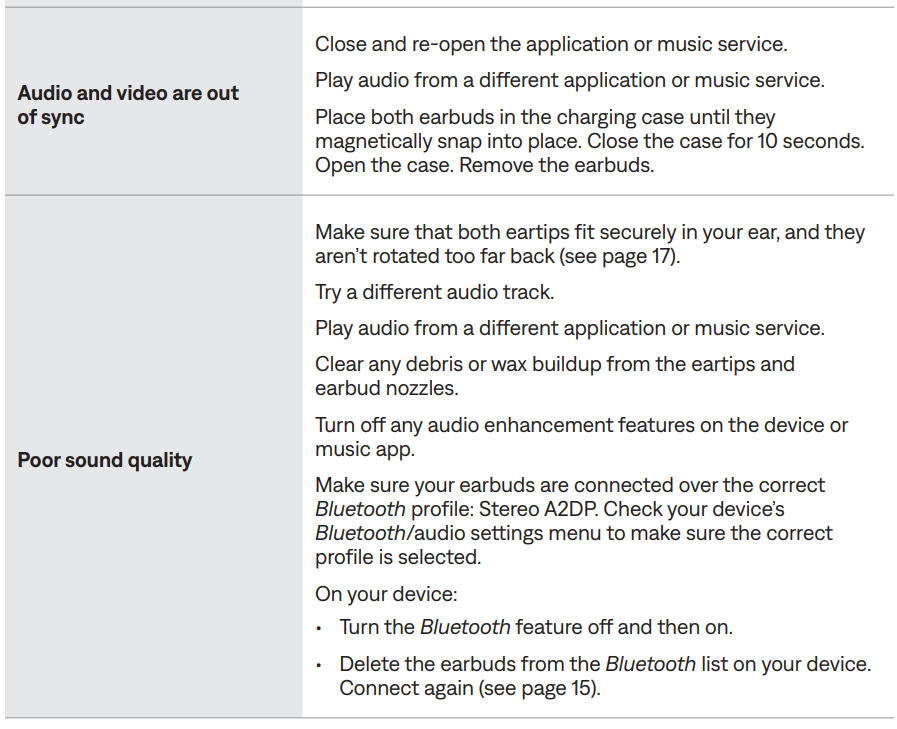
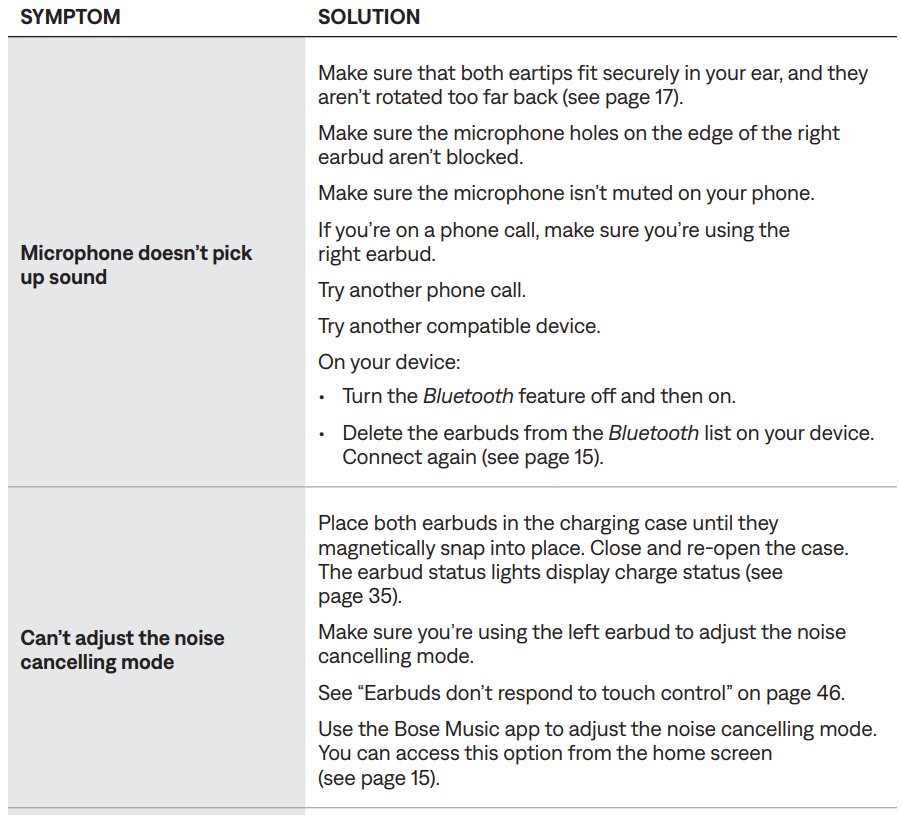
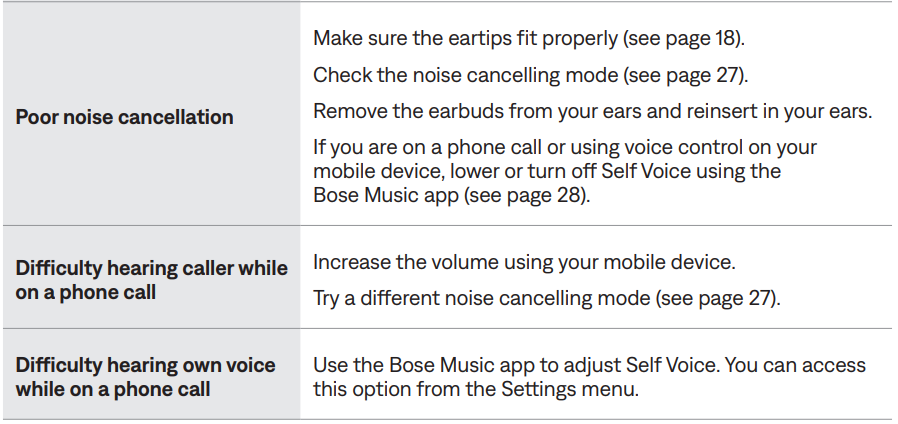
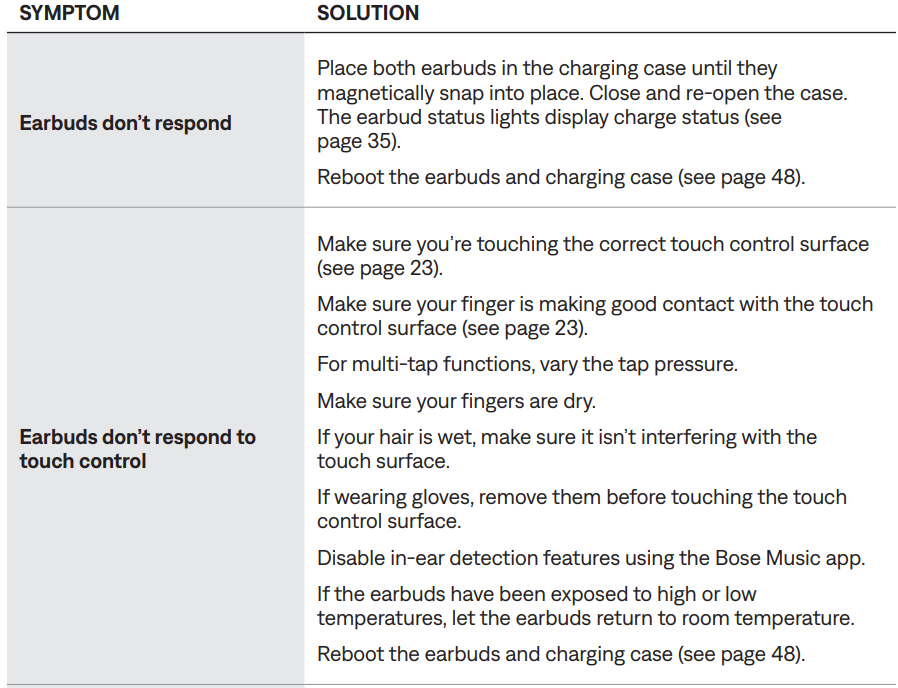
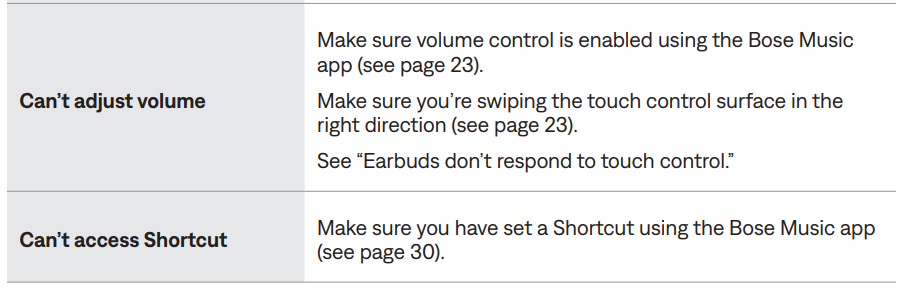
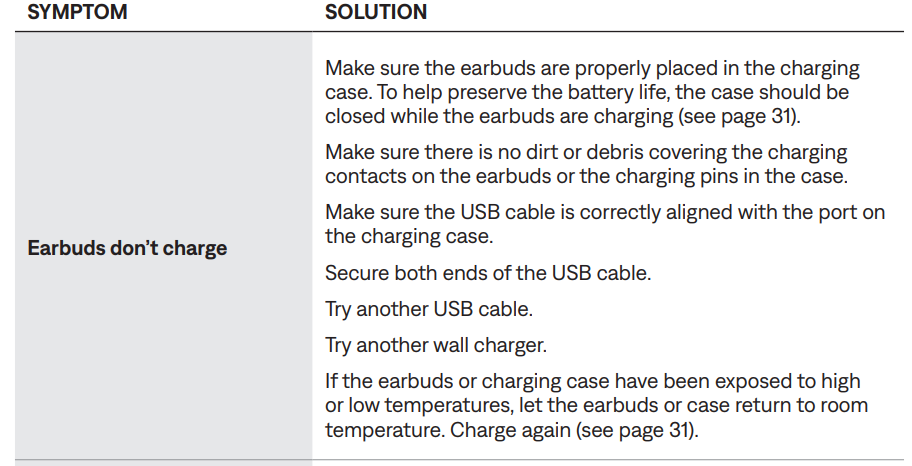
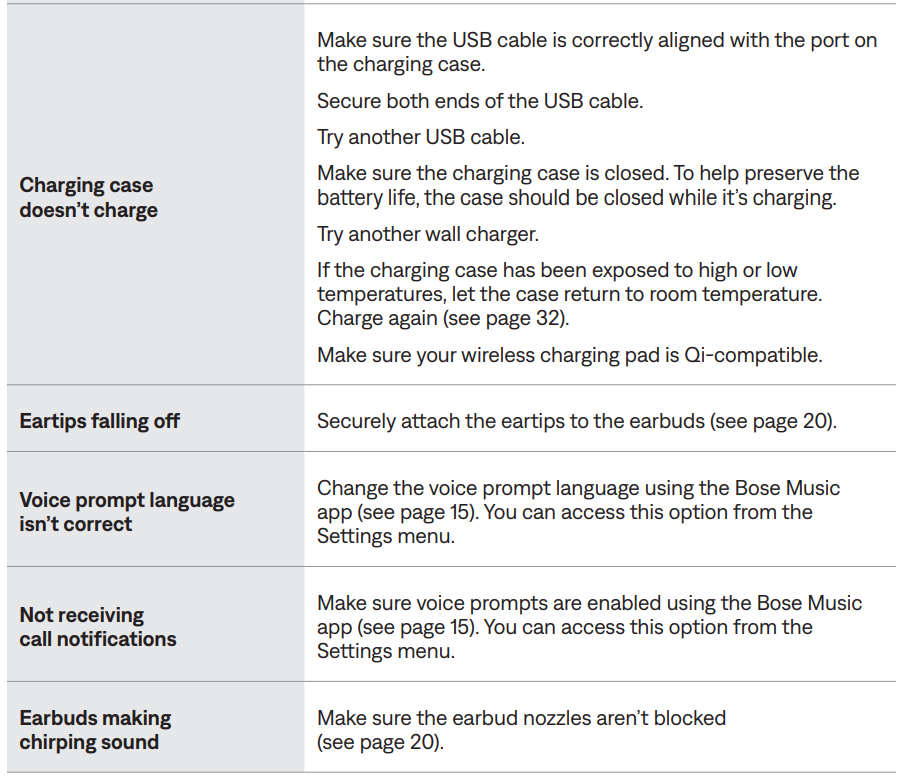
Troubleshooting: Common Issues and Solutions
OTHER SOLUTIONS
Pros & Cons: Balanced Review of Bose QuietComfort Earbuds
Pros
- Industry-leading noise cancellation with customizable modes
- Personalized audio via CustomTune technology
- Comfortable, secure fit with multiple eartips and band sizes
- Long battery life and wireless charging
- Excellent call quality and voice assistant integration
- Water and sweat resistant for active use
Cons
- Higher price compared to some competitors
- The case is slightly larger than average
- An app is required for full customization
The Bose QuietComfort Earbuds offer excellent value for money, especially for users prioritizing noise cancellation and comfort. Alternatives like Sony WF-1000XM5 and Apple AirPods Pro offer similar features but may not match Bose’s ANC performance.
Customer Reviews: User Feedback and Ratings
Customers consistently rate the Bose QuietComfort Earbuds 4.7 out of 5 stars. Most praise the exceptional noise cancellation, comfortable fit, and clear audio quality. Users frequently mention the ease of use, reliable Bluetooth connection, and long battery life. Common complaints include the premium price and occasional app dependency for advanced features. Many recommend these earbuds for frequent travelers, remote workers, and anyone seeking top-tier wireless audio. Typical testimonials highlight: “Best noise cancellation I’ve ever used,” and “Perfect for long flights and workouts.”
Faqs
How do I set up Bose QuietComfort Earbuds for the first time?
Why is my Bose QuietComfort Earbuds not connecting to my phone?
How do I improve noise cancellation on Bose QuietComfort Earbuds?
Can I use Bose QuietComfort Earbuds with Android and iPhone?
How often should I clean and maintain Bose QuietComfort Earbuds?
What do the different lights mean on the Bose QuietComfort Earbuds case?
How do I update firmware on Bose QuietComfort Earbuds?
How can I customize controls on Bose QuietComfort Earbuds?
More bose manuals
- Pairing & Setup: Bose Sport Earbuds User Manual
- Pairing & Setup: Bose QuietComfort Earbuds II User Manual
- Pairing & Setup: Bose Soundsport Free Wireless User Manual
- Pairing: Bose Quiet Comfort Ultra Earbuds (2 GEN) User Manual
- Pairing: Bose QuietComfort Ultra Earbuds User Manual
- Setup: Bose SoundTrue Around-Ear Headphones User Manual
Leave a Comment