
Bryant T6–WEM01–A Wi-Fi Thermostat User Manual
Content
Bryant T6-WEM01-A Wi-Fi Thermostat: Complete Product Manual and Buyer Guide
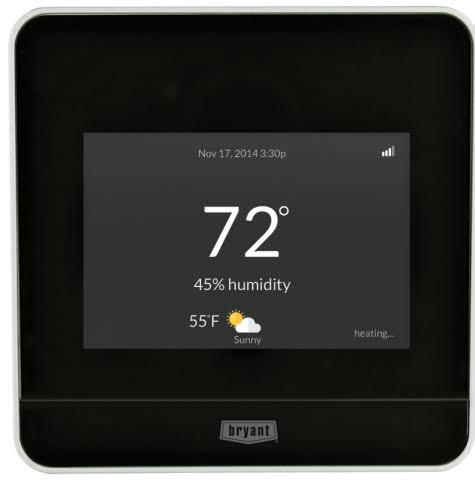
Introduction to the Bryant T6-WEM01-A Wi-Fi Thermostat
The Bryant T6-WEM01-A Wi-Fi thermostat is a smart, programmable HVAC control designed for homeowners who want dependable comfort, remote access, and better energy management. Often sold as Bryant Housewise, this Wi-Fi thermostat supports connected control through a mobile app and is built for low-voltage 24VAC heating and cooling systems. It is a practical choice for users who want an easy-to-use thermostat with scheduling, occupancy sensing, humidity support, and remote adjustment from almost anywhere.
One of its biggest strengths is flexibility. The Bryant T6-WEM01-A Wi-Fi thermostat works with conventional systems, heat pumps, hybrid heat setups, geothermal systems, and equipment with accessories such as humidifiers, dehumidifiers, or ventilation devices. That makes it especially attractive for households with more advanced HVAC setups. It also appeals to users who want a clear touchscreen interface, voice-assistant compatibility, and energy-saving features without moving to a premium-price smart thermostat.
This model is well suited for homeowners, property managers, and installers looking for a reliable replacement thermostat with modern controls. Typical pricing varies by seller and rebate eligibility, but the estimated retail range is usually around $100 to $200, with some utility programs reducing the effective cost through rebates. Availability is generally strongest through HVAC distributors, online retailers, and replacement-parts marketplaces.
For buyers comparing smart thermostats, the Bryant T6-WEM01-A Wi-Fi thermostat offers solid value, ENERGY STAR certification, and practical features that make everyday temperature control easier and more efficient.
Specifications and Key Features of the Bryant T6-WEM01-A Wi-Fi Thermostat
- Thermostat type: Wi-Fi programmable smart thermostat.
- System compatibility: 24VAC low-voltage HVAC systems.
- Heating support: Up to 2 stages for conventional systems or up to 4 stages for heat pump/auxiliary heat configurations.
- Cooling support: Up to 2 stages of cooling.
- Network support: Wi-Fi 802.11 b/g/n connectivity.
- Display: Full-color touchscreen interface.
- Smart home support: Compatible with common voice and connected-home ecosystems, depending on setup and region.
- Controls: Remote temperature adjustment, programmable schedules, and energy reporting.
- Sensors: Occupancy sensing, humidity sensing, and support for additional home temperature sensors.
- Accessory control: Compatible with humidifier, dehumidifier, and ventilation devices.
- Operating range: Designed for standard indoor thermostat environments with wide temperature tolerance.
- Physical size: Compact square design, approximately 4 x 4 x 1 inches.
- Efficiency: ENERGY STAR certified with low standby power consumption.
Compared with basic programmable thermostats, the Bryant T6-WEM01-A Wi-Fi thermostat adds remote control, system monitoring, and smarter staging options. Compared with popular premium models, it is usually simpler and more HVAC-focused, which can be an advantage for users who want dependable climate control instead of complex automation features.
Troubleshooting the Bryant T6-WEM01-A Wi-Fi Thermostat
If the thermostat does not power on, first check the HVAC breaker, furnace door switch, and wiring connections. A blank display often indicates a power issue, poor wire seating, or a failed transformer. If Wi-Fi connection drops, confirm that the router is broadcasting a compatible 2.4 GHz signal and that the thermostat is within range.
- Problem: Heating or cooling does not start. Solution: Verify system mode, setpoint, wiring, and HVAC equipment power.
- Problem: Wi-Fi setup fails. Solution: Restart the router, re-enter credentials, and move the thermostat closer to the signal source during setup.
- Problem: Incorrect heating or cooling behavior. Solution: Check configuration settings such as heat pump orientation, staging, and equipment type.
- Problem: Temperature readings seem off. Solution: Confirm thermostat placement away from vents, sunlight, or drafts.
- Problem: Schedule does not follow expected changes. Solution: Review program settings and occupancy-related features.
This model does not rely on many complex error codes, so most issues are resolved through setup verification and wiring checks. Preventive maintenance includes replacing HVAC filters regularly, keeping the thermostat firmware and app updated when available, and ensuring the unit is mounted securely away from heat sources. For warranty and support, contact the Bryant HVAC dealer network, the installing contractor, or the retailer from which the thermostat was purchased. If you need help, use the model number T6-WEM01-A when requesting technical support or replacement parts.
Pros and Cons of the Bryant T6-WEM01-A Wi-Fi Thermostat
Pros
- Strong HVAC compatibility for conventional, heat pump, and hybrid systems.
- Wi-Fi remote access makes temperature changes easy from a phone or tablet.
- ENERGY STAR certification supports energy-conscious use and possible rebates.
- Useful sensors and accessory support improve comfort control.
- Touchscreen interface is clear and easy for everyday use.
- Good value for homeowners who want smart features without unnecessary complexity.
Cons
- Interface and app experience may feel less advanced than top-tier smart thermostat brands.
- Setup can be more technical for users with multi-stage heat pump wiring.
- Availability may vary by dealer and region.
- Some buyers may prefer broader ecosystem support or more automation features.
Overall, the Bryant T6-WEM01-A Wi-Fi thermostat delivers solid value for money, especially for users who already have Bryant or compatible Carrier-family HVAC equipment. Compared with more expensive alternatives, it focuses on dependable comfort control rather than extra smart-home flair.
Customer Reviews of the Bryant T6-WEM01-A Wi-Fi Thermostat
Customer feedback is generally positive, with many users giving it around 4 out of 5 stars for reliability, ease of scheduling, and remote access. Buyers often praise the clear display, solid temperature control, and compatibility with complex HVAC systems. One common testimonial theme is that it “does the job well without being overcomplicated.”
Common complaints usually involve installation difficulty, Wi-Fi setup frustration, or confusion during heat pump configuration. Some users also note that the app and feature set are practical rather than flashy. For most homeowners, the recommendation is straightforward: choose the Bryant T6-WEM01-A Wi-Fi thermostat if you want a dependable smart thermostat for Bryant-compatible systems, especially when energy rebates are available.
Quick Buying and Setup Tips for the Bryant T6-WEM01-A Wi-Fi Thermostat
- Confirm HVAC compatibility before purchase, especially for heat pump and dual-fuel systems.
- Check whether your utility offers a rebate for smart thermostat installation.
- Use a professional installer if your system has multi-stage or accessory wiring.
- Place the thermostat away from direct sunlight, supply vents, and exterior doors.
- Test heating, cooling, fan, and schedule functions after installation.
Faqs
How do I set up the bryant T6–WEM01–A Wi-Fi Thermostat for the first time?
Why is my bryant T6–WEM01–A Wi-Fi Thermostat not connecting to Wi-Fi?
What HVAC systems are compatible with the bryant T6–WEM01–A Wi-Fi Thermostat?
How do I optimize schedules on the bryant T6–WEM01–A Wi-Fi Thermostat for better energy savings?
What should I do if the bryant T6–WEM01–A Wi-Fi Thermostat shows incorrect temperature readings?
How do I change fan settings on the bryant T6–WEM01–A Wi-Fi Thermostat?
How often should I maintain the bryant T6–WEM01–A Wi-Fi Thermostat?
Why does my bryant T6–WEM01–A Wi-Fi Thermostat keep cycling the HVAC system too often?
More bryant manuals
- Bryant 39006DP22-A Gas-Fired Induced-Draft Furnace User Manual
- Setup & Features: Bryant 619AHB Ductless Unit Split System User Manual
- Bryant R-454B Variable Speed Air Conditioner User Manual
- How to Use: Bryant Non-Condensing, 80% AFUE Gas Furnace User Manual
- Bryant 935SA Condensing Gas Furnace User Manual
- Bryant 926TC Condensing Gas Furnace User Manual
Leave a Comment