
How to Use: Carrier Edge Pro 33CS Commercial Thermostat User Manual
Content
Carrier Edge Pro 33CS Commercial Thermostat: Product Manual and Buyer Guide
Introduction
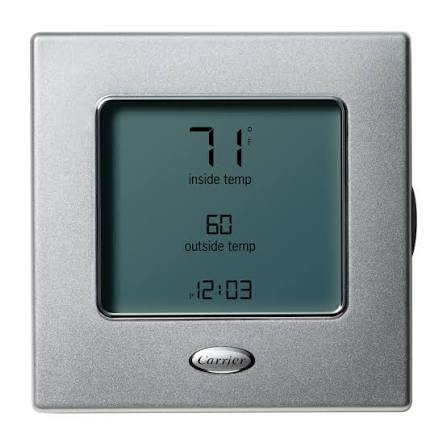
The Carrier Edge Pro 33CS commercial thermostat is a wall-mounted, low-voltage HVAC control designed for businesses that need dependable temperature management, flexible scheduling, and energy savings. Built for commercial spaces such as offices, retail stores, clinics, schools, and light industrial environments, it helps maintain comfortable indoor conditions while reducing unnecessary HVAC runtime.
One of the biggest advantages of the Carrier Edge Pro 33CS commercial thermostat is its flexibility. It supports 7-day, 5/2-day, or 1-day programming, and can also be configured for non-programmable operation. Many versions include features such as auto-changeover, occupancy scheduling, smart recovery, keypad lockout, remote sensing, and service reminders. Some models also support humidity control and dual-fuel applications, making them suitable for more advanced commercial HVAC systems.
The unit is especially appealing for facility managers and contractors who want a thermostat that is easy to install, simple to configure, and reliable for long-term use. Its sleek design, backlit display, and two-wire installation approach make it a practical upgrade from older commercial thermostats. The estimated price range typically falls between $180 and $300 depending on the model, seller, and included features, with availability through HVAC distributors, online supply stores, and commercial equipment resellers.
For businesses seeking a commercial programmable thermostat that balances comfort, control, and efficiency, the Carrier Edge Pro 33CS commercial thermostat remains a strong choice.
Specifications: Carrier Edge Pro 33CS Commercial Thermostat Features and Capabilities
- Wall-mounted, low-voltage commercial thermostat for HVAC systems.
- Supports 2-stage heat and 2-stage cool operation with auxiliary heat on compatible models.
- Programmable scheduling options: 7-day, 5/2-day, 1-day, or non-programmable modes.
- Selectable periods per day: 2 or 4 time blocks depending on configuration.
- Auto-changeover support for efficient heating and cooling transitions.
- Proportional-integral control for improved temperature stability and reduced overshoot.
- Keypad lockout security with passcode protection for commercial environments.
- Remote sensing and averaging with occupancy override for larger spaces.
- Humidity control available on humidity-enabled models.
- No batteries required; settings are stored in internal memory.
- 24 VAC, 50/60 Hz power requirement with low power draw.
- Approximate size: 5.2 in. x 5.2 in. x 1.3 in. on single-piece installations.
- Approximate weight: 0.75 lb for single-piece installation.
- Temperature display, fan control, service reminders, smart recovery, and daylight-saving adjustment.
Compared with basic commercial thermostats, the Carrier Edge Pro 33CS commercial thermostat offers more programming flexibility and stronger energy-management features. Compared with premium smart thermostats, it is less focused on app-based connectivity but delivers reliable on-wall control for conventional commercial HVAC systems.
Setup Guide: How to Install and Configure the Carrier Edge Pro 33CS Commercial Thermostat
Start by turning off power to the HVAC system at the breaker before handling any wiring. Remove the old thermostat and label each wire carefully so the new installation matches the correct terminal connections. Mount the thermostat base on a level wall surface, ideally away from direct sunlight, supply vents, or exterior drafts that can affect temperature readings.
Connect the low-voltage wires according to the system type: heat pump, air conditioner, heat-only, cool-only, or water-source heat pump. After wiring, attach the display unit and restore power. Use the on-screen menu to select system type, number of stages, programmable schedule, fan behavior, temperature limits, and keypad lockout settings if needed.
For paired sensors or remote sensing options, follow the accessory instructions and confirm that the thermostat is reading the correct room temperature. If the display does not power on, recheck the wiring and verify the HVAC transformer is supplying 24 VAC. If the system cycles too often, review cycle-per-hour settings and deadband configuration. If the thermostat shows incorrect temperature, confirm sensor placement and calibration.
Safety warning: never connect line-voltage wiring to this thermostat. It is intended only for low-voltage HVAC control. If the building uses complex commercial controls or multi-stage equipment beyond the thermostat’s supported setup, professional installation is recommended.
Pros and Cons of the Carrier Edge Pro 33CS Commercial Thermostat
Pros
- Flexible scheduling makes it ideal for offices, retail spaces, and mixed occupancy environments.
- Strong commercial feature set, including keypad lockout, service reminders, and occupancy override.
- Reliable temperature control with 2-stage heating and cooling support.
- No batteries required, which reduces maintenance and battery-related failures.
- Good value for businesses needing a durable commercial programmable thermostat.
- Some models support humidity control and dual-fuel compatibility, increasing system versatility.
Cons
- Not as feature-rich as modern Wi-Fi thermostats with mobile app control.
- Advanced configuration may be confusing for first-time installers.
- Compatibility depends on the specific HVAC system and model variant.
- Pricing can be higher than basic commercial thermostats, especially through specialty distributors.
Overall, the Carrier Edge Pro 33CS commercial thermostat offers excellent value for money when the priority is dependable building control rather than smart-home connectivity. Compared with simpler alternatives, it provides more professional HVAC management tools. Compared with cloud-connected thermostats, it focuses more on stability, scheduling, and local control.
Customer Reviews: What Users Say About the Carrier Edge Pro 33CS Commercial Thermostat
Typical user feedback for the Carrier Edge Pro 33CS commercial thermostat is generally positive, with many building managers rating it around 4.4 out of 5 stars for reliability and ease of daily use. Users commonly praise the clear display, flexible scheduling, and low-maintenance design. One frequent comment is that the thermostat works especially well in businesses that follow predictable occupancy patterns.
Common complaints usually involve setup complexity, especially when matching the thermostat to heat pump or multi-stage systems. Some users also note that it is not the best fit for buyers who want Wi-Fi access or smartphone control. Testimonials often highlight the benefit of battery-free operation and the convenience of having all settings retained after power loss.
Recommended for buyers who need a dependable commercial thermostat with programmable schedules, strong HVAC compatibility, and minimal maintenance. Less ideal for those who want app-based remote monitoring or a fully connected smart-building interface.
Frequently Asked Questions
- What is the Carrier Edge Pro 33CS commercial thermostat used for? It is used to control heating, cooling, and ventilation in commercial HVAC systems.
- Does it require batteries? No, the thermostat stores settings in memory and does not require batteries for backup storage.
- Is it programmable? Yes, it can be set for 7-day, 5/2-day, 1-day, or non-programmable operation depending on the model.
- Does it support heat pumps? Yes, compatible versions support heat pump and auxiliary heat configurations.
- Is professional installation required? Professional installation is recommended for multi-stage or commercial systems with advanced wiring needs.
Faqs
How do I set up the carrier Edge Pro 33CS Commercial Thermostat for the first time?
What should I do if my carrier Edge Pro 33CS Commercial Thermostat is not responding to HVAC commands?
Which HVAC systems are compatible with the carrier Edge Pro 33CS Commercial Thermostat?
How do I optimize scheduling on the carrier Edge Pro 33CS Commercial Thermostat to reduce energy use?
Why is the carrier Edge Pro 33CS Commercial Thermostat showing inaccurate temperature readings?
How do I reset the carrier Edge Pro 33CS Commercial Thermostat after a configuration error?
What maintenance does the carrier Edge Pro 33CS Commercial Thermostat need over time?
How can I fix common installation problems with the carrier Edge Pro 33CS Commercial Thermostat?
More carrier manuals
- Setup Guide: Carrier 24VNA6 Infinity Variable Speed Air Conditioner User Manual
- Setup: Carrier OBM154 Multipoise Oil Furnace User Manual
- Installation: Carrier 14 Seer Heat Pump System WPH4 User Manual
- Setup: Carrier Cassette Indoor Unit Ductless System 45MBCAQ User Manual
- Installation: Carrier Evaporator Coil CVPVA User Manual
- How to Use: Carrier Condensing Gas Furnace User Manual
Leave a Comment