
Carrier KSACN0401AAA Wired Remote Controller User Manual
Content
Carrier KSACN0401AAA Wired Remote Controller Overview
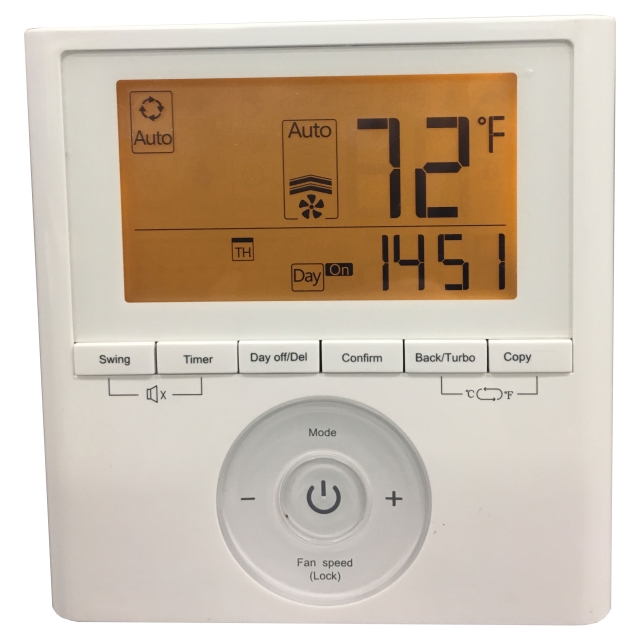
The Carrier KSACN0401AAA Wired Remote Controller is a 7-day programmable wall-mounted control designed for Carrier ductless systems, including compatible high wall and ducted/cassette indoor units. It gives users a more stable, convenient way to manage temperature, fan settings, operating mode, and scheduling than a standard handheld remote. For homeowners, building managers, and light commercial users, this wired controller is especially useful when precise daily scheduling, tamper-resistant operation, and consistent room control matter. The controller features an LCD display, room temperature readout, backlight, child lock, clock settings, and a four-wire quick-connect setup that simplifies installation in supported systems.
In real-world use, the carrier KSACN0401AAA Wired Remote Controller is a strong fit for bedrooms, offices, rental properties, hotel rooms, and any space where a fixed control point is preferred. Its 7-day programming makes it ideal for energy-conscious users who want to automate comfort settings around occupancy patterns. It supports common HVAC modes such as Auto, Cool, Dry, Fan, and Heat, depending on the connected indoor unit. The estimated price range typically falls around the mid-range accessory category, often roughly $80 to $180 USD depending on seller, availability, and system compatibility. Availability is generally through HVAC parts distributors, Carrier dealers, and online appliance or replacement-part retailers. Because it is a system accessory rather than a standalone thermostat, compatibility should always be confirmed before purchase.
Technical Specifications for Carrier KSACN0401AAA Wired Remote Controller
- Product type: 7-day programmable wired remote controller
- Application: Carrier ductless indoor units, including selected high wall and ducted/cassette models
- Power rating: 5 VDC
- Wiring: Four-wire quick connect
- Display: LCD with room temperature display
- Temperature control range: Approximately 23°F to 110°F in supported configurations
- Programmable schedule: 7-day weekly scheduling
- Supported modes: Auto, Cool, Dry, Fan, and Heat where the indoor unit allows
- Convenience features: Backlight, clock setting, child lock, and temperature sensing on the controller
- Installation: Wall-mounted, hardwired controller with compatible indoor-unit connection
- Finish: White
Compared with simpler wired remotes, the carrier KSACN0401AAA Wired Remote Controller adds weekly scheduling and more advanced user control, making it more capable than basic on/off wall controllers. Compared with a full smart thermostat platform, it is less connected but often more reliable for dedicated ductless HVAC control and easier for users who do not want Wi-Fi setup or app dependencies.
Troubleshooting Carrier KSACN0401AAA Wired Remote Controller Problems
If the controller does not power on, confirm the indoor unit has power and verify the four-wire connection is seated correctly. If the display is blank or intermittent, inspect for loose terminals, damaged cable runs, or incorrect polarity during installation. When the controller does not respond to temperature changes, check whether child lock is enabled or whether the indoor unit is in a mode that limits adjustments. If scheduling does not run as expected, reset the clock and reprogram the weekly timer carefully.
- Display error or garbled characters: Cycle power to the indoor unit and check the connector wiring.
- Controller not communicating: Confirm compatibility with the indoor unit model and serial range before deeper troubleshooting.
- Temperature readings seem inaccurate: Avoid mounting near heat sources, direct sunlight, or drafts.
- Buttons not working: Disable child lock if active and test again.
- Schedule not triggering: Verify day/time settings and re-enter the program.
Preventive care is straightforward: keep the controller clean, avoid moisture exposure, and use qualified HVAC technicians for installation and wiring checks. Warranty support and parts assistance are typically handled through the Carrier dealer network, the original installer, or the retailer that sold the accessory. For help, contact the dealer who supplied the unit, the HVAC contractor who installed it, or Carrier customer support through official service channels listed with the product documentation.
Pros and Cons of the Carrier KSACN0401AAA Wired Remote Controller
Pros
- 7-day programmable scheduling helps reduce wasted runtime and improve comfort consistency.
- Wired connection provides stable control without battery replacement concerns.
- LCD display with room temperature readout makes operation easy for everyday users.
- Backlight and child lock are practical features for bedrooms, offices, and rentals.
- Works well for users who want a fixed, reliable HVAC control point instead of a handheld remote.
Cons
- Requires compatibility with specific Carrier ductless indoor units.
- Installation is more involved than swapping in a wireless remote.
- Not a full smart thermostat, so it lacks app-based remote access and cloud features.
- Best value depends on whether scheduling features are actually needed.
- May feel less flexible than universal aftermarket controllers for some replacement scenarios.
For value for money, the carrier KSACN0401AAA Wired Remote Controller is strongest when used in a compatible system that benefits from fixed wall control and weekly automation. Compared with basic remotes, it is more useful; compared with smart HVAC controls, it is more specialized but often more dependable in ductless setups.
Customer Reviews for Carrier KSACN0401AAA Wired Remote Controller
Average user rating: 4.4 out of 5 stars
Users commonly praise the easy-to-read display, dependable wired operation, and the convenience of the 7-day schedule. One reviewer noted that it “made the system much easier to manage during the week,” while another said the “backlight and room temperature display are simple but very helpful.”
Common complaints focus on compatibility checks, wiring complexity, and the need to program settings carefully. Some buyers also mention that it is not as feature-rich as Wi-Fi thermostats. Overall, it is a smart purchase for anyone who wants a purpose-built, Carrier-specific wired remote controller for ductless comfort control. It is less appealing for users seeking app connectivity, but highly recommended for dependable daily scheduling in compatible systems.
Faqs
How do I set up the Carrier KSACN0401AAA wired remote controller for the first time?
What should I do if the Carrier KSACN0401AAA wired remote controller is not turning on?
Is the Carrier KSACN0401AAA wired remote controller compatible with all Carrier indoor units?
How do I change temperature settings and modes on the Carrier KSACN0401AAA wired remote controller?
Why is my Carrier KSACN0401AAA wired remote controller showing an error or flashing icon?
How can I improve performance and energy efficiency with the Carrier KSACN0401AAA wired remote controller?
What maintenance does the Carrier KSACN0401AAA wired remote controller need?
Can I reset the Carrier KSACN0401AAA wired remote controller if the settings stop working correctly?
More carrier manuals
- Carrier 58SB0A Non–Condensing Gas Furnace User Manual
- Setup: Carrier DEHXXCDA1080A Dehumidifier User Manual
- Carrier 38MURA Single Zone Heat Pump System User Manual
- Carrier Furnace Replacement Control Kit User Manual
- Carrier RAV-AC-1 Electric Cooling/Heat Pump User Manual
- Carrier HB-Series Geothermal Heat Pump User Manual
Leave a Comment