
Setup & Usage: Cuisinart Brew Central Coffeemaker DCC-1200C Series User Guide
Content
Cuisinart Brew Central Coffeemaker DCC-1200C Series
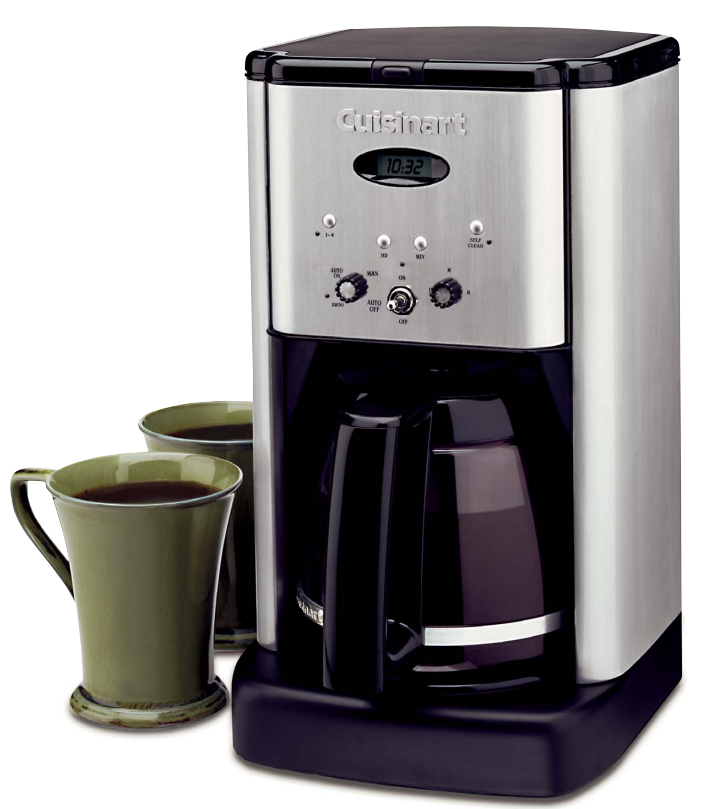
Introduction
The Cuisinart Brew Central Coffeemaker DCC-1200C Series is a perfect blend of vintage style and modern coffee brewing technology, designed to elevate your daily coffee experience. Featuring a classic brushed stainless steel exterior with retro-style controls, this programmable 12-cup coffeemaker offers both elegance and functionality for any kitchen. Its unique selling points include a charcoal water filter that removes impurities to enhance flavor, an adjustable keep-warm heater plate, and a 24-hour programmable auto-brew feature, allowing you to wake up to freshly brewed coffee every day.
Ideal for coffee enthusiasts who value convenience and quality, this coffeemaker suits busy households, offices, and anyone looking for consistent, bold coffee. Whether brewing a full pot for guests or a smaller quantity using the 1-4 cup setting, the device adapts to your needs without compromising taste. Available in a sleek stainless steel finish, the DCC-1200C Series is competitively priced around $90, making it an affordable yet premium option widely accessible through major retailers and online stores.
FEATURES AND BENEFITS
- Reservoir Cover
Flips back for easy filling. - Water Reservoir
- Showerhead (not shown) Distributes water evenly over coffee, reducing temperature loss as water passes through grounds.
- Water Filter (not shown)Charcoal water filter eliminates chlorine, calcium, bad tastes and odours from tap water.
- Filter Basket (not shown)
Holds a #4 paper filter or a permanent filter. - Filter Basket Holder
- LCD Digital Clock
Displays time of day and set time for automatic functions. - Hour and Minute Buttons
Used to set time of day and automatic functions. - Function Knob and Flip Switch Used to initiate programming of automatic functions.
- Heater Plate Control Knob
For controlling the temperature of the coffee after brewing. It has three temperature settings. - 1-4 Cup Setting
For brewing smaller pots of coffee. It provides ‘double’ heating of the water, so coffee is piping hot. - Self-Clean Setting
Tells you when it’s time to clean your coffeemaker. Remove builtup calcification from the water reservoir, helping to extend the life of your coffeemaker.
- Heater Plate Control Knob
- Brew Pause™
Stops flow of coffee from basket when carafe is removed (30 seconds max) from the heater plate, so a cup can be poured in mid-brew. Since the extraction rate varies during the brew cycle, we recommend allowing the brewing cycle to finish before pouring the coffee. - Ready Tone (not shown)
Signals the end of the brew cycle with five beeps. - Carafe
The easy pour, no drip carafe has an ergonomic handle and brewed coffee markings for two to twelve cups. - Heating Plate
Scratch resistant with black, nonstick coating
PROGRAMMING YOUR COFFEEMAKER
TO BREW COFFEE
- To turn the coffeemaker on and off:
- Turn on: To turn coffeemaker on, turn the function knob to the “Brew” position. Lift the flip switch up and release. The red “on” indicator light illuminates and brewing cycle starts.
- Turn off: Depress the flip switch down and release.
- To set the time:
Turn the function knob to “Clock”. Push and hold or pulse the “Hour” or “Minute” buttons to set the time of day. Turn the function knob to any other setting to begin time, or simply wait until the numerals stop blinking.- “Hour” Button: To change the hour, press the “Hour” pushbutton. Pressing and holding the pushbutton will cause hours to increase more rapidly. Pulse the pushbutton to increase hour more slowly. When the number count passes 12, the PM light activates and will be displayed on the LCD. After setting the time, the default hour is the last time set unless power is lost.
- “Minute” Button: To change the minute, press the “Minute” pushbutton. Pressing and holding the pushbutton will cause minutes to increase more rapidly. Pulse the pushbutton to increase minutes more slowly. After setting the time, the default minute is the last time set, unless power is lost.
Note: As you scroll, the numbers will advance slowly at first and then speed up to the rate of about three per second. When the number displayed approaches the desired setting, release the button and press repeatedly to advance one digit at a time.
- To program the Auto On:
Turn the function knob to “Program” to set the desired time to engage the Auto On. Change the auto on time in the program setting using the minute and hour pushbuttons, as you would to set the time of day. Then turn the function knob to “Auto On”. The LCD will display the current time. Lift and release the flip switch. The green light comes on to signal that the programming function is in use, and the brewing cycle will begin at the programmed time. At the programmed time, the green light will stay on and the red light will come on, indicating that the brewing cycle is starting.
To turn off: Depress the flip switch down and release. Note: To activate the auto-on feature again for brewing the next day, you must lift and release the flip switch; the green auto-on light will turn on. - To program the Variable Auto Off: Turn the function knob to the “Auto Off” position. Press and hold the “Hour” button for two seconds, until the clock display starts blinking. To change the hour and minutes, use the pushbuttons as you would to set the time of day. The Auto Off time can be set from zero to four hours.
- Decalcification:
Decalcification refers to removing calcium deposits which form on the metal parts of the coffeemaker over time. For best performance from your Brew Central™ Coffeemaker, decalcify the base unit from time to time. The frequency depends upon the hardness of your tap water and how often you use the coffeemaker. The flashing Self Clean light will indicate when you should clean your coffeemaker.
Self Cleaning:
If the Self Clean light begins to flash when the coffeemaker is turned on, it is telling you that the calcium buildup is interfering with the functioning of your coffeemaker and the flavour of your coffee. To clean, fill the water
reservoir to capacity with a mixture of 1/3 white vinegar and 2/3 water. Press the Self Clean button. When the self clean light glows, turn the coffeemaker on by pressing the ON button. The self clean light will shine steadily. The coffeemaker is now in Self Clean mode. One cycle should be sufficient to adequately clean the coffeemaker. When the cycle is completed and the five beeps sound, the coffeemaker will shut off. Turn the coffeemaker ON to see if the Self Clean light continues to flash. If it does, turn it to OFF and then repeat the cleaning procedure with a fresh solution of vinegar and water.
If the Self Clean light no longer flashes, turn the coffeemaker to OFF and then run one cycle of fresh cold water through the unit before using the unit again to brew coffee.
Notes on the Self Clean Function Pressing the Self Clean button cancels all other settings. If it is pressed accidentally, press it again to return the coffeemaker to all its previous settings. Pressing ON/OFF will also exit the Self Clean Mode and turn the coffeemaker OFF.
Cup Setting:
- The 1-4 cup setting button is used when you make small amounts of coffee. Normal coffeemakers will produce a colder batch of coffee when smaller amounts are made, because the heater doesn’t have enough time to properly ‘warm up’ to heat a small amount.
- The 1-4 setting basically ‘double heats’ the water, making your smaller amount as piping hot as a full pot would be.
- To use: When making a smaller amount, press the 1-4 button on the control panel after turning on the unit.
Heater Plate ‘Keep Warm’ Control:
The knob on the right of the control panel is the heater plate control setting for after
- brewing temperature. You can choose one of three heat settings to keep your coffee warm: low, medium, or high.
MAKING COFFEE
Before you make the first pot of coffee in your new Cuisinart® Brew Central™ Coffeemaker, we recommend operating the coffeemaker once using only water and a filter paper. This will remove any dust or residues that remain in the system from the manufacturing process.
CLEANING AND MAINTENANCE
- Always turn coffeemaker OFF and remove the plug from the electrical outlet before cleaning.
- Lift up the reservoir cover. Remove and discard the paper filter and ground coffee. The filter basket can be washed in warm, soapy water and rinsed thoroughly, or leaned in the upper rack of the dishwasher. Dry all parts after use.
- Do not put any water in the unit once the filter basket has been removed. Wipe the area under the filter basket with a damp cloth.
- Remove the carafe from the heating plate. Discard any remaining coffee. The carafe and lid can be washed in warm, soapy water and rinsed thoroughly, or placed in a dishwasher.
- The carafe and carafe lid should be placed on the upper rack only. Do not use any scouring agents or harsh cleansers on any part of the coffeemaker.
- Never immerse base unit in water or other liquid. To clean base, simply wipe with a clean, damp cloth and dry before storing.
- Fingerprints and other blemishes on the brushed metal housing can be washed off with soap and water or a nonabrasive cleaning solution. Wipe warming plate with a clean, damp cloth. Never use rough, abrasive materials or cleansers to clean the warming plate. Do not dry the inside of the water reservoir with a cloth, as lint may remain.
- Any other servicing should be performed by an authorized service representative.
WARRANTY LIMITED
THREE-YEAR WARRANTY
- We warrant that this Cuisinart product will be free of defects in material or workmanship under normal home use for 3 years from the date of original purchase.
- This warranty covers manufacturer’s defects including mechanical and electrical defects. It does not cover damage from consumer abuse, unauthorized repairs or modifications, theft, misuse, or damage due to transportation or environmental conditions. Products with removed or altered identification numbers will not be covered.
- This warranty is not available to retailers or other commercial purchasers or owners.
- If your Cuisinart product should prove to be defective within the warranty period, we will repair it or replace it if necessary.
- For warranty purposes, please register your product online at www.cuisinart.ca to facilitate verification of the date of original purchase and keep your original receipt for the duration of the limited warranty. This warranty excludes damage caused by accident, misuse or abuse, including damage caused by overheating, and it does not apply to scratches, stains, discolouration or other damage to external or internal surfaces that does not impair the functional utility of the product. This warranty also expressly excludes all incidental or consequential damages.
- Your Cuisinart product has been manufactured to the strictest specifications and has been designed for use only in 120 volt outlets and only with authorized accessories and replacement parts. This warranty expressly excludes any defects or damages caused by attempted use of this unit with a converter, as well as use with accessories, replacement parts or repair service other than those authorized by Cuisinart.
Specifications and Features of the Cuisinart Brew Central Coffeemaker DCC-1200C Series
- Capacity: 12 cups, with an additional 1-4 cup setting for smaller brews
- Design: Brushed stainless steel housing with retro flip switch and ergonomic carafe handle
- Water Filtration: Charcoal water filter to remove impurities for better coffee flavor
- Programmable 24-hour auto-brew timer with digital clock and auto shutoff (0-4 hours)
- Adjustable heater plate with three temperature settings (High, Medium, Low) to keep coffee warm
- Brew Pause™ feature allows pouring a cup mid-brew without spills
- Self-cleaning function with descaling alert indicator for calcium buildup maintenance
- Dimensions: Approximately 7.75" L x 9" W x 14" H; Weight: 8.8 lbs
- Includes a permanent gold-tone coffee filter and a measuring scoop; compatible with #4 paper filters
- Compared to similar models, it offers advanced temperature control and programmable features at a mid-range price point
Troubleshooting Common Issues with the Cuisinart Brew Central Coffeemaker DCC-1200C Series
Common problems users may encounter include:
- Coffeemaker not brewing: Check power connection and ensure the flip switch is ON. Verify the water reservoir is filled and the carafe is properly positioned.
- Water dripping after brewing: Confirm Brew Pause™ mechanism is clean and correctly slid back into place.
- Weak or off flavor coffee: Replace the charcoal water filter regularly and clean the gold-tone filter. Use fresh coffee grounds and ensure proper water-to-coffee ratio.
- Auto-brew timer issues: Reset the clock and refer to the instruction booklet to reprogram the timer correctly.
- Heating plate not maintaining temperature: Adjust the heater plate control knob; clean the plate to remove any residue.
Preventive maintenance includes regular descaling using the self-clean function triggered by the indicator light. The Cuisinart Brew Central DCC-1200C Series comes with a 3-year limited warranty, covering manufacturing defects. For support, customers can contact Cuisinart’s customer service via their official website or hotline provided in the user manual.
Pros & Cons of the Cuisinart Brew Central Coffeemaker DCC-1200C Series
- Pros:
- Stylish retro design with durable brushed stainless steel finish enhances kitchen aesthetics
- Programmable 24-hour auto-brew and auto-shutoff for convenience and safety
- Charcoal water filter improves coffee taste by removing impurities
- Brew Pause™ feature allows pouring mid-brew without drips or mess
- Adjustable heater plate lets you control coffee temperature for hours
- Self-cleaning function simplifies maintenance and extends machine life
- Good value for money with features usually found in higher-end models
- Cons:
- Glass carafe lacks insulation, so coffee may cool faster compared to thermal models
- Display screen does not have backlighting, which can be difficult to see in low light
- Programming interface may have a slight learning curve for new users
Customer Reviews and Feedback on the Cuisinart Brew Central Coffeemaker DCC-1200C Series
Users commonly praise the Cuisinart Brew Central Coffeemaker DCC-1200C Series for its consistent coffee flavor, ease of use, and stylish design. Many highlight the programmable features and the Brew Pause™ function as particularly convenient. Average star ratings hover around 4 to 4.5 stars out of 5, reflecting high satisfaction with its performance and temperature control.
Some complaints include the glass carafe cooling the coffee relatively quickly and the need for better backlighting on the digital display. Despite these points, customers recommend it for everyday use, especially for those who want reliable programmable brewing without paying premium prices. The included charcoal water filter and self-clean alerts are frequently noted as valuable additions improving coffee quality and appliance longevity.
Faqs
How do I set up the cuisinart Brew Central Coffeemaker DCC-1200C Series for the first time?
What should I do if my cuisinart Brew Central Coffeemaker DCC-1200C Series is not brewing properly?
How does the Brew Pause™ feature work on the cuisinart Brew Central Coffeemaker DCC-1200C Series?
Can I program the cuisinart Brew Central Coffeemaker DCC-1200C Series to auto-start brewing at a specific time?
What type of water filter does the cuisinart Brew Central Coffeemaker DCC-1200C Series use and how do I install it?
How do I clean and maintain the cuisinart Brew Central Coffeemaker DCC-1200C Series?
Why am I getting coffee grounds in the carafe when using the cuisinart Brew Central Coffeemaker DCC-1200C Series?
How can I optimize the brewing temperature on the cuisinart Brew Central Coffeemaker DCC-1200C Series?
More cuisinart manuals
- Setup & Features: Cuisinart Large Digital AirFryer Toaster Oven TOA-95 Instruction Manual
- Cuisinart Frozen Yogurt-Ice Cream & Sorbet Maker ICE-21C User Guide
- Setup & Features: Cuisinart AirFryer Toaster Oven TOA-60 Instruction Manual
- Cuisinart Griddler Elite GR-300 Usage Guide | Features
- Setup & Features: Cuisinart Can Opener CCO-50N Series Instruction Manual
- Cuisinart Mini Prep Food Processor DLC-4CHB User Guide
Leave a Comment