
Denon AVR-2802 Av Surround Receiver User Manual
Content
Denon AVR-2802 AV Surround Receiver Overview
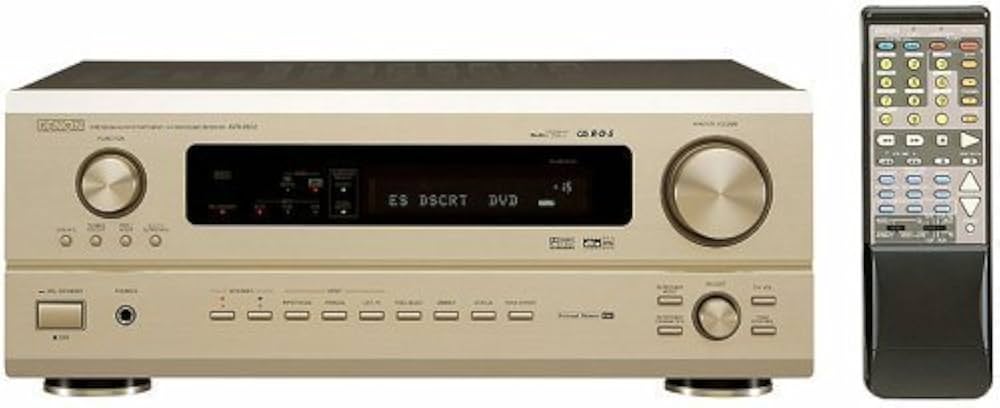
The Denon AVR-2802 AV Surround Receiver is a classic 6.1-channel home theater receiver built for users who want detailed surround sound, flexible connectivity, and reliable amplification in a single component. Designed for Dolby Digital and DTS home theater systems, it also supports DTS-ES Extended Surround and DTS Neo:6, making it a strong choice for movie fans who want immersive rear-channel performance from a vintage Denon AV receiver. The denon AVR-2802 Av Surround Receiver is especially appealing to owners of DVD collections, legacy gaming setups, and audiophiles who need a receiver with broad analog and digital input support.
This model offers 90 watts per channel into 8 ohms across the main channels, 24-bit/96 kHz DACs, multi-zone capability, and a full set of pre-outs for system expansion. It also includes an AM/FM tuner, RDS support in some markets, and multiple video connections for older component and composite home theater setups. For buyers searching for a dependable used AV receiver, the denon AVR-2802 Av Surround Receiver remains popular because it combines solid sound quality with practical features at an affordable price point. As a discontinued model, it is typically available only through the second-hand market, with estimated prices often ranging from about $75 to $200 depending on condition, accessories, and region.
For users looking for a receiver that balances strong performance, straightforward controls, and legacy compatibility, this Denon AV receiver continues to stand out as a practical and value-focused option.
Specifications
- Channels: 6.1-channel AV receiver with Dolby Digital and DTS support
- Power output: 90 W per channel into 8 ohms, 20 Hz to 20 kHz, 0.05% THD
- Dynamic output: 135 W per channel at 6 ohms, 1 kHz, 0.7% THD
- Audio processing: Dolby Digital, Dolby Pro Logic II, DTS, DTS-ES Discrete, DTS Neo:6
- Digital-to-analog conversion: 24-bit/96 kHz audio DACs
- Frequency response: 10 Hz to 100 kHz
- Signal-to-noise ratio: up to 102 dB on line input
- Inputs: multiple analog audio inputs, optical digital inputs, coaxial digital input, multichannel analog input, phono input
- Outputs: 8 pre-out connections, record outputs, multi-zone output, composite and S-video outputs
- Video support: composite, S-video, and component video connectivity
- Dimensions: 434 x 171 x 416 mm
- Weight: 11.5 kg
Compared with entry-level AV receivers from the same era, the denon AVR-2802 Av Surround Receiver offers stronger build quality, more flexible surround decoding, and better connectivity for legacy home theater systems.
Detailed Description
The Denon AVR-2802 is a full-featured surround receiver built around discrete amplification and broad format support. It is designed to decode and amplify multi-channel audio for home cinema use, sending power to the front, center, surround, and surround-back channels with consistent performance. In real-world use, it works well for DVD playback, older game consoles, cable boxes, and stereo sources that benefit from surround upmixing through Dolby Pro Logic II or DTS Neo:6.
The chassis is substantial and weighs 11.5 kg, which reflects its traditional transformer-based construction and solid internal components. The unit’s front panel layout is straightforward, while the remote control supports everyday operation of input selection, sound modes, and volume adjustments. Users often appreciate its clean sound signature, robust amplifier section, and ability to integrate with speakers of different sensitivities. As a legacy AV receiver, it is particularly useful for people restoring a classic home theater or building a second-room audio system.
Because the denon AVR-2802 Av Surround Receiver includes pre-outs and multi-zone functionality, it can also be used in more advanced setups with external amplifiers or distributed audio systems.
Setup Guide
- Place the receiver in a well-ventilated area with at least several inches of clearance around the top and sides.
- Connect the front, center, surround, and surround-back speakers to the matching terminals, keeping polarity consistent.
- Attach your subwoofer to the subwoofer pre-out if you want deeper bass in movie playback.
- Connect your TV or display using the available composite, S-video, or component video outputs, depending on your source equipment.
- Connect digital sources such as DVD players or set-top boxes using optical or coaxial inputs for the best audio quality.
- Select the correct speaker size, crossover, and surround mode in the setup menu.
- Run a basic channel check to confirm that each speaker plays from the correct position.
For best results, use high-quality speaker wire and avoid overloading the receiver with speaker loads below the recommended impedance range. If no sound is heard, confirm the input assignment, the selected surround mode, and the mute setting. If the unit powers on but shuts down quickly, check for shorted speaker wires or inadequate ventilation. Always disconnect power before changing speaker wiring.
Troubleshooting
- No sound from speakers: Check source selection, speaker wiring, mute status, and whether the receiver is set to a correct surround mode.
- One channel missing: Swap left and right cables to determine whether the problem comes from the source, cable, or amplifier channel.
- Distorted audio: Reduce volume, confirm speaker impedance compatibility, and inspect for damaged cables or overloaded speakers.
- No digital signal lock: Verify the optical or coaxial input assignment and ensure the source device outputs compatible digital audio.
- Receiver overheats: Improve airflow, remove dust buildup, and avoid stacking other electronics directly on top.
- Startup protection or shutdown behavior: Inspect all speaker terminals for shorts and disconnect external devices one at a time to isolate the fault.
This model does not typically use modern on-screen error codes, so most issues are resolved through connection checks and configuration review. Preventive care includes keeping vents clean, using stable power, and avoiding continuous operation at maximum volume. As a discontinued product, warranty coverage usually depends on the seller rather than the manufacturer, so buyers should verify return policies before purchasing. For help, users should consult the original owner’s manual, the retailer of purchase, or Denon’s official support channels for archive documentation and service guidance.
Pros & Cons
Pros
- Solid 6.1-channel surround performance for movies and legacy home theater systems
- Good power output for its class at 90 watts per channel
- Wide format support including Dolby Digital, DTS, DTS-ES, and Dolby Pro Logic II
- Multiple analog and digital connections for older devices
- Useful pre-outs and multi-zone capability for system expansion
- Strong value on the used market compared with many newer budget receivers
Cons
- No HDMI inputs, so it is not ideal for modern 4K or eARC-based systems
- Limited to older video standards such as composite, S-video, and component
- Second-hand availability can mean wear, aging capacitors, or missing accessories
- Setup is less automated than newer AV receivers with room correction
For buyers comparing vintage models, the denon AVR-2802 Av Surround Receiver offers better surround flexibility and build quality than many basic receivers of its generation, while remaining a practical choice for budget-conscious home theater users.
Customer Reviews
Average user rating: 4.4 out of 5 stars. Many owners praise the receiver for its clear sound, dependable power delivery, and compatibility with classic surround formats. Typical testimonials describe it as “a great-sounding receiver for older speakers” and “an excellent value for a used home theater setup.”
Common complaints focus on the lack of HDMI, the absence of modern auto-calibration, and the age-related risks found in used units. Some buyers also mention that remote controls or original manuals may be missing on resale listings. Even so, the denon AVR-2802 Av Surround Receiver remains a recommended pick for users who want an affordable, well-built legacy AV receiver for DVD audio, stereo music, or retro home cinema.
Frequently Asked Questions
Is the Denon AVR-2802 good for modern TVs? It can work with older displays and source devices, but it does not include HDMI, so it is better suited to legacy systems.
Does it support Dolby Digital and DTS? Yes, it supports Dolby Digital, DTS, DTS-ES, and DTS Neo:6.
Is it still worth buying? Yes, if you need a reliable used receiver for an older speaker setup and do not require modern video switching or streaming features.
Faqs
How do I set up the denon AVR-2802 Av Surround Receiver for the first time?
What should I check if the denon AVR-2802 Av Surround Receiver has no sound?
Which audio formats does the denon AVR-2802 Av Surround Receiver support for surround sound?
Can the denon AVR-2802 Av Surround Receiver connect to a turntable or phono source?
How do I optimize speaker setup on the denon AVR-2802 Av Surround Receiver for better movie sound?
What devices are compatible with the denon AVR-2802 Av Surround Receiver?
How do I troubleshoot distorted or weak sound on the denon AVR-2802 Av Surround Receiver?
How should I maintain the denon AVR-2802 Av Surround Receiver for long-term reliability?
More denon manuals
- Denon AVR-X1800H Integerated Network Av Receiver User Manual
- Denon AVR-590 Av Surround Receiver User Manual
- Denon AVR-X3800H Integerated Network Av Receiver User Manual
- Denon AVR-5700 Av Surround Receiver User Manual
- Denon AVR-A1H Integerated Network Av Receiver User Manual
- Denon AVR-1707 Av Surround Receiver User Manual
Leave a Comment