
Denon AVR-X3800H Integerated Network Av Receiver User Manual
Content
Denon AVR-X3800H Integrated Network AV Receiver: Complete Product Manual
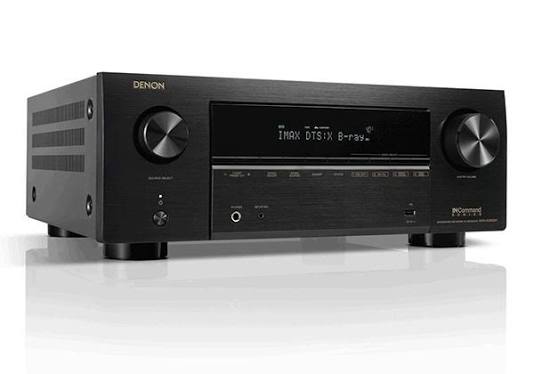
The Denon AVR-X3800H integrated network AV receiver is a premium home theater hub designed for users who want powerful surround sound, modern 8K video support, and flexible multi-room streaming in one unit. Built as a 9.4-channel receiver with 105 watts per channel, it delivers enough power and processing for immersive Dolby Atmos, DTS:X, IMAX Enhanced, and Auro-3D setups. It is ideal for dedicated home theater enthusiasts, gamers, and movie lovers who want a future-ready receiver for a living room or media room. The Denon AVR-X3800H Integerated Network Av Receiver also stands out for its extensive connectivity, including multiple HDMI 2.1 inputs, three HDMI outputs, HEOS built-in wireless streaming, and support for advanced room calibration.
This model is a strong fit for users building a 5.1.4, 7.1.4, or more advanced system with external amplification. It is also well suited to anyone upgrading from an older 4K receiver and looking for 8K passthrough, VRR, ALLM, and eARC support for modern TVs and game consoles. In the current market, its estimated price range is typically around $1,399 to $1,799, depending on promotions and retailer stock. Availability is generally broad through major AV retailers, audio specialists, and Denon-authorized sellers. For buyers seeking a balance of performance, expandability, and ease of use, this receiver remains one of the most compelling options in its class.
Specifications for Denon AVR-X3800H 9.4-Channel 8K Network AV Receiver
- Channels: 9.4-channel processing with 9 internal amplifiers and support for up to 4 subwoofers
- Power output: 105 watts per channel at 8 ohms, 20 Hz to 20 kHz, 0.08% THD, 2 channels driven
- High-current amplification: Designed for dynamic movie soundtracks and demanding speaker loads
- Video support: 8K Ultra HD passthrough, HDMI 2.1, HDR, and advanced gaming features
- HDMI connectivity: 6 HDMI inputs and 3 HDMI outputs, including eARC support
- Audio formats: Dolby Atmos, DTS:X, IMAX Enhanced, and Auro-3D compatibility
- Streaming: HEOS built-in, Wi-Fi, Bluetooth, AirPlay 2, and Ethernet network connectivity
- DACs: 32-bit/192 kHz digital-to-analog converters for all channels
- Room correction: Advanced setup and calibration support for optimized speaker tuning
- Weight and size: Approximately 27.6 lb with a full-size AV receiver chassis
- Comparison: More expandable than many midrange receivers, and often positioned below Denon flagship models while offering premium home theater features
Performance is especially strong for a receiver in this category, with a clean, detailed sound signature and enough processing power to support large speaker layouts. Compared with entry-level receivers, the AVR-X3800H offers more HDMI outputs, more subwoofer flexibility, and broader surround-format support. Compared with higher-end models, it may lack the absolute top-tier amplifier headroom, but it delivers excellent value for most serious home theater systems.
Detailed Description of the Denon AVR-X3800H Integrated Network AV Receiver
The Denon AVR-X3800H integrated network AV receiver works as the central control unit for a modern entertainment system. It receives audio and video signals from sources such as game consoles, Blu-ray players, media streamers, and set-top boxes, then processes and sends them to your TV, projector, speakers, and subwoofers. Its 9.4-channel architecture allows users to build surround sound systems with height speakers for immersive 3D audio. The receiver’s HEOS platform also enables music streaming across compatible rooms, making it useful beyond movie playback.
Build quality is solid and practical, with a full-size chassis, clearly labeled rear connections, and a front panel designed for everyday operation. The unit feels substantial and well ventilated, which is important for long listening sessions and multi-channel operation. In real-world use, it performs well in home theaters, gaming setups, and mixed-use media rooms where users want both premium sound and flexible source switching. The Denon AVR-X3800H Integerated Network Av Receiver is especially appealing to users who want advanced audio decoding without moving to a much more expensive flagship model.
Setup Guide: How to Install and Configure the Denon AVR-X3800H
- Place the receiver on a stable, well-ventilated surface with several inches of clearance around the top and sides.
- Connect your speakers to the correct terminals, matching polarity carefully for left, right, center, surround, and height channels.
- Attach one or more subwoofers to the pre-outs, then connect your TV to the HDMI eARC output.
- Connect source devices such as a streaming box, Blu-ray player, or game console to available HDMI inputs.
- Join the receiver to your home network through Wi-Fi or Ethernet for HEOS streaming and firmware updates.
- Power on the receiver and follow the on-screen setup assistant to select speaker layout, language, and input assignments.
- Run room calibration and save the results, then fine-tune bass, crossover, and distance settings if needed.
- Test audio and video playback from each source before closing the installation.
For best results, keep power cables separated from signal cables and avoid blocking the ventilation openings. If a device is not detected, check HDMI cable quality, confirm that the source output matches the display format, and ensure that HDMI Control or eARC settings are configured correctly. Safety-wise, always disconnect power before moving speaker wires, and never operate the unit in an enclosed cabinet without airflow.
Troubleshooting Denon AVR-X3800H Common Problems and Fixes
- No sound: Verify speaker wiring, input selection, mute status, and speaker assign settings.
- No video signal: Confirm the TV input, HDMI cable integrity, and that the source is set to the correct resolution.
- ARC or eARC not working: Enable HDMI Control and eARC on both the receiver and TV, then restart both devices.
- Network drops: Reconnect Wi-Fi, update firmware, or switch to wired Ethernet for more stable streaming.
- Overheating: Improve ventilation, lower the volume, and make sure the unit is not stacked with heat-producing gear.
- Speaker calibration issues: Rerun the setup assistant and verify that microphones and speaker distances are correct.
- Startup errors or protection mode: Disconnect all speaker wires, inspect for shorts, and reconnect one channel at a time.
Preventive care includes regular dust removal, firmware updates, and using high-quality HDMI cables rated for 8K. Warranty coverage and support depend on the region and retailer, but Denon service centers typically handle authorized repair and maintenance. For help, contact Denon customer support through the official website, your retailer’s support desk, or an authorized service provider in your country.
Pros and Cons of the Denon AVR-X3800H
Pros
- Excellent surround processing for Dolby Atmos, DTS:X, IMAX Enhanced, and Auro-3D
- Flexible 9.4-channel design with support for advanced speaker layouts and multiple subwoofers
- Strong HDMI 2.1 connectivity for 8K TVs, next-gen consoles, and modern streaming devices
- HEOS built-in for wireless music streaming and whole-home audio integration
- Good value for users who want premium features without moving into flagship pricing
- Useful for both home theater and gaming thanks to low-latency video features
Cons
- Large chassis may be difficult to fit in compact cabinets
- Best performance often requires careful setup and speaker calibration
- May need external amplification for very large or demanding speaker systems
- More expensive than entry-level receivers, especially for casual users
Compared with alternatives in the same class, the Denon AVR-X3800H Integerated Network Av Receiver offers more flexibility than many midrange models and stronger upgrade potential than entry-level receivers. For the money, it delivers a compelling mix of power, features, and expandability.
Customer Reviews and Owner Feedback
Typical customer feedback for the Denon AVR-X3800H is highly positive, with many owners rating it around 4.5 out of 5 stars. Users frequently praise its room-filling sound, easy HDMI switching, and excellent support for immersive formats. One common testimonial is that it “finally made my Atmos setup sound cinematic and balanced.” Another frequent comment is that the receiver is “feature-rich and ready for future upgrades.”
Common complaints include the large physical size, occasional setup complexity, and the need for a good ventilation plan. Some buyers also note that the best results come from careful calibration and proper speaker matching. Overall, it is a strong purchase recommendation for home theater enthusiasts, gamers, and music lovers who want a versatile AV receiver with advanced networking and high-end surround capabilities.
Faqs
How do I set up the denon AVR-X3800H Integerated Network Av Receiver for the first time without missing any important steps?
Why is my denon AVR-X3800H Integerated Network Av Receiver not producing sound, and what should I check first?
Which HDMI cable and TV connection should I use with the denon AVR-X3800H Integerated Network Av Receiver for 8K, ARC, or eARC?
How do I optimize speaker setup and Amp Assign settings on the denon AVR-X3800H Integerated Network Av Receiver?
How do Audyssey MultEQ XT32 and Dirac Live improve the denon AVR-X3800H Integerated Network Av Receiver?
What should I do if the denon AVR-X3800H Integerated Network Av Receiver will not connect to Wi-Fi or the network?
Is the denon AVR-X3800H Integerated Network Av Receiver compatible with gaming consoles and next-gen video features?
How should I maintain and clean the denon AVR-X3800H Integerated Network Av Receiver for long-term reliability?
More denon manuals
- Denon AVR-A1H Integerated Network Av Receiver User Manual
- Denon AVR-X1800H Integerated Network Av Receiver User Manual
- Denon AVR-X2800H Network Av Receiver User Manual
- Denon AVR-2802 Av Surround Receiver User Manual
- Denon Av Surround Receiver AVR-4306 User Manual
- Denon AVR-590 Av Surround Receiver User Manual
Leave a Comment