
Denon AVR-X2800H Network Av Receiver User Manual
Content
Denon AVR-X2800H Network AV Receiver Overview
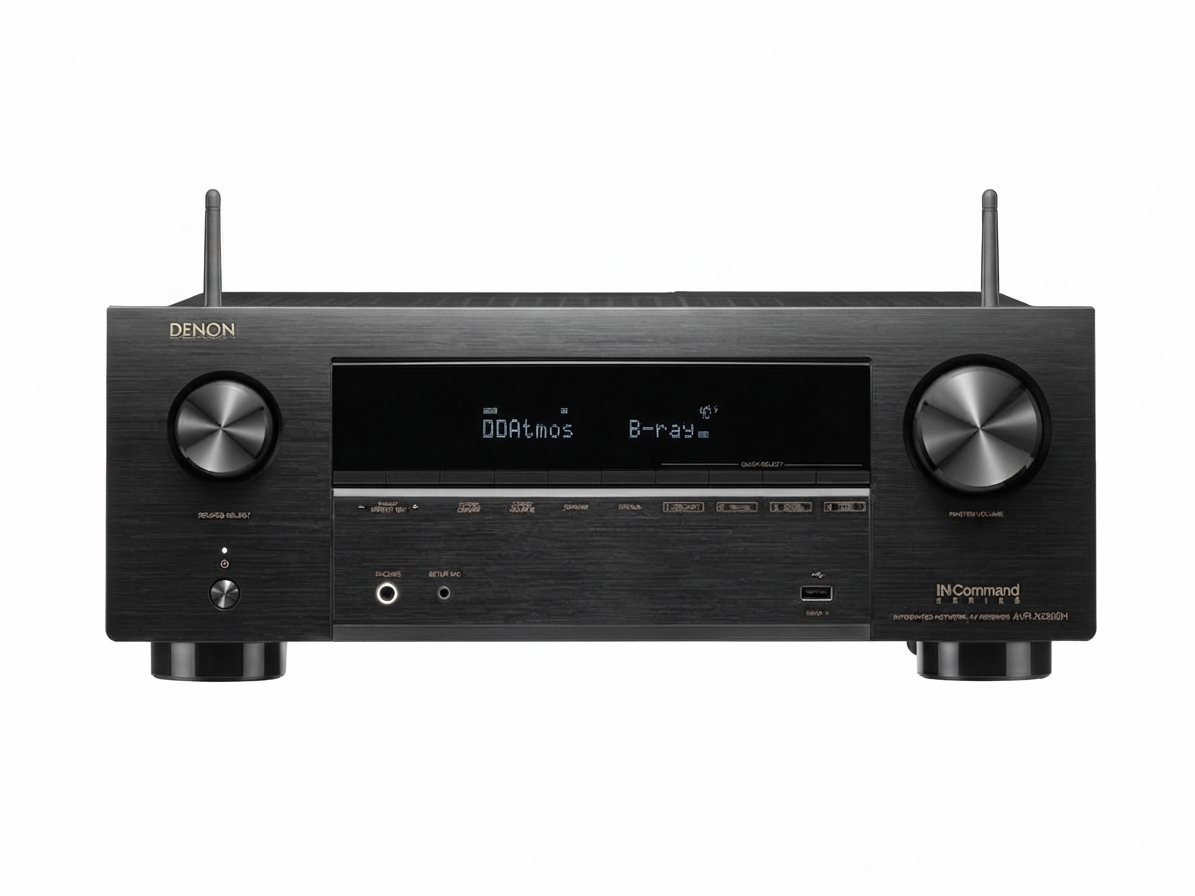
The Denon AVR-X2800H Network AV Receiver is a versatile 7.2-channel home theater solution built for users who want strong surround sound performance, modern HDMI 2.1 connectivity, and reliable multi-room streaming in one unit. With support for 8K pass-through, Dolby Atmos, DTS:X, HEOS Built-in, Wi-Fi, Bluetooth, and voice assistant integration, it is designed to handle everything from compact living-room setups to more advanced media rooms. The receiver is especially appealing to movie fans, gamers, and music listeners who want a balanced mix of power, flexibility, and easy setup.
One of the biggest advantages of the denon AVR-X2800H Network Av Receiver is its ability to drive a full 7.2-channel system while still remaining approachable for everyday users. It offers 95 watts per channel with two channels driven at 8 ohms, making it suitable for small to medium home theater spaces. The unit also supports modern gaming features such as 4K/120Hz and 8K/60Hz passthrough on compatible HDMI inputs, which makes it a smart choice for current-generation consoles and premium TVs.
Availability is generally strong through Denon retailers, home theater specialists, and major electronics stores. Pricing typically falls in the midrange AV receiver category, with an estimated street price around $900 to $1,200 depending on region, sales, and bundle offers. For buyers comparing alternatives, the AVR-X2800H sits above entry-level 5.1 receivers and below premium models with more channels and amplification headroom, making it a practical value option for most home entertainment systems.
Specifications for Denon AVR-X2800H Network AV Receiver
- Channels: 7.2-channel AV receiver with discrete amplification
- Power output: 95W per channel at 8 ohms, 20 Hz to 20 kHz, 0.08% THD, 2 channels driven
- HDMI: 6 inputs and 2 outputs, including eARC support
- Video support: 8K/60Hz and 4K/120Hz pass-through on compatible inputs
- HDR compatibility: HDR10, HDR10+, Dolby Vision, HLG, and Dynamic HDR
- Audio formats: Dolby Atmos, DTS:X, Dolby Surround, DTS Neural:X, and virtualization modes
- Streaming: HEOS Built-in, Wi-Fi, Bluetooth, AirPlay 2, and network audio support
- Room correction: Audyssey MultEQ XT setup and calibration support
- Subwoofer support: Dual subwoofer outputs for improved bass management
- Approximate size: Standard mid-size AV receiver chassis for rack or cabinet placement
Compared with entry-level 5.1 receivers, the denon AVR-X2800H Network AV Receiver adds more immersive surround capability, more HDMI flexibility, and stronger future-proofing. Compared with higher-end 9-channel models, it trades expansion potential for a simpler setup and a lower price point.
Detailed Description of the Denon AVR-X2800H Network AV Receiver
The Denon AVR-X2800H is engineered as an all-in-one control center for modern home theaters. It receives audio and video from gaming consoles, streaming devices, Blu-ray players, TVs, and turntables, then processes and distributes that signal to your speakers and display. The result is a clean, unified entertainment system with fewer boxes and fewer compatibility issues.
In real-world use, this receiver works especially well in living rooms and dedicated media rooms where 5.1.2 or 7.2-channel speaker layouts are common. Movie playback benefits from Dolby Atmos and DTS:X height effects, while music listeners can use HEOS for wireless streaming from compatible services. Turntable owners also gain a dedicated phono input, making it a flexible choice for both digital and analog sources.
The build quality reflects Denon’s familiar AV receiver design: a sturdy chassis, organized rear panel connections, and a user-focused front layout. The unit feels practical rather than flashy, which matches its purpose. Users typically appreciate the clear setup flow, stable network playback, and strong soundstage for the price. For buyers searching for a denon AVR-X2800H Network AV Receiver review that balances sound quality and convenience, this model offers a compelling middle-ground experience.
Setup Guide: How to Install and Configure the Denon AVR-X2800H
Start by placing the receiver in a well-ventilated cabinet or open shelf space. Leave enough room above and around the unit so heat can dissipate properly. Connect your speakers first, then attach the subwoofers, TV, and source devices using HDMI cables rated for high-speed or Ultra High Speed use if you plan to run 4K/120Hz or 8K signals.
- 1. Connect the main speaker wires to the matching terminals.
- 2. Attach one or two subwoofers to the subwoofer outputs.
- 3. Connect your TV to the HDMI output labeled for eARC or main display use.
- 4. Plug in gaming consoles, streaming boxes, or disc players to the HDMI inputs.
- 5. Power on the receiver and follow the on-screen setup assistant.
- 6. Run Audyssey room calibration with the included microphone for better sound balance.
- 7. Join your Wi-Fi network or use Ethernet for a more stable connection.
- 8. Pair Bluetooth devices or configure HEOS for wireless music streaming.
For best results, rename inputs and confirm speaker size settings during setup. If you do not get picture or sound, check HDMI input assignment, TV eARC settings, and cable compatibility. Always power the receiver off before changing speaker wiring, and never allow bare wire strands to touch, as this can cause protection shutdowns.
Troubleshooting the Denon AVR-X2800H Network AV Receiver
Common issues usually involve HDMI handshake problems, network connection drops, or speaker wiring mistakes. If the TV shows no signal, try a different HDMI cable, confirm that the source device is set to the correct output resolution, and verify that the receiver’s HDMI input is selected correctly. If audio is missing from streaming apps or TV apps, make sure eARC is enabled on both the TV and receiver.
- Problem: No sound from speakers. Solution: Check speaker terminal polarity, mute status, and input assignment.
- Problem: HDMI image but no audio. Solution: Enable ARC/eARC and confirm the TV audio output is set correctly.
- Problem: Wi-Fi disconnects. Solution: Move closer to the router, update firmware, or use Ethernet.
- Problem: Receiver shuts down. Solution: Inspect for shorted speaker wires and improve ventilation.
- Problem: Bluetooth pairing fails. Solution: Clear old pairings and restart both devices.
There are no widely known user-facing error codes that dominate day-to-day use, but protection mode typically indicates overheating or a speaker wiring fault. Preventive care includes keeping vents clear, updating firmware, and using quality HDMI and speaker cables. Warranty coverage and support options usually depend on region and retailer, so users should contact Denon customer support or the authorized dealer where the unit was purchased for service assistance.
Pros and Cons of the Denon AVR-X2800H Network AV Receiver
Pros
- Strong feature set for the price, especially for home theater and gaming
- 7.2-channel support gives more flexibility than basic 5.1 receivers
- Supports Dolby Atmos and DTS:X for immersive surround sound
- HEOS, Wi-Fi, Bluetooth, and AirPlay 2 make streaming easy
- Two subwoofer outputs improve bass management in larger rooms
- Reliable Denon interface and straightforward setup process
- Good value for buyers who want modern HDMI 2.1 support without moving to a much more expensive model
Cons
- Power is solid but not ideal for very large or inefficient speakers
- Not as expandable as higher-end 9-channel and 11-channel receivers
- Setup can still feel technical for first-time AV users
- Advanced theater builders may prefer more processing headroom
- Price can be higher than entry-level alternatives with fewer premium features
For buyers comparing alternatives, the denon AVR-X2800H Network AV Receiver offers a better balance of features and simplicity than many basic receivers, while remaining more affordable than flagship theater models.
Customer Reviews and User Feedback
Typical customer feedback for the Denon AVR-X2800H centers on its clear sound, easy streaming, and strong feature set. Many users rate it around 4.5 out of 5 stars for home theater performance and overall flexibility. Movie owners often praise the immersive surround presentation, while gamers appreciate the HDMI 2.1 compatibility and responsive video pass-through.
Common complaints usually involve the learning curve during setup, the need for careful HDMI configuration, and the fact that some users want more raw amplification power. A frequent testimonial theme is that it feels like a “future-ready” receiver for the price. Many buyers recommend it for medium rooms, especially if the system includes a powered subwoofer and a compatible 4K or 8K TV.
Overall, the denon AVR-X2800H Network AV Receiver is a strong recommendation for users who want a dependable, modern receiver with excellent everyday versatility.
Faqs
How do I set up the denon AVR-X2800H Network Av Receiver for the first time?
Why is my denon AVR-X2800H Network Av Receiver not showing sound from the TV through eARC?
What devices are compatible with the denon AVR-X2800H Network Av Receiver for 8K and 4K gaming?
How do I connect Wi-Fi and Bluetooth on the denon AVR-X2800H Network Av Receiver?
Can the denon AVR-X2800H Network Av Receiver power a full 7.2 home theater system?
How do I optimize sound quality on the denon AVR-X2800H Network Av Receiver after setup?
What should I do if the denon AVR-X2800H Network Av Receiver keeps losing network connection?
How should I maintain and clean the denon AVR-X2800H Network Av Receiver for long-term reliability?
More denon manuals
- Denon Av Surround Receiver AVR-4306 User Manual
- Denon AVR-A1H Integerated Network Av Receiver User Manual
- Denon AH-C830NCW Wireless In-Ear Headphones User Manual
- Denon AVR-X3800H Integerated Network Av Receiver User Manual
- Denon Envaya Portable Bluetooth Speaker DSB-250BT User Manual
- Denon AVR-X1800H Integerated Network Av Receiver User Manual
Leave a Comment