
Denon AH-C830NCW Wireless In-Ear Headphones User Manual
Content
Denon AH-C830NCW Wireless In-Ear Headphones Manual
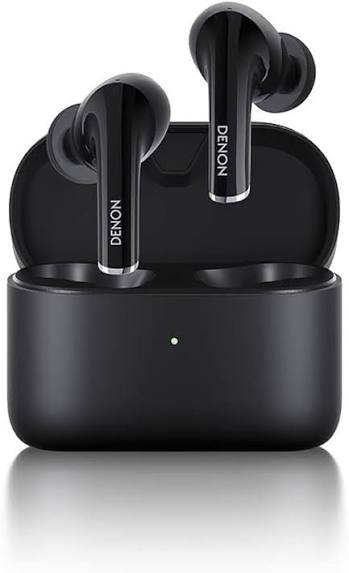
Introduction: What the Denon AH-C830NCW Wireless In-Ear Headphones Offer
The Denon AH-C830NCW Wireless In-Ear Headphones are true wireless earbuds designed for listeners who want active noise cancellation, balanced sound, and all-day portability in a compact form factor. Built around Denon’s audio heritage, these noise-cancelling earbuds combine a comfortable in-ear fit with Bluetooth 5.0 connectivity, AAC and SBC codec support, and an IPX4 water-resistant design for everyday use. They are especially well suited for commuting, office calls, travel, workouts, and focused listening at home.
One of the main selling points is the hybrid active noise cancelling system, which helps reduce ambient sound without making the audio feel overly compressed. A transparency mode, called Denon Ambient Monitor, allows users to hear outside noise when needed. Battery performance is practical for a full day of mixed listening, with up to 6 hours from the earbuds and up to 24 hours total with the charging case, or up to 4.8 hours with ANC enabled. The lightweight design also makes them easy to wear for extended sessions.
For shoppers comparing premium wireless earbuds, the Denon AH-C830NCW Wireless In-Ear Headphones typically sit in the mid-range price category, with availability often around the $100 to $160 range depending on retailer, color, and discounts. They appeal to users who value sound quality and noise cancellation more than app-heavy features or advanced codecs.
Specifications: Denon AH-C830NCW Technical Details and Features
- Driver type: 11 x 10 mm oval dynamic drivers for detailed stereo sound.
- Frequency response: 20 Hz to 20,000 Hz for standard full-range playback.
- Bluetooth: Bluetooth 5.0 with Class 1 transmission support.
- Codec support: AAC and SBC.
- Noise control: Hybrid active noise cancelling with ambient/transparency listening mode.
- Battery life: Up to 6 hours per charge, up to 24 hours total with the charging case.
- Battery life with ANC: Up to 4.8 hours per charge, up to 19.2 hours total with the charging case.
- Water resistance: IPX4 rating for sweat and splash resistance.
- Weight: About 5.3 g per earbud, with a compact charging case.
- Charging: USB-C charging case with rechargeable lithium-ion batteries.
- Controls: Touch-style wireless controls for playback, calls, and noise modes.
In comparison with similar true wireless earbuds, the Denon AH-C830NCW stands out for its audio tuning and ANC, while some rivals may offer longer battery life, multipoint Bluetooth, or stronger companion apps. It is a strong choice if sound quality and comfort matter more than extra software features.
Setup Guide: How to Pair and Use the Denon AH-C830NCW
Start by fully charging the earbuds and the case with the included USB-C cable. Remove both earbuds from the case, then enable Bluetooth on your phone, tablet, or laptop. The earbuds should enter pairing mode automatically on first use. If they do not, place them back in the case, close the lid, reopen it, and retry pairing.
Select the earbuds from the Bluetooth device list and confirm the connection. On supported Android devices, Google Fast Pair can speed up the setup process. After pairing, test audio playback, call quality, and the ANC or transparency mode to confirm everything is working as expected.
For best results, choose the ear tip size that creates a secure seal. A proper seal improves bass response, comfort, and noise cancellation performance. Avoid exposing the earbuds or case to heavy rain, swimming, or charging in wet conditions, since the earbuds are IPX4 rated but not fully waterproof. If pairing fails, delete the earbuds from your device list, restart Bluetooth, and try again. Keep the charging contacts clean and store the earbuds in the case when not in use.
Troubleshooting: Common Denon AH-C830NCW Problems and Fixes
If the earbuds do not power on, charge them for at least 15 to 30 minutes and confirm that the case itself has power. If only one earbud plays audio, reset the Bluetooth connection on your device, then return both earbuds to the case and reconnect. If the sound is low or thin, check the ear tip seal and make sure the earbuds are seated properly.
If active noise cancelling seems weak, clean the ear tips and confirm that the earbuds fit tightly. A poor seal can reduce ANC performance dramatically. If the earbuds do not charge, inspect the charging contacts for debris and make sure the cable and power adapter are functioning. There are no common public error codes for this model, so most issues are solved through reset, re-pairing, or cleaning the contacts.
To prevent future problems, update the device firmware if your connected device or app prompts for it, avoid extreme temperatures, and store the earbuds in the case after use. Denon products commonly include a one-year limited warranty through authorized sellers, and support is usually available through Denon customer service or the retailer where the product was purchased.
Pros & Cons: Is the Denon AH-C830NCW Worth It?
Pros
- Balanced sound tuning with a clean, detailed presentation.
- Effective hybrid ANC for commuting, office work, and travel.
- Compact, lightweight earbuds that are comfortable for long listening sessions.
- IPX4 water resistance adds useful protection for workouts and light rain.
- Reliable Bluetooth 5.0 connectivity with AAC support for Apple devices.
- Strong value for users who want premium sound without a premium flagship price.
Cons
- Battery life is good but not class-leading when ANC is enabled.
- No advanced codec support beyond AAC and SBC.
- Feature set is simpler than some competing earbuds with richer apps or multipoint pairing.
- The charging case is functional, but not especially compact compared with newer rivals.
Overall, the Denon AH-C830NCW Wireless In-Ear Headphones offer solid value for listeners who care most about sound quality, comfort, and noise cancellation. Compared with alternatives in the same price bracket, they are a strong audio-first option rather than a feature-heavy one.
Customer Reviews: What Users Commonly Say
Typical user feedback for the Denon AH-C830NCW Wireless In-Ear Headphones is positive, with many owners praising the clear mids, satisfying bass, and comfortable fit. A common star rating pattern falls around 4 out of 5 stars, especially among listeners who prioritize sound over software features.
Frequent compliments include dependable ANC for everyday environments, easy Bluetooth pairing, and strong call quality in quiet to moderately noisy spaces. Common complaints usually mention battery life with ANC enabled, the lack of an advanced companion app experience, and the absence of premium extras found on more expensive competitors.
These earbuds are a good purchase recommendation for commuters, remote workers, and casual music fans who want dependable wireless earphones with noise cancelling and balanced sound. Buyers who need multipoint Bluetooth, longer battery endurance, or extensive customization may want to compare them with newer alternatives before deciding.
Faqs
How do I set up denon AH-C830NCW Wireless In-Ear Headphones for the first time?
What should I do if my denon AH-C830NCW Wireless In-Ear Headphones are not pairing or connecting properly?
How do I switch between ANC and Transparency Mode on denon AH-C830NCW Wireless In-Ear Headphones?
Are denon AH-C830NCW Wireless In-Ear Headphones compatible with iPhone, Android, and laptops?
How long does the battery last on denon AH-C830NCW Wireless In-Ear Headphones with ANC on?
Why does one side of my denon AH-C830NCW Wireless In-Ear Headphones sound quieter than the other?
How do I improve call quality on denon AH-C830NCW Wireless In-Ear Headphones in noisy places?
How should I clean and maintain denon AH-C830NCW Wireless In-Ear Headphones for long-term use?
More denon manuals
- Denon Envaya Portable Bluetooth Speaker DSB-250BT User Manual
- Denon Av Surround Receiver AVR-4306 User Manual
- Denon AVR-X2800H Network Av Receiver User Manual
- Denon AVR-A1H Integerated Network Av Receiver User Manual
- Denon AVR-X3800H Integerated Network Av Receiver User Manual
- Denon AVR-X1800H Integerated Network Av Receiver User Manual
Leave a Comment