
Denon Av Surround Receiver AVR-4306 User Manual
Content
Denon AVR-4306 AV Surround Receiver Manual and Product Guide
Introduction
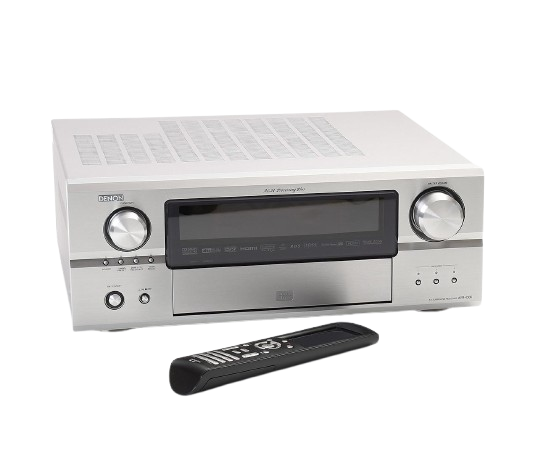
The Denon AVR-4306 is a flagship-style AV surround receiver designed for users who want powerful home theater performance, flexible connectivity, and advanced control features in one unit. As a 7.1-channel receiver, it delivers strong amplification, immersive surround decoding, and wide format support for movies, music, and multi-room entertainment. The denon Av Surround Receiver AVR-4306 is especially appealing to enthusiasts who want a premium receiver with HDMI switching, video upscaling, network capability, and multi-zone operation.
This model is well suited for dedicated home theater systems, large living rooms, and custom installations where multiple audio and video sources need to be managed efficiently. It supports popular surround formats such as Dolby Digital EX, Pro Logic IIx, DTS-ES, and DTS Neo:6, making it a strong match for DVD, cable, gaming, and legacy source playback. Its built-in Ethernet connectivity and internet radio support also broaden its appeal for users who want more than just a traditional AV receiver.
The denon Av Surround Receiver AVR-4306 originally launched as a premium product and was priced around the high-end receiver range, roughly $1,999 at release. Today, availability is typically limited to used, refurbished, or archived-stock markets. For buyers who value feature depth, robust build quality, and classic Denon engineering, it remains an attractive option in the secondhand market.
Specifications
- Channels: 7.1-channel surround sound receiver
- Power output: 130 watts per channel into 8 ohms; 170 watts per channel into 6 ohms
- Dynamic power: Up to 220 watts per channel into 4 ohms
- Surround formats: Dolby Digital EX, Dolby Pro Logic IIx, DTS-ES, DTS Neo:6, DTS 96/24
- Video connectivity: 3 HDMI inputs, 1 HDMI output, component, composite, and S-Video switching
- Upscaling and conversion: Video conversion to HDMI with upscaling support up to 1080i
- Audio conversion: 24-bit/192 kHz DAC performance
- Network features: Ethernet port and internet radio compatibility
- Multi-zone support: Yes, with multi-room and multi-source capability
- Dimensions: Approximately 17.1 x 6.75 x 16.9 inches
- Weight: Around 41 pounds
Compared with many midrange AV receivers of its era, the AVR-4306 offered more advanced processing, stronger connectivity, and higher-end control options. It sits above simpler 5.1-channel models and competes with other premium 7.1-channel receivers that emphasize both home theater performance and system integration.
Detailed Description
The Denon AVR-4306 is built for users who want a central control hub for an advanced entertainment system. It accepts multiple analog and digital sources, processes audio through high-quality conversion stages, and routes video through modern and legacy connections. This makes it useful for mixed setups that include Blu-ray players, older DVD players, game consoles, streaming devices, and external audio components.
Its real-world strengths include clean surround decoding, flexible input assignment, and the ability to simplify cabling by sending video through HDMI. The receiver’s multi-zone design also makes it practical for households that want music in one room and a separate source in another. The chassis feels substantial, and the weight reflects the heavy-duty transformer and amplifier design typical of Denon’s premium line.
Users generally appreciate the AVR-4306 for its strong audio performance, feature-rich setup options, and long-lasting build quality. In everyday use, it delivers a refined listening experience for movie soundtracks, concert DVDs, and stereo playback. The combination of power, switching flexibility, and network functions makes the denon Av Surround Receiver AVR-4306 a capable centerpiece for complex AV systems.
Setup Guide
- Place the receiver on a stable, well-ventilated shelf with at least several inches of clearance on top and sides.
- Connect speakers by matching the correct positive and negative terminals for all 7.1 channels.
- Attach your main display using HDMI if possible, then connect source devices such as a Blu-ray player, game console, or media box.
- Assign digital audio inputs and video inputs in the on-screen or front-panel setup menu.
- Run the auto-setup or calibration routine if available, and fine-tune speaker size, distance, and level settings.
- Set up network connectivity through the Ethernet port if you want internet radio or related network functions.
- Test each input, surround mode, and zone output before closing the cabinet or mounting the unit in a rack.
Use only properly rated speakers and never short the speaker terminals. Avoid blocking ventilation because the receiver can run warm during extended playback. If there is no sound, confirm the correct input assignment, speaker wiring, and mute status before moving to advanced diagnostics. For best results, complete setup with the master volume at a low level.
Troubleshooting
- No audio output: Check the selected input, speaker connections, mute setting, and surround mode. Verify that the source device is outputting audio.
- No video on HDMI: Confirm the HDMI cable, display input selection, and source resolution. Try a direct connection if the signal does not pass through.
- Intermittent sound: Inspect cables for loose contacts and clean input connections. Reduce electrical interference from nearby devices.
- Overheating: Improve airflow, lower the listening volume, and keep the receiver away from enclosed cabinets.
- Network issues: Recheck the Ethernet cable and router settings if internet radio or network functions fail.
- Setup errors: Reset speaker configuration and input assignments if a source plays through the wrong channel layout.
There are no widely documented consumer-style error codes commonly associated with this model, so most issues are solved through source verification, cable replacement, and menu resets. Preventive maintenance includes periodic dust removal, ventilation checks, and careful handling of speaker wire connections. Warranty coverage will depend on whether the unit is new-old-stock, refurbished, or used, so buyers should confirm support terms with the seller or reseller. For help, contact Denon support through its official customer service channels or an authorized audio service center.
Pros & Cons
Pros
- Powerful 7.1-channel amplification with strong home theater dynamics
- Extensive surround format support for movies and music
- HDMI switching with video conversion and upscaling convenience
- Multi-zone support for whole-home audio flexibility
- Solid build quality and premium feel
- Good value on the used market for feature-rich setups
Cons
- Older HDMI version compared with modern receivers
- Limited support for newer streaming and object-based audio formats
- Setup can feel complex for beginners
- Heavy chassis makes installation less convenient
- Availability is mostly restricted to used or refurbished units
For buyers comparing legacy home theater receivers, the AVR-4306 stands out for audio quality and connectivity depth. Newer alternatives offer more current HDMI standards and streaming platforms, but this model still offers strong value when purchased at the right price.
Customer Reviews
Typical user feedback for the denon Av Surround Receiver AVR-4306 is highly positive, with many owners praising its sound clarity, amplifier strength, and feature set. A common sentiment is that it performs like a premium system controller rather than a basic receiver. Many users would rate it around 4.5 out of 5 stars for home theater performance and build quality.
Frequent praise includes clean dialogue, immersive surround sound, and dependable switching between multiple devices. Common complaints usually focus on the learning curve, size, and the fact that newer AV receivers offer more modern connectivity. One typical user-style comment is: “Excellent sound and a true centerpiece for my theater room, but setup took time.” Another often repeated view is: “Still impressive for movies and music, especially if you already own legacy components.”
It is a strong purchase recommendation for enthusiasts building a classic AV system, especially when found in good condition at a fair price.
Faqs
How do I set up denon Av Surround Receiver AVR-4306 for the first time?
What should I do if denon Av Surround Receiver AVR-4306 has no sound but the display is on?
Which home theater formats and surround modes does denon Av Surround Receiver AVR-4306 support?
Can denon Av Surround Receiver AVR-4306 work with HDMI devices, older components, and legacy audio gear?
How do I get the best sound performance from denon Av Surround Receiver AVR-4306 in a 7.1 setup?
Why does denon Av Surround Receiver AVR-4306 enter protection mode or shut down unexpectedly?
Does denon Av Surround Receiver AVR-4306 support iPod, USB audio, or network streaming features?
How should I maintain and clean denon Av Surround Receiver AVR-4306 to extend its lifespan?
More denon manuals
- Denon AH-C830NCW Wireless In-Ear Headphones User Manual
- Denon AVR-X2800H Network Av Receiver User Manual
- Denon Envaya Portable Bluetooth Speaker DSB-250BT User Manual
- Denon AVR-A1H Integerated Network Av Receiver User Manual
- Denon AVR-X3800H Integerated Network Av Receiver User Manual
- Denon AVR-X1800H Integerated Network Av Receiver User Manual
Leave a Comment