
Denon AVR-S700W Network Av Receiver User Manual
Content
Denon AVR-S700W Network AV Receiver: Complete Product Manual
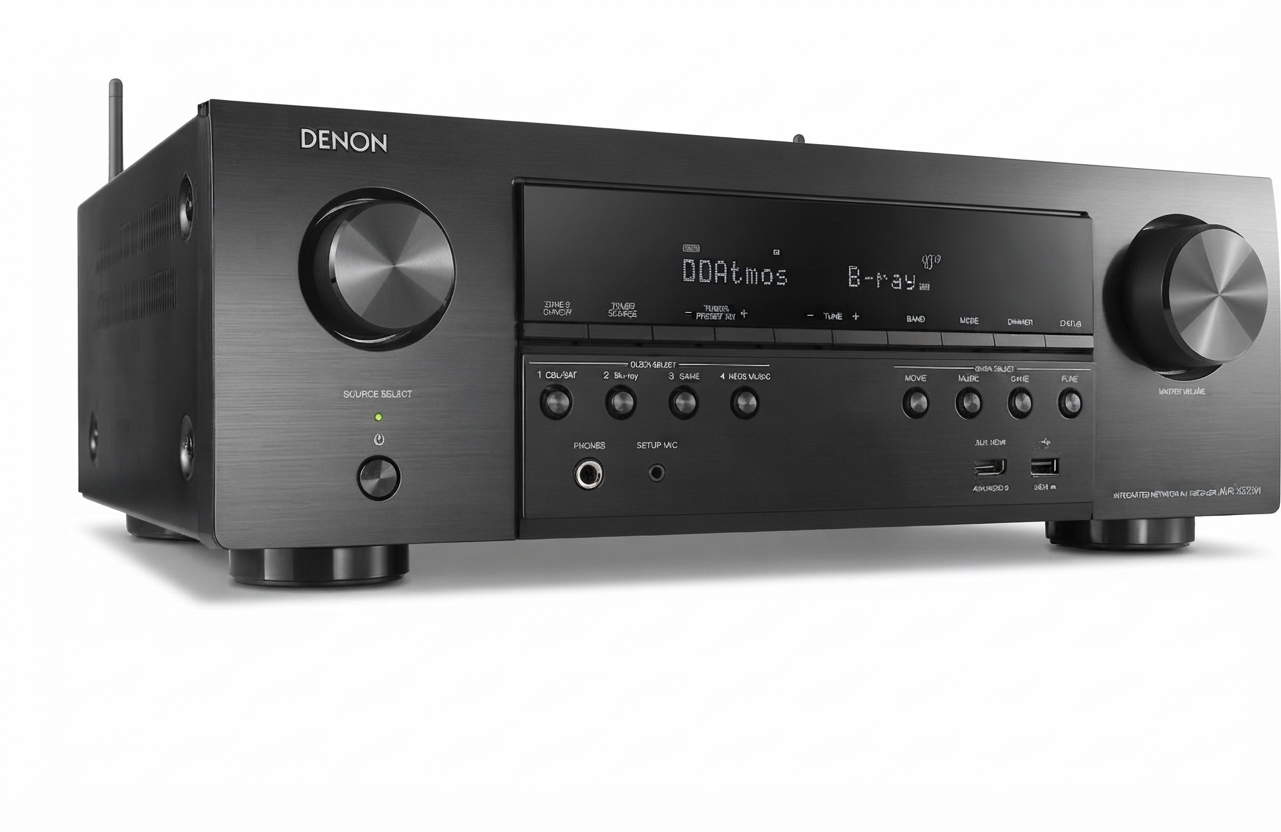
Introduction
The Denon AVR-S700W Network AV Receiver is a versatile home theater receiver designed for users who want reliable surround sound, flexible connectivity, and modern streaming features in one compact unit. Built around a 7.2-channel configuration, it supports immersive movie and music playback with Dolby TrueHD and DTS-HD Master Audio, while also offering network functions such as Wi-Fi, Bluetooth, and LAN connectivity for easy access to digital audio content. For many households, this model hits the sweet spot between performance and simplicity, making it a practical choice for living rooms, media rooms, and entry-level custom theater setups.
One of the biggest strengths of the Denon AVR-S700W Network AV Receiver is its balanced feature set. It includes multiple HDMI inputs, 4K Ultra HD passthrough, powered Zone 2 support, and compatibility with speakers in the 4 to 16 ohm range. That makes it suitable for users building a first surround system, upgrading an older AV receiver, or adding a streaming-ready hub for TV, gaming, and music. With rated output around 75 watts per channel into 8 ohms and higher output at 6 ohms, it delivers solid everyday performance for small to medium rooms.
As of current market availability, the Denon AVR-S700W Network AV Receiver is typically found through used electronics sellers, refurbished marketplaces, and archived product listings rather than as a new retail flagship. Estimated pricing generally falls in the budget-to-midrange used category, often depending on condition, accessories, and warranty coverage. For shoppers who want dependable Denon sound and network playback without stepping into premium pricing, this receiver remains an appealing option.
Specifications: Denon AVR-S700W Network AV Receiver Features and Technical Details
- Channels: 7.2-channel AV receiver with support for 7.1 processing and multichannel surround playback.
- Power output: 75 W + 75 W per channel into 8 ohms, 20 Hz to 20 kHz, at 0.08% THD; 110 W + 110 W per channel into 6 ohms at 1 kHz, 0.7% THD.
- Speaker compatibility: Works with speakers rated from 4 to 16 ohms.
- Audio formats: Supports Dolby TrueHD, DTS-HD Master Audio, Dolby Pro Logic IIz, and standard surround decoding.
- Connectivity: Built-in Wi-Fi, Bluetooth, LAN, USB, optical, coaxial, and HDMI connections.
- HDMI inputs: 6 total HDMI inputs, including front and rear connections.
- Video support: HDMI 2.0-era 4K Ultra HD passthrough with 60 Hz support and full home theater integration.
- Zone support: Powered Zone 2 audio for multi-room listening.
- Performance metrics: Frequency response extends to 100 kHz in direct mode, with a signal-to-noise ratio of about 98 dB.
- Power usage: Approximate consumption of 400 W, with low standby power draw for energy efficiency.
Compared with similar receivers in its class, the Denon AVR-S700W Network AV Receiver offers stronger networking and streaming convenience than basic non-network AVRs, while remaining simpler and more affordable than modern Dolby Atmos models. It is best viewed as a reliable 7-channel receiver for classic home theater setups rather than a premium object-based audio platform.
Troubleshooting: Common Problems and Fixes for the Denon AVR-S700W
If the receiver does not power on, first confirm that the power cord is fully inserted and the outlet is working. If there is no sound, check speaker wire polarity, source selection, input assignment, and volume level. When HDMI video is missing, inspect the HDMI cable, confirm the TV input, and verify that the source device is outputting a compatible signal. For network issues, restart the router, reconnect Wi-Fi settings, and test wired LAN if wireless stability is poor.
- No audio output: Reseat speaker wires, confirm the correct input, and disable mute if active.
- Distorted sound: Lower the volume, check speaker impedance, and ensure ventilation is adequate.
- Receiver freezes or behaves erratically: Perform a factory reset if configuration errors persist.
- Protection mode or shutdown: Inspect for shorted speaker wires, overheating, or incompatible speaker loads.
- Network connection failure: Reboot the router, forget and reconnect the network, or use Ethernet for better stability.
Preventive care includes keeping airflow around the chassis, using quality HDMI and speaker cables, and avoiding overloaded power strips. If problems continue, check the owner’s manual reset procedure or contact Denon support through the official customer service channels, an authorized service center, or the retailer that supplied the unit. Warranty coverage depends on where the receiver was purchased and whether it is sold new, refurbished, or used.
Pros & Cons of the Denon AVR-S700W Network AV Receiver
Pros
- Strong feature set for a 7.2-channel receiver, including Wi-Fi and Bluetooth streaming.
- Good everyday power for small to medium home theater rooms.
- Support for Dolby TrueHD and DTS-HD Master Audio improves movie sound quality.
- Powered Zone 2 adds flexibility for multi-room audio.
- Multiple HDMI inputs make it easy to connect gaming consoles, Blu-ray players, and streaming devices.
- Excellent value for users who want a dependable network AV receiver without paying for advanced premium features.
Cons
- No native Dolby Atmos or DTS:X, which limits future-proof immersive audio support.
- Older design compared with newer AV receivers that offer more advanced HDMI and room correction features.
- Best suited to entry-level and midrange systems rather than large dedicated theaters.
- Availability is mostly through used or refurbished channels, so condition can vary.
For value-conscious buyers, the Denon AVR-S700W Network AV Receiver is a solid choice if the goal is dependable surround sound, streaming convenience, and simple setup. Alternatives in newer product lines may offer more advanced immersive audio, but they usually cost significantly more.
Customer Reviews: What Users Say About the Denon AVR-S700W
Overall user feedback tends to be positive, with many owners praising the clear sound, straightforward controls, and stable everyday performance. Typical ratings fall around 4 out of 5 stars for users who want a practical home theater receiver rather than a cutting-edge feature set. Buyers often mention that setup is manageable and that the receiver performs well with TV, movies, and music.
Common compliments include strong audio clarity, reliable HDMI switching, and useful wireless playback features. Common complaints focus on the lack of newer immersive formats and the fact that some units are only available on the secondary market. A frequent recommendation from owners is to buy from a reputable seller and confirm that the remote, calibration accessories, and original packaging are included when possible.
Frequently Asked Questions
- Is the Denon AVR-S700W good for home theater? Yes, it is a capable 7.2-channel receiver for small to medium home theater systems.
- Does it support Bluetooth and Wi-Fi? Yes, it includes both Bluetooth and Wi-Fi for wireless streaming.
- Can it power Zone 2 speakers? Yes, it supports powered Zone 2 audio.
- Is it still worth buying? It is a strong option if you want reliable surround sound and network features at a lower price point.
Faqs
How do I set up the denon AVR-S700W Network Av Receiver for the first time?
Why is my denon AVR-S700W Network Av Receiver not connecting to Wi-Fi?
Can the denon AVR-S700W Network Av Receiver stream music from Bluetooth and AirPlay devices?
What speakers are compatible with the denon AVR-S700W Network Av Receiver?
How do I fix no sound from the denon AVR-S700W Network Av Receiver?
Does the denon AVR-S700W Network Av Receiver support 4K video passthrough and HDMI devices?
How do I optimize sound quality on the denon AVR-S700W Network Av Receiver?
What maintenance does the denon AVR-S700W Network Av Receiver need to stay in good condition?
More denon manuals
- Denon AVR-XIOOO Network Av Receiver User Manual
- Denon AVR-5805 Av Surround Receiver User Manual
- Denon PerL-Pro Wireless In-Ear Headphones AH-C15PL User Manual
- Denon AVR-1908 Av Surrouned Receiver User Manual
- Denon Urban-Ravert Headphones Over Ear AH-D400 User Manual
- Denon AVR-5800 Av Surround Receiver User Manual
Leave a Comment