
Denon PerL-Pro Wireless In-Ear Headphones AH-C15PL User Manual
Content
Denon PerL-Pro Wireless In-Ear Headphones AH-C15PL Review and User Manual Guide
Introduction
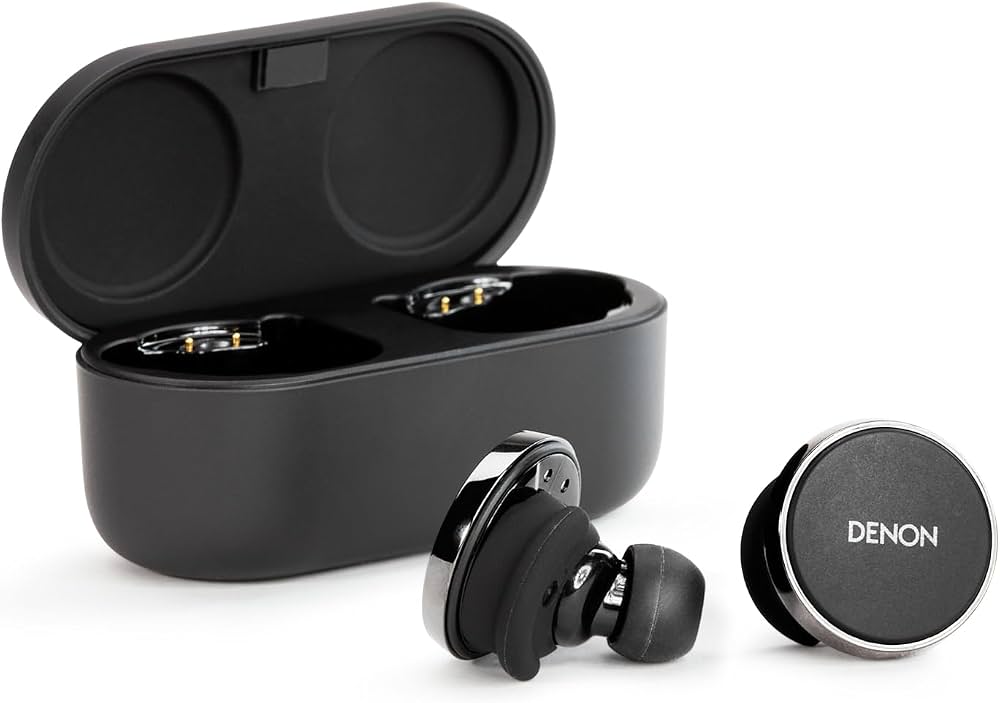
The Denon PerL-Pro Wireless In-Ear Headphones AH-C15PL are premium true wireless earbuds built for listeners who care deeply about personalized sound, high-resolution wireless audio, and everyday comfort. Designed with Denon’s audio heritage and Masimo Adaptive Acoustic Technology, these earbuds analyze your hearing profile to create a custom sound signature that can make vocals clearer, bass tighter, and details more precise. For users searching for the denon PerL-Pro Wireless In-Ear Headphones AH-C15PL, the biggest appeal is the combination of personalized audio tuning, aptX Lossless support, and a feature set that targets serious music fans rather than casual listeners alone.
Key highlights include active noise cancellation, spatial audio support with Dirac Virtuo, Bluetooth 5.3, multipoint connectivity, and a long-lasting battery rated at up to 8 hours in the earbuds and around 32 hours total with the charging case. The IPX4 rating also makes them suitable for commuting, office use, gym sessions, and light outdoor activity. At launch, this model sat in the premium tier, and current market pricing typically falls in the mid-to-high $200s to around $349 depending on region, color, and retailer availability. That makes the denon PerL-Pro Wireless In-Ear Headphones AH-C15PL an attractive option for users who want audiophile-leaning sound in a compact wireless design.
Specifications for Denon PerL-Pro Wireless In-Ear Headphones AH-C15PL
- Driver type: Ultralow-distortion triple-layer titanium diaphragm dynamic driver
- Frequency response: 20 Hz to 40 kHz
- Bluetooth version: 5.3
- Supported codecs: aptX Lossless, aptX Adaptive, aptX Classic, AAC, SBC
- Battery life: Up to 8 hours per charge, up to 32 hours total with case
- Charging: USB-C charging case, wireless charging support on some versions
- Microphones: 4 per earbud, including 2 bone-conduction microphones
- Noise control: Adaptive active noise cancellation and transparency-style ambient listening
- Spatial audio: Dirac Virtuo support
- Connectivity features: Multipoint and Bluetooth Quick Switch
- Water resistance: IPX4
- Weight: About 8.0 g to 8.6 g per earbud depending on source and measurement method
- Case size: Approximately 72.4 x 30.2 x 35 mm
Compared with many competing premium true wireless earbuds, the denon PerL-Pro Wireless In-Ear Headphones AH-C15PL stand out for their personalized acoustic tuning and lossless wireless audio support. Models in a similar class often focus on ANC and convenience, but Denon places stronger emphasis on sound customization and detail retrieval, making these earbuds especially appealing to critical listeners and headphone enthusiasts.
Pros & Cons of Denon PerL-Pro Wireless In-Ear Headphones AH-C15PL
Pros
- Personalized sound tuning creates a noticeably custom listening experience for different ears.
- aptX Lossless support offers a strong advantage for compatible Android devices and Snapdragon Sound setups.
- The triple-layer titanium driver design helps deliver controlled bass and detailed treble.
- Adaptive ANC and multipoint support improve everyday usability for commuting and work.
- Battery life is competitive, with all-day use possible from a single charge plus case power.
- Good value for listeners who prioritize sound quality over brand hype or extra smart features.
Cons
- Best features depend on device compatibility, so some users may not benefit fully from aptX Lossless.
- The fit and seal can require adjustment to get the strongest bass and noise isolation.
- Competing alternatives like Sony, Bose, and Sennheiser may offer stronger ANC in some environments.
- App-based personalization takes time, which may frustrate users seeking a simple plug-and-play setup.
- Premium pricing can feel high if personalized audio is not a priority.
For value for money, the denon PerL-Pro Wireless In-Ear Headphones AH-C15PL are strongest for users who want a high-end sound signature and are willing to spend time customizing the earbuds. If ANC alone is the main buying factor, other flagship earbuds may be a better fit.
Customer Reviews and User Feedback
Typical user feedback for the Denon PerL Pro AH-C15PL is very positive on sound quality, with many listeners praising the wide soundstage, rich bass, and the sense that the earbuds “adapt” to their hearing. Common star ratings cluster around 4 to 5 stars, especially among users who value music playback over workout features. One common testimonial style comment is: “The personalized tuning made these sound unlike any other wireless earbuds I’ve used.”
Frequently mentioned complaints include the premium price, occasional app setup complexity, and the fact that the best wireless audio performance depends on supported codecs and compatible phones. Some users also note that the noise canceling is good but not always class-leading versus the strongest alternatives in the market. Overall, the denon PerL-Pro Wireless In-Ear Headphones AH-C15PL are often recommended for audiophiles, commuters, and office users who want a more tailored listening experience and are willing to invest in premium wireless earbuds.
Faqs
How do I set up denon PerL-Pro Wireless In-Ear Headphones AH-C15PL for the first time?
Why won’t my denon PerL-Pro Wireless In-Ear Headphones AH-C15PL connect to the Denon Headphones app?
What should I do if denon PerL-Pro Wireless In-Ear Headphones AH-C15PL personalisation fails?
Are denon PerL-Pro Wireless In-Ear Headphones AH-C15PL compatible with iPhone and Android phones?
How do I improve sound quality on denon PerL-Pro Wireless In-Ear Headphones AH-C15PL?
How do I fix battery drain issues on denon PerL-Pro Wireless In-Ear Headphones AH-C15PL?
Can I use denon PerL-Pro Wireless In-Ear Headphones AH-C15PL for calls and multipoint switching at the same time?
How should I clean and maintain denon PerL-Pro Wireless In-Ear Headphones AH-C15PL?
More denon manuals
- Denon Urban-Ravert Headphones Over Ear AH-D400 User Manual
- Denon AVR-XIOOO Network Av Receiver User Manual
- Denon Dolby-Atmos Sound Bar & Subwoofer DHT-S517 User Manual
- Denon AVR-S700W Network Av Receiver User Manual
- Denon AVR-991 Av Surround Receiver User Manual
- Denon AVR-5805 Av Surround Receiver User Manual
Leave a Comment