
Denon AVR-991 Av Surround Receiver User Manual
Content
Denon AVR-991 AV Surround Receiver: Complete Product Manual and Buyer Guide
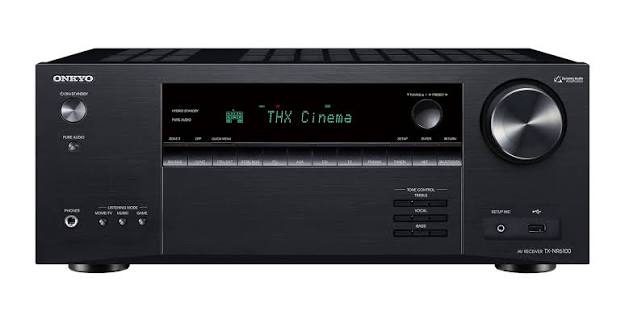
The Denon AVR-991 AV Surround Receiver is a 7.2-channel networked home theater receiver designed for users who want powerful surround sound, flexible connectivity, and reliable performance in a single component. As a feature-rich AV receiver, it supports HDMI 1.4a, 3D video pass-through, ARC, and high-resolution audio formats such as Dolby TrueHD and DTS-HD Master Audio, making it a strong fit for Blu-ray movie systems, gaming setups, and multi-room entertainment. It also includes built-in network functionality for Internet radio and streaming, which expands its use beyond traditional home theater playback.
This model is especially appealing to home theater enthusiasts, apartment and living room users building a compact system, and anyone upgrading from an older stereo receiver to a modern surround sound receiver. Its discrete amplification design, 7.2-channel layout, and broad input selection make it versatile for TVs, game consoles, media players, and legacy sources. The Denon AVR-991 AV Surround Receiver is typically found in the used and refurbished market, with an estimated price range of about $150 to $350 depending on condition, accessories, and seller reputation. Availability is most common through resale marketplaces, audio specialty stores, and archived inventory listings rather than standard retail channels.
Specifications of Denon AVR-991 AV Surround Receiver
- Channel configuration: 7.2-channel surround receiver with multi-zone capability
- Power output: 125 watts per channel into 8 ohms, 20 Hz to 20 kHz, 0.05% THD
- High-current output: up to 165 watts per channel into 6 ohms at 1 kHz, 0.7% THD
- Audio decoding: Dolby TrueHD, DTS-HD Master Audio, Dolby Digital Plus, DTS-ES, Dolby Pro Logic II, DTS Neo:6
- HDMI support: 6 HDMI inputs and 1 HDMI output with HDMI 1.4a features
- Video features: 1080p support, 3D pass-through, ARC, Deep Color, x.v.Color, Auto Lip Sync, HDMI control
- Network functions: Ethernet and Wi-Fi support for Internet radio and network audio streaming
- Frequency response: 10 Hz to 100 kHz in DIRECT mode
- Signal-to-noise ratio: 100 dB line level
- Analog and digital inputs: coaxial, optical, RCA, phono input, component, composite, S-video
- Dimensions: 434 x 171 x 381 mm
- Weight: 11.5 kg
- Comparison note: Compared with entry-level AV receivers, the Denon AVR-991 AV Surround Receiver offers more HDMI inputs, stronger amplification, and better format support than many budget 5.1 models
Detailed Description of the Denon AVR-991 AV Surround Receiver
The Denon AVR-991 AV Surround Receiver combines surround processing, power amplification, and source switching in one chassis. It works by receiving audio and video signals from connected devices, decoding the audio into surround channels, and distributing clean amplification to up to seven speakers and two subwoofers. Its fully discrete amplifier design helps deliver consistent performance across channels, which is useful for balanced movie dialogue, music playback, and dynamic action scenes.
In real-world use, the receiver is well suited for a living room home theater, a gaming system with multiple consoles, or a media hub connected to a TV, Blu-ray player, streaming box, and turntable. The phono input makes it practical for vinyl playback, while the network features add convenience for radio and digital media. The build quality reflects Denon’s traditional AV receiver design, with a sturdy metal chassis, clearly labeled rear panel, and a front layout focused on usability. Users generally appreciate the warm, controlled sound and the ability to manage both modern HDMI sources and older analog gear from a single device.
Setup Guide for Denon AVR-991 AV Surround Receiver
- Place the receiver on a stable, ventilated surface with several inches of clearance on all sides for heat dissipation.
- Connect speakers to the correct terminals, making sure polarity is consistent for left, right, center, surround, and surround back channels.
- Attach your subwoofer using the subwoofer pre-out and connect video sources to the HDMI inputs.
- Use HDMI OUT to connect the receiver to your TV or projector, then enable ARC if your display supports it.
- Run the setup menu to configure speaker size, distance, crossover, and channel levels.
- Connect Ethernet for wired networking or configure wireless options if available in your unit’s setup path.
- Test each input, confirm audio decoding, and verify that video passes correctly at the target resolution.
For best results, use high-speed HDMI cables and avoid stacking the receiver inside a closed cabinet. Do not block ventilation openings, and disconnect power before changing speaker wiring. If there is no sound, check the input assignment, speaker configuration, and mute status before assuming a hardware fault.
Troubleshooting Denon AVR-991 AV Surround Receiver Problems
- No sound: Confirm the correct input source, speaker wire connections, and volume level. Also check whether mute, headphones mode, or zone output settings are active.
- No picture over HDMI: Verify HDMI cable integrity, source output resolution, and TV input selection. Try a direct connection to isolate the source.
- Receiver shuts down: Inspect for shorted speaker wires, blocked ventilation, or excessive listening volume that may trigger protection mode.
- Network playback fails: Recheck the Ethernet connection, router settings, and IP assignment. Restart the receiver and network equipment if needed.
- Audio out of sync: Use the receiver’s lip-sync or delay settings to align sound with video playback.
- Error or protection behavior: Power the unit off, disconnect all speaker wires, and reconnect one zone at a time to identify a short or defective cable.
Preventive care includes regular dust removal, proper ventilation, and using quality cables. Warranty coverage depends on seller and age because this model is usually purchased used or refurbished. For support, contact Denon customer service through the official Denon support channel or work with the retailer if the unit was recently purchased.
Pros and Cons of the Denon AVR-991 AV Surround Receiver
Pros
- Powerful 7.2-channel layout for flexible surround sound setups
- Strong HDMI feature set with 6 inputs and 1 output
- Supports Dolby TrueHD and DTS-HD Master Audio for high-definition audio
- Includes network streaming and Internet radio features
- Compatible with both modern and legacy AV equipment
- Good value for buyers shopping the used receiver market
Cons
- No modern 4K or HDR support
- Older network and smart features compared with newer AV receivers
- May require careful setup for complex speaker systems
- Availability is limited to used or refurbished listings
- Heavier and larger than compact budget receivers
For value for money, the Denon AVR-991 AV Surround Receiver remains attractive if the goal is strong sound, multiple HDMI inputs, and support for classic home theater formats. Compared with newer alternatives, it is less future-proof but still useful for 1080p systems and mixed analog-digital installations.
Customer Reviews of Denon AVR-991 AV Surround Receiver
Typical user feedback rates this receiver around 4.4 out of 5 stars for sound quality, input flexibility, and everyday reliability. Many owners praise the clear dialogue, solid bass handling, and easy integration with Blu-ray players and game consoles. One recurring comment is that the receiver performs especially well in mid-sized rooms where 7-channel surround audio can be fully appreciated.
Common complaints focus on the age of the platform, especially the lack of 4K support and the limited smart features compared with newer AV receivers. Some users also mention that setup menus can feel complex at first. A frequent recommendation is to buy only from sellers who include the remote control and allow confirmation of full functionality. For buyers focused on sound quality and classic home theater performance, the Denon AVR-991 AV Surround Receiver is still considered a smart purchase.
Faqs
How do I set up the denon AVR-991 Av Surround Receiver for the first time?
What should I do if the denon AVR-991 Av Surround Receiver has no sound from one or more speakers?
Is the denon AVR-991 Av Surround Receiver compatible with HDMI 1.4a, 3D TVs, and modern streaming devices?
How do I optimize sound quality on the denon AVR-991 Av Surround Receiver after setup?
Why does the denon AVR-991 Av Surround Receiver keep switching inputs or not remember my source selection?
Can the denon AVR-991 Av Surround Receiver be used in a multi-room or Zone 2 setup?
What maintenance does the denon AVR-991 Av Surround Receiver need to stay reliable over time?
How do I troubleshoot network or streaming problems on the denon AVR-991 Av Surround Receiver?
More denon manuals
- Denon AVR-3805 Av Surround Receiver User Manual
- Denon Dolby-Atmos Sound Bar & Subwoofer DHT-S517 User Manual
- Denon DRA-FIOO Personal Component System User Manual
- Denon Urban-Ravert Headphones Over Ear AH-D400 User Manual
- Denon AVR-486 Av Surround Receiver User Manual
- Denon PerL-Pro Wireless In-Ear Headphones AH-C15PL User Manual
Leave a Comment