
Denon AVR-486 Av Surround Receiver User Manual
Content
Denon AVR-486 AV Surround Receiver Overview
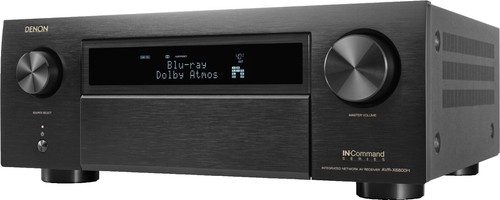
The Denon AVR-486 AV Surround Receiver is a classic home theater receiver designed for users who want reliable multichannel performance, flexible surround decoding, and straightforward day-to-day operation. Built around a fully discrete 7-channel amplifier section, it delivers 75 watts per channel into 8 ohms with low distortion, making it a solid choice for compact to mid-sized home theaters. Its support for DTS-ES Discrete 6.1, Dolby Digital EX, and Denon’s DSP-based surround modes gives it the versatility needed for movies, TV audio, and gaming.
This model is especially appealing to budget-conscious home theater enthusiasts, first-time receiver buyers, and anyone restoring or upgrading an older speaker setup. The Denon AVR-486 AV Surround Receiver works well in systems that need multiple analog and digital connections, clear channel separation, and dependable sound processing without overcomplicated setup. It is also a practical fit for living rooms, media rooms, and secondary entertainment spaces where ease of use matters as much as performance.
As an older discontinued model, availability is mainly through resale marketplaces, used electronics sellers, and vintage audio retailers. Typical price ranges vary widely based on condition, accessories, and whether the unit has been tested, but buyers usually see it in the lower used-market range rather than the premium vintage segment. For users who prioritize functionality over cutting-edge features, it remains a relevant AV receiver option.
Specifications for Denon AVR-486 AV Surround Receiver
- Amplifier channels: 7 fully discrete channels
- Rated power output: 75W per channel at 8 ohms, 20 Hz to 20 kHz, 0.08% THD
- Higher-power rating: 110W per channel at 6 ohms, 1 kHz, 0.7% THD
- Surround formats: DTS-ES Discrete 6.1, Dolby Digital EX, and Denon DSP surround modes
- Processing features: Virtual 5CH/7CH Stereo and multiple preset surround modes
- Power supply: AC 120V, 60Hz
- Dimensions: 17-3/32 in. W x 5-25/32 in. H x 1-23/64 in. D
- Weight: 24 lbs 8 oz
In practical terms, the Denon AVR-486 AV Surround Receiver offers stronger surround-channel flexibility than many entry-level 5.1 receivers of its era. Compared with basic budget models, it stands out for its 7-channel amplification and support for advanced matrix and discrete surround playback. It is best viewed as a mid-tier legacy AV receiver with respectable output and broad format support rather than a modern network-connected unit.
Detailed Product Description
The Denon AVR-486 AV Surround Receiver is built to handle the core demands of home theater audio: decoding surround sound, powering multiple speakers, and switching between sources with minimal hassle. Its discrete amplifier design helps maintain cleaner separation across channels, which improves clarity in dialogue, effects, and music playback. For movie fans, the receiver can create a more immersive soundstage by directing audio to front, center, surround, and surround-back speakers.
Real-world use cases include connecting a DVD player, game console, cable box, or older media streamer through the available inputs and routing the sound to a full speaker package. The receiver’s DSP modes can also enhance stereo content by expanding it into a wider, more room-filling presentation. The chassis has the solid, traditional feel expected from Denon equipment of this era, with a practical layout designed for durability and regular daily use.
User experience is straightforward: the interface is built for direct operation rather than modern app-based control, so it favors users who want simple hardware controls and dependable audio performance. The Denon AVR-486 AV Surround Receiver is especially suitable for owners of classic home theater systems who want a reliable upgrade path without replacing every component.
Setup Guide for Denon AVR-486 AV Surround Receiver
Set up the receiver by placing it on a stable, ventilated surface with several inches of clearance around the top and sides. Connect the front, center, surround, and surround-back speakers to the matching terminals, then attach your source devices such as a disc player, TV audio output, or game console. Use the proper speaker impedance and ensure all wiring is secure before powering the unit on.
After wiring, enter the speaker configuration menu and assign the system as 5.1 or 7.1 depending on your speaker layout. Select the correct input source, adjust channel levels, and run the test tones if available to balance the system. If you are pairing legacy components, make sure analog and digital connections match the source device’s output format.
Safety is important during installation. Do not block ventilation openings, avoid loose wire strands near terminals, and unplug the receiver before making changes to speaker wiring. If sound is missing, confirm the correct input is selected, the mute function is off, and the speaker cables are not reversed or shorted. For unstable playback, test the source component and cable quality before assuming a receiver fault.
Troubleshooting Common Problems
If the receiver powers on but produces no sound, check the selected input, volume level, speaker connections, and surround mode settings. A common issue is incorrect source selection, especially when switching between analog and digital inputs. If one channel is silent, inspect the speaker wire, swap speakers to isolate the fault, and verify channel-level settings in the setup menu.
If audio cuts out at higher volumes, reduce the load by confirming the speaker impedance and ensuring the unit has proper airflow. Overheating can cause shutdown or distortion, so keep the receiver free of dust and avoid enclosing it in a tight cabinet. There are no modern digital error codes in the usual sense, but front-panel behavior and sound symptoms can help identify signal, wiring, or thermal issues.
Preventive care includes regular dust cleaning, careful cable management, and periodic checks of speaker terminals. As a discontinued product, warranty coverage is typically limited or unavailable unless purchased from a specialized refurbished seller. For support, consult the original manual, the seller’s return policy, or Denon service resources and authorized audio repair centers if restoration is needed.
Pros and Cons of the Denon AVR-486 AV Surround Receiver
Pros
- 7-channel amplification supports flexible surround setups
- Strong legacy format support including Dolby Digital EX and DTS-ES Discrete 6.1
- Solid power output for small to medium home theaters
- Clear, practical controls for users who prefer simple operation
- Good value on the used market for budget home theater builds
Cons
- No modern streaming, Wi-Fi, or Bluetooth features
- Older connectivity standards may require adapters for current devices
- Used units may need cleaning, testing, or repair
- Lacks the advanced room correction found in newer AV receivers
- Best suited to legacy systems rather than modern smart homes
For value, the Denon AVR-486 AV Surround Receiver is attractive if the goal is affordable multichannel sound rather than modern convenience. Compared with newer receivers, it loses on networking and calibration tools, but it still offers respectable amplification and dependable surround decoding for the right buyer.
Customer Reviews and User Feedback
Typical user feedback for the Denon AVR-486 AV Surround Receiver is generally positive, especially from buyers restoring older theater systems. Many users praise its strong sound for movies and its ability to drive a full speaker setup without sounding strained at normal listening levels. Common ratings in resale communities often fall around 4 out of 5 stars for condition-dependent purchases.
Frequent praise includes reliable performance, clean channel separation, and easy basic operation. Common complaints focus on its age, limited modern connectivity, and the need for careful setup when used with newer TVs or streaming devices. A typical testimonial might be: “Great sound for an older receiver, especially if you already own compatible speakers.” Another common note is: “Excellent for the price, but expect to use adapters.”
It is a strong recommendation for buyers who want a classic Denon surround receiver and do not need wireless features. Users looking for plug-and-play smart functionality should consider a newer AV receiver instead.
Frequently Asked Questions About the Denon AVR-486 AV Surround Receiver
Is the Denon AVR-486 AV Surround Receiver good for home theater? Yes, it is well suited for legacy home theater setups with 5.1 or 7.1 speaker configurations.
Does it support Dolby Digital EX and DTS-ES? Yes, it includes support for both formats, along with Denon surround modes.
Is it still worth buying today? It can be a good purchase if you want affordable multichannel audio and do not need network features.
Faqs
How do I set up the denon AVR-486 Av Surround Receiver for the first time?
What should I do if the denon AVR-486 Av Surround Receiver powers on but no sound comes out?
Which surround sound formats does the denon AVR-486 Av Surround Receiver support?
Can the denon AVR-486 Av Surround Receiver handle a 7.1 speaker setup?
How do I connect a TV, DVD player, and game console to the denon AVR-486 Av Surround Receiver?
Why does my denon AVR-486 Av Surround Receiver keep shutting down or flashing a warning light?
How do I reset the denon AVR-486 Av Surround Receiver to fix configuration problems?
What maintenance does the denon AVR-486 Av Surround Receiver need to stay reliable?
More denon manuals
Leave a Comment