
Denon AVR-S660H Network Av Receiver User Manual
Content
Introduction
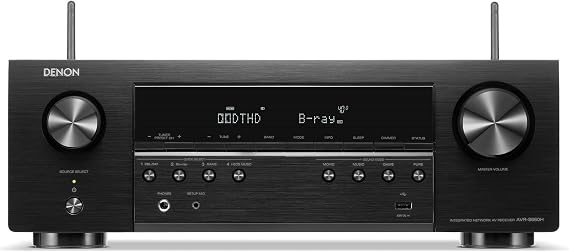
The Denon AVR-S660H Network Av Receiver is a compact 5.2-channel home theater receiver designed for users who want modern HDMI 2.1 connectivity, 8K video support, and easy streaming in an affordable package. It delivers a strong mix of home cinema features and everyday usability, making it a practical choice for first-time AV receiver buyers, bedroom theater setups, and small to medium living rooms.
Key selling points include 75 watts per channel, six HDMI inputs, HEOS built-in streaming, Dolby TrueHD and DTS-HD Master Audio support, and compatibility with HDR10, HDR10+, HLG, and Dolby Vision. It also supports 8K/60Hz and 4K/120Hz pass-through on select HDMI inputs, which makes it attractive for gaming consoles, next-gen media players, and modern TVs. The Denon AVR-S660H Network Av Receiver is especially appealing to users who want simple setup, wireless music playback, and a reliable upgrade from a soundbar.
Typical pricing usually falls in the budget-to-midrange category, with new units often found around the low-to-mid $300 range and refurbished or sale pricing sometimes lower. Availability remains broad through major electronics retailers, home theater specialists, and Denon’s official channels, though stock can vary by region.
Specifications
- Channels: 5.2-channel AV receiver with support for up to two subwoofers.
- Power output: 75 watts per channel at 8 ohms, 20 Hz to 20 kHz, 0.08% THD, 2-channel driven.
- Higher-power ratings: 100 watts per channel at 6 ohms, 1 kHz, 0.7% THD.
- HDMI: 6 inputs and 1 output, with 3 inputs supporting 8K video.
- Video support: 8K/60Hz, 4K/120Hz, HDR10, HDR10+, HLG, and Dolby Vision.
- Audio formats: Dolby TrueHD, Dolby Surround, DTS-HD Master Audio, DTS Neo:6, and more.
- Streaming: HEOS Built-in, Wi-Fi, Bluetooth, AirPlay 2, and network playback.
- Calibration: Audyssey MultEQ room correction for speaker optimization.
- Connectivity: HDMI eARC, ARC, USB, Ethernet, optical, coaxial, and analog inputs.
- Frequency response: 10 Hz to 100 kHz in Direct mode.
- Signal-to-noise ratio: 98 dB in Direct mode.
- Compared with similar models, it offers stronger modern video support than many older 5.1 receivers, while remaining more compact and easier to use than larger 7.2-channel alternatives.
Detailed Description
The Denon AVR-S660H Network Av Receiver acts as the central hub for a home entertainment system. It takes audio and video signals from source devices such as game consoles, Blu-ray players, streaming boxes, and media servers, then processes and routes them to your TV and speakers. With HDMI 2.1 support on selected ports, it is designed to handle modern high-bandwidth video formats without sacrificing audio quality.
In real-world use, it performs well for movie watching, casual gaming, and streaming music throughout the home. HEOS integration lets users play music from popular services and sync it across compatible speakers. The receiver’s 5.2-channel layout works best for setups that prioritize front-stage clarity, immersive surround sound, and one or two subwoofers rather than full-height Atmos systems.
The chassis uses a clean, understated Denon design with a durable front panel and clearly labeled controls. The unit feels solid and practical rather than flashy, which suits users who value reliability. Day-to-day operation is straightforward, and the on-screen setup process helps new owners get started quickly.
Setup Guide
- Place the receiver in a well-ventilated cabinet or open shelf and leave enough space above it for heat dissipation.
- Connect your speakers to the correct front, surround, center, and subwoofer terminals, matching polarity carefully.
- Attach your TV to the HDMI output using an eARC-capable port if you want simplified TV audio return.
- Connect game consoles, streaming devices, and disc players to the HDMI inputs, preferably using the 8K-enabled ports for high-bandwidth sources.
- Power on the receiver and follow the on-screen setup assistant to choose speaker layout, TV format, and network settings.
- Connect to Wi-Fi or Ethernet, then sign in to HEOS and preferred streaming apps if available.
- Run Audyssey room calibration with the supplied microphone for improved sound balance.
If there is no picture, confirm that the TV is connected to the correct HDMI output and that the source device is using a supported resolution. If audio is missing, check the input assignment, TV eARC settings, and speaker wiring. Always power off the unit before connecting or disconnecting speaker cables to avoid damage.
Troubleshooting
- No sound: Verify the correct input is selected, speaker wires are secure, and the receiver is not muted.
- No HDMI signal: Try a different HDMI cable, confirm the source is set to a supported resolution, and test another HDMI input.
- Network drops: Reboot the router, switch to Ethernet if possible, or reconnect the receiver to Wi-Fi.
- Distorted audio: Lower the volume, check speaker impedance, and confirm there are no wire shorts.
- Calibration issues: Reposition the microphone, reduce background noise, and rerun Audyssey.
Common display messages such as HDMI handshake or input-related errors are usually resolved by power cycling the TV, source device, and receiver in sequence. Preventive care includes keeping firmware updated, using certified HDMI cables, and maintaining good airflow around the chassis. Denon typically provides warranty coverage through authorized retailers and official support channels, with help available through customer service, online manuals, and regional service centers.
Pros & Cons
Pros
- Excellent value for an entry-level 8K AV receiver.
- Supports modern gaming features like 4K/120Hz and 8K pass-through.
- HEOS, Wi-Fi, Bluetooth, and AirPlay 2 make streaming easy.
- Simple setup and user-friendly menus suit beginners.
- Strong audio format support for movies and TV.
Cons
- Only 5.2 channels, so it is not ideal for large immersive Atmos systems.
- Power output is fine for small to medium rooms but not for demanding high-sensitivity setups.
- Fewer physical HDMI outputs than more advanced receivers.
- No built-in height amplification for expansion beyond basic surround sound.
For buyers comparing alternatives, this model is a strong option if you want modern HDMI features without paying for a larger 7.2-channel receiver. It offers good value for money for compact home theater builds, especially when compared with older receivers that lack 8K video support and network streaming.
Customer Reviews
Customer feedback for the Denon AVR-S660H Network Av Receiver is generally positive, with many users giving it around 4 to 4.5 stars out of 5. Buyers often praise the easy setup, clear sound, and reliable HDMI performance with streaming devices and game consoles.
Common compliments include “great sound for the price,” “simple to configure,” and “perfect upgrade from a soundbar.” Frequent complaints mention limited power for larger rooms, occasional HDMI handshake delays, and the need to carefully match TV settings for eARC. One typical user takeaway is that it works best for modest home theater systems where convenience and modern connectivity matter more than extreme output.
Purchase it if you want a dependable, well-rounded receiver for movies, gaming, and music streaming. Consider larger models if you need more channels, more amplification, or a future-proof Atmos expansion path.
Faqs
How do I set up the denon AVR-S660H Network Av Receiver for the first time?
What should I do if the denon AVR-S660H Network Av Receiver has no sound?
Can the denon AVR-S660H Network Av Receiver handle 8K and 4K gaming consoles?
Why does the denon AVR-S660H Network Av Receiver keep turning off or showing protection mode?
How do I connect the denon AVR-S660H Network Av Receiver to Wi-Fi and HEOS?
Is the denon AVR-S660H Network Av Receiver compatible with eARC and Dolby Atmos TVs?
How can I improve surround sound performance on the denon AVR-S660H Network Av Receiver?
What maintenance does the denon AVR-S660H Network Av Receiver need to stay reliable?
More denon manuals
Leave a Comment