
Denon AVR-X6800H Network Av Receiver User Manual
Content
Introduction: Denon AVR-X6800H Network AV Receiver Overview
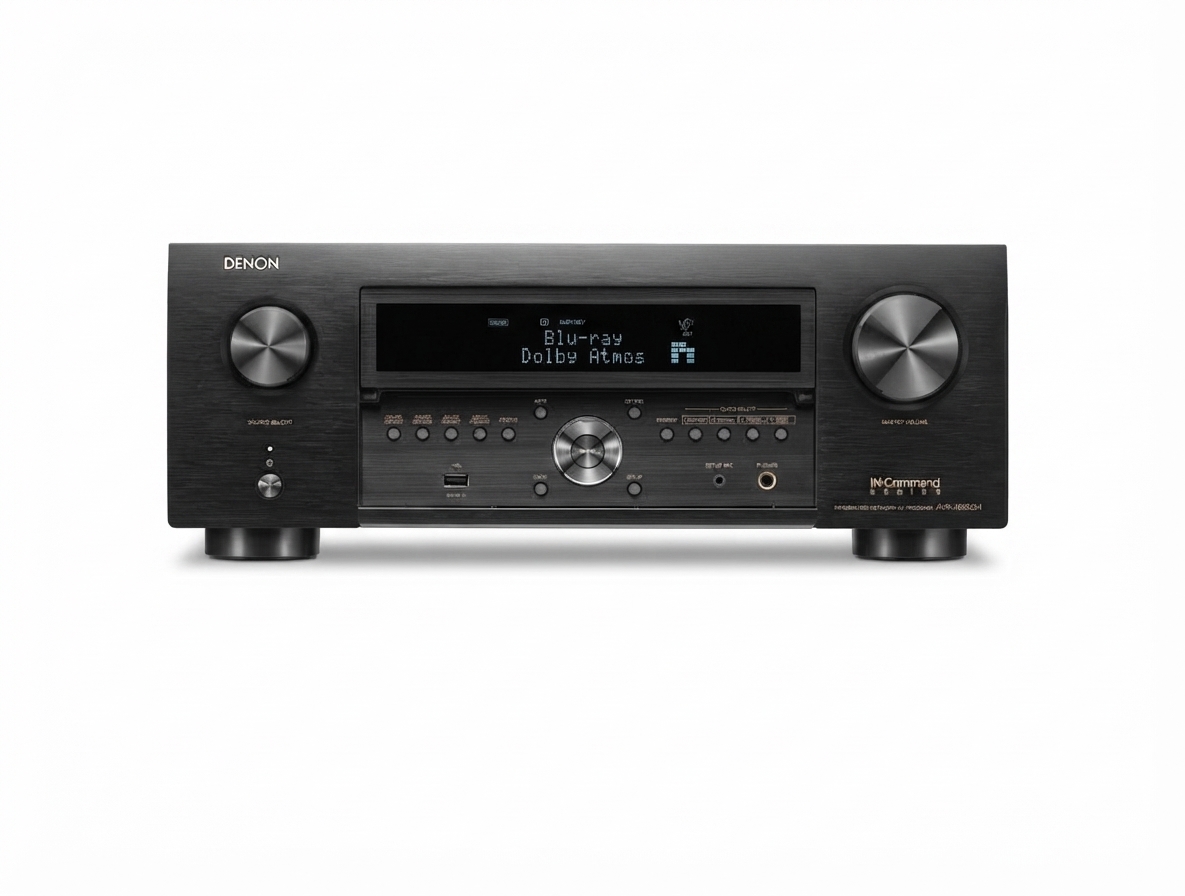
The Denon AVR-X6800H Network AV Receiver is a premium home theater hub built for users who want powerful surround sound, advanced HDMI 2.1 connectivity, and flexible multi-room audio in one platform. Designed as an 11.4-channel AV receiver with 13.4-channel processing, it delivers a strong foundation for immersive movie playback, gaming, and high-end audio systems. With support for Dolby Atmos, DTS:X Pro, IMAX Enhanced, and Auro-3D, it is a compelling choice for anyone building a serious Dolby Atmos home theater or upgrading an older surround receiver.
This model stands out for its combination of 8K video support, HEOS built-in streaming, advanced room calibration, and four subwoofer outputs for smoother bass management. It is especially well suited to enthusiast home theater owners, custom installers, and users who want an AV receiver that can anchor a large media room or dedicated cinema setup. The Denon AVR-X6800H Network AV Receiver also appeals to gamers and streaming users who need modern connectivity with low-latency video passthrough.
Estimated pricing typically falls in the premium range, often around $3,000 to $3,800 depending on retailer, promotions, and regional availability. It is generally available through major electronics retailers and authorized Denon dealers, with occasional refurbished options. For buyers seeking a future-ready network AV receiver with strong amplification and expandability, the AVR-X6800H is one of Denon’s most capable current models.
Specifications: Denon AVR-X6800H Technical Details
- 11 amplified channels with 13.4-channel processing for expanded surround configurations.
- Power output: 140 watts per channel at 8 ohms, 20 Hz to 20 kHz, 0.05% THD, 2-channel driven.
- 175 watts per channel at 6 ohms, 1 kHz, 0.7% THD, 2-channel driven.
- 250 watts per channel at 6 ohms, 1 kHz, 10% THD, 1-channel driven.
- 7 HDMI inputs and 3 HDMI outputs with 8K support on all HDMI inputs and two outputs.
- 4 subwoofer outputs for improved bass distribution and room correction flexibility.
- Support for Dolby Atmos, DTS:X Pro, IMAX Enhanced, Auro-3D, and HEOS multi-room audio.
- Built-in network streaming with Wi-Fi, Ethernet, Bluetooth, and voice assistant compatibility.
- Audyssey MultEQ XT32 included, with optional Dirac Live upgrade support.
- Approximate weight: 34 to 40 pounds depending on configuration and source listing.
Compared with midrange AV receivers, the Denon AVR-X6800H Network AV Receiver offers more amplification, more subwoofer outputs, and broader format support. It sits above mainstream 7.2-channel receivers and below flagship separates, making it a strong value for advanced home theater builds.
Detailed Description: How the Denon AVR-X6800H Works
The Denon AVR-X6800H Network AV Receiver functions as the central switching and amplification unit for a modern home theater. It accepts audio and video from sources such as Blu-ray players, streaming devices, game consoles, and media servers, then routes the signals to speakers and displays with minimal compromise. Its internal amplifier section powers up to 11 speakers directly, while its processing engine supports larger layouts when external amplification is added.
In real-world use, this means you can build systems such as 7.4.4 or 9.4.4 speaker layouts for Dolby Atmos playback, with precise bass control through four independent subwoofer outputs. The receiver also handles high-bandwidth video for next-gen gaming consoles, 4K HDR projectors, and 8K displays. Build quality is strong, with a metal front panel, substantial chassis construction, and a design that reflects Denon’s emphasis on durability and thermal stability.
Users generally appreciate the clear on-screen setup flow, flexible input assignment, and clean sound signature. The network features also make it a practical choice for wireless music streaming, multi-zone audio, and daily TV use in a living room or dedicated theater.
Setup Guide: How to Install and Configure the AVR-X6800H
- Place the receiver on a stable shelf with at least several inches of ventilation on all sides.
- Connect your speakers to the labeled terminals, matching polarity carefully for each channel.
- Attach your TV or projector using one of the HDMI outputs, then connect source devices to the HDMI inputs.
- For network features, connect to Wi-Fi during setup or use Ethernet for the most stable streaming performance.
- Run the built-in setup assistant and follow the on-screen prompts for speaker assignment, input naming, and audio calibration.
- Use Audyssey MultEQ XT32 to measure your room and optimize speaker levels, distance, and crossover settings.
- Enable HEOS, Bluetooth, or AirPlay 2 as needed for music playback and multi-room streaming.
Before powering on, confirm that all wiring is secure and that no speaker strands are touching adjacent terminals. Avoid blocking the ventilation grills, and never place the unit in an enclosed cabinet without airflow. If audio or video does not appear, recheck HDMI input selection, ensure HDMI CEC settings match your TV, and confirm your display supports the chosen resolution or refresh rate.
Troubleshooting: Common Problems and Fixes
- No sound: Verify speaker wiring, mute status, zone assignment, and source input selection.
- No video signal: Check HDMI cable quality, input mapping, and 8K or 4K compatibility settings.
- Network connection drops: Reboot the router, switch to Ethernet, or re-enter Wi-Fi credentials.
- One speaker is silent: Inspect channel assignment and perform a new speaker calibration.
- Overheating: Improve ventilation, reduce cabinet heat buildup, and lower volume if needed.
- Firmware issues: Update the receiver through the network menu to restore compatibility and stability.
Common setup-related error symptoms usually resolve by resetting HDMI handshakes, updating firmware, or rerunning room correction. Preventive maintenance includes keeping the unit dust-free, using quality certified HDMI cables, and avoiding power cycling during updates. Denon warranty coverage and support are typically available through authorized dealers and Denon customer service, with service options varying by region.
Pros and Cons of the Denon AVR-X6800H Network AV Receiver
- Pros: Excellent channel count for immersive theater builds, with 11 amplified channels and 13.4-channel processing.
- Pros: Strong format support including Dolby Atmos, DTS:X Pro, IMAX Enhanced, and Auro-3D.
- Pros: Four subwoofer outputs improve bass management and room balance.
- Pros: Full network streaming support through HEOS, Wi-Fi, Bluetooth, and Ethernet.
- Pros: 8K HDMI capability makes it a future-ready AV receiver for gaming and premium video.
- Cons: Premium pricing puts it out of reach for casual buyers.
- Cons: Large size and weight require a sturdy cabinet or rack.
- Cons: Best results often depend on careful calibration and speaker matching.
- Cons: Buyers who only need a simple 5.1 or 7.1 setup may find lower-cost alternatives more practical.
For value, it is strongest when used in advanced home theater systems where its processing power and connectivity can be fully exploited. Compared with smaller receivers, it offers more flexibility; compared with separates, it remains easier to install and more affordable.
Customer Reviews: What Buyers Say About the AVR-X6800H
Customer feedback for the Denon AVR-X6800H Network AV Receiver is generally positive, with many users rating it around 4 to 5 stars for sound quality, processing power, and feature depth. Enthusiasts often praise the immersive surround performance, clean dialogue, and strong subwoofer integration. Many buyers also like the broad format support and the convenience of HEOS streaming.
Common complaints usually focus on the price, the complexity of initial setup, and the learning curve for users new to advanced AV receivers. Some reviewers note that getting the best result may require time spent on calibration and HDMI configuration. Overall, it is frequently recommended for serious home theater buyers, especially those upgrading to an Atmos-based system or building a custom media room.
Final Recommendation
If you want a high-end network AV receiver with serious surround processing, flexible speaker expansion, and excellent modern connectivity, the Denon AVR-X6800H Network AV Receiver is a standout option. It is best suited for enthusiasts who want premium performance now and room to grow later.
Faqs
How do I set up the denon AVR-X6800H Network Av Receiver for the first time with a TV and speakers?
What should I do if my denon AVR-X6800H Network Av Receiver has no sound or the audio keeps cutting out?
Which HDMI cables and ports should I use with the denon AVR-X6800H Network Av Receiver for 8K and 4K gaming?
How many speakers and subwoofers can the denon AVR-X6800H Network Av Receiver support in a home theater setup?
Can I use the denon AVR-X6800H Network Av Receiver with Dolby Atmos, DTS:X, and Auro-3D content?
How do I connect a smart TV to the denon AVR-X6800H Network Av Receiver using ARC or eARC?
What network features make the denon AVR-X6800H Network Av Receiver useful for streaming and multi-room audio?
How should I maintain and troubleshoot the denon AVR-X6800H Network Av Receiver to keep it working properly?
More denon manuals
Leave a Comment