
Denon Dolby Atmos Sound Bar DHT-S217 User Manual
Content
Denon DHT-S217 Dolby Atmos Sound Bar Overview
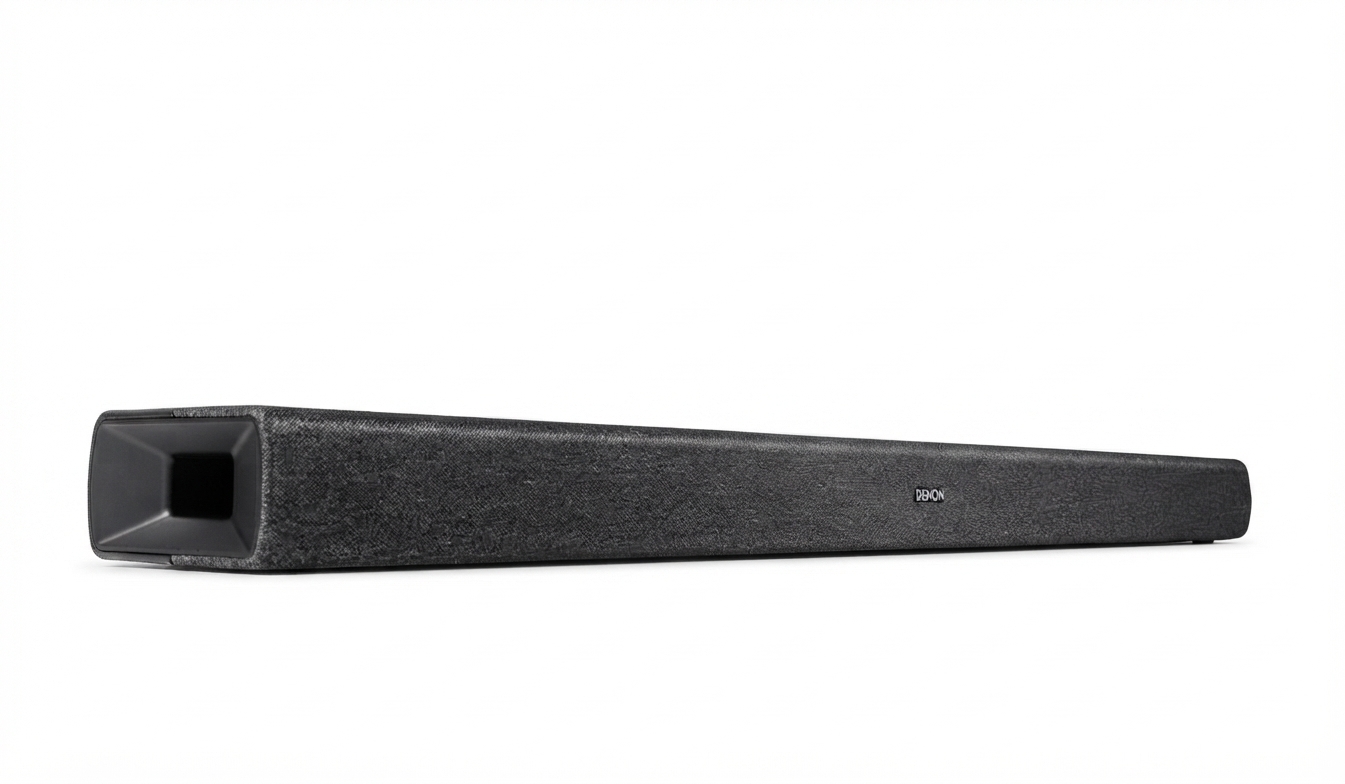
The Denon DHT-S217 Dolby Atmos Sound Bar is a compact, all-in-one home audio upgrade designed for TV owners who want clearer dialogue, fuller bass, and a more immersive surround experience without adding a separate subwoofer. Built around a 2.1-channel layout with built-in down-firing subwoofers, it delivers a streamlined setup that fits easily under most televisions while still supporting Dolby Atmos playback for more spacious sound. This makes the denon Dolby Atmos Sound Bar DHT-S217 a strong choice for movie fans, sports viewers, and everyday streaming users who want a noticeable step up from built-in TV speakers.
One of its biggest advantages is simplicity. With HDMI eARC, optical input, Bluetooth streaming, and HDMI input passthrough support, the sound bar works with modern smart TVs, game consoles, and mobile devices. The slim design, wall-mount compatibility, and included TV-focused connectivity also make it a practical option for apartments, bedrooms, and small living rooms. For users looking for an affordable Dolby Atmos soundbar that balances performance and convenience, the Denon DHT-S217 sits in the mid-range market with an estimated price range of about $199 to $299, depending on retailer promotions and regional availability. It is widely available through major electronics stores and online marketplaces in many regions. The denon Dolby Atmos Sound Bar DHT-S217 is especially appealing to buyers who want richer sound without the complexity or cost of a multi-speaker surround system.
Denon DHT-S217 Specifications and Key Features
- Audio system: 2.1-channel sound bar with 6 total drivers
- Dolby support: Dolby Atmos, Dolby Digital, Dolby Digital Plus, Dolby TrueHD, and linear PCM playback
- Speaker layout: 2 tweeters, 2 midrange drivers, and 2 built-in subwoofer drivers
- Connectivity: HDMI eARC, HDMI input, optical digital input, analog input, and Bluetooth 5.0
- Wireless streaming: Bluetooth audio for phones, tablets, and laptops
- Dimensions: 890 x 120 x 67 mm, making it suitable for most TVs
- Weight: approximately 3.6 kg, which is light enough for wall mounting
- Power consumption: 40W; standby power is 1.7W and deep standby is 0.5W
- Operating temperature: 5°C to 35°C
- Wireless range: approximately 10 meters for Bluetooth in line of sight
In performance terms, the DHT-S217 is best suited for compact to medium-size rooms where users want strong dialogue clarity and room-filling sound without extra components. Compared with many budget sound bars, it stands out because it includes Dolby Atmos support and built-in bass drivers rather than relying on a separate subwoofer. Against larger premium models, it is less expansive in surround placement but offers a simpler, more affordable package for everyday TV audio.
How to Set Up the Denon DHT-S217 Sound Bar
Begin by placing the sound bar directly below the TV or mounting it to the wall using the included template and spacers. Keep the front grille unobstructed so the drivers can project sound freely. For the best audio quality, connect the sound bar to an HDMI eARC port on your TV using the HDMI cable, then enable HDMI-CEC and eARC in the TV settings.
If your TV does not support eARC, use the optical digital input for stable stereo and surround-compatible output. You can also use the HDMI input for passthrough from a streaming device or console, or the analog input for older equipment. After connecting, power on the TV and sound bar, then select the correct input mode with the remote.
- Make sure the TV audio output is set to external speakers or ARC/eARC.
- Pair Bluetooth by selecting Bluetooth mode and connecting from your phone or tablet.
- Test dialogue, music, and movie playback to confirm the sound mode is active.
- If there is no sound, check HDMI cable seating, TV output settings, and input selection.
Safety tip: do not place the unit near heat sources, liquids, or blocked ventilation areas. The denon Dolby Atmos Sound Bar DHT-S217 performs best when set up on a stable surface with clear space around the drivers.
Troubleshooting Denon DHT-S217 Common Problems and Fixes
If the sound bar produces no audio, first verify that the TV is outputting sound through HDMI ARC/eARC or optical output. Reconnect the HDMI cable, confirm that CEC is enabled, and restart both the TV and sound bar. If Bluetooth pairing fails, clear the device list and try pairing again within the Bluetooth range of about 10 meters.
- No sound: check input mode, HDMI ARC setting, and TV audio output format.
- Low volume or weak bass: raise the TV output level and confirm the sound mode is not muted or reduced.
- Audio delay: use the TV lip-sync or audio delay adjustment in the sound settings.
- Distorted sound: lower source volume and test another cable or input.
- Bluetooth dropouts: move the device closer and reduce interference from nearby wireless devices.
This model does not commonly display user-facing error codes, so most issues are resolved through input checks, power cycling, and settings resets. Preventive care includes using quality HDMI cables, keeping firmware and TV software updated, and avoiding blocked speaker openings. Warranty coverage and regional support vary by market, so users should contact Denon customer support or an authorized retailer for service, repair, and parts assistance. Keep your proof of purchase ready when requesting help.
Pros and Cons of the Denon DHT-S217
Pros
- Compact design that fits easily under most TVs
- Dolby Atmos support for more immersive movie and streaming audio
- Built-in subwoofer drivers remove the need for a separate bass unit
- HDMI eARC, optical, analog, and HDMI input support for flexible connectivity
- Good value for users who want better sound without a complex surround system
- Clear dialogue performance makes it useful for news, sports, and TV shows
Cons
- Virtual Atmos effect is less expansive than systems with rear speakers
- Bass is solid for a compact bar, but not as deep as a dedicated subwoofer setup
- Best results depend on a TV with HDMI eARC support
- Not ideal for large rooms or users seeking theater-style surround separation
For value for money, the denon Dolby Atmos Sound Bar DHT-S217 offers a strong balance of sound quality, simplicity, and features. Compared with cheaper basic sound bars, it delivers more advanced audio processing and better connectivity. Compared with premium multi-piece systems, it is easier to install and less expensive, though it sacrifices some cinematic scale.
Customer Reviews and Real-World Feedback
Typical customer feedback for the Denon DHT-S217 trends positive, especially from users upgrading from TV speakers. Many buyers rate it around 4 out of 5 stars for improved clarity, compact design, and easy setup. Users often praise the cleaner dialogue, reliable HDMI eARC performance, and the convenience of having built-in bass without a separate subwoofer.
- Praise: “Movies sound much fuller, and voices are easier to understand.”
- Praise: “Setup took minutes, and the bar fits neatly under the TV.”
- Complaint: “The virtual Atmos effect is good, but not as dramatic as a surround system.”
- Complaint: “Bass is decent, but serious home theater fans may want more low-end impact.”
Most owners recommend it for bedrooms, apartments, and living rooms where simplicity matters more than maximum surround immersion. The denon Dolby Atmos Sound Bar DHT-S217 is a smart purchase for users who want a dependable, easy-to-use sound upgrade with strong everyday performance and broad compatibility.
Faqs
How do I set up denon Dolby Atmos Sound Bar DHT-S217 for the first time with an HDMI eARC TV?
What should I do if denon Dolby Atmos Sound Bar DHT-S217 has no sound after installation?
Does denon Dolby Atmos Sound Bar DHT-S217 work with TVs that do not support eARC?
How do I enable Dolby Atmos on denon Dolby Atmos Sound Bar DHT-S217 for streaming apps and devices?
Why is dialog too quiet on denon Dolby Atmos Sound Bar DHT-S217, and how can I fix it?
Can I connect a separate subwoofer to denon Dolby Atmos Sound Bar DHT-S217?
What are the best sound modes on denon Dolby Atmos Sound Bar DHT-S217 for movies, music, and nighttime listening?
How should I clean and maintain denon Dolby Atmos Sound Bar DHT-S217 to keep it working properly?
More denon manuals
Leave a Comment