
Denon Dolby-Atmos Sound Bar & Subwoofer DHT-S517 User Manual
Content
Denon Dolby Atmos Sound Bar & Subwoofer DHT-S517: Complete Product Manual and Buyer Guide
Introduction
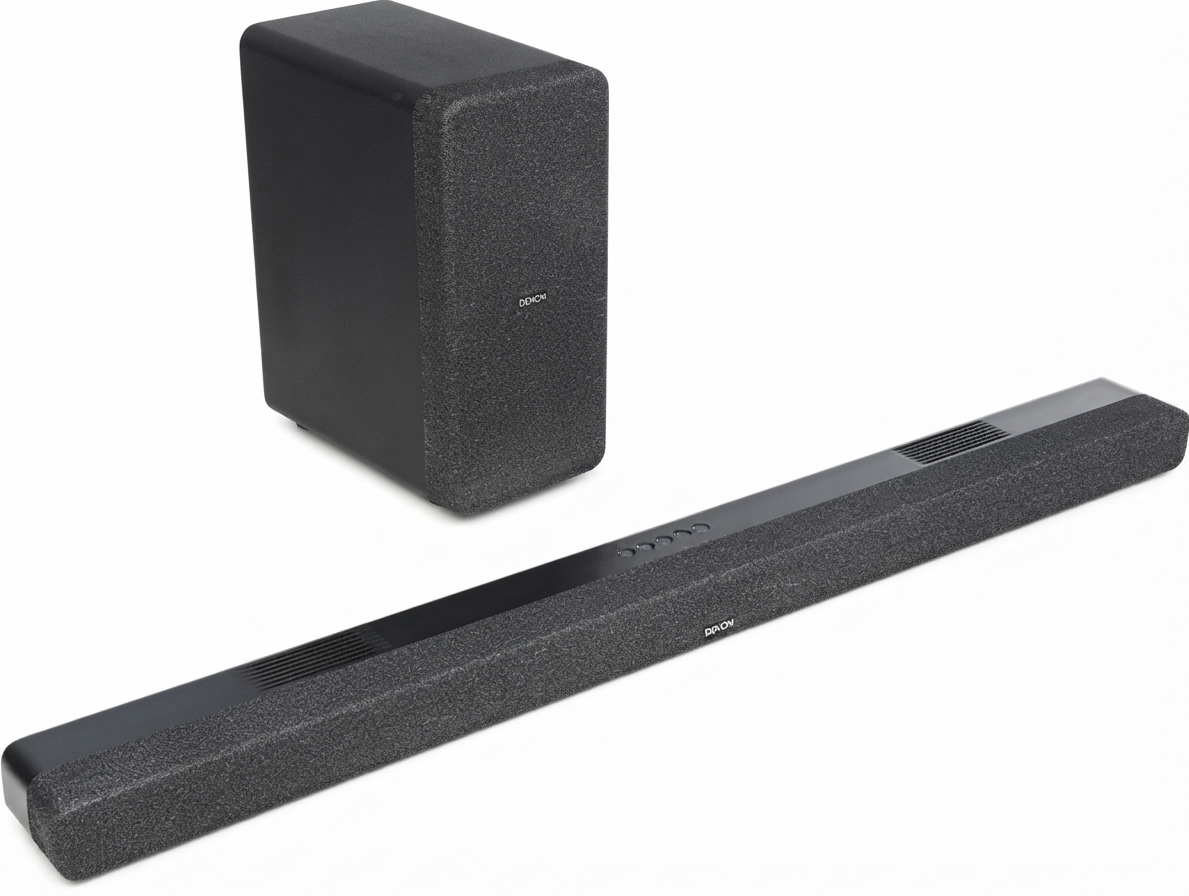
The Denon Dolby-Atmos Sound Bar & Subwoofer DHT-S517 is a feature-rich home theater upgrade designed for TV viewers who want immersive sound without the complexity of a full surround system. Built around a 3.1.2-channel layout, it combines a compact soundbar with a wireless subwoofer to deliver clearer dialogue, stronger bass, and overhead-style Dolby Atmos effects. This makes the Denon Dolby-Atmos Sound Bar & Subwoofer DHT-S517 a strong fit for movie lovers, gamers, sports fans, and everyday streaming users who want richer audio from a single streamlined setup.
One of its biggest strengths is ease of use. With HDMI eARC, optical input, Bluetooth streaming, and Denon’s dialog enhancement features, it works well with modern smart TVs and legacy sets alike. The included wireless subwoofer adds depth to action scenes and music, while the up-firing drivers help create a more spacious listening experience. It is especially appealing for medium-sized living rooms, bedrooms, and apartments where a full speaker system may be impractical.
The estimated price range for the Denon Dolby-Atmos Sound Bar & Subwoofer DHT-S517 typically falls in the mid-range category, often around the $300 to $450 range depending on retailer, promotions, and region. Availability remains generally good through major electronics stores and online marketplaces. For buyers seeking Dolby Atmos soundbar performance, simple setup, and solid value, the Denon Dolby-Atmos Sound Bar & Subwoofer DHT-S517 is a compelling option.
Specifications
- Audio layout: 3.1.2-channel soundbar with wireless subwoofer
- Driver system: 7-driver design with left/right tweeters, midrange drivers, center driver, and up-firing speakers
- Surround format support: Dolby Atmos, Dolby Digital, Dolby Digital Plus, Dolby TrueHD
- Connectivity: HDMI eARC/ARC, optical input, analog 3.5 mm input, Bluetooth
- Sound modes: Movie and Music presets, plus Night mode and Dialog Enhancement
- Soundbar dimensions: Approximately 41.3 in wide, 2.3 in high, 3.8 in deep
- Subwoofer dimensions: Approximately 6.7 in wide, 14.5 in deep, 11.4 in high
- Power figures: About 50 W for the soundbar and 100 W for the subwoofer in published retail specifications
- Placement: Tabletop or wall-mount friendly design
- Comparison: Compared with basic 2.1 soundbars, this model adds a dedicated center channel and up-firing Atmos drivers for better voice clarity and height effects
Detailed Description
The Denon Dolby-Atmos Sound Bar & Subwoofer DHT-S517 is designed to improve TV audio with a balance of power, clarity, and convenience. Its 3.1.2 arrangement means it handles left, center, right, and overhead audio tasks more effectively than a standard stereo soundbar. The center channel helps keep dialogue intelligible, while the up-firing drivers bounce sound off the ceiling to simulate height effects in compatible content.
The wireless subwoofer handles low-frequency output, giving explosions, music, and cinematic effects more impact. In real-world use, that makes it suitable for action movies, live sports, gaming, and music playback. The build quality reflects Denon’s practical home audio approach, with a slim soundbar enclosure and a separate subwoofer that can be placed near a wall or beside furniture for stronger bass response.
User experience is generally straightforward. The controls are simple, the remote is easy to understand, and HDMI eARC reduces setup friction with modern TVs. For households that want a cleaner setup than a multi-speaker system but more immersion than built-in TV speakers, the Denon Dolby-Atmos Sound Bar & Subwoofer DHT-S517 delivers a strong everyday upgrade.
Setup Guide
Setting up the Denon Dolby-Atmos Sound Bar & Subwoofer DHT-S517 is designed to be beginner-friendly. Start by placing the soundbar directly below the TV, making sure the front grille is unobstructed. Position the wireless subwoofer near the front of the room or along a wall for stronger bass output. Connect the soundbar to the TV using HDMI eARC if your TV supports it, since this is usually the best option for audio quality and single-remote control.
If HDMI eARC is not available, use the optical input instead. After connecting power to both units, turn on the TV and soundbar, then select the appropriate input mode. Pairing the subwoofer is typically automatic, but if bass is not present, check the wireless connection indicator and restart both devices. Bluetooth pairing can be used for music streaming from phones and tablets.
Troubleshooting tip: if sound is delayed or missing, confirm that the TV audio output is set to external speakers and that HDMI CEC/eARC settings are enabled. Safety precautions include keeping the units away from water, avoiding blocked ventilation, and not placing heavy objects on top of the soundbar. Always use the included power accessories and follow the owner’s manual for wall mounting.
Troubleshooting
Most issues with the Denon Dolby-Atmos Sound Bar & Subwoofer DHT-S517 are easy to solve with basic checks. If there is no sound, confirm the TV output setting, verify cable seating, and make sure the correct input source is selected. If the subwoofer is not producing bass, recheck its power connection and move it closer to the soundbar for a stronger wireless link. If dialogue sounds unclear, enable the dialog enhancer or reduce other audio effects.
If the system fails to connect through HDMI eARC, power-cycle the TV and soundbar, then confirm that the TV supports ARC or eARC and that the HDMI cable is rated for high-speed use. If Bluetooth pairing fails, delete the device from your phone and pair again from scratch. There are no widely used consumer-facing error codes for routine use, so most problems are solved through reset, input selection, or cable replacement.
Preventive measures include keeping firmware updated when applicable, using quality HDMI cables, and avoiding signal interference around the subwoofer. Warranty coverage and support options depend on the retailer and region, but Denon typically provides product support through its official customer service channels, authorized dealers, and downloadable manuals. For help, customers should contact Denon support or the retailer that sold the unit.
Pros & Cons
Pros
- Clear dialogue performance thanks to the dedicated center channel
- Dolby Atmos support adds a more immersive home theater experience
- Wireless subwoofer provides stronger bass without extra cabling
- HDMI eARC simplifies setup with modern TVs
- Good value for users who want premium sound without a full AV receiver setup
- Works well for movies, streaming, gaming, and sports
Cons
- Not as expansive as a true multi-speaker surround system
- Atmos height effects are effective but still limited by room acoustics
- Best results depend on TV compatibility and proper setup
- Wireless subwoofer placement may require some adjustment for balanced bass
Overall, the Denon Dolby-Atmos Sound Bar & Subwoofer DHT-S517 offers strong value for money in the mid-range soundbar segment. Compared with cheaper stereo bars, it delivers much better clarity and immersion. Compared with higher-end alternatives, it may lack advanced calibration tools or rear speakers, but it remains an excellent choice for buyers who want simplicity and solid cinematic sound.
Customer Reviews
Customer feedback for the Denon Dolby-Atmos Sound Bar & Subwoofer DHT-S517 is generally positive, with many users praising the easy setup, strong bass, and clear voice reproduction. Typical ratings often fall around 4 out of 5 stars, especially from buyers upgrading from built-in TV speakers.
Common praise includes comments such as, “Great sound for movies and streaming,” and “Dialog is much easier to hear than on my TV.” Frequent complaints usually focus on the size of the subwoofer, the limited surround width compared with full systems, or the need to fine-tune bass levels for smaller rooms.
Purchase recommendation: this model is a smart buy for users who want a reliable Dolby Atmos soundbar with wireless subwoofer support and simple day-to-day use. It is especially appealing for mid-sized rooms and mixed entertainment setups. Frequent issues are usually minor and can be solved through better placement, input adjustments, or TV audio settings.
Faqs
How do I set up denon Dolby-Atmos Sound Bar & Subwoofer DHT-S517 for the first time with HDMI eARC?
What should I do if denon Dolby-Atmos Sound Bar & Subwoofer DHT-S517 has no sound from my TV?
Does denon Dolby-Atmos Sound Bar & Subwoofer DHT-S517 work with non-ARC TVs?
How do I get the best Dolby Atmos effect from denon Dolby-Atmos Sound Bar & Subwoofer DHT-S517?
Why is the wireless subwoofer on denon Dolby-Atmos Sound Bar & Subwoofer DHT-S517 not connecting?
Can I use Bluetooth on denon Dolby-Atmos Sound Bar & Subwoofer DHT-S517 for music streaming?
How should I use the sound modes on denon Dolby-Atmos Sound Bar & Subwoofer DHT-S517 for movies and dialogue?
How do I maintain and clean denon Dolby-Atmos Sound Bar & Subwoofer DHT-S517 safely?
More denon manuals
- Denon AVR-991 Av Surround Receiver User Manual
- Denon Urban-Ravert Headphones Over Ear AH-D400 User Manual
- Denon AVR-3805 Av Surround Receiver User Manual
- Denon PerL-Pro Wireless In-Ear Headphones AH-C15PL User Manual
- Denon DRA-FIOO Personal Component System User Manual
- Denon AVR-XIOOO Network Av Receiver User Manual
Leave a Comment