
Setup Guide: Dimplex 81cm Tower Fan with Remote DCTF81R User Manual
Content
Dimplex 81cm Tower Fan with Remote DCTF81R: Product Manual and Buyer Guide
Introduction
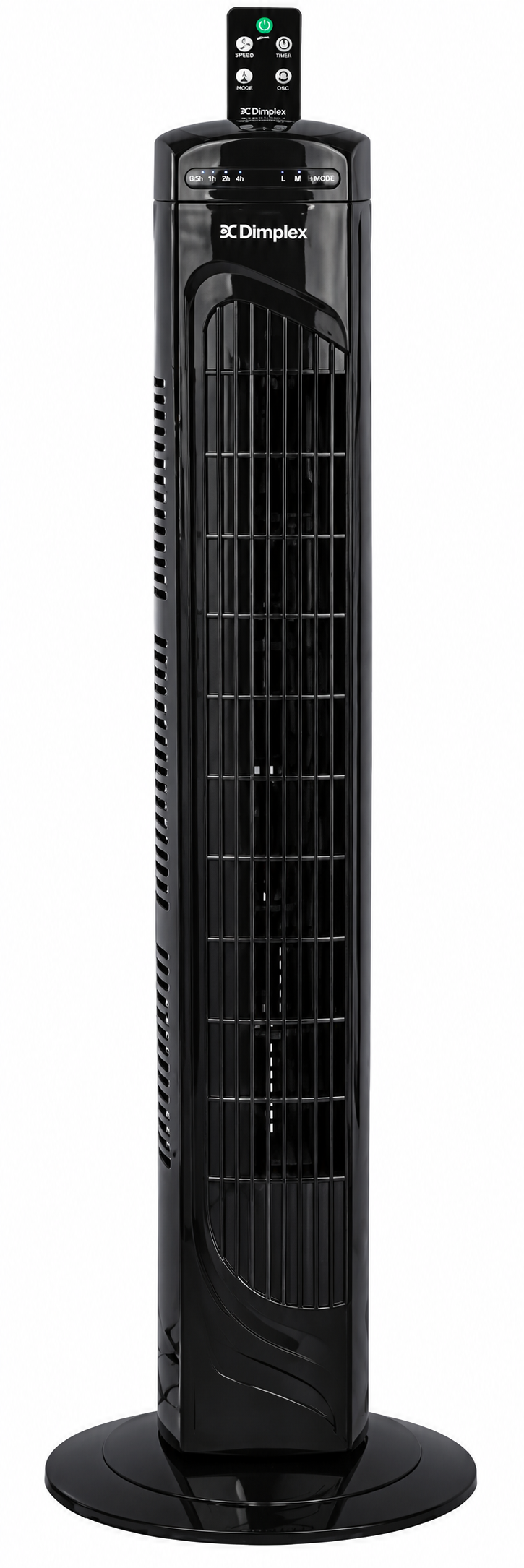
The Dimplex 81cm Tower Fan with Remote DCTF81R is a compact, modern cooling solution designed for bedrooms, living rooms, home offices, and small workspaces. With its slim tower profile, remote control convenience, and 70-degree oscillation, it delivers consistent airflow without taking up much floor space. This makes it a practical choice for users who want a quiet, easy-to-use fan that blends into everyday living areas while still providing strong air movement.
Its key benefits include three speed settings, three operating modes, a timer function, LED display, and simple button or remote operation. The fan is designed for straightforward daily use, whether you need a gentle breeze while sleeping or broader circulation during warmer afternoons. The DCTF81R is especially appealing to buyers looking for a portable fan that is lightweight, easy to move, and simple to store when not in use.
Typical availability is through appliance retailers and online stores, with an estimated price range of around AUD $50 to $100 depending on the seller, seasonal demand, and promotions. For shoppers comparing tower fans, this model offers a strong balance of practicality, convenience, and value. The dimplex 81cm Tower Fan with Remote DCTF81R is well suited to anyone seeking an affordable tower fan with remote control and reliable everyday performance.
Specifications for Dimplex 81cm Tower Fan with Remote DCTF81R
- Model: DCTF81R
- Type: 81cm tower fan with remote control
- Color: Black
- Power supply: 220–240V~, 50Hz
- Rated power: 45W
- Speed settings: 3
- Operating modes: 3
- Timer: 0–7.5 hours
- Air volume: 18.10m³/min
- Oscillation: 70 degrees
- Controls: On-unit buttons and remote control
- Noise level: 54dB(A) maximum
- Weight: 1.9kg net
- Dimensions: 240 x 240 x 810mm
In terms of everyday performance, the 45W output and 18.10m³/min air volume place it in the practical mid-range for compact tower fans. Compared with smaller desk fans, it provides taller and more directional airflow. Compared with larger premium tower fans, it is simpler, lighter, and more budget-friendly, making it ideal for everyday domestic cooling rather than heavy-duty whole-room air circulation.
Detailed Description
The dimplex 81cm Tower Fan with Remote DCTF81R uses a vertical airflow design to move air evenly through a room while occupying minimal floor space. Its oscillating tower body helps distribute air across a wider area, and the three speed levels allow users to choose between soft, medium, and stronger airflow depending on the temperature and room size. The LED display makes it easy to view the selected mode, speed, and timer settings at a glance.
The fan is built for simple, everyday cooling in homes and offices. In bedrooms, the timer function is especially useful for overnight use. In living rooms, oscillation helps improve comfort during warm weather. In home offices, the remote control adds convenience by allowing quick adjustments without leaving a desk or couch.
Its lightweight 1.9kg construction makes repositioning easy, while the compact 240mm square base helps maintain stability. The black finish gives it a clean, modern look that suits most interiors. For users who want a no-fuss cooling appliance with dependable controls and solid airflow, this tower fan offers a practical user experience.
Setup Guide: How to Use the DCTF81R Tower Fan
- Remove all packaging materials and place the fan on a flat, stable surface.
- Check that the base is secure and that the air outlet is unobstructed.
- Plug the unit into a suitable 220–240V power outlet.
- Use the power button on the fan or the remote to turn it on.
- Select a speed level using the SPEED/ON control.
- Choose a mode if you want a different airflow pattern.
- Press OSC to activate or stop oscillation.
- Set the timer between 0 and 7.5 hours if you want automatic shut-off.
The remote control should be pointed toward the fan’s front sensor area for best response. If the remote does not work, replace the batteries and confirm there is no obstruction between the remote and the unit. Keep the fan away from curtains, water, and unstable surfaces. Never cover the air outlet, and do not insert objects into the grille or moving parts. For safe operation, disconnect the appliance before cleaning or moving it.
Troubleshooting the Dimplex 81cm Tower Fan with Remote DCTF81R
- Fan does not power on: Check the wall outlet, plug connection, and power button. Try a different outlet if needed.
- Remote control not responding: Replace the batteries, ensure correct orientation, and aim directly at the unit.
- Weak airflow: Confirm the speed setting is high enough and that the air inlet and outlet are not blocked.
- Oscillation not working: Re-press the OSC button and make sure the fan is on a stable surface.
- Timer not operating: Re-enter the timer setting after turning the fan on.
- Unusual noise or vibration: Turn the fan off, check for debris, and ensure the base is fully assembled and level.
The DCTF81R does not use complex digital error codes in normal household operation, so most issues are solved through basic checks and proper setup. Preventive care includes regular dust removal, safe storage during off-seasons, and keeping the fan away from moisture. For warranty questions or parts support, contact Dimplex customer care through the brand’s official support channels and keep your model number and proof of purchase ready.
Pros and Cons of the Dimplex 81cm Tower Fan with Remote DCTF81R
Pros
- Compact 81cm tower design saves floor space and suits small rooms.
- Remote control improves convenience for bedrooms and living spaces.
- Three speed settings and three modes offer flexible cooling.
- 70-degree oscillation helps spread air more evenly.
- Lightweight build makes it easy to move from room to room.
- Timer function supports overnight or scheduled use.
- Good value for buyers who want an affordable tower fan with remote control.
Cons
- 45W output is best for personal or small-room cooling rather than large open spaces.
- Maximum noise level of 54dB(A) may be noticeable at higher speeds.
- Limited advanced features compared with premium tower fans.
- No cord storage, which may affect tidy storage.
Overall, the Dimplex DCTF81R compares well against basic tower fans by offering a practical feature set at a reasonable price. Users who want quiet premium performance or smart app controls may prefer a higher-end alternative, but most households will find this model offers solid everyday value.
Customer Reviews and User Feedback
Many buyers rate the fan around 4 out of 5 stars for convenience, compact size, and easy operation. Positive comments often mention the remote control, lightweight design, and useful timer for bedtime use. One common testimonial is: “Simple to use, moves air well, and fits neatly in the corner of the room.”
Frequent complaints usually focus on noise at higher speed settings and airflow that is better suited to smaller rooms than large open-plan areas. Some users also prefer a longer power cord or more advanced mode options. For most shoppers, the strongest recommendation is for bedrooms, home offices, and medium-sized personal spaces where convenience matters more than maximum output.
If you want a straightforward cooling appliance with dependable controls, the dimplex 81cm Tower Fan with Remote DCTF81R is a sensible purchase, especially when it is discounted or bundled with seasonal offers.
Faqs
How do I set up the dimplex 81cm Tower Fan with Remote DCTF81R for the first time?
Why is my dimplex 81cm Tower Fan with Remote DCTF81R not turning on?
How do I use the remote control on the dimplex 81cm Tower Fan with Remote DCTF81R effectively?
What features make the dimplex 81cm Tower Fan with Remote DCTF81R useful in small rooms?
How can I reduce noise from the dimplex 81cm Tower Fan with Remote DCTF81R?
What should I do if the oscillation on the dimplex 81cm Tower Fan with Remote DCTF81R stops working?
How often should I clean the dimplex 81cm Tower Fan with Remote DCTF81R?
What is the best way to improve airflow and performance on the dimplex 81cm Tower Fan with Remote DCTF81R?
More dimplex manuals
- Dimplex DCTFTT106 LED Tower Fan User Manual
- How to Use: Dimplex Portable Air Conditioner DCP16C User Manual
- Dimplex XLF50 Electric Fireplace User Manual
- Setup: Dimplex DFI2309 Electric Fireplace Owner Manual
- Dimplex XLF5017-XD IgniteXL Bold Linear Electric Fireplace User Guide
- Installation: Dimplex Revillusion Built-in Electric Firebox RBF30-FG User Manual
Leave a Comment