
Dimplex DCTFTT106 LED Tower Fan User Manual
Content
dimplex DCTFTT106 LED Tower Fan Product Manual
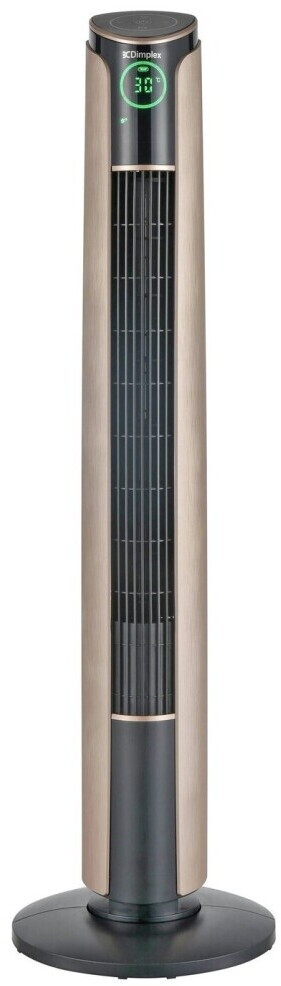
Introduction: dimplex DCTFTT106 LED Tower Fan overview, features, and who it is for
The dimplex DCTFTT106 LED Tower Fan is a slim, modern cooling solution designed for bedrooms, living rooms, home offices, and other medium-sized indoor spaces. With a 1060mm height, 45W power consumption, three speed settings, three operating modes, and a timer that runs from 0 to 12 hours, it offers flexible airflow control in a compact footprint. The tower design helps save floor space, while the LED display and touch or remote controls make everyday use simple and convenient.
This model is built for users who want a practical fan with a balance of performance, quiet operation, and ease of use. It is especially suitable for households that need targeted cooling without the bulk of a pedestal fan. The adjustable tilt of up to 7 degrees, carry handle, and remote control improve portability and everyday comfort. At around 55dB(A), it is generally quiet enough for sleeping, studying, and office use, although it is not completely silent.
The dimplex DCTFTT106 LED Tower Fan is typically positioned in the budget-to-mid-range category, with an estimated price range of about £60 to £90 depending on retailer, season, and stock availability. It is commonly available through appliance stores, online marketplaces, and Dimplex stockists. For buyers searching for a reliable LED tower fan with remote control, this model offers strong value and straightforward functionality.
Troubleshooting: common dimplex DCTFTT106 LED Tower Fan problems and fixes
If the fan does not start, check that it is connected to a working 220-240V power supply and that the plug and socket are secure. If the remote control is unresponsive, replace the batteries and make sure nothing is blocking the sensor on the unit. Weak airflow usually indicates the fan speed has been set too low or the air inlet and outlet need cleaning. For unusual vibration or noise, place the fan on a level surface and verify that no object is touching the grille or airflow path.
This model does not commonly use visible error codes, so most issues are solved through power resets, battery replacement, and cleaning. If the display becomes unresponsive, switch the unit off, unplug it for several minutes, and restart it. Preventive care includes dusting the grilles regularly, avoiding operation in damp areas, and storing the remote safely. The unit should not be covered during use.
Warranty and support are usually handled by Dimplex customer care or the retailer where the fan was purchased. For assistance, contact Dimplex customer support at 1300 556 816 or email customercare@glendimplex.com.au. Keep the proof of purchase and model number ready when requesting help.
Pros and Cons of the dimplex DCTFTT106 LED Tower Fan
Pros
- Slim tower design saves space and suits modern interiors.
- Three speed settings and three modes provide flexible airflow for daily use.
- Remote control and touch controls make operation easy from bed or desk.
- 12-hour timer is useful for overnight cooling and energy management.
- Carry handle improves portability between rooms.
- Quiet operation around 55dB(A) makes it practical for bedrooms and offices.
Cons
- 45W output is best for personal or medium-room cooling, not large open-plan spaces.
- Only three speed levels may feel limited compared with premium tower fans.
- No advanced smart features such as app control or voice assistant support.
- Airflow is effective but less powerful than some oscillating pedestal fan alternatives.
Overall, the dimplex DCTFTT106 LED Tower Fan offers solid value for money if you want a dependable, easy-to-use cooling fan rather than a feature-heavy smart appliance. Compared with cheaper basic tower fans, it adds better convenience through LED display, timer control, and remote use. Compared with higher-end DC tower fans, it is less efficient and less customizable, but it remains a sensible everyday choice.
Customer reviews for dimplex DCTFTT106 LED Tower Fan
Typical customer feedback for the dimplex DCTFTT106 LED Tower Fan is positive overall, with many users rating it around 4 out of 5 stars for convenience, quietness, and compact size. Buyers often praise the remote control, easy setup, and the fact that it fits neatly into smaller rooms. The timer and LED display are commonly mentioned as useful features for night-time use.
Common complaints usually focus on airflow strength in larger rooms and the limited number of speed settings. Some users also prefer a heavier base for extra stability, although most find the unit stable enough on flat flooring. A frequent recommendation is to use the fan on a higher setting when first cooling a room, then switch to a lower setting for sleep or background comfort. For shoppers wanting a practical tower fan with simple controls, this model is usually a worthwhile purchase.
Quick buying guide: is the dimplex DCTFTT106 LED Tower Fan worth it?
If you need a compact LED tower fan with remote control, timer settings, and quiet everyday performance, the dimplex DCTFTT106 LED Tower Fan is a strong option. It is best for bedrooms, home offices, and smaller living areas where space-saving design matters more than maximum airflow. For larger rooms or users who want advanced smart features, a more powerful premium tower fan may be a better fit.
Faqs
How do I set up the dimplex DCTFTT106 LED Tower Fan for the first time?
Why is my dimplex DCTFTT106 LED Tower Fan not turning on, and what should I check first?
How does the oscillation feature work on the dimplex DCTFTT106 LED Tower Fan?
What are the best room conditions for using the dimplex DCTFTT106 LED Tower Fan efficiently?
How do I clean and maintain the dimplex DCTFTT106 LED Tower Fan safely?
Why is the dimplex DCTFTT106 LED Tower Fan making unusual noise during operation?
How can I get stronger airflow from the dimplex DCTFTT106 LED Tower Fan without increasing noise too much?
What should I know about compatibility and power requirements for the dimplex DCTFTT106 LED Tower Fan?
More dimplex manuals
- Dimplex XLF50 Electric Fireplace User Manual
- Setup Guide: Dimplex 81cm Tower Fan with Remote DCTF81R User Manual
- Setup: Dimplex DFI2309 Electric Fireplace Owner Manual
- How to Use: Dimplex Portable Air Conditioner DCP16C User Manual
- Dimplex XLF5017-XD IgniteXL Bold Linear Electric Fireplace User Guide
- Installation: Dimplex Revillusion Built-in Electric Firebox RBF30-FG User Manual
Leave a Comment