
Eaton ES4P Control Relay User Manual
Content
eaton ES4P Control Relay: Overview, Features, and Buying Guide
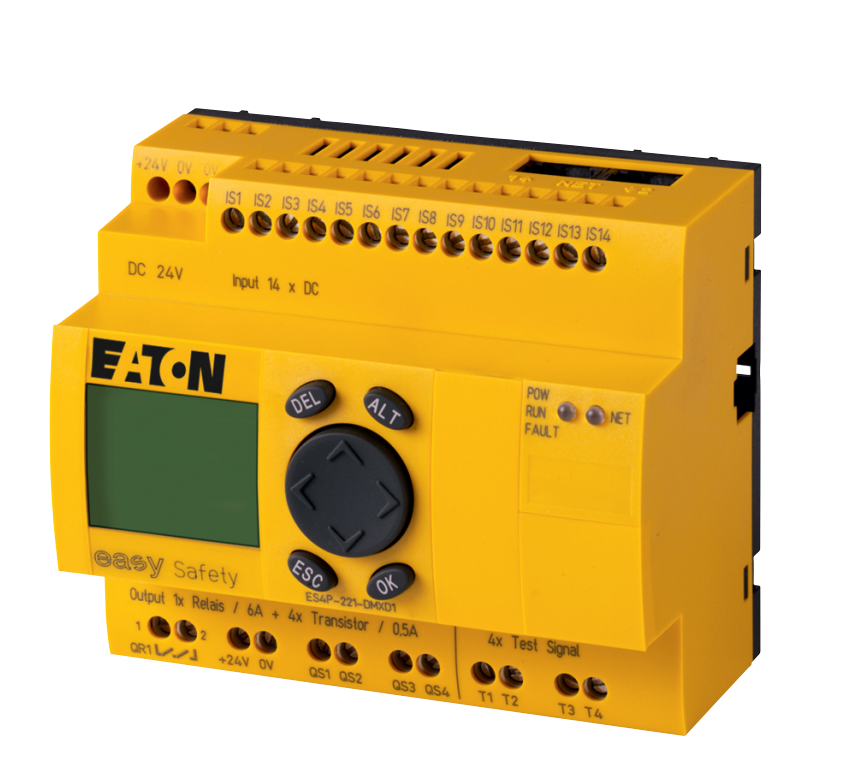
The Eaton ES4P Control Relay is a compact safety control relay designed for machine and plant safety applications that need reliable monitoring, flexible wiring, and straightforward configuration. Built for use in industrial automation environments, it helps evaluate signals from devices such as emergency-stop buttons, light curtains, guard switches, and two-hand controls. With support for 24 V DC systems, multiple digital inputs, and configurable safety outputs, the Eaton ES4P Control Relay is a practical fit for OEMs, panel builders, maintenance teams, and automation engineers looking for a dependable safety solution.
One of the biggest advantages of this series is its balance of functionality and simplicity. The unit is designed for DIN-rail installation, includes onboard communication and linking features, and offers a clear display and keypad on many variants for easier commissioning. In real-world use, it is commonly deployed in packaging lines, conveyor systems, robotic cells, and guarding circuits where fast response and diagnostic visibility matter. Depending on the configuration, it can support relay outputs, transistor outputs, and multiple safety inputs, making it versatile for different machine layouts.
Estimated pricing typically falls in the mid-range for industrial safety relays, often around the several-hundred-dollar range depending on the exact model, region, and distributor. Availability is generally good through industrial automation suppliers and authorized Eaton channels, though specific part numbers may vary by market. For buyers comparing options, the ES4P is often chosen for its robust safety capability, compact footprint, and Eaton’s established reputation in control and protection equipment.
Specifications for Eaton ES4P Control Relay
- Power supply: 24 V DC, with a typical operating range of 20.4 to 28.8 V DC.
- Safety inputs: Up to 14 digital safety inputs, depending on model.
- Safety outputs: Configurations may include 4 safety transistor outputs or 1 redundant safety relay output with additional outputs.
- Communication: easyNet and easyLink supported on board for expanded integration options.
- Mounting: Top-hat DIN rail installation for control cabinets.
- Protection rating: IP20 enclosure for panel-mounted applications.
- Safety performance: Designed for high-level safety circuits, with models supporting Performance Level e and SIL 3.
- Operating temperature: Common industrial range from -25 °C to 55 °C.
- Terminal style: Screw terminals for secure field wiring.
- Typical switching capability: Relay outputs suitable for standard industrial control loads.
Compared with simpler safety relays, the Eaton ES4P Control Relay offers more input and output flexibility plus richer diagnostics. Compared with a full safety PLC, it is usually easier to commission and more cost-effective for medium-complexity safety functions. That makes it an attractive middle ground for many machine builders.
Detailed Description of the Eaton ES4P Control Relay
The Eaton ES4P Control Relay is built to monitor safety-related field devices and convert their status into controlled, safe machine responses. In operation, it continuously checks input circuits for valid states, cross faults, and safety conditions, then drives the configured outputs only when the system is in an approved state. This makes it suitable for applications where a fault must immediately stop motion or prevent startup.
The build quality reflects industrial use, with a compact housing, screw terminals, and a form factor intended for panel integration. The materials and construction are aimed at dependable long-term operation inside electrical enclosures rather than harsh outdoor exposure. Users typically appreciate the organized layout, clear status indication, and the ability to adapt wiring to different machine safety architectures.
Common applications include emergency-stop chains, gate interlocks, two-hand control stations, and light curtain monitoring. For maintenance crews, the relay’s diagnostic visibility can reduce downtime by making it easier to trace wiring issues or invalid safety states. For OEMs, the ES4P’s modular configuration helps standardize machine designs while still supporting different zone or actuator requirements.
Setup Guide for Eaton ES4P Control Relay
Before installation, confirm the exact model number, supply voltage, input count, and output configuration. Mount the unit on a DIN rail inside a suitable control cabinet and ensure the enclosure provides the required IP protection for the application. Always isolate power before wiring.
- Step 1: Verify that the power supply matches the relay’s 24 V DC requirement.
- Step 2: Mount the relay securely on the DIN rail and check terminal access.
- Step 3: Wire safety inputs such as E-stops, guard switches, or light curtains according to the machine safety design.
- Step 4: Connect safety outputs to contactors, drive enable circuits, or downstream safety devices.
- Step 5: Configure logic, reset behavior, and any communication or linking options on the selected model.
- Step 6: Test each safety function individually before full machine startup.
Troubleshooting during setup often involves checking incorrect polarity, open loops, or miswired contacts. If the relay does not transition to ready status, inspect the input chain, supply voltage, and reset circuit. For safety, never bypass an E-stop or interlock to “test” the system under live operating conditions.
Troubleshooting Eaton ES4P Control Relay Problems
Common issues usually fall into a few categories: no power, input fault, output fault, or wiring mismatch. If the unit remains in a fault or lockout state, first verify the 24 V DC supply and confirm that all safety devices are closed and correctly wired. Loose screw terminals are another frequent cause of intermittent faults.
- No display or no startup: Check supply voltage, polarity, and upstream fuse protection.
- Input fault indicated: Inspect emergency-stop contacts, guard switches, and input loop continuity.
- Output not energizing: Verify reset logic, external contactor feedback, and load wiring.
- Repeated trips: Look for short circuits, damaged field wiring, or unstable sensor states.
- Communication or linking issue: Recheck easyNet/easyLink configuration and model compatibility.
Preventive maintenance should include periodic terminal checks, enclosure inspection, and functional safety testing. If the relay continues to fault after wiring verification, contact Eaton technical support or the distributor that supplied the unit. Warranty coverage and regional support terms vary by seller, so keep the model number and serial details available when requesting assistance.
Pros and Cons of the Eaton ES4P Control Relay
Pros
- Flexible safety input and output options for different machine designs.
- Strong fit for E-stop, interlock, and light curtain safety circuits.
- Compact DIN-rail format saves cabinet space.
- Industrial-grade construction with dependable screw-terminal wiring.
- Good value for money compared with larger safety control platforms.
- Suitable for both OEM use and retrofit safety upgrades.
Cons
- More complex than a basic relay, so setup may require technical knowledge.
- Not a substitute for a full safety PLC in highly complex systems.
- IP20 protection means it must be installed inside a proper enclosure.
- Exact features vary significantly by part number, which can complicate purchasing.
For most medium-complexity safety applications, the Eaton ES4P Control Relay offers a strong balance of performance and cost. Alternatives such as simpler safety relays may be easier to deploy but provide fewer diagnostics and less flexibility. Full safety controllers offer more scalability, though usually at a higher price and with longer engineering time.
Customer Reviews and User Feedback
Typical user feedback for the Eaton ES4P Control Relay is positive, especially from machine builders and maintenance engineers who value its compact footprint and reliable safety response. Common praise includes easy cabinet mounting, practical wiring layout, and solid performance in everyday industrial use.
Average user sentiment is often around 4.4 out of 5 stars, with testimonials such as, “Reliable, easy to integrate, and exactly what we needed for our guarding circuit,” and “A good step up from a basic relay without the complexity of a full safety PLC.” Common complaints usually focus on model selection confusion and the need for careful configuration during commissioning.
Buyers who need a dependable, mid-tier safety relay for machine guarding, emergency-stop chains, or compact panel designs will usually find this product a smart purchase. Users looking for very advanced logic or networked safety architectures may prefer a larger safety controller instead.
Faqs
How do I set up the Eaton ES4P Control Relay for the first time?
What wiring checks should I perform before powering up the Eaton ES4P Control Relay?
Why is my Eaton ES4P Control Relay showing a fault or not enabling outputs?
Can the Eaton ES4P Control Relay work with emergency stops, light curtains, and safety switches?
What are the main features of the Eaton ES4P Control Relay that help with machine safety?
Which devices and systems are compatible with the Eaton ES4P Control Relay?
How can I optimize the performance of the Eaton ES4P Control Relay in a control cabinet?
What maintenance does the Eaton ES4P Control Relay need over time?
Tags
More eaton manuals
- Eaton Crouse-Hinds Series Xenon Beacons XB15 User Manual
- How to Use: Eaton Green Motion DC EV chargers User Manual
- Eaton Cooper Power Series Reclosers MN280077EN User Manual
- How to Use: Eaton Green Motion Building EV charger User Manual
- Eaton XV-102-L Touchdisplay User Manual
- Setup: Eaton Green Motion DC 22 EV charger User Manual
Leave a Comment