
Garmin DASH CAM X110 User Manual
Content
Garmin Dash Cam X110: Compact 1080p Dash Cam Manual and Buyer Guide
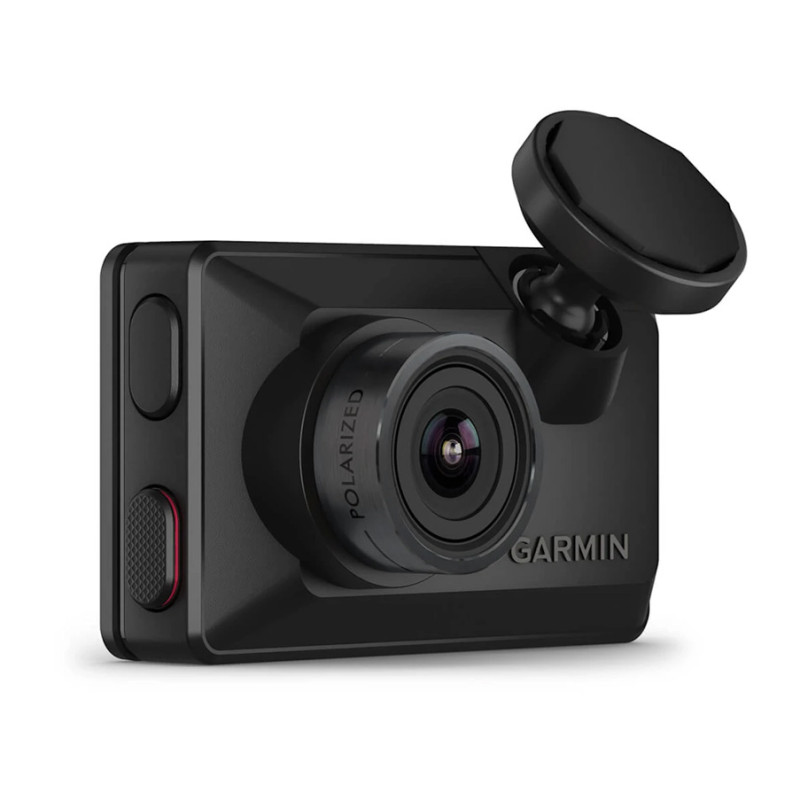
The Garmin Dash Cam X110 is a compact front-facing dash cam built for drivers who want clear 1080p recording, reliable incident capture, and simple everyday operation. With a 2.4-inch color display, 140-degree field of view, voice control, GPS, and Garmin’s Clarity HDR processing, the Garmin Dash Cam X110 is designed to record road events with strong detail in both bright daylight and low-light conditions. It is a practical choice for commuters, rideshare drivers, road-trip travelers, and anyone who wants added documentation in case of an accident or roadside dispute.
One of the biggest advantages of the Garmin Dash Cam X110 is its balance of ease of use and premium features. It supports automatic incident recording, wireless connectivity through the Garmin Drive app, and dash cam auto-sync with compatible Garmin cameras for multi-camera coverage. The screen makes setup and playback straightforward, while the compact body helps it blend into the windshield without creating much distraction. It also supports microSD cards up to 512 GB, giving users flexibility for longer recording loops.
Estimated pricing typically falls in the $190 to $240 range, depending on the retailer and promotions. Availability is generally broad through major electronics stores, online marketplaces, and Garmin-authorized sellers. For buyers searching for a smart, easy-to-install dash camera with GPS and voice command support, the Garmin Dash Cam X110 is a strong mid-range option.
Specifications for Garmin Dash Cam X110 1080p Dash Camera
- Video resolution: 1080p Full HD
- Field of view: 140 degrees diagonal
- Display: 2.41-inch color TFT LCD
- Display resolution: 480 x 272 pixels
- Storage support: microSD card required, minimum 8 GB, up to 512 GB, Class 10 or faster
- Connectivity: Wi-Fi and Bluetooth support for app pairing
- GPS: Built in for location and speed data overlay
- Voice control: Supported for hands-free operation
- Recording format: H.264 video codec
- Power input: 4.75 to 5.25 V DC, 1 A
- Operating temperature: -20°C to 60°C
- Charging temperature: 0°C to 60°C
- Weight: 62 g
- Mount type: Adhesive mount
- Battery life: Up to 20 minutes
The Garmin Dash Cam X110 compares closely to the X210 and X310 models, but the X110 is the more affordable screen-equipped option for drivers who want core features without stepping into higher-end upgrades. Compared with the smaller Garmin Mini series, it offers a built-in display and a more traditional standalone experience. For buyers seeking a compact dash cam with GPS and reliable 1080p recording, the X110 sits in the sweet spot between value and functionality.
Setup Guide: How to Install and Configure Garmin Dash Cam X110
Start by inserting a compatible microSD card into the dash cam before mounting it. Use a Class 10 card sized between 8 GB and 512 GB for best results. Attach the adhesive mount to a clean section of the windshield, then connect the power cable to the vehicle’s 12V outlet or hardwire kit if applicable. Position the camera so it has a clear view of the road without blocking your visibility.
After powering on the device, follow the on-screen setup prompts to select language, time zone, video quality, and recording preferences. Pair the camera with the Garmin Drive app on your smartphone to enable wireless file transfers, settings control, and firmware updates. You can also set voice control commands, parking mode options, and GPS-related preferences through the app or device menu.
If the camera does not power on, confirm the cable is fully seated and the vehicle outlet is active. If recording does not begin, check whether the microSD card is properly formatted and not full. Always avoid mounting the camera in a way that obstructs airbags, mirrors, or driver sightlines. For parking mode use, follow local regulations and use a suitable power setup.
Troubleshooting Garmin Dash Cam X110 Common Problems and Fixes
One common issue is the camera not turning on. This is usually caused by a loose power connection, an inactive vehicle outlet, or a cable problem. Reseat the power cable, test another outlet, and verify that the car provides power when ignition is on. If the device repeatedly restarts, the microSD card may be incompatible or corrupted.
If recordings are missing or stopping unexpectedly, reformat the memory card in the camera and confirm it is a Class 10 card supported by the device. Blurry footage can often be improved by cleaning the lens, checking windshield alignment, and enabling the correct video settings. If Wi-Fi pairing fails, turn Bluetooth and Wi-Fi off and back on, then retry with the Garmin Drive app.
Typical user-facing errors are often tied to storage, power, or card formatting rather than hardware failure. Preventive care includes updating firmware, regularly backing up important clips, and replacing aging microSD cards before they fail. Garmin support is available through its customer support portal, and warranty service depends on the retailer and region of purchase. For help, use the official Garmin support channels, product manual, or authorized service options.
Pros and Cons of Garmin Dash Cam X110
Pros
- Clear 1080p video with 140-degree coverage for dependable daily recording
- Built-in GPS adds useful location and speed data for incident documentation
- Compact design looks clean on the windshield and does not feel bulky
- 2.4-inch screen makes setup, review, and menu navigation easy
- Voice control supports safer hands-free operation
- Supports large microSD cards up to 512 GB for extended recording capacity
- Strong value for drivers who want Garmin quality without moving to a premium model
Cons
- No included memory card, so the first-time setup costs more
- Adhesive mount only, which may feel less flexible than magnetic designs
- Battery life is short and intended mainly for brief unplugged use
- Parking mode may require extra hardware and subscription-related features
- Not as advanced as higher-end alternatives with richer driver assistance tools
Overall, the Garmin Dash Cam X110 delivers solid value for drivers who want dependable core features at a reasonable price. It competes well against compact models from other brands by offering GPS, voice control, and a built-in display in one simple package.
Customer Reviews: What Drivers Say About the Garmin DASH CAM X110
Customer feedback for the Garmin DASH CAM X110 is generally positive, with many users praising the sharp video quality, easy setup, and compact size. Common ratings fall around 4 to 4.5 out of 5 stars, especially from buyers who want a straightforward dash cam for daily commuting. Reviewers often highlight the reliable GPS data and the convenience of the screen for quick checks and menu navigation.
Frequent complaints focus on the need to buy a separate microSD card and the limited usefulness of the internal battery. Some users also mention that parking mode can feel less convenient if additional accessories are required. Even so, most owners recommend the device for drivers who want a simple, dependable camera rather than an advanced multi-camera system.
Frequently Asked Questions About Garmin Dash Cam X110
Does the Garmin Dash Cam X110 record in 4K?
No, the Garmin Dash Cam X110 records in 1080p Full HD for practical everyday use and balanced storage efficiency.
Does it need Wi-Fi to work?
No, the camera records locally to a microSD card, but Wi-Fi helps with app pairing, file transfers, and settings management.
Is the Garmin Dash Cam X110 worth buying?
Yes, it is a strong choice for drivers who want a compact dash cam with GPS, voice control, and reliable 1080p recording at a mid-range price.
Faqs
How do I set up garmin DASH CAM X110 for the first time?
What should I do if garmin DASH CAM X110 is not recording automatically?
Does garmin DASH CAM X110 support the Garmin Drive app and multiple-camera setup?
What kind of video quality and viewing angle does garmin DASH CAM X110 offer?
How do I adjust garmin DASH CAM X110 camera placement for the best image?
Is garmin DASH CAM X110 compatible with parking mode and hardwire installation?
How can I improve garmin DASH CAM X110 performance in hot weather or long drives?
What maintenance does garmin DASH CAM X110 need to stay reliable?
More garmin manuals
Leave a Comment