
Garmin VENU GPS Smartwatch User Manual
Content
Garmin Venu GPS Smartwatch: Complete Product Manual
Introduction
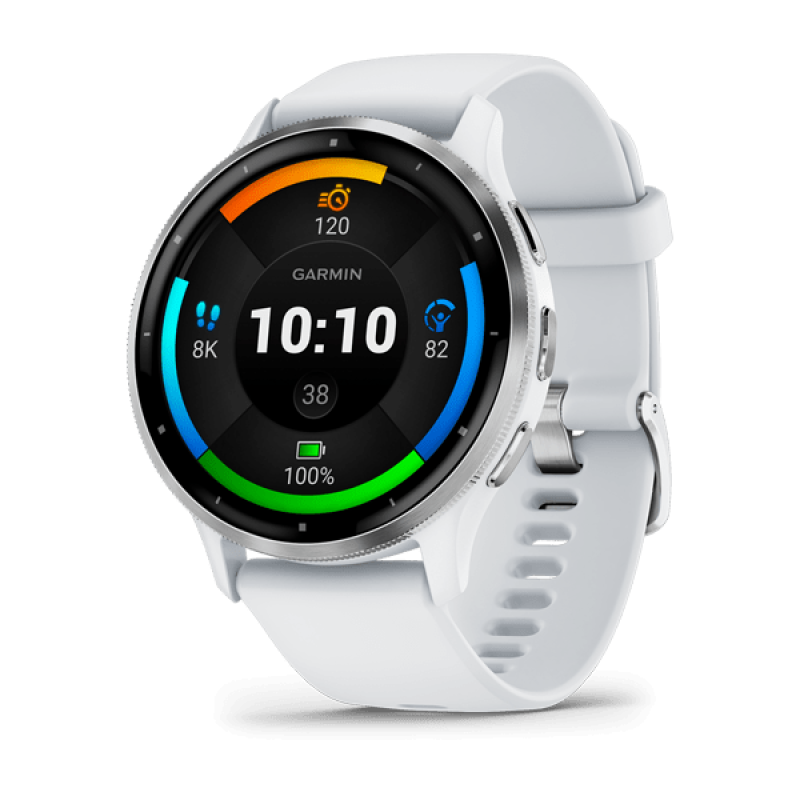
The Garmin Venu GPS Smartwatch is a versatile fitness-focused wearable designed for users who want a stylish everyday watch with serious health and activity tracking. It combines built-in GPS, an AMOLED touchscreen, heart rate monitoring, pulse oximeter support, and animated on-screen workouts in a package that feels equally at home in the gym, office, or outdoors. For people who want a smartwatch that emphasizes wellness without sacrificing smart features, the Venu remains a strong choice.
One of its biggest strengths is its bright 1.2-inch AMOLED display, which delivers vivid colors and sharp detail for easy readability in direct light and during workouts. The watch also supports Garmin Pay, music playback, sleep tracking, and multiple sport profiles, making it useful for runners, cyclists, swimmers, and general fitness users. Battery life is another major advantage, with up to five days in smartwatch mode and around six hours with GPS and music enabled.
The Garmin Venu GPS Smartwatch is ideal for users who want a balance of fitness tracking, smart convenience, and premium design. It is widely available through major electronics retailers and online marketplaces, with estimated pricing typically starting around the $300 to $350 range depending on color and retailer promotions. For shoppers comparing it with other fitness watches, the Venu stands out for its AMOLED screen and Garmin’s trusted sports-tracking ecosystem.
Specifications
- Display: 1.2-inch AMOLED touchscreen with 390 x 390 resolution
- Case size: 43.2 x 43.2 x 12.4 mm
- Weight: Approximately 46.3 g
- Battery life: Up to 5 days in smartwatch mode; up to 6 hours in GPS plus music mode
- Water resistance: 5 ATM, suitable for swimming
- GPS: Built-in GPS with support for common satellite systems
- Sensors: Heart rate, pulse oximeter, accelerometer, gyroscope, barometric altimeter, compass
- Smart features: Garmin Pay, music storage and playback, notifications, workout animations
- Workout support: Multiple activity profiles, guided workouts, running and cardio tracking
- Comparison: Compared with the vívoactive 4, the Venu adds an AMOLED display for richer visuals; compared with newer Venu models, it offers a simpler feature set and lower cost
The Garmin Venu GPS Smartwatch is best known for blending premium display quality with strong fitness tracking. While newer Garmin models may offer longer battery life or additional sensors, the original Venu still delivers a compelling mix of performance and value for users who want a stylish daily smartwatch.
Detailed Description
The Garmin Venu GPS Smartwatch works as a hybrid lifestyle and fitness device, tracking your movement, heart rate, stress, sleep, and workouts throughout the day. Its built-in GPS records outdoor runs, walks, and cycling sessions without requiring a phone nearby. The touchscreen interface makes it easy to navigate menus, start activities, check stats, and view animated workout guidance directly on the watch face.
In real-world use, the Venu is well suited for commuting, training sessions, casual wear, and health monitoring. Runners can use the GPS and heart rate tracking for pace and distance data, while gym users benefit from animated exercises and rep-based training support. Swimmers can also use it thanks to its 5 ATM water resistance. The AMOLED panel is one of its most noticeable advantages, making notifications and fitness metrics easy to read indoors and outdoors.
Build quality is solid, with a lightweight case designed for all-day wear. The watch feels premium without being bulky, and the materials are durable enough for everyday fitness use. User experience is generally smooth, especially for people already familiar with Garmin’s app ecosystem. The overall impression is a dependable smartwatch that prioritizes fitness insights and polished visuals over a more app-heavy smartwatch platform.
Setup Guide
To set up the Garmin Venu GPS Smartwatch, begin by fully charging the device before first use. Power it on, then install the Garmin Connect app on your smartphone. Open the app, create or sign into your Garmin account, and follow the pairing prompts to connect the watch via Bluetooth. Once connected, allow access to notifications, fitness data, and location services if you want full functionality.
After pairing, configure essential settings such as units of measurement, wrist preference, activity goals, and watch face style. You can also enable music services, Garmin Pay, and sleep tracking if supported in your region. For best results, update the watch firmware before starting regular use. This helps improve accuracy, stability, and feature compatibility.
If pairing fails, restart both the watch and phone, ensure Bluetooth is enabled, and remove any old watch profiles from the app. Avoid submerging the watch before confirming the water resistance seals are intact. Do not expose the device to extreme heat, and use only Garmin-approved charging accessories. For safety, keep the device clean and dry after swimming or heavy sweat exposure.
Troubleshooting
Common issues with the Garmin Venu GPS Smartwatch usually involve pairing, GPS lock, battery drain, or sync delays. If the watch will not pair, delete the device from Bluetooth settings, restart both devices, and try pairing again through Garmin Connect. If GPS takes too long to acquire a signal, move to an open outdoor area and wait for a clearer sky view before starting an activity.
Rapid battery drain is often caused by always-on display settings, frequent GPS use, bright screen settings, or heavy notification activity. Lowering brightness, disabling unnecessary alerts, and reducing GPS-heavy workouts can help. If the touchscreen becomes unresponsive, restart the watch and clean the display with a soft cloth. For sync problems, open Garmin Connect, refresh the connection, and confirm that the phone’s background app permissions are enabled.
Garmin support is available through its official help channels, and warranty coverage may vary by region and retailer. For persistent hardware issues, users should contact Garmin support or the original seller for service options. Preventive care, firmware updates, and regular cleaning can reduce most long-term problems.
Pros & Cons
Pros
- Bright AMOLED display with excellent readability and color quality
- Built-in GPS and accurate health tracking for outdoor and indoor workouts
- Lightweight, comfortable design for all-day wear
- Strong fitness features including guided workouts and activity tracking
- Good value for users who want premium visuals without paying flagship prices
Cons
- Battery life is shorter than some Garmin watches with MIP displays
- Fewer advanced training tools than higher-end Garmin models
- Smartwatch app ecosystem is more limited than some competing brands
- GPS plus music mode can drain battery quickly during long sessions
For buyers comparing it with alternatives, the Garmin Venu GPS Smartwatch offers a better display than many fitness watches in its class, but it trades some endurance and advanced training depth for style and convenience. It is a strong value for everyday users, especially those who care about design and wellness tracking.
Customer Reviews
User feedback for the Garmin Venu GPS Smartwatch is generally positive, with many customers praising the vivid AMOLED screen, accurate activity tracking, and comfortable fit. Common ratings cluster around 4 to 4.5 stars, especially among users who want a smartwatch that looks good and handles fitness well.
Typical praise includes comments like “the display is brilliant indoors and outdoors” and “great for daily workouts and sleep tracking.” Common complaints focus on battery life, occasional sync delays, and the learning curve of Garmin’s menu system. Many buyers say it is a smart purchase for runners, walkers, and casual fitness users, while power athletes often prefer a more advanced Garmin model.
Overall, the Garmin Venu GPS Smartwatch is frequently recommended for people who want a polished fitness smartwatch with strong everyday usability and reliable Garmin tracking.
Faqs
How do I set up the garmin VENU GPS Smartwatch for the first time?
What should I do if my garmin VENU GPS Smartwatch is not pairing with my phone?
How can I improve GPS accuracy on the garmin VENU GPS Smartwatch?
Does the garmin VENU GPS Smartwatch work with iPhone and Android phones?
How do I use music storage and playback on the garmin VENU GPS Smartwatch?
Why is the battery draining faster on my garmin VENU GPS Smartwatch?
What health and fitness features does the garmin VENU GPS Smartwatch offer?
How should I clean and care for the garmin VENU GPS Smartwatch?
More garmin manuals
Leave a Comment