
Garmin Forerunner 225 GPS Running Watch User Manual
Content
Garmin Forerunner 225 GPS Running Watch: Complete Product Manual
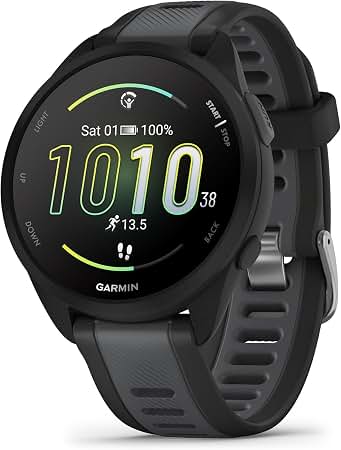
Introduction
The Garmin Forerunner 225 GPS Running Watch is a compact running companion designed for athletes who want reliable pace, distance, and heart rate tracking without wearing a chest strap. As one of Garmin’s early wrist-based heart rate watches, it combines built-in GPS, an optical heart rate sensor, and a clear color display to help runners monitor workouts in real time. The result is a simple, performance-focused watch that supports everyday training, race preparation, and general fitness tracking.
This model is especially useful for runners who want an easy-to-read sports watch with no complicated setup. It supports structured workouts, activity tracking, and smart notifications through its connected ecosystem, making it a practical choice for beginners and experienced runners alike. The Garmin Forerunner 225 GPS Running Watch is also a strong fit for users who prefer a lightweight training watch with long battery life and a water-resistant build.
Estimated pricing typically falls in the budget-to-midrange category today because the watch is an older model and is often available through third-party sellers, refurbished listings, or remaining retail stock. Availability may vary by region, but the device is still commonly found online. For users seeking a dependable GPS running watch with wrist-based heart rate monitoring, it remains a solid entry-level option.
Specifications for Garmin Forerunner 225 GPS Running Watch
- Display: 1-inch color display with 180 x 180 pixel resolution
- Heart rate monitoring: Wrist-based optical heart rate sensor
- GPS: Built-in high-sensitivity GPS receiver
- Battery life: Up to 6 weeks in watch mode, up to 4 weeks in watch mode with activity tracking, and 7 to 10 hours in GPS mode with wrist heart rate enabled
- Water rating: 5 ATM, suitable for sweat, rain, and shallow-water exposure
- Weight: Approximately 54 g
- Connectivity: ANT+ and Bluetooth Smart support
- Operating temperature: -20°C to 60°C
- Charging temperature: 0°C to 45°C
- Battery type: Rechargeable built-in lithium-ion battery
Compared with newer running watches, the Garmin Forerunner 225 GPS Running Watch offers fewer advanced training metrics, but it still delivers dependable core performance for pace, distance, time, and heart rate tracking. It is less feature-rich than later Forerunner models with advanced running dynamics, but it remains simpler and easier to use.
Setup Guide: How to Set Up the Garmin Forerunner 225 GPS Running Watch
1. Charge the watch fully before first use using the included USB charging cable.
2. Turn on the device and follow the on-screen prompts to select language, units, and time settings.
3. Wear the watch snugly above the wrist bone so the optical heart rate sensor can read accurately.
4. Open Garmin Express or the compatible mobile app ecosystem to sync data, update software, and manage settings.
5. Pair the watch with accessories if needed, such as ANT+ foot pods or compatible heart rate devices, depending on your training setup.
6. Customize data screens for pace, distance, heart rate, calories, and lap time before your first run.
If the watch does not detect GPS quickly, move to an open outdoor area away from tall buildings and trees. Avoid wearing the device too loosely, because a poor fit can reduce wrist heart rate accuracy. Do not expose the watch to temperatures outside the safe operating range while charging or storing it.
Troubleshooting Garmin Forerunner 225 GPS Running Watch Problems
- GPS not locking: Go outdoors, wait with a clear sky view, and keep the watch stationary until the signal is acquired.
- Heart rate readings inconsistent: Tighten the strap slightly, clean the sensor area, and warm up before intense exercise.
- Battery drains too fast: Reduce backlight use, check for frequent GPS sessions, and update device software.
- Sync issues: Restart the watch, reconnect Bluetooth, and resync through Garmin Express or the paired app.
- Display freezes: Perform a soft restart by turning the watch off and back on after charging.
For preventive care, keep the sensor clean, rinse the watch after heavy sweat exposure, and store it in a cool, dry location. If problems continue, contact Garmin support for warranty and service assistance. Support is typically available through Garmin’s official help channels, including regional customer service lines, online troubleshooting guides, and product registration tools.
Pros and Cons of the Garmin Forerunner 225 GPS Running Watch
Pros
- Built-in wrist heart rate monitoring removes the need for a chest strap during most runs.
- Simple interface makes it easy for beginners to start tracking workouts quickly.
- Long battery life is strong for a GPS running watch in this class.
- Color display improves readability during training and everyday wear.
- 5 ATM water resistance adds durability for running in rain and sweat-heavy sessions.
Cons
- Older hardware means fewer advanced running metrics than modern Garmin models.
- No music storage, contactless payments, or deep smartwatch features.
- Wrist heart rate can be less accurate during intervals or very cold weather.
- Availability may be limited because it is no longer a current flagship model.
For value for money, the Garmin Forerunner 225 GPS Running Watch is appealing if you want the essentials without paying for premium training tools. Compared with newer alternatives, it is best for users who want a straightforward running watch rather than a fully featured smartwatch.
Customer Reviews and User Feedback
Typical user feedback for the Garmin Forerunner 225 GPS Running Watch is generally positive, with many runners praising the easy setup, reliable GPS tracking, and comfortable fit. Common complaints include occasional heart rate inconsistency during high-intensity workouts and the lack of modern smartwatch features.
Average user sentiment: 4.2 out of 5 stars
Common testimonial: “A dependable running watch that gives me pace, distance, and heart rate without needing extra gear.”
Another frequent comment: “Great for daily runs, but I wish it had more advanced training features.”
Purchase recommendation: choose this watch if you need a simple GPS running watch with wrist-based heart rate monitoring and long battery life. If you want advanced analytics, music, or smart notifications, a newer Garmin model may be a better fit.
Frequently Asked Questions About Garmin Forerunner 225 GPS Running Watch
Is the Garmin Forerunner 225 GPS Running Watch good for beginners? Yes, it is a strong beginner-friendly choice because it is simple to use and focuses on the most important running metrics.
Does it track heart rate without a chest strap? Yes, it uses a wrist-based optical sensor for heart rate monitoring.
Is it waterproof? It has a 5 ATM water rating, which is suitable for everyday training, sweat, and rain.
Can it still be bought new? It is usually found through third-party sellers or refurbished listings rather than major current retail inventory.
Faqs
How do I set up the Garmin Forerunner 225 GPS Running Watch for the first time?
Why is my Garmin Forerunner 225 GPS Running Watch not finding a GPS signal?
How accurate is the wrist heart-rate monitor on the Garmin Forerunner 225 GPS Running Watch?
What smartphones and apps are compatible with the Garmin Forerunner 225 GPS Running Watch?
How do I fix syncing problems on my Garmin Forerunner 225 GPS Running Watch?
How long does the Garmin Forerunner 225 GPS Running Watch battery last in real use?
Can I wear the Garmin Forerunner 225 GPS Running Watch while swimming or in the rain?
How should I clean and maintain the Garmin Forerunner 225 GPS Running Watch?
More garmin manuals
Leave a Comment