
Garmin VARIA Rearview Rader RTL515 User Manual
Content
Garmin Varia RTL515 Rearview Radar Taillight Product Manual
Introduction
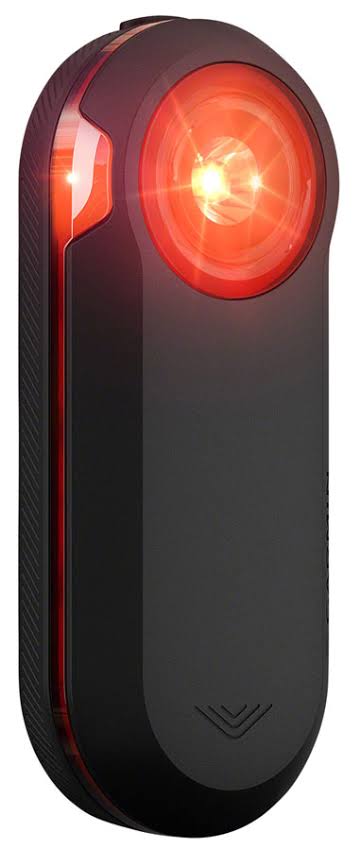
The garmin VARIA Rearview Rader RTL515 is a rear radar and taillight designed to help cyclists ride with more confidence on roads, commute routes, and long-distance training sessions. It detects approaching vehicles from behind and pairs with compatible bike computers, smartphones, and radar display units to deliver visual and audible alerts. For riders who spend time in traffic, the combination of radar awareness and bright rear lighting makes it a practical safety upgrade.
One of its biggest advantages is the way it blends visibility with situational awareness. Instead of only making you more visible, it actively warns you when vehicles are approaching, which is especially useful on busy roads, rural descents, and low-visibility rides. The device supports multiple light modes, long battery life, wireless connectivity, and an IPX7 water rating for wet-weather use.
The garmin VARIA Rearview Rader RTL515 is aimed at road cyclists, commuters, endurance riders, and e-bike users who want an added layer of rear protection without adding much bulk. Typical pricing is around $199.99 / €199.99, though discounts are common depending on retailer and season. It is widely available through Garmin and major cycling retailers.
Specifications
- Device type: Rearview radar with integrated LED taillight
- Radar detection range: Up to 140 meters for approaching vehicles
- Lighting modes: Solid, peloton, night flash, day flash
- Brightness: 20 lm solid, 8 lm peloton, 29 lm night flash, 65 lm day flash
- Battery life: Up to 6 hours solid, 8 hours peloton, 6 hours night flash, 16 hours day flash, up to 3 months standby
- Battery type: Rechargeable built-in lithium-ion battery
- Connectivity: ANT+ and Bluetooth Low Energy
- Water rating: IPX7
- Operating temperature: -20°C to 50°C
- Charging temperature: 0°C to 45°C
- Weight: Approximately 71 g
- Dimensions: 98.6 x 19.7 x 39.6 mm
- Viewing angle: 220 degrees
Compared with the RVR315, the RTL515 adds a taillight for increased visibility, while both models share the same core radar safety concept. Against newer premium rear radar lights, the RTL515 remains a strong value choice for riders who want proven performance and broad device compatibility.
Setup Guide
1. Mount the device to the seatpost using the supplied mounting hardware and make sure it sits securely and vertically.
2. Power on the unit using the device button, then enter pairing mode by holding the button for about two seconds when the device is off.
3. Pair it with a compatible Garmin bike computer, a supported smartwatch, the Varia display unit, or a smartphone through the appropriate app or device menu.
4. Select your preferred light mode before riding: day flash for maximum visibility, night flash for reduced glare, solid for continuous illumination, or peloton mode for group riding.
5. Test the radar by riding in a safe area and confirming that alerts appear on your connected device when a vehicle approaches.
If pairing fails, restart both devices, confirm Bluetooth or ANT+ is enabled, and move closer during setup. Keep the lens clean, avoid mounting on loose seatposts, and do not block the radar sensor with bags, mudguards, or racks.
For safety, never rely only on radar alerts. Always scan the road, follow traffic laws, and use the light in a mode appropriate for the conditions.
Troubleshooting
- No radar alerts: Re-pair the device, ensure the connected head unit supports radar, and check that the radar is powered on.
- Light not turning on: Charge the battery fully, verify the button is responsive, and inspect the charging cable and port for debris.
- Frequent disconnects: Reduce distance between devices, remove wireless interference, and update device firmware.
- Weak battery life: Use day flash or lower-power modes only when needed, and avoid storing the unit fully discharged.
- False or inconsistent alerts: Confirm the mount is stable and aligned straight behind the bike.
There are no widely used public error codes for everyday users, so most issues are fixed by re-pairing, charging, updating firmware, or checking installation. Preventive care includes regular cleaning, proper storage, and periodic battery charging even during off-season use. Garmin products generally include warranty support, and help is available through Garmin customer support and authorized retailers. If you need assistance, contact Garmin support through the official support channel for your region.
Pros & Cons
Pros
- Excellent rear-vehicle awareness for commuting and road cycling
- Bright taillight with multiple modes for day and night use
- Long battery life in day flash mode for extended rides
- Broad compatibility with Garmin devices and smartphones
- Lightweight design that does not add much bulk to the bike
- Strong value for riders who want radar safety without upgrading to a more expensive system
Cons
- Requires a compatible display or app to get full radar benefits
- Micro-USB charging is less convenient than newer USB-C devices
- Radar alerts can feel repetitive in heavy traffic
- Not ideal if you only want a basic taillight without smart features
Compared with simpler rear lights, the garmin VARIA Rearview Rader RTL515 costs more but delivers a major safety advantage. Compared with newer premium alternatives, it remains one of the best-balanced options for price, reliability, and real-world usefulness.
Customer Reviews
Average user sentiment is generally very positive, with many riders rating it around 4.5 out of 5 stars. Customers often praise the confidence boost from knowing when cars are approaching, especially on narrow roads and during early-morning commutes.
Typical feedback includes comments like, “The radar alerts changed the way I ride on traffic-heavy roads,” and “Battery life is excellent in flash mode.” Common complaints focus on the price, the need for a compatible head unit, and occasional false alerts in dense traffic. Many buyers recommend it for road cyclists, commuters, and endurance riders who prioritize safety over simplicity.
For riders comparing the garmin VARIA Rearview Rader RTL515 with basic taillights, customer feedback consistently shows that the radar function is the feature that justifies the upgrade.
Faqs
How do I set up garmin VARIA Rearview Rader RTL515 for the first time?
Why is my garmin VARIA Rearview Rader RTL515 not pairing with my Garmin Edge or phone?
What does the garmin VARIA Rearview Rader RTL515 detect while I am riding?
Which devices are compatible with garmin VARIA Rearview Rader RTL515?
How can I reduce false alerts on garmin VARIA Rearview Rader RTL515?
What are the taillight modes on garmin VARIA Rearview Rader RTL515 and when should I use them?
How do I fix garmin VARIA Rearview Rader RTL515 if it turns off too soon or will not stay on?
How should I maintain and care for garmin VARIA Rearview Rader RTL515 for long-term use?
More garmin manuals
Leave a Comment