
Garmin DASH Camera 46W User Manual
Content
Garmin Dash Cam 46W Product Manual and Buyer Guide
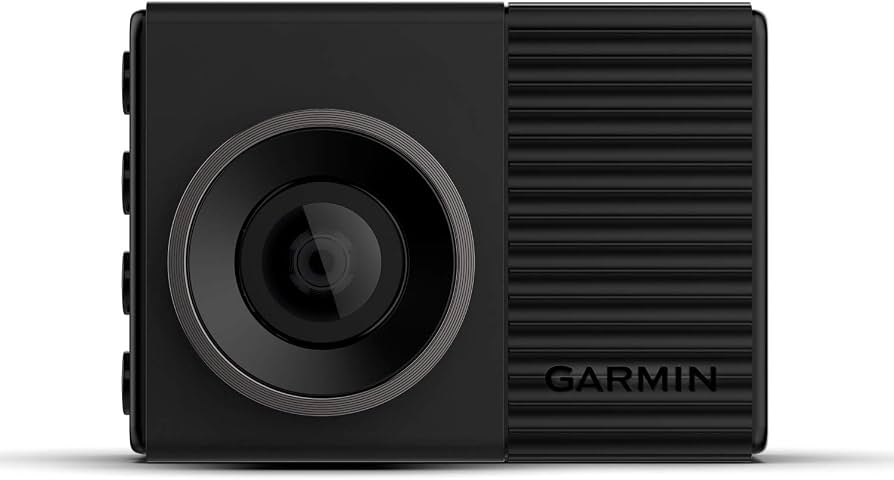
The Garmin Dash Cam 46W is a compact front-facing dash camera designed for drivers who want reliable incident recording, discreet installation, and easy everyday use. It captures 1080p HD video with a 140-degree field of view, which makes it well suited for documenting lanes, intersections, and roadside events without taking up much windshield space. Its built-in GPS, voice control, Wi‑Fi, and Bluetooth support make it a strong choice for commuters, rideshare drivers, road-trippers, and anyone who wants an easy-to-manage car security camera.
One of the biggest strengths of the Garmin Dash Cam 46W is its balance between size and functionality. It supports automatic incident detection, loop recording, and wireless sharing through a mobile app, so footage can be reviewed quickly after an event. The magnetic mount also makes removal simple when parking in unfamiliar areas. As a midrange dash cam, it delivers solid value for drivers who want trusted Garmin reliability without moving into premium 2K or 4K models.
Estimated pricing typically falls in the midrange category, often around $130 to $180 depending on retailer, availability, and bundle contents. Availability may vary because this model is older and may be sold alongside newer Garmin dash cam replacements or through third-party stock. For buyers searching for a dependable 1080p dash cam with GPS logging and voice commands, the Garmin Dash Cam 46W remains a practical and familiar option.
Specifications for Garmin Dash Cam 46W: Key Features and Performance
- Video resolution: 1080p Full HD at 30 fps for clear daytime and nighttime recording.
- Field of view: 140 degrees, offering wide road coverage for front-facing events.
- Camera sensor: 2.1 MP image capture for everyday dash cam use.
- Display: 2-inch color LCD for quick menu access and playback.
- Connectivity: Wi‑Fi and Bluetooth for wireless file transfer and app pairing.
- GPS: Built-in GPS stamps speed, time, and route data onto recordings.
- Voice control: Hands-free commands for saving video and taking photos.
- Storage: microSDHC or microSDXC, Class 10 or higher, FAT32 format recommended.
- Power input: 4.75 to 5.25 Vdc, 1 A.
- Operating temperature: -20°C to 55°C for normal vehicle environments.
Compared with similar Garmin models, the Garmin Dash Cam 46W offers a wider view than the older standard 46 series version and sits below higher-resolution 56 and 66W models that capture more detail but usually cost more. For drivers comparing 1080p dash cams, it is best viewed as a dependable everyday recorder rather than a premium cinematic camera.
How to Set Up the Garmin Dash Cam 46W
Start by inserting a compatible microSD card before powering on the device. Mount the camera high on the windshield, ideally near the rearview mirror, so it records the road clearly without blocking your view. Connect the power cable to the included vehicle adapter and route the cable neatly along the trim for a clean installation. Once the camera starts, follow the on-screen setup to choose language, time zone, date format, and voice-control preferences.
Pair the dash cam with the Garmin Drive app over Wi‑Fi and Bluetooth to review clips, update settings, and transfer recordings to your phone. Enable incident detection and automatic recording so the camera saves footage when sudden braking or impact is detected. For best results, format the memory card in the camera before first use and check that the firmware is current.
If the camera does not power on, confirm the vehicle outlet is active and the cable is fully seated. Avoid mounting the unit where airbags deploy, and do not operate the dash cam while driving. Always secure cables so they do not interfere with steering, pedals, or visibility.
Troubleshooting Garmin Dash Cam 46W Problems and Fixes
Common issues usually involve memory cards, power delivery, or wireless pairing. If the camera shows card errors, replace the card with a Class 10 microSD card or reformat it in the device. If recordings stop unexpectedly, the storage may be full or the card may be incompatible. If the camera will not boot, test a different 12V outlet and inspect the power cable for damage.
- Blank screen: Check power, restart the device, and verify the mount connection.
- Video not saving: Reformat the microSD card and confirm the card is not write-protected.
- Wi‑Fi pairing failure: Reset Bluetooth and Wi‑Fi on the phone, then re-pair through the app.
- GPS not locking: Move the vehicle outdoors and wait for satellite acquisition.
- Low video quality: Clean the lens and verify the windshield area is free of glare or dirt.
Preventive maintenance includes periodic card formatting, firmware updates, and lens cleaning. Warranty and support options depend on the seller and purchase region, so buyers should keep receipts and registration details available. For direct help, Garmin customer support, the product manual, and retailer support pages are the best starting points.
Pros and Cons of the Garmin Dash Cam 46W
Pros
- Compact design makes it discreet and easy to mount.
- 1080p recording is sharp enough for most commute and incident documentation needs.
- Built-in GPS adds useful speed and location data to clips.
- Voice control improves convenience while driving.
- Wi‑Fi and Bluetooth support simplify file sharing and app control.
- Good value for drivers who want a reliable midrange dash cam.
Cons
- Resolution is lower than newer 1440p or 4K alternatives.
- Small screen is functional but not ideal for detailed playback.
- Older model status can make pricing inconsistent across stores.
- Some buyers may prefer parking-mode features found in newer competitors.
Overall, the Garmin Dash Cam 46W is a strong choice for buyers who value simplicity, GPS tracking, and compact design over ultra-high-resolution video. Against newer alternatives, it remains attractive for users who want a trusted brand and a straightforward setup rather than a feature-heavy premium unit.
Customer Reviews and Real-World User Feedback
Customer feedback for the Garmin Dash Cam 46W is generally positive, with many users praising its ease of use, compact size, and dependable recording quality. Average ratings commonly fall around 4.5 out of 5 stars, reflecting strong satisfaction among commuters and everyday drivers. Reviewers often mention that the voice controls and magnetic mount make the camera easy to live with day after day.
Frequent complaints usually focus on the dated 1080p resolution compared with newer models and the limited screen size. Some users also note that setup is easiest when the memory card is formatted correctly from the start. For most buyers, this model is recommended if the goal is a trusted, simple, and discreet dash cam rather than a top-tier night-vision or high-resolution recorder.
Faqs
How do I set up garmin DASH Camera 46W for the first time?
Why is my garmin DASH Camera 46W not recording video?
What microSD card does garmin DASH Camera 46W need for reliable recording?
How do I connect garmin DASH Camera 46W to the Garmin Drive app?
What features make garmin DASH Camera 46W useful while driving?
Why is the video from my garmin DASH Camera 46W blurry or low quality?
How can I fix garmin DASH Camera 46W Wi-Fi or Bluetooth connection problems?
How should I clean and maintain garmin DASH Camera 46W for long-term use?
More garmin manuals
Leave a Comment