
Garmin INSTINCT GPS Smartwatch User Manual
Content
Garmin Instinct GPS Smartwatch Manual: Rugged Outdoor Performance for Everyday Adventures
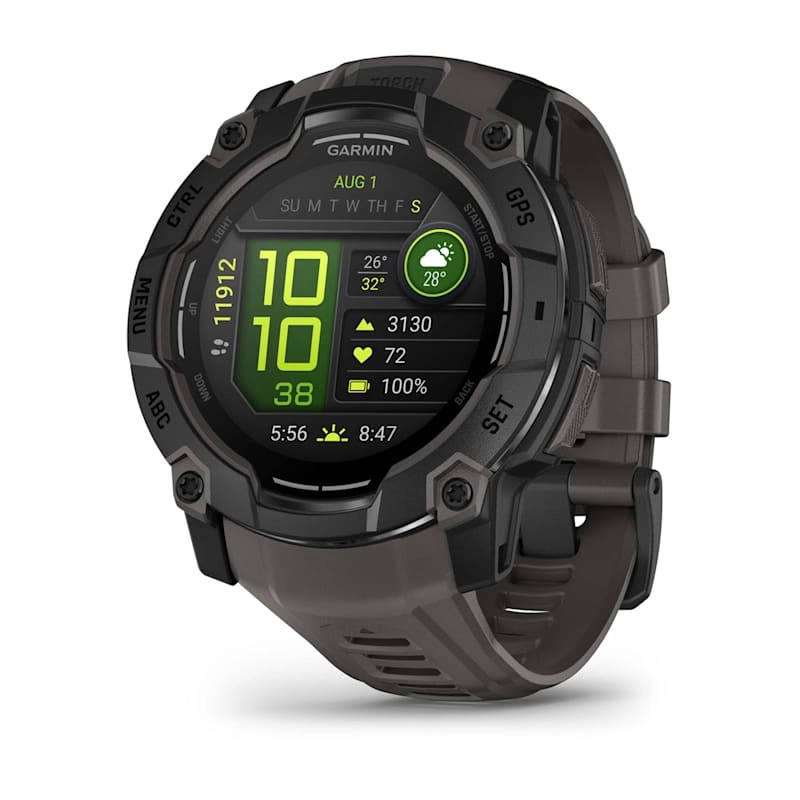
The Garmin Instinct GPS Smartwatch is built for users who need a durable, reliable, and easy-to-read wearable for outdoor training, navigation, and daily fitness tracking. Designed with a rugged fiber-reinforced case, water resistance, and military-grade toughness, it stands out as a dependable choice for hikers, runners, cyclists, military users, and anyone who spends time in demanding environments. The Garmin Instinct GPS Smartwatch combines built-in GPS, heart rate tracking, compass, altimeter, barometer, and smartphone notifications in a single compact device, making it especially useful for people who want practical performance without unnecessary complexity.
One of its biggest strengths is battery life, which is a major selling point for outdoor users who need long-lasting support between charges. It also offers strong GPS accuracy, activity tracking, and broad compatibility with Android and iPhone devices. The transflective display is easy to read in direct sunlight, which makes it ideal for outdoor use. Depending on the version and retailer, the estimated price range typically starts around budget to mid-range outdoor smartwatch pricing, often near the low-to-mid hundreds of dollars, with availability through major electronics stores, outdoor gear retailers, and online marketplaces. For buyers seeking a tough, practical GPS watch, the Garmin Instinct GPS Smartwatch remains a highly attractive option.
Technical Specifications and Key Features
- Display: 1.27-inch sunlight-readable monochrome or transflective-style display for strong outdoor visibility
- Case size: Approximately 45 mm rugged outdoor watch body
- Weight: Lightweight enough for all-day wear, typically around the low-50-gram range
- Build: Fiber-reinforced polymer case with chemically reinforced glass
- Durability: Military-standard toughness with 100-meter water resistance
- GPS: Built-in GPS with support for outdoor tracking and navigation functions
- Sensors: Heart rate monitor, barometric altimeter, compass, accelerometer, and thermometer-related tracking features depending on model
- Connectivity: Bluetooth smartphone syncing for notifications and app-based data management
- Battery life: Long runtime designed for extended outdoor use, with smartwatch mode lasting up to about two weeks on many configurations
- Compatibility: Works with Android and iOS smartphones
- Storage and tracking: Activity logging, step counting, sleep tracking, and workout history
- Comparison: Compared with sleeker lifestyle smartwatches, the Garmin Instinct GPS Smartwatch focuses more on endurance, toughness, and navigation than on flashy apps or AMOLED visuals
Detailed Product Description
The Garmin Instinct GPS Smartwatch is engineered for users who need dependable performance in rugged conditions. Its design follows a no-nonsense approach: a durable outer shell, practical button-based navigation, and a high-contrast display that remains readable in harsh sunlight. Rather than emphasizing entertainment features, it prioritizes core tools such as GPS tracking, heart rate monitoring, altitude measurement, and route awareness.
In real-world use, the watch excels during hiking, trail running, camping, kayaking, and everyday fitness routines. The build quality feels secure and purpose-built, with materials selected to handle bumps, dust, rain, and repeated outdoor use. Users often appreciate the physical-button layout because it is easier to operate with gloves or wet hands than touchscreen-based watches. For many wearers, the watch’s practical interface and long battery life make it more convenient than more complex smartwatches. The Garmin Instinct GPS Smartwatch is especially well suited for users who value function, reliability, and endurance over luxury styling.
Setup Guide: How to Set Up Garmin Instinct GPS Smartwatch
- Charge the watch fully before first use using the included charging cable.
- Power on the device by holding the top-left button until the display turns on.
- Download the Garmin Connect app on your smartphone.
- Enable Bluetooth on your phone and open the app to begin pairing.
- Follow the on-screen prompts to sync the watch, confirm permissions, and set up profile details.
- Customize activity tracking, notification settings, heart rate alerts, and display preferences.
- Choose your preferred units, time format, and GPS settings before using the watch outdoors.
- Test a short activity such as a walk or run to confirm GPS lock and sensor response.
If pairing fails, restart both the watch and the phone, then try again in a low-interference area. Make sure Bluetooth is enabled and the Garmin Connect app has the necessary permissions. Avoid exposing the watch to extreme heat during charging, and do not use damaged cables or adapters. For safety, keep the device dry during installation and avoid forcefully pressing buttons while charging.
Troubleshooting Common Garmin Instinct Problems
- Problem: Watch will not power on. Solution: Charge it for at least 20 to 30 minutes, then retry a restart.
- Problem: Phone will not connect. Solution: Turn Bluetooth off and on, restart both devices, and remove old pairings before reconnecting.
- Problem: GPS signal is weak. Solution: Move to an open area, wait for satellite acquisition, and avoid tall buildings or dense tree cover.
- Problem: Battery drains faster than expected. Solution: Reduce backlight brightness, shorten timeout settings, and use battery-saving GPS modes when appropriate.
- Problem: Heart rate or sensor readings seem inaccurate. Solution: Clean the watch back, adjust the fit, and wear it snugly above the wrist bone.
- Problem: Watch is frozen. Solution: Perform a restart or reset according to the device instructions.
Preventive care helps reduce most issues. Keep the charging contacts clean, update the firmware regularly, and avoid prolonged exposure to salt water without rinsing afterward. Warranty coverage is commonly offered through the retailer or manufacturer for one year on many models, though terms may vary by seller. For help, users should contact Garmin support through the official support portal, product manual resources, or authorized retailers for service guidance.
Pros and Cons of the Garmin Instinct GPS Smartwatch
Pros
- Excellent rugged durability for hiking, training, and outdoor work
- Strong battery life compared with many GPS smartwatches
- Readable display in bright sunlight
- Reliable GPS tracking and outdoor sensors
- Physical buttons work well with gloves and wet conditions
- Good value for users who want practical outdoor performance
Cons
- Display is less vibrant than AMOLED competitors
- Fewer lifestyle and third-party app features than premium smartwatches
- Interface may feel basic to users who prefer touchscreen control
- Design is more functional than fashionable
- Some users may prefer newer alternatives with richer maps or advanced training metrics
Overall, the Garmin Instinct GPS Smartwatch offers strong value for money if ruggedness and battery life matter more than app-heavy smart features. Compared with sleeker alternatives, it is the better pick for users who prioritize durability, reliability, and outdoor readability.
Customer Reviews and User Feedback
Average user sentiment for the Garmin Instinct GPS Smartwatch is typically positive, with many owners giving it around 4 to 4.5 out of 5 stars. Buyers frequently praise the watch for its toughness, battery performance, and dependable GPS tracking. Outdoor enthusiasts often describe it as the watch they trust for long hikes, training blocks, and travel.
Common complaints usually focus on the simple display, limited smart features, and the learning curve for new users who are used to touchscreens. One satisfied customer said, “It’s the best watch for hiking I have owned—battery life and durability are outstanding.” Another user noted, “The screen is basic, but it’s exactly what I needed for outdoors and workouts.” For shoppers who want a rugged GPS smartwatch instead of a lifestyle-focused wearables platform, the Garmin Instinct GPS Smartwatch remains an easy recommendation.
Faqs
How do I set up garmin INSTINCT GPS Smartwatch for the first time?
Why is my garmin INSTINCT GPS Smartwatch not connecting to my phone?
What should I do if the garmin INSTINCT GPS Smartwatch cannot find GPS satellites?
How can I extend battery life on garmin INSTINCT GPS Smartwatch during long trips?
Is garmin INSTINCT GPS Smartwatch compatible with Android and iPhone devices?
Which features of garmin INSTINCT GPS Smartwatch are most useful for hiking and outdoor navigation?
How do I keep garmin INSTINCT GPS Smartwatch accurate for heart rate and activity tracking?
What maintenance and care routine should I follow for garmin INSTINCT GPS Smartwatch?
More garmin manuals
Leave a Comment