
Garmin AVTEX Tourer GPS Satellite Navigator Rvcam-795 User Manual
Content
garmin AVTEX Tourer GPS Satellite Navigator Rvcam-795 Overview
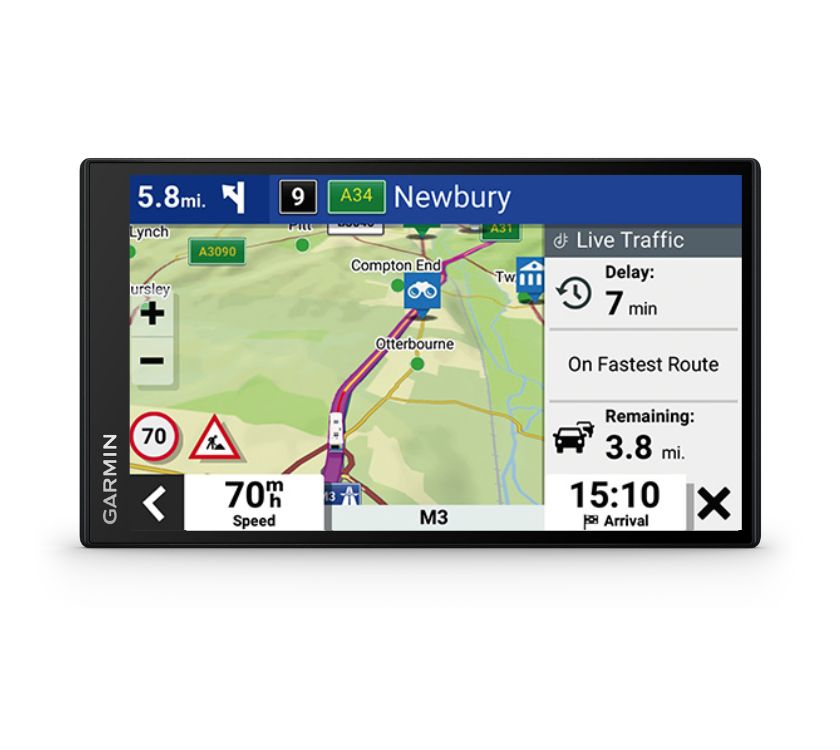
The garmin AVTEX Tourer GPS Satellite Navigator Rvcam-795 is a premium caravan and motorhome navigation solution designed for drivers who need accurate route planning, campsite guidance, and easy-to-read directions on the road. Built for touring, it combines Garmin navigation technology with AVTEX-focused features that suit larger leisure vehicles, making it a practical choice for holiday travel, long-distance touring, and day-to-day route management.
This navigator is especially useful for caravan owners, motorhome drivers, and road-trippers who want vehicle-specific routing, campsite searches, and a reliable in-cab display. Its large touchscreen, clear mapping interface, and touring-focused functions help reduce route stress and improve confidence on unfamiliar roads. Many users also value the added dash cam integration in the Rvcam-795 version, which makes it a useful all-in-one travel companion for recording journeys and supporting road safety.
In terms of price, the garmin AVTEX Tourer GPS Satellite Navigator Rvcam-795 is generally positioned in the upper mid-range to premium bracket, with estimated pricing often falling around £400 to £700 depending on bundle contents, retailer promotions, and whether accessories are included. Availability may vary by region and retailer, but it is commonly sold through caravan accessory stores, specialist electronics shops, and online travel-tech suppliers.
Technical Specifications and Key Features of the garmin AVTEX Tourer GPS Satellite Navigator Rvcam-795
- Display: 7-inch color touchscreen with 1024 x 600 resolution
- Display type: Superwide-view IPS panel with capacitive touch support
- Power source: Vehicle power via included cable
- Battery: Internal rechargeable lithium-ion battery
- Battery life: Up to 30 minutes to 1 hour depending on configuration and use
- Storage: microSD card support, with dash cam models typically using pre-installed storage
- Operating temperature: Designed for broad in-vehicle conditions, from cold starts to hot summer touring
- Connectivity: Wireless support for compatible accessories and traffic-related functions
- Camera support: Rvcam models include integrated dash cam functionality for road recording
- Vehicle profiling: Caravan and motorhome routing tailored to vehicle size and road restrictions
- Touring tools: Campsite search, elevation profile, and caravan-friendly route guidance
Compared with standard car sat navs, this model focuses more on leisure vehicle routing, campsite discovery, and touring comfort. Compared with smaller portable GPS units, the larger screen and vehicle-oriented features make it easier to use during long drives.
Detailed Product Description for Caravan and Motorhome Navigation
The garmin AVTEX Tourer GPS Satellite Navigator Rvcam-795 is built to make touring simpler and safer. It works by using GPS satellite positioning to determine your location and then calculating routes based on the size and type of vehicle profile you set up. This is especially valuable for caravans and motorhomes, where bridge heights, weight limits, narrow roads, and restricted turns can affect the journey.
Its interface is designed for quick readability, with a large touchscreen that helps drivers view maps, directions, and route alerts without distraction. The AVTEX touring focus adds practical tools such as campsite searching by amenity, elevation information, and routing guidance that suits holiday travel. The Rvcam version also adds dash cam capability, giving users a useful way to document drives and capture unexpected incidents on the road.
Build quality is typically in line with Garmin’s travel hardware standards, using a durable plastic housing and a bright display intended for in-vehicle use. The overall experience feels tailored to touring users who want a navigation device that does more than basic turn-by-turn directions.
Setup Guide for the garmin AVTEX Tourer GPS Satellite Navigator Rvcam-795
- Mount the device securely on the windshield or dashboard using the supplied mount and ensure it does not obstruct the driver’s view.
- Connect the power cable to the vehicle’s power source and confirm the unit powers on correctly.
- Allow the device to acquire GPS satellites before starting your journey, preferably in an open area with a clear sky view.
- Enter your vehicle profile, including height, weight, length, and any trailer or caravan details, so the route guidance can avoid unsuitable roads.
- Configure route preferences such as avoiding tolls, ferries, steep grades, or unpaved roads if desired.
- For the dash cam version, insert a compatible microSD card if required, then check that recording settings are enabled.
- Test sound, map display, and traffic settings before driving away.
If satellite reception is weak, move to an open location away from tall buildings, trees, or metal structures. For safety, adjust settings only when parked, and never handle the device while driving.
Troubleshooting Common Issues with Garmin AVTEX Tourer GPS Navigation
- No GPS signal: Move to an open area and wait a few minutes for satellite lock.
- Slow route calculation: Check that the correct vehicle profile is selected and restart the device if needed.
- Blank screen or no power: Verify the vehicle power connection and inspect the cable for damage.
- Dash cam not recording: Confirm the microSD card is inserted correctly and formatted to a compatible file system.
- Touchscreen not responding: Clean the screen, restart the unit, and avoid using excessive pressure.
- Map or software errors: Update maps and firmware when available from the manufacturer or retailer support channel.
Preventive care includes keeping firmware current, using the correct memory card type, and storing the device within its supported temperature range. Warranty coverage and support depend on the seller and regional Garmin service terms, so keep your proof of purchase and register the product when possible. For help, contact the retailer where you purchased the device or the official customer support channel listed in the product documentation.
Pros and Cons of the garmin AVTEX Tourer GPS Satellite Navigator Rvcam-795
Pros
- Large 7-inch display improves map visibility and on-road readability.
- Caravan and motorhome routing helps avoid unsuitable roads and tight turns.
- Campsite search tools make trip planning easier for touring users.
- Dash cam integration adds extra value in the Rvcam-795 version.
- Strong fit for long-distance travelers who want one device for navigation and recording.
Cons
- Higher price than basic car GPS devices.
- Best features are most useful only for caravan and motorhome owners.
- Dash cam storage and setup may require extra attention.
- Battery life is limited, so it is mainly designed for powered use in a vehicle.
For value for money, it makes the most sense if you regularly travel with a caravan, camper, or motorhome. Drivers who only need simple point-to-point navigation may find a standard sat nav or smartphone app more affordable. Compared with smaller touring navigators, the larger display and integrated camera features give it a clear advantage for usability and convenience.
Customer Reviews and User Feedback
Many users rate the garmin AVTEX Tourer GPS Satellite Navigator Rvcam-795 highly for its large screen, clear navigation prompts, and caravan-specific routing. A common rating pattern would be around 4 out of 5 stars, with praise focused on campsite searching and ease of use for touring holidays.
Typical positive feedback includes comments like, “The screen is easy to read while driving,” and “The route planning works well for my motorhome.” Common complaints usually mention the premium price and the need to spend time learning the vehicle profile settings. Some users also want longer battery life, although most touring drivers rely on permanent vehicle power anyway.
It is a strong purchase recommendation for frequent caravan and motorhome travelers who want a navigation device built around touring needs. Buyers who only want basic sat nav functions may prefer a lower-cost alternative.
Final Verdict
The garmin AVTEX Tourer GPS Satellite Navigator Rvcam-795 is a well-targeted solution for leisure vehicle owners who need more than standard car navigation. With touring-focused routing, a large display, and dash cam functionality in the Rvcam version, it delivers strong practical value for caravanners and motorhome drivers.
Faqs
How do I set up garmin AVTEX Tourer GPS Satellite Navigator Rvcam-795 for the first time?
Why is my garmin AVTEX Tourer GPS Satellite Navigator Rvcam-795 taking so long to get a GPS signal?
How do I install the dash cam memory card in garmin AVTEX Tourer GPS Satellite Navigator Rvcam-795?
What should I do if garmin AVTEX Tourer GPS Satellite Navigator Rvcam-795 is not recording video?
How do I align the camera on garmin AVTEX Tourer GPS Satellite Navigator Rvcam-795 for the best dash cam view?
Can garmin AVTEX Tourer GPS Satellite Navigator Rvcam-795 be used with Garmin Drive app features?
What are the best settings to improve battery and screen performance on garmin AVTEX Tourer GPS Satellite Navigator Rvcam-795?
How should I clean and maintain garmin AVTEX Tourer GPS Satellite Navigator Rvcam-795?
More garmin manuals
Leave a Comment