
Garmin VENU 3 Series GPS Smartwatch User Manual
Content
Garmin Venu 3 Series GPS Smartwatch: Complete Product Manual and Buying Guide
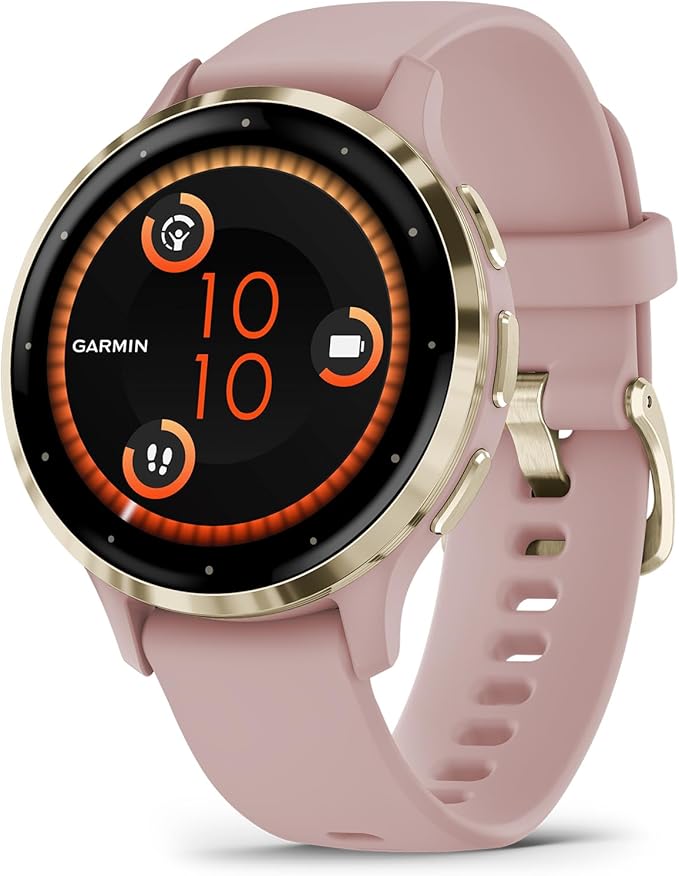
Introduction
The Garmin Venu 3 Series GPS Smartwatch is a premium fitness and lifestyle smartwatch designed for users who want advanced health tracking, reliable GPS performance, and everyday smart features in one polished package. Built with a bright AMOLED touchscreen, strong battery life, and Garmin’s well-known fitness ecosystem, it offers a balanced experience for runners, gym users, commuters, and anyone who wants a smartwatch that does more than count steps. The Garmin Venu 3 Series GPS Smartwatch supports calls and texts when paired with a compatible phone, music storage, contactless payments, and detailed wellness metrics such as sleep tracking, stress monitoring, heart rate, and blood oxygen measurement.
This model is especially appealing to people who want a stylish watch that works equally well for workouts and daily wear. The 45 mm Venu 3 and smaller Venu 3S give buyers size options, while the intuitive touch interface makes navigation easy for beginners and experienced athletes alike. It is also a strong choice for Android and iPhone users who want broad compatibility without giving up advanced training tools. The estimated price range is typically around $300 to $450, depending on size, color, and retailer availability. It is widely available through major electronics stores, sports retailers, and Garmin-authorized sellers.
Specifications
- Display: 1.4-inch AMOLED touchscreen on the larger model with 454 x 454 resolution for crisp visibility.
- Sizes: Venu 3 and Venu 3S variants for different wrist sizes.
- Battery life: Up to 14 days in smartwatch mode on Venu 3 and up to 10 days on Venu 3S; up to 26 hours in GPS-only mode on the larger model.
- Storage: 8 GB built-in memory for apps, music, and watch data.
- Connectivity: Bluetooth, Wi-Fi, and ANT+ support for syncing and accessories.
- Water resistance: 5 ATM, suitable for swimming and everyday water exposure.
- Sensors: Heart rate sensor, pulse oximeter, accelerometer, gyroscope, compass, barometric altimeter, and ambient light sensor.
- Smart features: Microphone, speaker, call handling, text replies, music playback, Garmin Pay, and smartphone notifications.
- Compatibility: Works with both Android and iOS devices.
- Materials: Fiber-reinforced polymer case with stainless steel bezel and silicone band.
Compared with similar mid-premium smartwatches, the Garmin Venu 3 Series GPS Smartwatch stands out for stronger fitness tracking, longer battery life, and more advanced wellness insights than many mainstream lifestyle wearables.
Detailed Description
The Garmin Venu 3 Series GPS Smartwatch blends a modern smartwatch design with Garmin’s performance-focused software. It works by combining onboard sensors, GPS positioning, and smartphone integration to deliver real-time health and activity data. During exercise, it tracks pace, distance, heart rate, calories, and route data while also supporting structured workouts and guided training features. In daily use, it monitors sleep, recovery, stress levels, and overall wellness trends so users can better understand their routines.
The watch is built with a fiber-reinforced polymer housing and a stainless steel bezel, giving it a premium look while keeping weight manageable for all-day wear. The AMOLED display is one of its biggest strengths, offering excellent brightness and color contrast for indoor and outdoor readability. Real-world use cases include gym training, running, cycling, walking, sleep analysis, commute notifications, and hands-free calling from the wrist. Users typically appreciate the smooth touchscreen experience, fast syncing, and dependable battery performance. For people who want a smartwatch that feels refined but still behaves like a serious fitness tool, the Garmin Venu 3 Series GPS Smartwatch is a strong fit.
Setup Guide
- Charge the watch fully using the included Garmin charging cable before first use.
- Download the Garmin Connect app on your iPhone or Android phone.
- Turn on the watch and follow the on-screen pairing instructions.
- Allow Bluetooth access, notifications, and health permissions in the app.
- Set up your profile, including age, weight, height, and activity goals.
- Choose your preferred watch face, data fields, and notification settings.
- Enable optional features such as Garmin Pay, music services, and safety alerts if needed.
If pairing fails, restart both the phone and watch, toggle Bluetooth off and back on, and try again. Make sure the Garmin Connect app is updated and that the watch is close to the phone during setup. Avoid exposing the device to extreme temperatures during charging or initial configuration. Do not attempt to charge the watch if the cable or port appears damaged. For swimming or outdoor use, confirm that water resistance settings and activity profiles are correct before starting workouts.
Troubleshooting
- Watch not pairing: Restart both devices, remove old Bluetooth pairings, and reconnect through Garmin Connect.
- Battery draining too fast: Lower screen brightness, disable always-on display, reduce GPS/music use, and update firmware.
- Heart rate data seems inaccurate: Wear the watch snugly above the wrist bone and clean the sensor area.
- GPS takes too long to lock: Go outdoors with a clear view of the sky and wait a few moments before starting the activity.
- Notifications not appearing: Check app permissions, phone focus modes, and Bluetooth connection status.
- Music or payment features not working: Reconfirm account setup and regional availability in Garmin Connect.
Preventive maintenance includes regular software updates, sensor cleaning, and proper charging habits. The watch typically includes a one-year limited warranty, and Garmin support can assist with setup, repairs, and troubleshooting through its customer support channels. For phone-based help, Garmin support is available through its official customer care system, while some retailers also provide order-specific assistance.
Pros & Cons
Pros
- Excellent AMOLED display with sharp outdoor readability.
- Long battery life compared with many mainstream smartwatches.
- Strong health and fitness tracking with useful wellness insights.
- Supports calls, texts, music, and contactless payments.
- Comfortable design for all-day wear and sleep tracking.
- Good value for users who want premium features without moving to a full sports watch.
Cons
- Smaller app ecosystem than Apple Watch or Wear OS devices.
- Some advanced features depend on a connected smartphone and Garmin services.
- Price may feel high for users who only want basic step and notification tracking.
- Touch-first navigation may take time for users coming from button-based fitness watches.
Compared with alternatives such as the Apple Watch Series and Samsung Galaxy Watch models, the Garmin Venu 3 Series GPS Smartwatch offers better battery life and stronger fitness focus, though it is less app-centric and more specialized for health tracking.
Customer Reviews
Average user sentiment is generally strong, with many buyers rating the watch around 4.5 out of 5 stars. Common praise includes the bright screen, reliable GPS, comfortable fit, and excellent battery life. One frequent testimonial style comment is: “It finally feels like a smartwatch that can last more than a day and still handle my workouts.” Another commonly repeated positive note is the accuracy of sleep and heart-rate tracking.
Common complaints usually focus on the premium price, the learning curve for Garmin’s menus, and occasional syncing issues after phone updates. Some users also wish for a larger third-party app library. Despite those concerns, many customers recommend it for fitness-minded buyers, travelers, and anyone who values battery life over app overload. The Garmin Venu 3 Series GPS Smartwatch is often recommended as a smart buy for users who want a polished smartwatch with serious health and training features.
Faqs
How do I set up garmin VENU 3 Series GPS Smartwatch for the first time?
Why is my garmin VENU 3 Series GPS Smartwatch not pairing with my phone?
What should I do if garmin VENU 3 Series GPS Smartwatch GPS is slow to lock or inaccurate?
Which phones are compatible with garmin VENU 3 Series GPS Smartwatch?
How do I fix garmin VENU 3 Series GPS Smartwatch battery draining too fast?
Can garmin VENU 3 Series GPS Smartwatch make calls and reply to texts from the wrist?
How do I use music, Garmin Pay, and Wi‑Fi on garmin VENU 3 Series GPS Smartwatch?
How should I clean and maintain garmin VENU 3 Series GPS Smartwatch for long-term use?
More garmin manuals
- Garmin AVTEX Tourer GPS Satellite Navigator Rvcam-795 User Manual
- Garmin EPIX GEN 2 Standard & Pro Series GPS Smartwatch User Manual
- Garmin FENIX 6 Series GPS Smartwatches User Manual
- Garmin FORERUNNER 265 Series Watch User Manual
- Garmin D2 AIRX10 Gps Golf Smartwatch User Manual
- Garmin DASH Camera 47W User Manual
Leave a Comment