
Garmin DASH Camera 47W User Manual
Content
Garmin Dash Cam 47W Product Manual and Buyer Guide
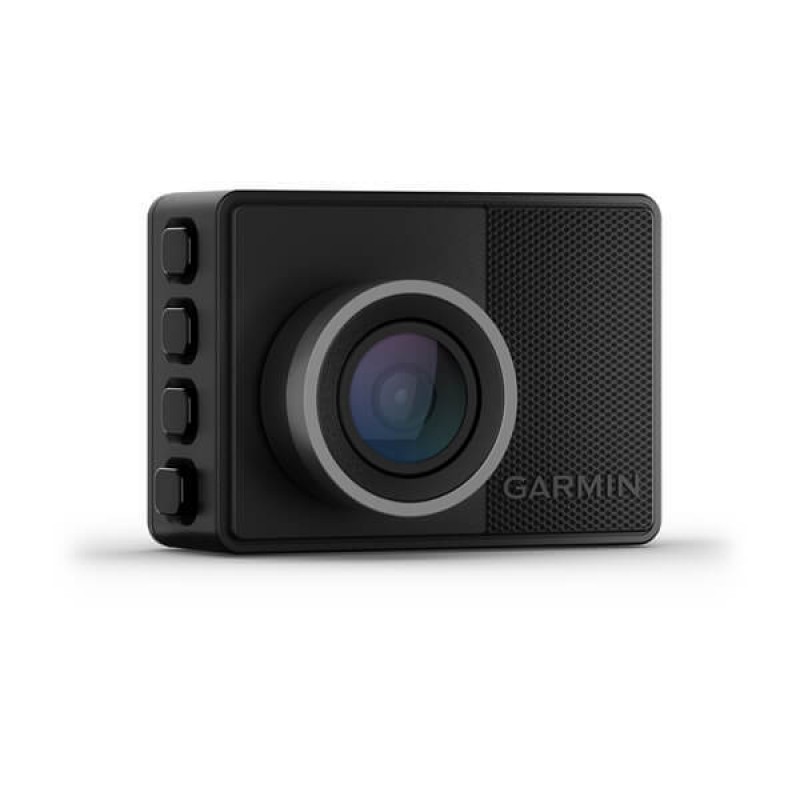
Introduction: Garmin Dash Cam 47W Overview, Benefits, and Best Use Cases
The Garmin Dash Cam 47W is a compact wide-angle dashboard camera designed for drivers who want reliable road coverage, simple operation, and clear 1440p video capture. With a 140-degree field of view, HDR recording, and voice control support, it is built for everyday commuting, fleet monitoring, rideshare driving, and long-distance travel. The small form factor makes the Garmin Dash Cam 47W easy to mount behind the rearview mirror, keeping the windshield setup clean and unobtrusive while still recording key events on the road.
One of its strongest selling points is its balance of premium features and approachable usability. The camera offers automatic incident detection, built-in GPS for location and speed stamping, Wi-Fi connectivity, and integration with the Garmin Drive app for video review and settings management. It is also part of Garmin’s broader multi-camera ecosystem, which makes it appealing for drivers who want to expand coverage later with additional compatible cameras.
The Garmin Dash Cam 47W is a practical choice for drivers who value straightforward setup, dependable loop recording, and dependable image quality in varying light conditions. Typical pricing often falls in the mid-range dash cam category, commonly around the $150 to $220 range depending on retailer promotions and bundle options. Availability is generally strong through major electronics retailers, automotive stores, and online marketplaces, although stock can vary by region and accessory bundle.
Specifications: Garmin Dash Cam 47W Features, Performance, and Comparison
- Video resolution: 1440p at 30 fps with HDR for improved clarity in mixed lighting.
- Alternative capture mode: 1080p at 60 fps for smoother motion recording.
- Camera sensor: 2.1 MP class, optimized for compact dash cam use.
- Field of view: 140 degrees, providing wide road coverage without extreme distortion.
- Wireless connectivity: 2.4 GHz Wi-Fi for pairing with a smartphone and the Garmin Drive app.
- Power input: 4.75 to 5.25 Vdc, 1 A for camera operation.
- Operating temperature range: -20°C to 60°C.
- Storage support: microSDHC or microSDXC card, 8 GB or greater, Class 10 or higher, FAT32 format.
- Built-in GPS: Adds time, speed, and location data to recorded clips.
- Comparison note: Compared with the Garmin Dash Cam 57 and 67W, the 47W offers similar core functionality but uses a lower-resolution 2.1 MP sensor rather than the higher-resolution 3.7 MP sensor found in newer models.
For drivers who need dependable front-facing recording without premium-tier pricing, the Garmin Dash Cam 47W remains a strong value option. It is especially appealing when compared with many entry-level dash cams that lack GPS, voice control, or app-based clip management.
Setup Guide: How to Install and Configure the Garmin Dash Cam 47W
Start by inserting a compatible microSD card before mounting the camera. Use a high-endurance card rated Class 10 or higher, then format it in the device if prompted. Mount the camera on the windshield near the rearview mirror, making sure the lens has a clear forward view and the adhesive mount is applied in a clean, stable area. Avoid installing the adhesive mount in extreme temperatures; a moderate ambient temperature is recommended for best adhesion.
Next, route the power cable neatly along the headliner and connect it to the vehicle power source. Once powered on, pair the camera with the Garmin Drive app over Wi-Fi. Keep the smartphone within about 3 m of the device during pairing, and follow the on-screen prompts to complete setup. From the app, you can adjust video quality, driver assistance settings, audio recording, and automatic event detection.
For safety, always position the unit so it does not block the driver’s view or interfere with airbags. If pairing fails, restart both the phone and camera, forget the camera network on the phone, and try again. If the device does not power on, verify the car charger, cable seating, and fuse or outlet condition.
Troubleshooting: Common Garmin Dash Cam 47W Problems and Fixes
- No power: Check the vehicle outlet, USB cable, and camera connection; test another power source if possible.
- Recording stops unexpectedly: Confirm that the memory card is compatible, properly formatted, and not full or damaged.
- Wi-Fi pairing issues: Move the phone closer, disable conflicting networks temporarily, and reconnect through the Garmin Drive app.
- Video playback errors: Remove the card and check for corruption, then reformat or replace with a high-endurance card.
- Poor night video: Clean the lens, verify windshield placement, and ensure HDR is enabled if available in settings.
Preventive care helps reduce most issues. Reformat the card periodically, keep firmware updated through the app, and avoid removing power while footage is being written. If error messages persist, the camera may need a card replacement or factory reset. Garmin support typically offers warranty coverage, product registration help, and online troubleshooting resources. For direct assistance, use Garmin’s official support channels, including phone, email, and live chat availability in supported regions.
Pros and Cons of the Garmin Dash Cam 47W
Pros
- Compact design that stays discreet on the windshield.
- 1440p recording with HDR for balanced image quality in daylight and low light.
- Built-in GPS adds useful context for incident reviews.
- Wi-Fi app integration makes clip management easier.
- Voice control improves hands-free operation while driving.
- Strong value for users who want trusted brand reliability without moving to a premium model.
Cons
- 2.1 MP sensor is not as advanced as newer high-end Garmin models.
- Requires a compatible microSD card, which may add to total cost.
- Best results depend on proper placement and cable routing.
- Not the best choice if you need advanced rear-camera or multi-channel coverage out of the box.
Overall, the Garmin Dash Cam 47W offers solid value for money if your priority is dependable front-road recording from a trusted manufacturer. It is a practical alternative to budget brands that may offer higher headline specs but weaker app support or less polished software.
Customer Reviews: What Buyers Say About the Garmin Dash Cam 47W
Customer feedback for the Garmin Dash Cam 47W is generally positive, with many users praising its compact size, easy setup, and reliable recording. Typical ratings cluster around 4 out of 5 stars, especially among commuters and road-travel users who want a no-fuss dash cam.
Common compliments include clear daytime footage, accurate GPS tagging, and simple smartphone connectivity. Buyers also appreciate the clean design and the ability to hide the unit behind the mirror for a factory-installed look. Common complaints focus on the smaller sensor compared with newer models, the need for careful SD card selection, and occasional Wi-Fi reconnection hiccups.
For most drivers, the Garmin Dash Cam 47W is a good purchase if dependable core performance matters more than premium-tier resolution. It is especially recommended for first-time dash cam buyers, daily commuters, and users who want a trusted brand with easy app support.
Faqs
How do I set up garmin DASH Camera 47W for the first time in my car?
Why is my garmin DASH Camera 47W not recording automatically when I start the car?
What video quality and field of view does garmin DASH Camera 47W offer for everyday driving?
How do I pair garmin DASH Camera 47W with the Garmin Drive app on my smartphone?
What should I do if garmin DASH Camera 47W keeps saying the memory card is full or unreadable?
Can garmin DASH Camera 47W work with parking mode and incident alerts when my car is parked?
How do I improve garmin DASH Camera 47W video clarity at night or in low-light driving?
What maintenance does garmin DASH Camera 47W need to stay reliable over time?
More garmin manuals
Leave a Comment