
Garmin VENU X1 Watch User Manual
Content
Garmin VENU X1 Watch Review and Product Manual
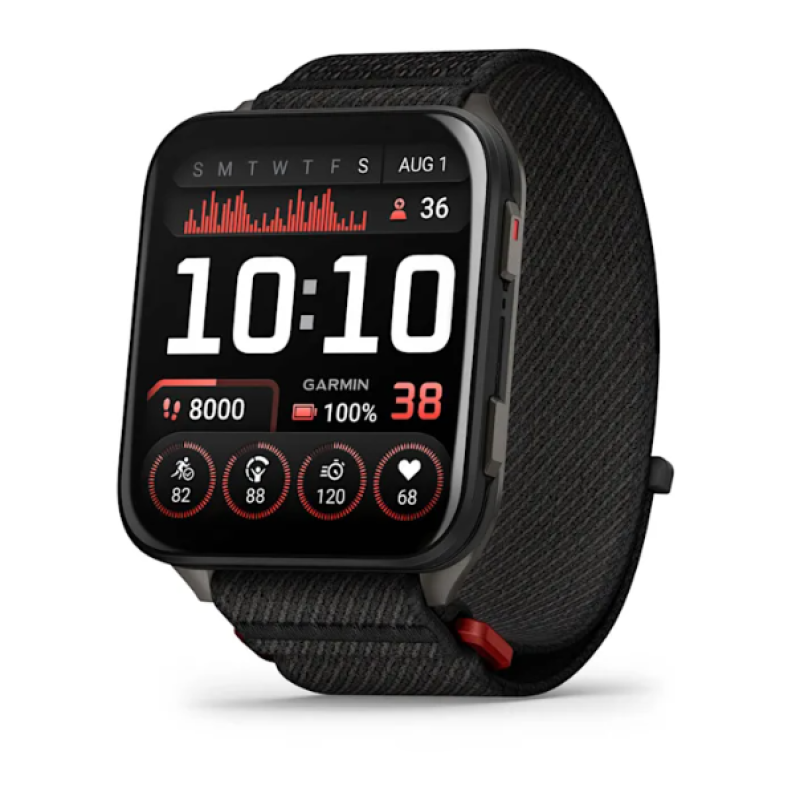
The garmin VENU X1 Watch is a premium, ultra-slim smartwatch built for users who want advanced health tracking, strong fitness features, and a large display in a lightweight design. It stands out with its 2-inch AMOLED touchscreen, sapphire crystal lens, titanium caseback, and a remarkably thin 7.9 mm profile. This makes it one of Garmin’s most stylish and comfortable wearables, especially for all-day use, workouts, and sleep tracking.
It is designed for athletes, runners, golfers, fitness enthusiasts, and everyday users who want a high-end smartwatch with GPS navigation, music storage, wellness insights, and long battery life. The garmin VENU X1 Watch is also a strong choice for people switching from mainstream smartwatches who want better battery performance and deeper fitness data. Typical pricing is around $799.99 in the U.S., £679.99 in the U.K., and AU$1,499 in Australia, with availability varying by region and retailer.
One of its biggest advantages is the combination of a large screen and a lightweight build. The watch supports advanced GNSS tracking, health monitoring, Garmin Pay, offline maps, and music storage, making it suitable for both training and daily productivity. Its slim design, premium materials, and bright display help it appeal to users who want a luxury feel without sacrificing athletic functionality.
Specifications of Garmin VENU X1 Watch
- Display: 2-inch AMOLED touchscreen, 448 x 486 resolution
- Case size: 41 x 46 x 7.9 mm
- Weight: 34 g without band, about 40 g with ComfortFit band
- Materials: Sapphire crystal lens, fiber-reinforced polymer body, titanium caseback
- Battery life: Up to 8 days in smartwatch mode, up to 11 days in battery saver mode
- GPS performance: Up to 16 hours in GPS-only mode, 14 hours in all-systems GNSS mode, 7 hours with music
- Water resistance: 5 ATM
- Storage: 32 GB for music, apps, and maps
- Connectivity: Bluetooth, Wi-Fi, Garmin Connect compatibility
- Operating range: -20°C to 45°C
Compared with models like the Forerunner 970 and Apple Watch Ultra 2, the garmin VENU X1 Watch offers a larger display and thinner design, but it does not include the same multi-band GPS depth found on some higher-end sports watches. It focuses on balance: premium looks, strong battery life, and practical fitness features in a lighter package.
Detailed Description of Garmin VENU X1 Watch
The garmin VENU X1 Watch combines smartwatch convenience with serious fitness tracking. Its AMOLED screen is bright, sharp, and easy to read indoors or outdoors, while the slim body makes it comfortable for long wear. The sapphire crystal helps resist scratches, and the titanium caseback adds durability without excessive weight. This creates a watch that feels premium but never bulky.
In daily use, the watch tracks heart rate, sleep, stress, Body Battery, workouts, and GPS-based activities. It supports maps and music, so runners, cyclists, hikers, and golfers can leave their phone behind more often. Real-world use cases include navigating trails, monitoring training load, checking recovery, and receiving notifications throughout the day. The interface is responsive, and the touchscreen-first layout makes it especially easy to browse widgets, maps, and data screens.
The user experience is best described as polished and practical. The garmin VENU X1 Watch feels fast, lightweight, and highly readable, with enough battery life to reduce daily charging pressure. It is ideal for users who value design as much as performance.
Setup Guide for Garmin VENU X1 Watch
- Charge the watch fully using the Garmin proprietary charger before first use.
- Download the Garmin Connect app on your smartphone.
- Turn on the watch and follow the on-screen pairing instructions.
- Grant Bluetooth, location, notification, and health permissions in the app.
- Sign in or create a Garmin account to sync data and back up settings.
- Set your preferred watch face, activity profiles, and health tracking options.
- Enable Wi-Fi for faster syncing and music or map downloads.
- Test GPS, heart rate, and notifications after setup is complete.
For best results, keep the watch snug on the wrist during workouts, but not uncomfortably tight. Avoid exposing the device to water outside its 5 ATM rating, and do not charge it in extreme temperatures. If pairing fails, restart both the phone and the watch, then try removing the device from Bluetooth settings and pairing again through Garmin Connect.
Troubleshooting Garmin VENU X1 Watch Problems
- Watch will not pair: Restart both devices, turn Bluetooth off and on, and re-pair through Garmin Connect.
- GPS takes too long to lock: Go outdoors with a clear sky view, update software, and sync the watch before activity.
- Battery drains quickly: Reduce always-on display use, lower brightness, disable unused sensors, and limit music playback.
- Heart rate readings seem inaccurate: Wear the watch higher on the wrist and tighten the strap slightly during exercise.
- Touchscreen responds slowly: Clean the display, remove moisture, and restart the device if needed.
- Sync errors: Reconnect Wi-Fi, confirm app permissions, and update Garmin Connect and device firmware.
Preventive care includes regular software updates, proper charging habits, and cleaning the watch after sweat or water exposure. If issues continue, Garmin support and warranty service are available through official customer care channels, retailer support, and regional service centers. Keep your proof of purchase and serial number ready when requesting help.
Pros and Cons of Garmin VENU X1 Watch
Pros
- Large 2-inch AMOLED display is bright, crisp, and easy to read.
- Very slim and lightweight design improves all-day comfort.
- Premium materials, including sapphire crystal and titanium caseback, enhance durability.
- Strong battery life for a smartwatch with a large screen.
- Excellent fitness, wellness, and GPS features for active users.
- Built-in storage supports music and offline maps.
Cons
- Premium pricing makes it less budget-friendly than midrange Garmin models.
- Battery life drops significantly with always-on display use.
- Some competing sports watches offer deeper multi-band GPS capabilities.
- Touch-first design may not suit users who prefer more physical buttons.
For value, the garmin VENU X1 Watch is best for users who want style, comfort, and advanced health tracking in one device. It competes well against smartwatches like the Apple Watch Ultra 2 and sporty Garmin alternatives, especially if display quality and lightweight wear matter most.
Customer Reviews of Garmin VENU X1 Watch
User feedback is generally positive, with many buyers praising the large AMOLED display, thin profile, and premium feel. Common ratings often fall around 4.5 out of 5 stars, with comments highlighting comfort, readability, and reliable fitness tracking.
Typical praise includes: “The screen is incredible and easy to read in sunlight,” and “It feels much lighter than expected for such a big smartwatch.” Common complaints focus on the high price and the fact that always-on display mode reduces battery life faster than some users expect. Several reviewers also mention that those who want hard-button sport controls may prefer a more training-focused Garmin model.
Purchase recommendation: choose the garmin VENU X1 Watch if you want a premium smartwatch for health tracking, workouts, and daily wear. If your priority is maximum battery life or advanced athletic metrics, a different Garmin model may be a better fit.
Faqs
How do I set up the garmin VENU X1 Watch for the first time?
Why is my garmin VENU X1 Watch not pairing with my phone?
What should I do if the garmin VENU X1 Watch is not syncing activities or notifications?
Which phones and apps are compatible with the garmin VENU X1 Watch?
How long does the garmin VENU X1 Watch battery last in real use?
How do I use maps and navigation on the garmin VENU X1 Watch?
How do I connect wireless sensors to the garmin VENU X1 Watch?
How should I clean and maintain the garmin VENU X1 Watch?
More garmin manuals
Leave a Comment