
Garmin ENDURO 2 Multisport GPS Watch User Manual
Content
Garmin Enduro 2 Multisport GPS Watch: Complete Product Manual
Introduction
The Garmin Enduro 2 Multisport GPS Watch is built for endurance athletes, ultra-runners, hikers, mountaineers, and outdoor adventurers who need exceptional battery life, advanced navigation, and rugged durability in one premium wearable. Designed to support long training blocks and demanding races, this multisport GPS watch combines solar charging, multi-band GNSS, topographic mapping, and a bright built-in LED flashlight for reliable performance in remote environments. It is especially appealing to athletes who spend extended time off-grid and want a watch that can keep up with back-to-back sessions, long expeditions, and all-day navigation without frequent charging.
One of its biggest advantages is battery endurance. In smartwatch mode, it can last up to 34 days, with significantly longer life when solar charging is available. In GPS mode, it offers marathon-level stamina for long-distance events and multi-day adventures. The sapphire lens, titanium construction, and 10 ATM water resistance make it a strong choice for harsh outdoor use, while the touchscreen and button controls provide versatility in wet, cold, or gloved conditions. The Garmin Enduro 2 Multisport GPS Watch also includes preloaded maps, performance metrics, and training tools that support trail running, cycling, skiing, rowing, and expedition planning.
Availability is generally strong through Garmin and major outdoor retailers, with an estimated price range around $1,000 to $1,100 USD depending on region and promotions. For users searching for a premium endurance smartwatch with outstanding battery life and advanced navigation, this model remains one of the most capable options in the multisport category.
Specifications and Key Features
- Display: 1.4-inch sunlight-visible memory-in-pixel touchscreen with 280 x 280 resolution.
- Case size: 51 x 51 x 15.6 mm for a large, rugged profile.
- Weight: Approximately 70 g with the UltraFit nylon strap.
- Materials: Titanium case, sapphire lens, and durable sport-ready band options.
- Water rating: 10 ATM for swimming, rain, and harsh weather use.
- Battery life: Up to 34 days in smartwatch mode and up to 46 days with solar charging.
- GPS battery life: Up to 110 hours and up to 150 hours with solar charging.
- All-satellite systems mode: Up to 78 hours and up to 96 hours with solar charging.
- Multi-band GNSS: Up to 68 hours and up to 81 hours with solar charging.
- Storage: 32 GB for maps, activities, and media.
- Navigation: TopoActive maps, turn-by-turn guidance, and advanced route tools.
- Training features: VO2 max estimates, endurance metrics, race widgets, and recovery tools.
- Connectivity: Bluetooth, ANT+, Wi-Fi, and smartphone sync support.
- Comparison note: Compared with lighter everyday smartwatches, the Enduro 2 is larger and more expensive, but it offers much longer battery life and stronger outdoor navigation tools.
Detailed Product Description
The Garmin Enduro 2 Multisport GPS Watch is engineered as an ultra-endurance companion rather than a general-purpose smartwatch. It works by combining GPS and multi-band satellite positioning with Garmin’s sport and navigation software to track distance, pace, elevation, heart rate, and route progress with high accuracy. The watch is especially useful for athletes who train in mountains, forests, deserts, or other challenging environments where signal quality and battery life matter most.
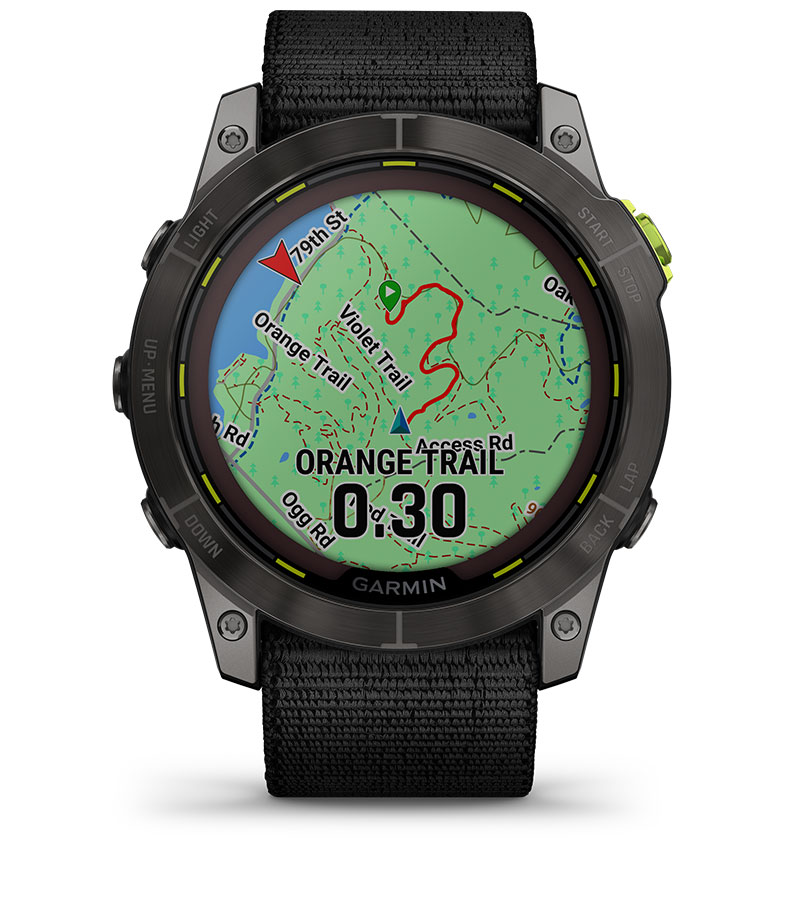
In real-world use, the watch supports trail running, ultra-marathons, mountain biking, backcountry skiing, hiking, and expedition travel. The built-in mapping tools help users follow routes, inspect terrain, and stay oriented on unfamiliar trails. The LED flashlight adds practical value during early-morning runs or campsite tasks, while solar charging helps extend uptime during long days outdoors. The build quality feels premium and purpose-built, with titanium and sapphire materials that resist wear better than standard fitness watches.
User experience is centered on durability, readability, and endurance. The touchscreen makes map viewing easier, while physical buttons help during rain or intense activity. For athletes who prioritize reliability over a compact design, the Garmin Enduro 2 Multisport GPS Watch delivers one of the most complete outdoor performance packages available.
Setup Guide: How to Set Up the Garmin Enduro 2 Multisport GPS Watch
- Charge the watch fully before first use using the included charging cable.
- Power on the device and choose your preferred language, units, and region settings.
- Install the Garmin Connect app on your smartphone and sign in or create an account.
- Enable Bluetooth on your phone and pair the watch through the app.
- Allow permissions for notifications, location, calendar, health data, and activity syncing.
- Set up your user profile, including age, weight, height, and activity goals.
- Customize data fields, activity profiles, and navigation preferences for running, cycling, hiking, or triathlon use.
- Download maps, music, or software updates over Wi-Fi when available.
- Test GPS lock outdoors before your first workout to confirm accurate satellite reception.
For best results, keep the watch away from extreme heat during charging and avoid opening the case or exposing the device to chemicals. If pairing fails, restart both the watch and phone, then reattempt the connection. Make sure the watch is charged above a low-battery threshold and that Bluetooth permissions remain active.
Safety note: The device is water resistant, but it should not be used for diving or exposed to high-pressure water jets. Always review activity settings before using navigation or performance features on long outdoor sessions.
Troubleshooting Common Problems
- Problem: The watch will not power on. Solution: Charge it for at least 15 to 30 minutes and try a forced restart.
- Problem: GPS takes too long to lock. Solution: Move outdoors to an open area, update satellite data, and avoid heavy tree cover or tall buildings.
- Problem: Phone pairing fails. Solution: Remove the device from Bluetooth settings, restart both devices, and pair again through Garmin Connect.
- Problem: Battery drains faster than expected. Solution: Reduce backlight brightness, disable unused sensors, and check whether multi-band GPS is enabled unnecessarily.
- Problem: Map or activity data appears missing. Solution: Sync with Garmin Connect and verify enough storage space remains.
- Problem: Buttons or touchscreen feel unresponsive. Solution: Dry the watch, clean the screen gently, and confirm that the device is not in a locked mode.
Preventive maintenance improves reliability. Keep firmware updated, rinse the watch after saltwater exposure, and avoid charging the device in hot environments. If issues continue, Garmin support and regional service centers can assist with diagnostics, repair, or warranty claims. Owners should retain proof of purchase and serial information for service requests. For help, contact Garmin customer support through the official support channel for your country.
Pros and Cons
Pros
- Exceptional battery life for ultra-distance training and expeditions.
- Strong navigation tools with detailed maps and route guidance.
- Premium build with titanium and sapphire materials.
- Multi-band GNSS improves tracking in difficult terrain.
- Useful flashlight adds real-world convenience.
- Excellent value for serious endurance athletes who need long runtime.
Cons
- Large case size may feel bulky on smaller wrists.
- High price makes it less accessible than mainstream fitness watches.
- Advanced features may be more than casual users need.
- Battery claims depend on solar exposure and usage settings.
Against alternatives like lighter GPS running watches, the Enduro 2 is less compact but far more capable for off-grid endurance use. Against premium outdoor watches, it stands out for battery longevity and all-around training support.
Customer Reviews and User Feedback
Average user sentiment is generally very positive, with many buyers rating the watch around 4.5 out of 5 stars. Endurance athletes frequently praise its battery life, mapping accuracy, and rugged construction. A common testimonial is that it feels built for real adventure rather than casual gym use.
Typical praise includes comments such as: “Battery life is unbelievable for long races,” “The maps are a game changer on trails,” and “The flashlight is more useful than expected.” Common complaints focus on the premium price, large size, and the learning curve that comes with so many features. Some users also note that the best battery results require careful configuration.
For athletes who need a top-tier adventure watch, the Garmin Enduro 2 Multisport GPS Watch is easy to recommend. Buyers looking for simpler daily fitness tracking may find it more capable than necessary, but serious trail runners, hikers, and ultra-endurance athletes will likely appreciate the investment.
Faqs
How do I set up the garmin ENDURO 2 Multisport GPS Watch for the first time?
Why is my garmin ENDURO 2 Multisport GPS Watch taking a long time to find satellites?
What should I do if the battery on my garmin ENDURO 2 Multisport GPS Watch drains faster than expected?
How do I use the mapping and navigation features on garmin ENDURO 2 Multisport GPS Watch?
Is the garmin ENDURO 2 Multisport GPS Watch compatible with iPhone and Android phones?
How can I improve GPS accuracy on garmin ENDURO 2 Multisport GPS Watch during trail runs or races?
How do I clean and maintain the garmin ENDURO 2 Multisport GPS Watch after sweaty workouts or muddy hikes?
What are the most useful garmin ENDURO 2 Multisport GPS Watch settings for ultrarunning and endurance training?
More garmin manuals
Leave a Comment