
Garmin EPIX GEN 2 Standard & Pro Series GPS Smartwatch User Manual
Content
Introduction to Garmin epix Gen 2 Standard & Pro Series GPS Smartwatch
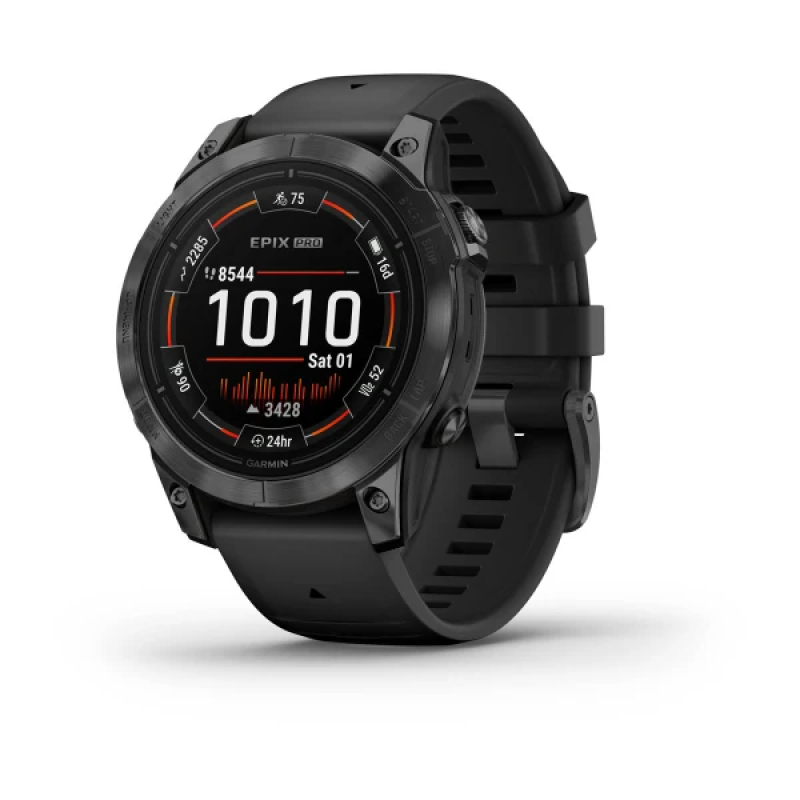
The garmin EPIX GEN 2 Standard & Pro Series GPS Smartwatch is a premium AMOLED multisport watch designed for runners, hikers, golfers, swimmers, cyclists, and anyone who wants advanced fitness tracking in a luxury smartwatch form factor. It combines a bright always-on display, rugged build quality, and deep training analytics, making it one of Garmin’s most capable flagship wearables for both everyday wear and serious endurance training.
One of its biggest strengths is the balance between style and performance. The epix Gen 2 lineup delivers a sharp touchscreen interface, detailed mapping, wrist-based health tracking, music storage, smart notifications, and long battery life across multiple size options. The Pro Series adds newer training and outdoor features, including an LED flashlight, improved sensor technology, and enhanced endurance-focused metrics, which makes it especially appealing to athletes who train early in the morning or after dark.
This smartwatch is built for users who want a true all-in-one tool: outdoor navigation, structured workouts, daily wellness monitoring, and premium materials in a single device. It is ideal for fitness enthusiasts, trail runners, adventure travelers, and professionals who want a watch that looks refined in the office but performs like a high-end sports instrument outdoors.
Estimated pricing typically starts around the upper midrange and can rise significantly depending on case size, finish, and sapphire edition. Availability is generally strong through Garmin and major electronics retailers, though popular Pro configurations may vary by region and stock levels. For buyers comparing premium fitness watches, the garmin EPIX GEN 2 Standard & Pro Series GPS Smartwatch remains a standout choice for display quality, training depth, and everyday practicality.
Specifications for Garmin epix Gen 2 Standard & Pro Series GPS Smartwatch
- Display: AMOLED touchscreen with always-on mode for clear visibility indoors and outdoors.
- Sizes: Commonly available in 42 mm, 47 mm, and 51 mm variants depending on model and edition.
- Battery life: Up to 10 days in smartwatch mode on smaller models and up to 31 days on larger Pro versions, with GPS use varying by size and settings.
- Navigation: Built-in GPS, multi-band GNSS on Pro models, topographic maps, and turn-by-turn routing support.
- Health tracking: Heart rate monitoring, sleep tracking, Pulse Ox, stress tracking, Body Battery, and HRV insights.
- Training tools: VO2 max estimates, training readiness, recovery time, hill and endurance metrics on Pro models, and structured workout support.
- Connectivity: Bluetooth, Wi-Fi, ANT+, and smartphone notification syncing.
- Durability: 100-meter water resistance, reinforced materials, and premium options such as sapphire crystal and titanium bezel on select editions.
- Music and apps: On-device music storage and support for popular streaming services through connected features.
Compared with a typical fitness watch, the epix Gen 2 offers a more premium display and stronger navigation tools. Compared with the Garmin fēnix line, it delivers a brighter AMOLED screen and a more modern visual experience while keeping similar outdoor performance.
Detailed Description of the Garmin epix Gen 2 Standard & Pro Series GPS Smartwatch
The Garmin epix Gen 2 Standard & Pro Series GPS Smartwatch works as a wrist-based training computer, health monitor, and navigation device. It uses satellite positioning to track distance, pace, elevation, and route data during outdoor activities, while sensors continuously collect wellness information throughout the day. The touchscreen and physical buttons give users flexible control in wet conditions, while the AMOLED display makes maps, stats, and alerts easy to read.
Real-world use cases include marathon training, trail navigation, mountain biking, gym sessions, swimming, and daily activity tracking. The Pro Series is especially useful for endurance athletes who want newer performance metrics and improved outdoor visibility. The flashlight feature on Pro models adds practical value for campsite use, nighttime runs, and emergencies.
Build quality is excellent, with a rugged case design and premium materials that feel durable without being bulky. Sapphire editions add scratch resistance, and titanium accents improve the high-end look and long-term wearability. User experience is generally smooth, with responsive menus, strong app integration, and useful health insights that are easy to review at a glance. For users who want a refined smartwatch that still behaves like a serious training tool, this model delivers a well-rounded experience.
Setup Guide for Garmin epix Gen 2 Standard & Pro Series GPS Smartwatch
- Press and hold the light button to power on the watch.
- Follow the on-screen prompts to select language, region, and basic preferences.
- Install the Garmin Connect app on your smartphone and pair the watch through Bluetooth.
- Sign in to your Garmin account, then sync health data, activity settings, and notifications.
- Set up Wi-Fi, music services, and Garmin Pay if supported in your region.
- Customize watch faces, data fields, activity profiles, and alert settings.
- For outdoor users, download maps and verify GPS settings before your first workout.
When configuring the watch, choose whether you want the always-on display enabled, how brightness should behave, and which sensors should stay active. Pairing with headphones, chest straps, and bike sensors is straightforward through the accessory menus.
If pairing fails, restart both devices, toggle Bluetooth off and on, and make sure the watch is within range. Keep the watch charged before first use, and avoid exposing the device to harsh impact or charging it in extreme temperatures. Do not attempt to use the watch for medical diagnosis or in unsafe conditions where distraction could be dangerous.
Troubleshooting the Garmin epix Gen 2 Standard & Pro Series GPS Smartwatch
- Problem: Watch will not turn on. Solution: Charge it for at least 15 to 20 minutes, then hold the light button again.
- Problem: Bluetooth connection drops. Solution: Re-pair the watch in Garmin Connect and keep the phone close during syncing.
- Problem: GPS is slow to lock. Solution: Move to an open area, update satellite data, and start the activity after a full signal fix.
- Problem: Music skips or headphones disconnect. Solution: Reconnect Bluetooth audio, reduce interference, and store fewer wireless devices nearby.
- Problem: Touchscreen is unresponsive. Solution: Dry the screen, clean it gently, and use the physical buttons until conditions improve.
- Problem: Battery drains too quickly. Solution: Reduce brightness, disable unnecessary sensors, shorten timeout settings, and review always-on display usage.
Common reset options usually include restoring default settings or clearing a specific activity profile when problems persist. Preventive care includes regular firmware updates, proper charging habits, and avoiding repeated exposure to extreme heat or saltwater without rinsing afterward.
Warranty coverage and support availability depend on region and purchase channel. For help, users should contact Garmin support through the official support portal, the Garmin Connect help area, or the retailer where the watch was purchased.
Pros & Cons of Garmin epix Gen 2 Standard & Pro Series GPS Smartwatch
Pros
- Beautiful AMOLED display with excellent readability for maps, stats, and notifications.
- Advanced fitness and recovery tracking that suits serious athletes and multi-sport users.
- Strong navigation features, including detailed maps and accurate GPS performance.
- Premium construction with sapphire and titanium options for better durability and style.
- Useful smart features such as music storage, notifications, and contactless payment support.
- Pro models add practical outdoor tools like the built-in flashlight and improved training metrics.
Cons
- Higher price than many mainstream smartwatches.
- Feature depth may feel overwhelming for casual users.
- Battery life is strong, but always-on AMOLED use can reduce endurance.
- Some advanced functions are more valuable to runners and outdoors users than to everyday wearers.
In value-for-money terms, the watch makes the most sense for buyers who will use the sports, navigation, and recovery tools regularly. Compared with simpler alternatives, it costs more, but it also replaces several devices by combining smartwatch, training watch, and outdoor navigator functions.
Customer Reviews of Garmin epix Gen 2 Standard & Pro Series GPS Smartwatch
Customer feedback is generally very positive, with many users praising the bright display, premium build, and accurate workout tracking. Common ratings often land around 4.5 out of 5 stars among dedicated fitness buyers, especially those who appreciate Garmin’s ecosystem and detailed performance metrics.
Typical praise includes “the best screen Garmin has made,” “great battery life for an AMOLED watch,” and “excellent for running, hiking, and everyday wear.” Common complaints usually mention the high cost, learning curve, and occasional setup complexity for first-time Garmin users.
Most reviewers recommend it for athletes, frequent travelers, and outdoor enthusiasts who want a premium GPS smartwatch with advanced features. Buyers who only need step tracking and basic notifications may find the watch more powerful than necessary, but serious users often consider it worth the investment.
Faqs
How do I set up the garmin EPIX GEN 2 Standard & Pro Series GPS Smartwatch for the first time?
What should I do if my garmin EPIX GEN 2 Standard & Pro Series GPS Smartwatch will not pair with my phone?
Why is my garmin EPIX GEN 2 Standard & Pro Series GPS Smartwatch battery draining faster than expected?
How do I fix GPS accuracy issues on the garmin EPIX GEN 2 Standard & Pro Series GPS Smartwatch?
What features make the garmin EPIX GEN 2 Standard & Pro Series GPS Smartwatch useful for training and workouts?
Is the garmin EPIX GEN 2 Standard & Pro Series GPS Smartwatch compatible with iPhone and Android phones?
How do I reduce accidental button presses and touchscreen issues on the garmin EPIX GEN 2 Standard & Pro Series GPS Smartwatch?
How should I clean and maintain the garmin EPIX GEN 2 Standard & Pro Series GPS Smartwatch for long-term use?
More garmin manuals
Leave a Comment